
Subclip
Subclip lets you edit, caption, and dub videos with voice cloning, so you can reclaim 80% of your time and go global.
Visit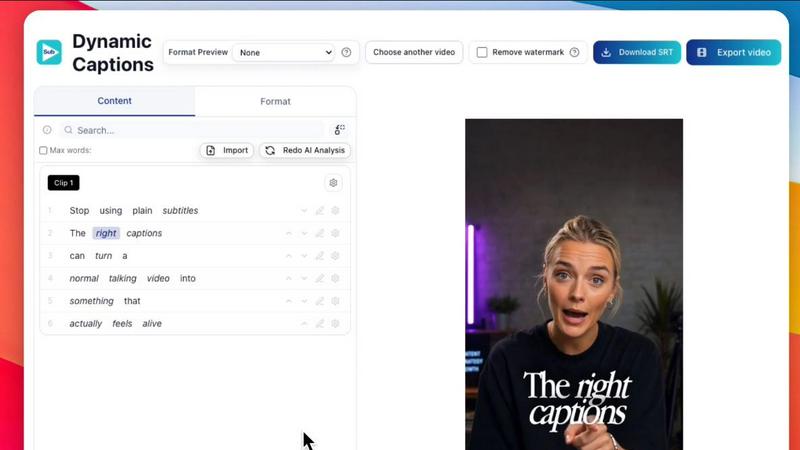
About Subclip
Subclip is an AI-powered video editor designed to fundamentally transform how creators, marketers, educators, and content teams approach video production. It reimagines the editing process by allowing you to work with video as intuitively as you would with a text document. Instead of scrubbing through endless timelines and raw footage, Subclip lets you simply drag in a transcript and start editing. The core value proposition is reclaiming your time, promising to save up to 80% of the manual effort traditionally spent on video production. Subclip achieves this through a suite of powerful AI features: it can clone your voice to re-record parts of your video seamlessly, remove silences and filler words with a single click, auto-generate accurate subtitles in over 48 languages, and dub your video into more than 21 languages while preserving your original tone, emotion, and even background music. The platform supports the entire workflow from rough cut to final export, including AI-powered clipping that identifies high-energy moments and punchlines. For advanced users, Subclip integrates with professional editing suites like DaVinci Resolve, Final Cut Pro, and Adobe Premiere Pro via NLE timeline export. It also includes team collaboration features, built-in scheduling for platforms like YouTube and X, and instant exports without lengthy upload or download waits. Whether you are a YouTuber, podcaster, course creator, coach, vlogger, or part of an agency, Subclip is built for speed and simplicity, removing the complexity of traditional tools and replacing them with intuitive, AI-driven features that continuously improve your workflow.
Features of Subclip
Rough Cut using Text Transcript
Edit your videos as easily as editing a Google Doc. Subclip allows you to trim mistakes, remove unwanted sections, and rearrange your content directly by manipulating the transcript text. This text-based editing automatically updates your timeline, eliminating the need for manual rework and tedious scrubbing through footage. Once your rough cut is complete, you can export the NLE timeline directly to professional editors like DaVinci Resolve, Final Cut Pro, and Adobe Premiere Pro for further refinement, creating a seamless bridge between AI-powered speed and professional-grade finishing.
AI Clipping and Intelligence
Subclip’s engine automatically scans your long-form videos to identify high-energy segments, punchlines, key emotional shifts, and other moments with the highest potential for audience engagement. It assigns a Viral Score, Engagement metric, and Retention rate to each potential clip, helping you pick the winners for short-form content without watching every second of footage. This feature empowers creators to rapidly repurpose long videos into multiple high-retention clips for social media, dramatically increasing output and viewership with minimal manual effort.
One-Click Unlimited Captions and Subtitles
Generate stunning, accurate subtitles for your videos in over 48 languages with a single click. Subclip offers unlimited subtitle generation and unlimited export video minutes, so you never have to worry about hitting a cap. You can fully customize the text style, formatting, and appearance of your captions to match your brand. This feature not only makes your content more accessible to a global audience but also significantly boosts engagement, as videos with captions are known to hold viewer attention longer, especially on social media platforms where sound is often off.
AI Dubbing with Voice Clone
Translate your video into 21+ languages while maintaining your original tone, emotion, and personality. Subclip’s AI dubbing feature clones your voice, ensuring that the dubbed version sounds like you speaking a foreign language, not a generic robot. This preserves the authenticity of your content and builds trust with international audiences. The tool intelligently syncs the new audio with the video’s original background music and sound effects, creating a polished, professional result that feels native to each language, allowing you to go global without re-recording.
Use Cases of Subclip
For Creators and Podcasters
Long-form podcasters and video creators can use Subclip to 10x their viewership with zero additional effort. The AI clipping feature automatically extracts the most engaging moments, punchlines, and viral-worthy segments from hours of raw footage. Creators can then quickly add dynamic captions, remove awkward silences and filler words, and export these clips in the perfect aspect ratio for YouTube Shorts, Instagram Reels, or TikTok. This cyclical process of creating long content and repurposing it into short clips continuously feeds a creator’s social media presence and drives growth.
For Coaches and Course Creators
Coaches and educators who produce recorded courses or training videos can leverage Subclip to effortlessly reach a global student base. By using the AI dubbing with voice clone feature, they can translate their entire course library into over 20 languages while retaining their own voice and instructional tone. This removes the massive expense and time commitment of hiring human voice actors for each language. The process is iterative: a course creator can start with one language, gather feedback, refine the content, and then continuously dub new or improved versions into additional languages, expanding their impact and revenue streams.
For Vloggers
Vloggers can dramatically streamline their editing workflow with Subclip. Instead of spending hours aligning B-roll, removing background noise, and adding captions manually, they can do it all in one click. Subclip allows vloggers to add captions, insert B-roll, clean up audio by removing noise and room echo, and export the final video in multiple formats (16:9, 9:16, 1:1) directly from the browser. This iterative efficiency means vloggers can produce and publish more content, consistently improve their production quality, and spend less time in front of the editing timeline and more time creating real-world experiences.
For Agencies and Freelancers
Agencies and freelance video editors can use Subclip to increase their output and profitability at a fraction of the cost. With unlimited transcription, export, and team collaboration features, multiple team members can work on projects simultaneously, share feedback within the platform, and schedule posts directly to YouTube and X. The ability to export timelines to professional editors like DaVinci Resolve or Premiere Pro allows for a hybrid workflow: use Subclip for the fast, AI-powered rough cut and social media versions, then pass the project to a senior editor for final polish. This continuous improvement cycle helps agencies scale their services without linearly scaling their headcount.
Frequently Asked Questions
How does Subclip's text-based editing actually work?
Subclip transcribes your uploaded video into a text transcript. You can then edit the video by simply deleting, rearranging, or trimming words and sentences in the transcript. The video timeline automatically updates to reflect your text edits. This allows you to remove mistakes, filler words, and long pauses without ever touching a traditional timeline or razor tool. Once your transcript is clean, your video is essentially edited.
Can I use my own voice for dubbing into other languages?
Yes, absolutely. Subclip's AI dubbing feature includes voice cloning. You provide a sample of your voice, and the AI learns its unique tone, pitch, and cadence. When you dub a video into another language, the output will sound like you speaking that language naturally, preserving your personal brand and emotional delivery. This is far more authentic than using a generic text-to-speech voice.
Does Subclip work with professional video editing software?
Yes, Subclip is designed to integrate into professional workflows. After you create a rough cut using the text transcript, you can export the entire timeline as a .fcpxml file. This file can be directly imported into DaVinci Resolve, Final Cut Pro, and Adobe Premiere Pro. This allows you to use Subclip for the fast, AI-powered first pass and then hand off the project to a professional editor for color grading, advanced effects, and final polish.
What languages are supported for transcription and dubbing?
Subclip supports local transcription in over 48 languages, ensuring high accuracy for your subtitles. For AI dubbing with voice clone, the platform supports over 21 languages, including major global languages like English, Spanish, French, German, Japanese, Korean, Portuguese, and many more. The platform is continuously adding new languages to help you expand your global reach.
Pricing of Subclip
Subclip operates on a freemium pricing model. It offers a free tier that allows new users to explore the platform and its core features. For users who need more power, there are affordable paid plans. The specific pricing details for these plans are available on Subclip's official Pricing page. The free tier is designed to give you a hands-on experience of the speed and simplicity of AI-powered video editing before committing to a subscription.
Similar to Subclip


HubVanta is a free AI creative toolkit for generating images, videos, voices, and visual edits from one browser workspace.

Oravaa's human-sounding Voice AI scales your phone operations by handling 24/7 support, qualifying leads, and automating outreach, continuously.

Hush Touch is an offline voice-to-text app for Mac that learns your vocabulary and enhances dictation accuracy.

Glossa delivers real-time AI translation of sermons into 100+ languages, breaking language barriers effortlessly.

Bantr offers unlimited offline text-to-speech on Mac, ensuring privacy and natural voiceovers without subscriptions.

KaiCalls is your 24/7 AI voice agent that effortlessly answers calls, qualifies leads, and schedules appointments.

Vowen transforms your voice into seamless productivity across every app you use.