
conceptviz
ConceptViz simplifies science and math teaching by turning complex concepts into clear, ready-to-use diagrams.
VisitPublished on:
December 3, 2025
Pricing:
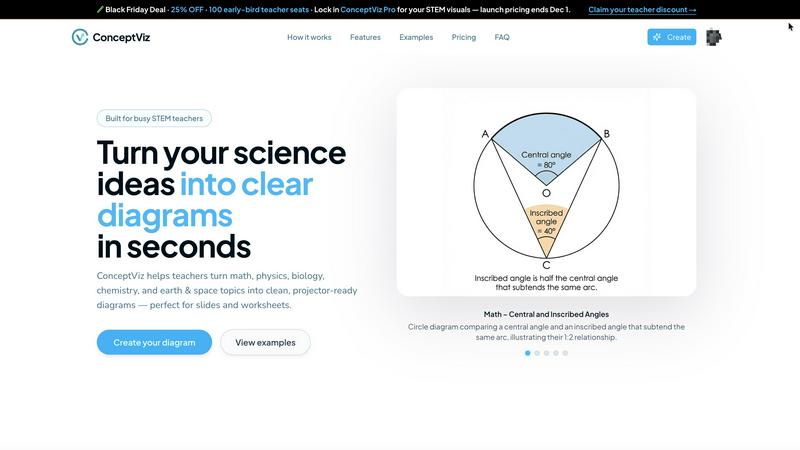
About conceptviz
ConceptViz is an innovative tool designed to empower educators, students, and researchers by transforming complex scientific concepts into clear, classroom-ready diagrams in mere seconds. Tailored specifically for STEM subjects, it addresses the pressing need for accurate visual explanations that resonate across diverse educational levels, from K-12 to university research. With ConceptViz, users can create projector-ready visuals that enhance lesson plans, labs, and assessments. The main value proposition lies in its simplicity and speed, allowing users to generate custom diagrams that align with their unique teaching methods. By eliminating the frustration of searching for generic images online, ConceptViz ensures that every visual is tailored to specific educational needs, fostering a more engaging learning experience for students. This tool not only saves valuable preparation time for educators but also enhances the clarity and effectiveness of instruction, making it an essential resource in modern classrooms and research environments.
Features of conceptviz
User-Friendly Interface
ConceptViz offers a straightforward interface that allows users to create diagrams easily. With just a few clicks, educators can navigate through subjects and grade levels, making the experience seamless and efficient, even for those with no design skills.
Fast Diagram Generation
Users can generate custom diagrams in seconds, significantly reducing preparation time. By simply typing a plain-English description of what they need, educators can quickly receive high-quality visuals that are ready for classroom use.
High-Quality Visuals
The diagrams produced by ConceptViz maintain high contrast and clarity, ensuring they are readable from any distance in a classroom setting. This quality is crucial for effective teaching, as it helps students grasp complex concepts more easily.
Subject & Grade Presets
ConceptViz includes a variety of presets tailored for different subjects and grade levels, from elementary to high school and university. This feature allows educators to select appropriate templates that fit their curriculum, enhancing the relevance and accuracy of the diagrams.
Use Cases of conceptviz
Enhancing Lesson Plans
Educators can use ConceptViz to create visuals that enhance their lesson plans. By generating diagrams that align with their teaching methods, they can provide students with clearer explanations of complex scientific concepts, fostering better understanding.
Streamlining Lab Activities
In laboratory settings, ConceptViz can be utilized to create detailed diagrams that illustrate experimental setups. This can help students visualize procedures, improving their engagement and comprehension during hands-on learning experiences.
Supporting Diverse Learning Styles
ConceptViz caters to various learning styles by providing visual representations of scientific concepts. Educators can address the needs of visual learners and enhance overall classroom engagement by incorporating these custom diagrams into their instruction.
Aiding Research Presentations
Researchers can leverage ConceptViz to create professional-grade visuals for presentations and papers. By generating accurate diagrams that illustrate their findings, they can communicate their research more effectively to a broad audience, including peers and stakeholders.
Frequently Asked Questions
How does ConceptViz generate diagrams?
ConceptViz generates diagrams by allowing users to input a plain-English description of the visual they need. The tool then translates this description into a clear, high-quality diagram ready for classroom or presentation use.
Is there a free trial available for ConceptViz?
Yes, ConceptViz offers a free trial that allows users to explore the tool's features without any financial commitment. This trial enables educators and researchers to assess its suitability for their needs.
Can I use ConceptViz for subjects other than STEM?
While ConceptViz is primarily designed for STEM subjects, its diagramming capabilities can be adapted for various fields. Users can experiment with different descriptions to create visuals for a broader range of topics.
What formats are the generated diagrams available in?
The diagrams generated by ConceptViz are available in high-resolution PNG format, making them suitable for use in presentations, worksheets, and other educational materials. This ensures that visuals maintain quality regardless of how they are displayed.
Similar to conceptviz

Motiofy is an AI creative workspace that helps creators and teams turn ideas into polished visual stories.

AI transcription for voice notes, meetings, and audio files in 1,700 languages, with AI summaries and subtitle export and unlimited chat ai usage.

AI sales agent that finds qualified leads, runs outreach, follows up automatically, creates content, and helps book more meetings.

A working index of AI tools. We record what each one costs, what it connects to, and exactly where it stops being useful.

Find SaaS growth tools worth your time. Every tool is reviewed before it's listed, so the shortlist is already made for you.

Tired of chasing down the right AI tool across a dozen tabs? Tools Network brings them all together in one curated directory.

AI-native presentation and visual content platform that turns prompts, documents, images, videos, and data into polished, shareable decks.

AI storyboard and script tool that turns a screenplay into structured scenes, shot lists and boards in the browser.