
xyOps
xyOps continuously evolves your infrastructure automation with visual workflows, smart monitoring, and adaptive job scheduling.
Visit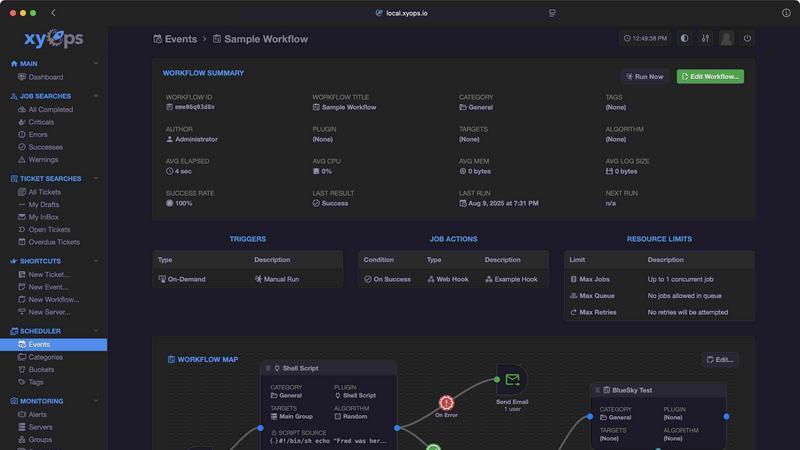
About xyOps
xyOps is a next-generation, open-source platform that unifies job scheduling, workflow automation, server monitoring, alerting, and incident response into a single, cohesive system. It is purpose-built for developers and operations teams who demand complete control over their automation stack without sacrificing data privacy, operational freedom, or full visibility into their infrastructure. Unlike other tools that hide critical features behind paywalls or push telemetry data back to external servers, xyOps is designed to run anywhere, on your own terms, with complete transparency. The platform allows you to orchestrate your entire infrastructure from one central location, scheduling jobs across fleets of servers, tracking performance in real-time, setting smart alerts, and managing incidents with a built-in ticketing system. xyOps is not just about replacing cron or stitching together disparate monitoring tools; it is about creating a continuous improvement loop where every job, alert, and workflow feeds back into the system to make your operations more resilient and efficient. With a visual workflow builder, flexible job scheduling, a plugin system that supports any language, and a marketplace for ready-made integrations, xyOps adapts to your needs whether you manage five servers or five thousand. It is 100% free and open source under the BSD 3-Clause license, ensuring that all current and future features remain accessible forever, with professional support plans available separately for teams that need additional assistance.
Features of xyOps
Visual Workflow Builder
The graphical workflow editor lets you chain multiple jobs with conditional logic, passing data and even files between steps to create meaningful automation pipelines. You can assign specific actions to events, such as sending notifications or triggering webhooks, and attach limiters like timeouts, memory caps, and log size caps to prevent runaway processes. The builder supports running jobs in parallel or creating custom queues, giving you full control over execution order and concurrency. This feature transforms complex orchestration into a visual, iterative process where you can continuously refine and improve your workflows.
Flexible Job Scheduler
xyOps reimagines job scheduling far beyond traditional cron with the ability to target individual servers or entire groups, set multiple schedules per event, and define blackout ranges for holidays or planned downtime. It includes crontab import support for easy migration, one-time jobs for single-shot tasks, and plugin-based scheduler extensions for custom scheduling logic. This flexibility ensures that your automation can evolve as your infrastructure grows, allowing you to continuously adjust timing and targets without rewriting scripts or managing multiple scheduling tools.
Active Job Tracking
Run any number of jobs in parallel with the option to set a maximum parallel limit and queue the rest for sequential execution. The system provides real-time progress updates along with time remaining estimates, and it enforces per-job limits on CPU, memory, and other resources. Jobs can emit their own progress and custom stats, and you can define custom actions based on job results, such as triggering follow-up tasks or notifications. This visibility enables a continuous feedback loop where you can monitor performance and iteratively optimize job execution.
Smart Alerts
Rich alerting is built in with trigger expressions that support flexible rules, allowing you to define exactly when and how you get notified. Alerts can be sent via email, webhook, or custom notification channels, and each alert includes a snapshot of the server at the time of the trigger. The system can automatically create tickets or run jobs in response to alerts, and active alerts can even prevent new jobs from launching to avoid compounding issues. This smart alerting framework creates a continuous improvement cycle, where each incident becomes a learning opportunity to refine your monitoring rules.
Use Cases of xyOps
Centralized Infrastructure Orchestration
Teams managing fleets of servers across multiple environments can use xyOps to schedule and monitor jobs from a single pane of glass. Whether you have five servers or five thousand, the platform adapts by allowing you to group servers manually or automatically based on hostname, and it scales to thousands of worker servers in your cluster. This use case eliminates the need for separate scheduling, monitoring, and alerting tools, creating a unified system that continuously improves as you add more infrastructure.
Incident Response Automation
When a server goes down or a critical job fails, xyOps can automatically create a ticket in its built-in ticketing system, attach relevant log snapshots, and even trigger remediation workflows. The integrated ticketing system supports file attachments and can launch CI/CD jobs via API, enabling a fully scriptable incident response pipeline. This use case turns every incident into a repeatable, automated process that gets refined over time, reducing mean time to resolution.
Custom Plugin Development and Marketplace
Developers can write plugins in any language using a simple JSON over STDIO Plugin API, with no SDK required. The plugin system supports multiple types including Event, Action, Monitor, and Trigger, and each plugin can define custom parameters with UI form fields. Teams can then publish their plugins to the xyOps Marketplace, contributing to a growing library that includes integrations with Atlassian, AWS S3, Discord, GitHub, OpenAI, Slack, and many more. This creates an ecosystem where continuous improvement is driven by community contributions.
High-Availability Job Execution
Organizations that require zero downtime can run multiple hot backups of xyOps, ensuring that no jobs are interrupted during a primary failover. The system scales to thousands of worker servers and supports easy agent installation on macOS, Linux, and Windows. This use case is ideal for mission-critical environments where job scheduling and monitoring must remain operational through power losses or hardware failures, with continuous improvement coming from redundancy testing and failover drills.
Frequently Asked Questions
What is the licensing model for xyOps?
xyOps is 100% free and open source under the BSD 3-Clause license, and it always will be. The license will never be modified, split, or amended with additional restrictive terms. No new code or contributions will ever be accepted under a non-OSI-approved license, ensuring that all current and future app features remain open source forever. Professional and enterprise support plans are available separately for teams that need additional assistance.
How does xyOps handle scalability for large fleets?
xyOps is built to scale from five servers to five thousand or more. You can run multiple hot backups that take over on power loss without interrupting any jobs. The platform supports thousands of worker servers in your cluster, and you can group servers manually or automatically based on hostname. Agents are easily installed on macOS, Linux, and Windows, making it simple to grow your infrastructure over time.
Can I integrate xyOps with my existing tools?
Yes, xyOps offers a plugin system that supports any language via a simple JSON over STDIO Plugin API, with no SDK required. There is a growing Marketplace with both official and community plugins for tools like Atlassian, AWS S3, Discord, GitHub, OpenAI, Slack, Telegram, and many more. You can also add MCP servers as plugins, write and publish your own plugins, and use the fully scriptable API for custom integrations.
What kind of monitoring and alerting does xyOps provide?
xyOps provides server and group-level dashboards with custom monitors and alerts for CPU, memory, network, disk, and log tracking per job. You can run custom commands to grab custom metrics and view historical performance graphs from hourly to yearly. Smart alerts use trigger expressions with flexible rules, and notifications can be sent via email, webhook, or custom channels. Each alert includes a server snapshot, and alerts can automatically create tickets or run jobs for incident response.
Similar to xyOps


A directory of AI tools where a person used each one first.

Find SaaS growth tools worth your time. Every tool is reviewed before it's listed, so the shortlist is already made for you.

Tired of chasing down the right AI tool across a dozen tabs? Tools Network brings them all together in one curated directory.

Done-for-You SaaS Visibility for Search & AI | UseWok

Schedule and publish social content across 10 platforms with one dashboard, API, and MCP built for teams and AI agents.

Turn daily annoyances and raw ideas into inventions, products, and businesses. EntreDash provides a virual personal advisory board using AI automation

Luffy is an AI employee in Slack that remembers your workspace and executes tasks across every app.