
Workatool
Workatool is the operating system for service businesses, turning leads into paid jobs with AI-powered quotes and automated workflows that improve.
Visit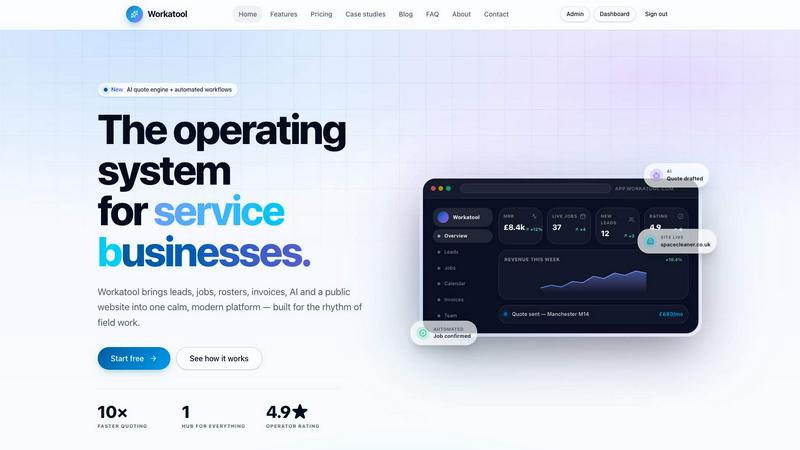
About Workatool
Workatool is the all-in-one operating system designed specifically for service businesses. It is built for cleaning companies, trades, maintenance firms, recruitment agencies, contractors, and other service providers who need to manage their daily operations from a single, unified platform. Instead of stitching together multiple disconnected tools for CRM, job management, scheduling, invoicing, and communication, Workatool brings everything into one calm, modern dashboard. The platform combines CRM, job management, staff scheduling, quotes, contracts, invoicing, payroll tracking, customer communication, automations, and AI-powered tools in a single interface. This means businesses can automate repetitive tasks such as payment reminders, customer follow-ups, review requests, recurring jobs, and staff scheduling, reducing admin work and saving significant time. Workatool helps service businesses streamline operations, improve customer experience, and scale more efficiently. It connects with the tools you already use, including Stripe, GoCardless, QuickBooks, Xero, Google Calendar, Outlook, Slack, WhatsApp, Mailchimp, Twilio, Zapier, and Notion. Whether you are a one-person crew or a multi-region operation, Workatool adapts to the rhythm of field work, providing a live view of your entire business at a glance. From leads and invoices to team utilisation and revenue, everything is connected in real time, allowing operators to run quieter, more efficient businesses.
Features of Workatool
AI Quote Engine
The AI quote engine drafts professional quotes from just a one-line job brief, saving you hours of manual work. It automatically generates pricing, follow-ups, and daily insights that are on-brand and fully editable. This feature accelerates your quoting process by up to 10 times, helping you win more jobs faster. The AI learns from your past quotes to improve accuracy over time, making each subsequent quote more refined and aligned with your business style.
Automated Workflows
Workatool watches your entire pipeline and quietly handles the next step in every process. It drafts quotes, sends job confirmations, chases late invoices, and reminds your team about upcoming tasks automatically. Confirmation emails, payment reminders, and review requests trigger themselves based on your predefined rules. This continuous automation ensures that nothing slips through the cracks, allowing you to stay in control while the platform does the typing and follow-up work for you.
Unified Client and Staff Portals
Workatool provides a branded client portal where your customers can self-serve: approve quotes, pay invoices, and track job progress in real time. For your team, a dedicated staff app on iOS, Android, and web gives them clock-in functionality, job sheets, photo uploads, and chat features. This unified inbox combines customer chat and internal notes in one calm thread, ensuring everyone stays informed without switching between apps.
Live Reports and Insights
The platform delivers live reports and insights on revenue, MRR, win-rate, team utilisation, and a per-user audit log. These metrics update the moment any change occurs, giving you a real-time view of your business health. AI-flagged anomalies help you spot issues before they become problems, while customisable dashboards let you monitor the KPIs that matter most to your operations. This feature turns raw data into actionable intelligence for continuous improvement.
Use Cases of Workatool
Streamlining Daily Operations for Cleaning Companies
A cleaning company with multiple recurring contracts uses Workatool to automate job scheduling, staff dispatch, and invoicing. The platform spawns recurring jobs automatically from contracts, schedules the right team members, and sends invoices with payment links. The AI quote engine drafts new quotes for one-off cleanings in seconds. The unified dashboard shows live job status, team utilisation, and revenue, allowing the owner to see the whole business at a glance and make data-driven decisions to improve efficiency.
Managing Field Teams for Maintenance Firms
A maintenance firm with a team of field technicians uses Workatool to dispatch jobs, track clock-in and clock-out times, and capture job sheets with photos. The staff app ensures every technician knows their next job and can communicate with the office in real time. Automated workflows send job confirmations to clients and chase late invoices. Live reports on team utilisation and job completion rates help the firm optimise scheduling and reduce downtime, leading to higher productivity and customer satisfaction.
Scaling Recruitment Agencies
A recruitment agency uses Workatool to manage leads, candidates, and placements from a single pipeline. The CRM tracks every interaction, while automated workflows handle follow-ups and interview scheduling. The AI quote engine drafts placement proposals and contracts quickly. The client portal allows hiring managers to approve candidates and track progress. Live reports on win-rate and revenue per consultant help the agency identify top performers and refine their sales process for continuous growth.
Multi-Site Operations for Contractors
A contractor running multiple sites across different regions uses Workatool to oversee all projects from one dashboard. Recurring contracts spawn jobs for each site, and the platform schedules the appropriate teams. Automated payment reminders and review requests run in the background. The unified inbox handles client communication and internal notes seamlessly. Live reports on revenue, MRR, and site-specific utilisation allow the contractor to compare performance across locations and make strategic decisions to scale the business efficiently.
Frequently Asked Questions
How does Workatool automate repetitive tasks?
Workatool automates tasks by watching your pipeline and handling the next step based on your predefined rules. For example, when a new lead comes in, the AI can draft a quote automatically. When a job is booked, a confirmation email is sent. When an invoice becomes overdue, a payment reminder is triggered. You set the rules once, and the platform runs them continuously, reducing manual admin and ensuring consistency across all customer interactions.
Can Workatool integrate with my existing tools?
Yes, Workatool connects with many of the tools you already use, including Stripe, GoCardless, QuickBooks, Xero, Google Calendar, Outlook, Slack, WhatsApp, Mailchimp, Twilio, Zapier, and Notion. This means you can sync your financial data, calendars, communication channels, and more without manual data entry. The platform is designed to fit into your existing workflow, not replace everything you rely on.
Is Workatool suitable for a one-person business?
Absolutely. Workatool scales from a one-person crew to multi-region operations. For a solo operator, the platform simplifies quoting, scheduling, invoicing, and customer communication into one calm dashboard. You can automate follow-ups and reminders, so you spend less time on admin and more time on the work that generates revenue. The intuitive interface and mobile app make it easy to manage your business from anywhere.
How does the AI quote engine work?
The AI quote engine drafts quotes from a one-line job brief. You simply describe the job, and the AI generates a professional, on-brand quote with pricing based on your past quotes and business rules. You can edit the quote before sending it. The AI learns from your edits and feedback, improving its accuracy over time. This feature reduces quoting time by up to 10 times, helping you respond to leads faster and win more jobs.
Explore more in this category:
Similar to Workatool

Jev turns text or JSON into Choice, Score and Noul answers with probabilities. Build decision flows, process batches and call the API from one Console

Panzoe is an all-in-one AI platform for personal productivity, business automation, AI assistants, content creation, and custom AI solutions.

Novastart brings apps and files onto an infinite canvas where people and AI agents can work together.

AI Email Filter sorts incoming mail into folders using plain-language prompts you write. Works with any IMAP mailbox; bring your own LLM if you want.

Free collection of online developer utilities, code formatters, and digital converters designed to streamline your daily workflow.

Translate JSON, Markdown, and TXT files while preserving keys, nested paths, and project structure.

Visual financial timelines for couples and young professionals.

The #1 Native Form Builder Plugin for Framer - No Code, No Embeds, No External Platforms.