
Vizcept
Vizcept turns plain-English descriptions into publication-ready concept diagrams, helping students and researchers clarify ideas with every iteration.
Visit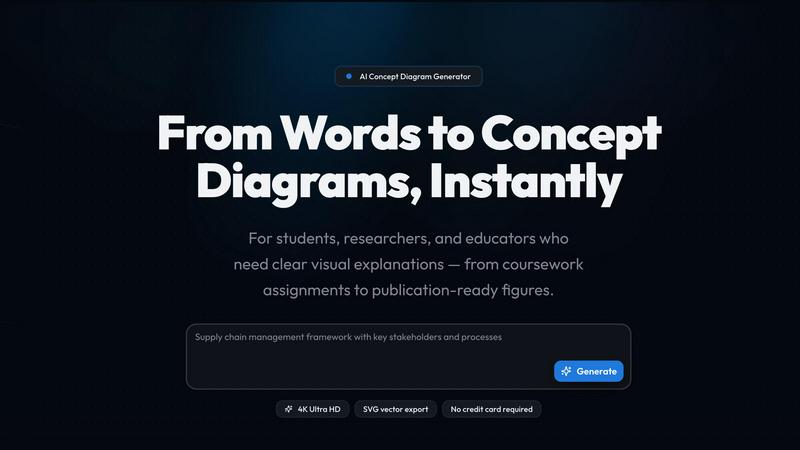
About Vizcept
Vizcept is an AI-powered concept diagram generator built for people who think in concepts and relationships, not in boxes and arrows. It transforms how students, researchers, and educators create visual explanations by allowing them to describe a topic in plain English, after which the AI identifies key concepts, causal relationships, and logical structures from the text to generate a clean, professionally structured diagram in seconds. The product is designed for a broad audience, from undergraduates and PhD candidates working on assignments and theses to graduate students and faculty preparing publication-ready figures for journals, posters, and grant proposals, as well as K-12 and university instructors who need clear, lesson-specific diagrams. Vizcepts main value proposition lies in its ability to make the diagram creation process cyclical and iterative: users can describe, generate, review, and refine continuously, improving both the clarity of their thinking and the quality of their visuals. The platform supports specialized tools for every discipline, including an AI Diagram Maker, Free Body Diagram, Animal Cell, Syntax Tree, Food Web, Conceptual Framework, Circuit Diagram, Phylogenetic Tree, Graphical Abstract, and more. With 4K Ultra HD and SVG export options, diagrams are crisp enough for slides and posters, and editable for further refinement in tools like Figma, Illustrator, and Inkscape. Trusted by students and researchers at over 120 universities including Harvard, MIT, Stanford, and Oxford, Vizcept has already helped generate over 50,000 diagrams with a user rating of 4.8 out of 5. The platform offers free credits to start with no credit card required, embodying a philosophy of continuous improvement where every iteration brings users closer to the perfect visual representation of their ideas.
Features of Vizcept
Natural Language Input
Describe your topic the way you would explain it to a colleague, and Vizcept handles the rest. This feature eliminates the need for manual dragging, dropping, and formatting, allowing you to focus on the substance of your ideas rather than the mechanics of diagram creation. The AI understands methodological structure and logical flow, not just visual layout, so your diagrams capture the actual logic of your work. You can iteratively refine your description to improve the output, making the process cyclical and continuously better with each attempt.
Context-Aware Generation
Vizcepts AI goes beyond simple keyword matching to understand the deeper relationships between concepts in your description. It identifies causal links, hierarchical structures, and sequential processes, then translates these into a visually coherent diagram that matches the intended logic. This context awareness ensures that diagrams are not just aesthetically pleasing but also intellectually accurate, making them suitable for coursework, journal papers, and lecture slides where precision matters. The iterative nature of this feature means you can adjust your input and see improvements in real time.
4K Ultra HD and SVG Export
Diagrams generated by Vizcept are available in 4K Ultra HD resolution for crisp, publication-ready PNGs that look great on slides, posters, and in print. Additionally, the platform offers SVG vector export, which allows you to open and edit your diagrams in professional design tools like Figma, Illustrator, and Inkscape. This dual export capability supports a cyclical workflow: generate a base diagram, export as SVG for fine-tuning, then re-import or use directly in your final document. The high resolution ensures that even complex diagrams with many nodes and connections remain clear and readable.
Specialized Tools for Every Discipline
Vizcept provides a comprehensive suite of specialized diagram tools tailored to specific academic and professional needs. These include an AI Diagram Maker for general concept maps, a Free Body Diagram Maker for physics, an Animal Cell Diagram Generator for biology, a Syntax Tree Generator for linguistics, a Food Web Maker for ecology, a Conceptual Framework Generator for research, a Circuit Diagram Maker for electronics, a Phylogenetic Tree Maker for evolutionary biology, a Graphical Abstract Maker for journal submissions, a Bell Curve Maker for statistics, and a Sentence Diagram Generator for grammar. Each tool is optimized for its domain, ensuring that the output meets the standards and conventions of the respective field. This variety allows users to continuously improve their diagrams by selecting the most appropriate tool for each task.
Use Cases of Vizcept
Creating Publication-Ready Figures for Research Papers
Researchers and graduate students can use Vizcept to generate figures that are clean enough to drop straight into a thesis or peer-reviewed paper. By describing their conceptual framework, pathway diagram, or research model in plain English, they receive a professionally structured visual that meets publication standards. The SVG export feature allows for further refinement in design tools, supporting an iterative process where the figure can be adjusted and improved until it perfectly communicates the research findings. This use case saves hours of manual drawing and ensures consistency across multiple figures in a single document.
Developing Study Aids and Assignment Diagrams for Students
Undergraduate and PhD students can leverage Vizcept to create clear, well-structured concept diagrams for assignments, lab reports, and thesis presentations. By describing topic maps, process flows, or relationship diagrams, students can quickly visualize complex information, aiding their understanding and improving their grades. The free plan with credits allows students to try the tool without financial commitment, and the ability to iterate on descriptions means they can refine their diagrams as their understanding of the subject deepens. This cyclical learning process enhances both diagram quality and subject mastery.
Generating Lesson-Specific Visuals for Educators
K-12 and university instructors can use Vizcept to generate concept diagrams that match their specific lesson plans, rather than relying on generic clip art. By describing the key concepts and relationships they want to teach, educators receive projector-ready diagrams with high contrast and minimal visual noise, sized perfectly for slides and worksheets. The ability to download as high-res PNG or printable worksheet supports a continuous improvement cycle: educators can create, test in class, gather feedback, and refine the diagram for future lessons. Subject and topic presets speed up generation for frequently used diagram types.
Designing Graphical Abstracts for Journal Submissions
Researchers preparing manuscripts for publication can use Vizcepts Graphical Abstract Maker to create compelling visual summaries of their work. By describing the study design, key findings, and implications in plain English, they receive a diagram that captures the essence of their research in a single, engaging visual. The 4K Ultra HD export ensures the abstract looks professional in both digital and print formats, while the SVG export allows for fine-tuning to match journal-specific style guides. This use case supports an iterative workflow where the abstract can be refined based on reviewer feedback or updated as the research evolves.
Frequently Asked Questions
How does Vizcept turn my text into a diagram?
Vizcept uses advanced AI to analyze your plain-English description, identifying key concepts, causal relationships, and logical structures. It then generates a professionally structured diagram that visually represents these elements. You can refine the output by adjusting your description and regenerating, creating a cyclical process where each iteration improves the diagram based on your feedback.
Can I export diagrams in formats that work with design software?
Yes, Vizcept offers both 4K Ultra HD PNG and SVG vector export options. The SVG format is fully editable in tools like Figma, Illustrator, and Inkscape, allowing you to make fine adjustments to colors, labels, and layout. This supports an iterative workflow where you can generate a base diagram, export it, edit it, and then use it directly in your final document.
Is there a free way to try Vizcept before committing?
Absolutely. Vizcept offers free credits to get started with no credit card required. This allows you to generate several diagrams and explore the platforms features before deciding on a paid plan. The free credits support the same quality and export options as paid accounts, so you can fully evaluate the tool for your needs.
What types of diagrams can Vizcept create?
Vizcept includes a wide range of specialized tools for different disciplines, such as the AI Diagram Maker, Free Body Diagram Maker, Animal Cell Diagram Generator, Syntax Tree Generator, Food Web Maker, Conceptual Framework Generator, Circuit Diagram Maker, Phylogenetic Tree Maker, Graphical Abstract Maker, Bell Curve Maker, and Sentence Diagram Generator. This variety ensures you have the right tool for any academic or professional task, and new tools are added regularly based on user feedback.
Explore more in this category:
Similar to Vizcept

Free collection of online developer utilities, code formatters, and digital converters designed to streamline your daily workflow.

Translate JSON, Markdown, and TXT files while preserving keys, nested paths, and project structure.

Visual financial timelines for couples and young professionals.

The #1 Native Form Builder Plugin for Framer - No Code, No Embeds, No External Platforms.

Practical, independent guides to home repairs, maintenance, costs, troubleshooting, and everyday fixes.

Highlight faster. Study in flow with custom shortcuts and a workflow built around you. Print smarter, or turn any page into a tiled poster.


A free launch checklist for SaaS, apps, AI tools and more. Every step says why it matters and when you can skip it.