
SubcueAI
SubcueAI delivers real-time AI answer suggestions during video interviews to help you prepare, practice, and continuously improve your performance.
Visit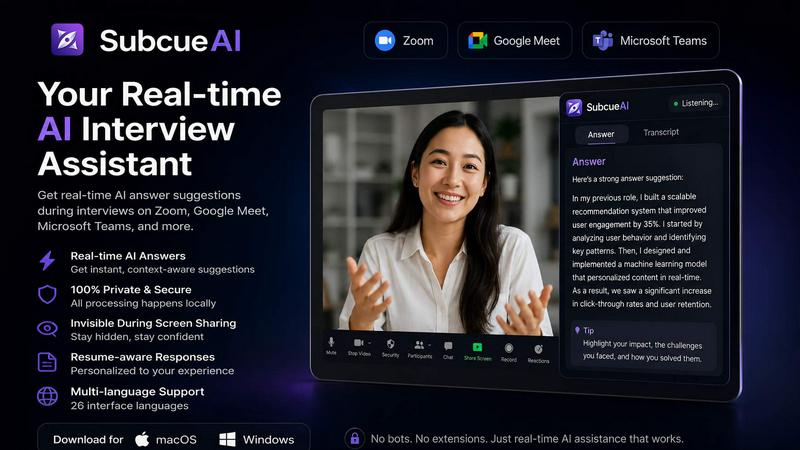
About SubcueAI
SubcueAI is a dedicated AI interview assistant designed for macOS and Windows users who are serious about improving their job interview performance. It functions as a real-time answer suggestion tool that captures audio from popular video conferencing platforms like Zoom, Google Meet, Microsoft Teams, and WebEx. By leveraging dual audio capture technology, it listens to both system audio and your microphone simultaneously, transcribes questions using speech-to-text, and generates context-aware talking points powered by GPT-4o. This tool is built for candidates preparing for technical coding interviews, behavioral questions, case interviews, and any other format that requires structured, confident responses. The core value proposition is continuous improvement through iterative practice. SubcueAI does not just help you answer a single question; it provides a cyclical loop of practice, real-time AI assistance, and post-session analytics that allow you to track your progress over multiple rounds. It is designed to be private and local-first, meaning your audio and transcripts are processed on your device without being stored on external servers. With a simple floating overlay, users can review AI-generated suggestions, internalize them, and rehearse their responses naturally. Whether you are a job seeker aiming to land a top-tier role or a professional looking to sharpen your interview skills, SubcueAI offers a structured, private, and intelligent way to prepare.
Features of SubcueAI
Real-Time AI Answer Assistant
This feature delivers intelligent, context-aware answer suggestions as you practice your interview responses. Powered by GPT-4o, the assistant captures the question being asked, transcribes it accurately, and generates relevant talking points that appear in a floating overlay on your screen. It is designed for technical, behavioral, and case interview prep, giving you the ability to review and internalize key points before delivering your answer. This real-time support helps you build confidence and structure your responses more effectively with each practice session.
Dual Audio Capture for Video Calls
SubcueAI uses dual audio capture technology to record both system audio and your microphone simultaneously. This ensures that when you are practicing with a partner on Zoom, Google Meet, Microsoft Teams, or WebEx, every part of the conversation is captured clearly. The tool works seamlessly in the background without interfering with your call, making it ideal for mock interviews. This feature eliminates the need for external recording devices or browser plugins, providing a clean and reliable audio input for the AI to process.
Interview Performance Analytics
After each practice session, SubcueAI provides a detailed AI analysis that includes scoring, identification of strengths and weaknesses, and actionable improvement suggestions. This feature turns every practice round into a learning opportunity. You can track your progress across multiple sessions, seeing how your responses evolve over time. The analytics are designed to highlight patterns in your answers, such as areas where you may be too vague or where you excel, allowing you to focus your preparation on the right areas for continuous improvement.
Private and Local-First Architecture
Privacy is a core design principle for SubcueAI. Audio is captured and processed locally on your device, meaning no meeting bots, third-party recorders, or browser plugins are involved. Interview transcripts are never persisted on SubcueAI servers, and any uploaded resumes are encrypted at rest. The application runs quietly in the background with minimal CPU and memory usage. A quick-toggle visibility hotkey allows you to hide the overlay instantly for distraction-free focus during practice, ensuring you maintain control over your data and your environment.
Use Cases of SubcueAI
Technical Coding Interview Preparation
For software engineers and developers, SubcueAI is an invaluable tool for practicing technical coding interviews. As you work through algorithm questions or system design problems, the AI transcribes the question and generates talking points about key concepts, data structures, and solution approaches. You can rehearse your thought process aloud, receive real-time suggestions for structuring your answer, and then review the analytics to see how well you communicated your technical reasoning. This iterative cycle helps you improve your clarity and depth with each practice round.
Behavioral Interview Practice
Behavioral interviews require candidates to tell compelling stories about their past experiences. SubcueAI helps you structure these narratives by capturing the question and providing context-aware suggestions for framing your response using frameworks like STAR (Situation, Task, Action, Result). As you practice, you can refine your stories, ensure you cover all key points, and receive feedback on your delivery. The post-session analytics highlight which stories resonated best and where you can add more detail, enabling continuous improvement in your storytelling ability.
Case Interview Simulation
For consulting and management roles, case interviews demand structured problem-solving under time pressure. SubcueAI supports this format by transcribing the case prompt and generating real-time suggestions for breaking down the problem, identifying key data points, and structuring your analysis. You can practice with a partner or alone, using the AI overlay to guide your thinking without giving away the answer. After the session, the analytics provide insights into your logical flow, hypothesis generation, and quantitative reasoning, helping you refine your approach over multiple case simulations.
Mock Interviews with a Partner
SubcueAI is designed to enhance mock interviews conducted with a friend, mentor, or career coach. Using dual audio capture, it records both your partner's questions and your responses. The real-time AI assistant provides suggestions as you speak, and after the session, both parties can review the analytics to discuss areas for improvement. This collaborative use case turns every mock interview into a structured learning experience, allowing you to iterate on your answers and build confidence before the real interview.
Frequently Asked Questions
What is an AI interview assistant and how does SubcueAI work?
An AI interview assistant is a software tool that helps you prepare for job interviews by providing real-time answer suggestions and post-session analytics. SubcueAI works by capturing audio from your computer during video calls or practice sessions. It transcribes the questions using speech-to-text and generates context-aware talking points using GPT-4o. These suggestions appear in a floating overlay on your screen, allowing you to review and internalize them before responding. After the session, you receive a detailed performance analysis with scoring and improvement tips.
Does SubcueAI work with Zoom, Google Meet, and Microsoft Teams?
Yes, SubcueAI is designed to work with all major video conferencing platforms, including Zoom, Google Meet, Microsoft Teams, and WebEx. It uses dual audio capture technology to record both system audio and your microphone simultaneously, ensuring that every part of the conversation is captured regardless of the platform you are using. The tool runs quietly in the background and does not require any browser plugins or third-party integrations.
How is SubcueAI architected and is it a meeting bot?
SubcueAI is not a meeting bot. It is a local-first application that runs on your own device. Audio is captured and processed locally, meaning no data is sent to external servers for recording or transcription. The AI processing for generating answer suggestions happens on-device or through encrypted connections, depending on the model used. This architecture ensures your privacy and gives you full control over your interview data. It is designed for personal practice and preparation, not for recording or analyzing meetings without consent.
Can SubcueAI help with technical and behavioral interview prep?
Absolutely. SubcueAI is built to support a wide range of interview formats, including technical coding interviews, behavioral questions, and case interviews. For technical prep, it helps you structure your reasoning around algorithms, data structures, and system design. For behavioral prep, it assists in framing your experiences using structured storytelling techniques. The AI adapts its suggestions based on the context of the question, making it a versatile tool for any interview type you need to practice.
Pricing of SubcueAI
SubcueAI operates on a credits-based pricing model with three main tiers: Starter, Pro, and Premium. The Starter plan is free and includes 100 credits per month with access to the standard AI model for mock interview practice. The Pro plan costs $20 per month and provides 2,000 credits per month, access to the smart AI model, performance analytics, resume-driven context, and full interview history and analysis. The Premium plan is $75 per month and offers 8,000 credits per month, the expert AI model, advanced analytics and insights, priority support, and early access to new features. Users can also purchase optional top-up packs that never expire for all plans. Discounts are available for 3-month (10% off) and annual (20% off) subscriptions.
Explore more in this category:
Similar to SubcueAI

Jev turns text or JSON into Choice, Score and Noul answers with probabilities. Build decision flows, process batches and call the API from one Console

Panzoe is an all-in-one AI platform for personal productivity, business automation, AI assistants, content creation, and custom AI solutions.

Novastart brings apps and files onto an infinite canvas where people and AI agents can work together.


AI Email Filter sorts incoming mail into folders using plain-language prompts you write. Works with any IMAP mailbox; bring your own LLM if you want.


Free collection of online developer utilities, code formatters, and digital converters designed to streamline your daily workflow.

Translate JSON, Markdown, and TXT files while preserving keys, nested paths, and project structure.