
ProcessSpy
ProcessSpy is the advanced Mac process monitor that evolves with your needs for deeper system insights.
Visit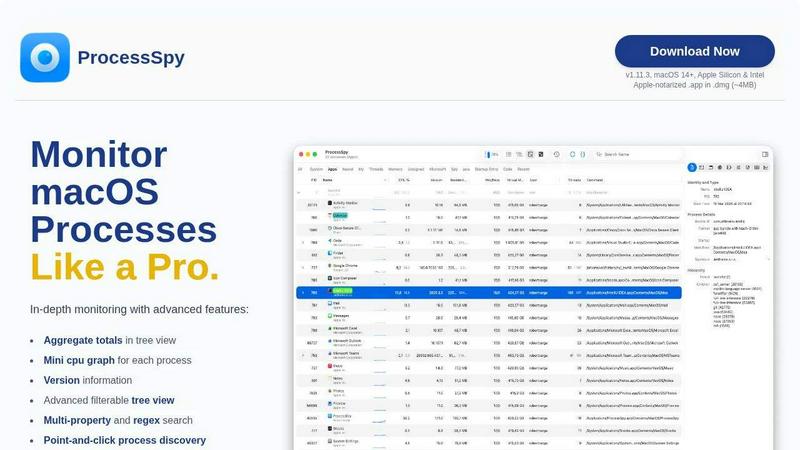
About ProcessSpy
ProcessSpy is the definitive native process explorer and advanced system monitor for macOS, designed to fill the critical gaps left by the built-in Activity Monitor. It serves as the macOS counterpart to the renowned Sysinternals Process Explorer for Windows, offering developers, power users, and IT professionals unparalleled visibility into their system's inner workings. Born from a developer's frustration with distinguishing between multiple Java processes, ProcessSpy evolves the monitoring experience by revealing the full command-line paths, version information, and environment variables that Activity Monitor hides. Its core value proposition is delivering a deep, actionable, and Mac-native view of every process, thread, and resource. The tool is built with a philosophy of continuous refinement, leveraging native macOS APIs for a fast, responsive, and integrated feel without the bloat of cross-platform frameworks. From visualizing intricate process hierarchies to instantly terminating unresponsive applications, ProcessSpy provides the detailed intelligence needed for advanced debugging, system optimization, and security auditing on modern Macs.
Features of ProcessSpy
Advanced Hierarchical Process Tree
ProcessSpy visualizes your system's activity not as a flat list, but as a dynamic, hierarchical tree that clearly shows parent-child relationships between processes. This view goes beyond simple visualization by calculating and displaying aggregate totals for CPU usage, memory consumption, and thread counts for entire branches of the tree. This continuous improvement in data presentation allows you to instantly understand which application or service is responsible for resource consumption, not just which individual process.
Multi-Property & Regex Search with JavaScript Filters
Move beyond basic name searches. ProcessSpy's powerful quick-search supports regular expressions and simultaneous queries across multiple process properties. You can, for example, find all processes with "node" in the name AND a specific port in their command line. This capability is further extended by advanced JavaScript filters, allowing you to script complex, multi-condition logic for pinpointing exactly the processes you need, embodying an iterative approach to data filtering.
Comprehensive Process Inspection & Context Menus
Gain immediate insight into any process with detailed metadata displayed directly in the main table, including version information. Right-clicking on processes, open files, network connections, or loaded dynamic libraries (Dylibs) brings up context-sensitive menus packed with useful actions. This design provides instant access to critical functions, streamlining your workflow and enabling faster diagnostics and management.
Historical Recording & Process Memory (Paid)
Unlock a forensic-level view of system behavior. The paid license enables ProcessSpy to record historical timelines of CPU, memory, and thread metrics, which can be exported to CSV for analysis. Furthermore, it remembers finished processes—preserving their command line, environment variables, and recorded history for later review. This feature represents the pinnacle of iterative monitoring, allowing you to analyze past events and understand system behavior over time, not just in the present moment.
Use Cases of ProcessSpy
Developer Debugging & Profiling
Developers can cut through the noise when debugging multi-process applications. Distinguish between several instances of "python" or "java" by seeing the full executable path, command-line arguments, and version. Inspect environment variables to diagnose configuration issues and use the tree view to understand spawned child processes, turning a chaotic list into a clear map of your application's runtime footprint.
System Performance Investigation
When your Mac slows down, identify the true culprit efficiently. Use the aggregate totals in the tree view to see which application family is consuming total resources. Filter processes with high CPU or memory, and employ the mini CPU graphs per process to spot trends. This methodical, iterative investigation replaces guesswork with data-driven insight.
Security & Malware Analysis
Security-conscious users can audit system activity for suspicious behavior. Discover unknown processes, inspect their signatures and entitlements (paid feature), see what files and network connections they have open, and check if they were launched by a launch agent or daemon. The ability to flag newly discovered processes provides an immediate alert for unexpected activity.
IT Support & Troubleshooting
IT professionals can use ProcessSpy to diagnose issues on user machines. The tool can help identify conflicting software, kill stubborn processes that won't quit through normal means, and verify the runtime details of installed services. The JSON export feature allows for saving snapshots of process states to share for remote analysis, facilitating a collaborative troubleshooting cycle.
Frequently Asked Questions
Is ProcessSpy safe to install on my Mac?
Yes, ProcessSpy is completely safe. It is an Apple-notarized application, meaning it has been scanned and approved by Apple for malicious content. It is distributed as a signed .app inside a .dmg file, ensuring integrity and safety for both Intel and Apple Silicon Macs. This commitment to security is a core part of its development cycle.
What versions of macOS does ProcessSpy support?
ProcessSpy is designed for modern macOS systems, specifically supporting macOS 14 (Sonoma) and newer, including the latest versions. It is optimized for both Apple Silicon and Intel architectures. This focus on current OS versions ensures it can leverage the latest native APIs for performance and features, part of its continuous improvement path.
What is the license model for the paid features?
A single license key, available for purchase, unlocks all advanced paid features. This license is priced at a one-time fee of $24.99 and is valid for one user across an unlimited number of their personal devices. It includes lifetime updates and new features, aligning with a model of sustained value and ongoing product evolution.
How does ProcessSpy compare to the built-in Activity Monitor?
ProcessSpy reveals what Activity Monitor intentionally hides or omits. Key differences include showing full command-line paths, process version info, environment variables, and detailed hierarchy with aggregate totals. ProcessSpy also offers powerful search/filtering, historical recording, and deep inspection of entitlements and signatures—features completely absent from Activity Monitor, offering a fundamentally more iterative and detailed analysis workflow.
Similar to ProcessSpy

Jev turns text or JSON into Choice, Score and Noul answers with probabilities. Build decision flows, process batches and call the API from one Console

Face recognition API, a drop-in replacement for AWS Rekognition. Index, search, compare and detect faces, billed per photo with no subscription.

Search 20,000+ open-source and SaaS tools by the job you need done or the app you want to replace.

Residential and datacenter proxy provider with 50M+ ethically sourced IPs across 150+ countries. Unlimited from $4.08/hr, pay-per-GB from $1.64/GB.

A free browser-based toolkit for creating, cutting, converting, and previewing sprite sheet animations.

Moderation, routing, intent and scoring for any text over one Jev-compatible API, hosted in the EU.

A free directory of 950+ projects built on Laya, the open-source decision model. Updated daily.

Translate JSON, Markdown, and TXT files while preserving keys, nested paths, and project structure.