
Caesura
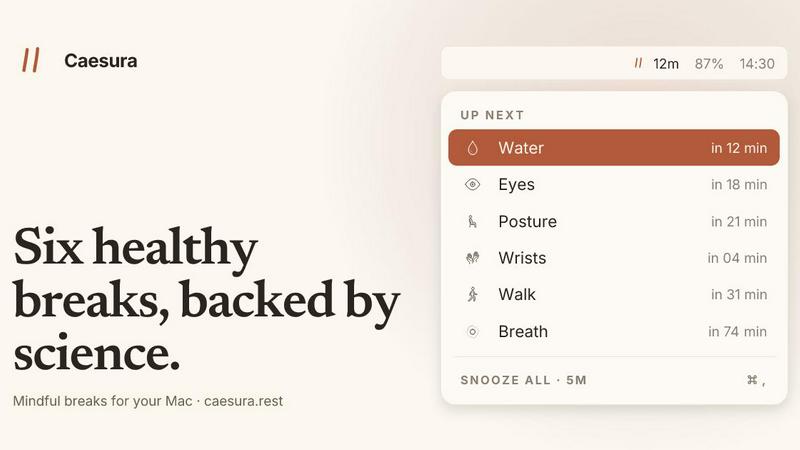
Caesura is a macOS menu-bar app that reminds you to drink water, stretch, rest your eyes, and breathe on science-backed intervals, pausing during.
VisitPublished on:
June 26, 2026
Pricing:
About Caesura
Caesura is a calm, minimalist macOS menu-bar break manager designed for people who spend long days at a desk. It is not another productivity tool that demands your attention; instead, it is a quiet companion that reminds you to take care of your body with six science-backed breaks: drink water, walk, stretch your wrists, rest your eyes, check your posture, and breathe. Each break runs on its own independent schedule, with intervals derived from peer-reviewed research rather than arbitrary round numbers. The core value proposition is simple: Caesura helps you build sustainable health habits without breaking your focus. When two reminders fall close together, Caesura intelligently coalesces them into one gentle prompt, ensuring you are never interrupted twice in a row. The app respects your flow by automatically pausing during video calls, screen sharing, fullscreen apps, and calendar events, then picking up exactly where it left off. There are no accounts to create, no clutter, no telemetry, and no subscription. It is a one-time purchase for macOS 14 and later, with a free 14-day trial. Caesura is for developers, designers, writers, remote workers, and anyone who wants to stay healthy and focused throughout a long workday. It is a cyclical tool that iterates with you, adapting to your schedule and habits, helping you improve your well-being one gentle nudge at a time.
Features of Caesura
Six Science-Backed Breaks
Caesura offers six distinct break types, each with an interval rooted in scientific research. Water every 45 minutes, walk every 60 minutes, wrists every 30 minutes, eyes every 20 minutes, posture every 30 minutes, and breathing every 90 minutes. You can turn any break off, retune its interval, or change how it appears. This cyclical approach means you can continuously refine your routine based on what works best for your body, ensuring your health habits evolve with you.
Intelligent Break Coalescing
When two breaks are due within a minute of each other, Caesura coalesces them into one gentle prompt. This means you never experience back-to-back interruptions that disrupt your workflow. Instead, you receive a single, consolidated reminder that addresses multiple needs at once. This feature is a continuous improvement over traditional break managers that pile on notifications, helping you maintain focus while still caring for your health.
Automatic Pause and Resume
Caesura respects your flow by watching for video calls, screen sharing, fullscreen apps, Do Not Disturb mode, calendar events, and games. When any of these are active, every timer freezes and picks up exactly where it left off. If you had 12 minutes until your water break, you still have 12 minutes after the call ends. This cyclical pause and resume ensures you never miss a break due to a meeting, and you are never interrupted during deep work.
Customizable Break Prompts
Each break can be displayed in one of three styles: Overlay, Banner, or Notification. An overlay takes over your screen until you press Return, ideal for breaks you might otherwise ignore. A banner slides in from under the menu bar and auto-dismisses in 30 seconds. A notification is the lightest touch, a standard macOS alert. You can assign different styles to different breaks, allowing you to iterate on what level of prompting works best for each habit.
Use Cases of Caesura
The Remote Developer
A software developer spends 10 hours a day in front of a screen, often deep in code for hours without moving. Caesura reminds them to walk every 60 minutes and stretch their wrists every 30 minutes, preventing repetitive strain injuries. The automatic pause during fullscreen coding sessions ensures they are never interrupted while debugging. Over time, the developer cycles through different break intervals, finding the rhythm that keeps them healthy and productive.
The Remote Worker in Back-to-Back Meetings
A project manager has a calendar packed with video calls. Caesura detects when they are in a call and pauses all timers. After the call, it resumes exactly where it left off. When two breaks coalesce into one, the manager gets a single prompt to drink water and check their posture. This cyclical approach helps them stay hydrated and aligned without adding stress to their packed schedule.
The Creative Writer
A novelist writes for long stretches, often losing track of time. Caesura's eye break every 20 minutes reminds them to look 20 feet away for 20 seconds, reducing digital eye strain. The breathing break every 90 minutes helps them reset their focus. They customize the prompts to use a subtle banner for eyes and a full overlay for breathing, iterating on the setup until it feels like a natural part of their creative process.
The Health-Conscious Designer
A graphic designer wants to build a sustainable health routine. They start with all six breaks enabled, then gradually turn off the ones they no longer need. Over weeks, they cycle through different intervals for water and walking, finding the cadence that keeps them hydrated and active. Caesura's one-time purchase model allows them to commit to their health without worrying about recurring costs.
Frequently Asked Questions
How does Caesura know when I am on a call?
Caesura watches your camera, screen sharing, calendar, and which app owns the screen. When it detects a video call, screen recording, fullscreen app, Do Not Disturb mode, or a calendar event, it automatically pauses all break timers. The timers resume exactly where they left off when the activity ends.
Can I customize the break intervals and prompts?
Yes, you can turn any of the six breaks on or off, retune their intervals, and change how each break appears. You have three prompt styles per break: Overlay, Banner, or Notification. This allows you to iterate on your setup until it perfectly fits your workflow and health needs.
Is my data collected or sold?
No. Caesura is a one-time purchase with no account creation, no telemetry, and no data collection. Your break history and preferences are stored locally on your Mac. The app respects your privacy completely.
What happens if I miss a break?
If you miss a break, Caesura simply waits for the next scheduled interval. It does not nag or punish you. The app is designed to be a gentle nudge, not a strict enforcer. This cyclical, non-judgmental approach helps you build habits over time without feeling pressured.
Pricing of Caesura
Caesura is available as a one-time purchase for $15. There are no subscriptions, no recurring fees, and no hidden costs. You can try the app free for 14 days before making a purchase. No credit card is required for the trial. The purchase is valid for macOS 14 and later, and it is yours forever.
Similar to Caesura

Translate JSON, Markdown, and TXT files while preserving keys, nested paths, and project structure.

Visual financial timelines for couples and young professionals.

The #1 Native Form Builder Plugin for Framer - No Code, No Embeds, No External Platforms.

Practical, independent guides to home repairs, maintenance, costs, troubleshooting, and everyday fixes.

Adopt a virtual baby who grows, learns, and remembers you.


Highlight faster. Study in flow with custom shortcuts and a workflow built around you. Print smarter, or turn any page into a tiled poster.
