
Browser Notes
Browser Notes keeps your notes, boards, and mind maps local in your browser without signup or cloud, improving how you think with every iteration.
Visit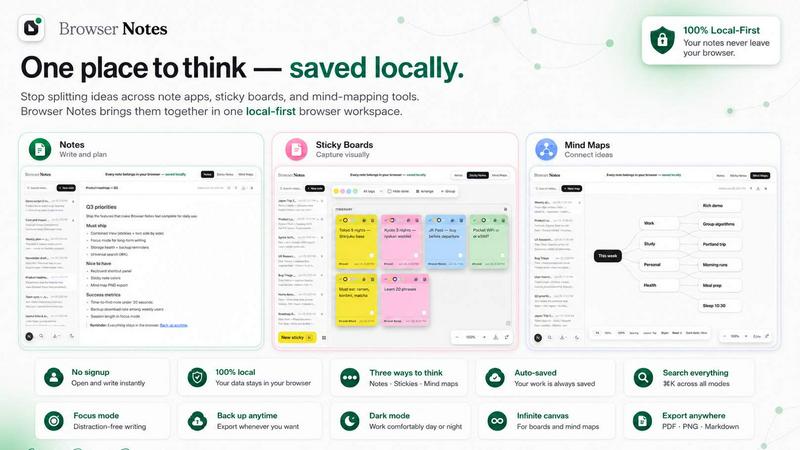
About Browser Notes
Browser Notes is a local-first productivity tool that consolidates your notes, sticky notes, and mind maps into a single, private workspace inside your browser. Traditional note-taking often scatters your thoughts across different apps, sticky boards, and mind-mapping tools, while pushing your private ideas to the cloud. Browser Notes eliminates this fragmentation by bringing everything together in one place, stored entirely in your browser. There is no account required, no tracking, and no forced sync. You work offline by default, and your data never leaves your machine unless you choose to back it up manually. This product is designed for individuals who value privacy, simplicity, and control over their digital thoughts. It is ideal for students, writers, project managers, and anyone who needs a reliable, always-available space for capturing and organizing ideas. The main value proposition is continuous improvement through iteration: you can start with a simple note, expand it into a sticky note board for brainstorming, or branch out into a mind map for deeper exploration. Every change stays local, and you can back up your entire workspace at any time. Browser Notes respects your privacy and your workflow, letting you refine your thinking over time without external interference or data leaks. It is a Chrome extension that turns your browser into a powerful, private notebook.
Features of Browser Notes
Notes with Markdown Formatting
Write and format your notes using Markdown, a lightweight markup language that allows you to add headings, lists, bold, italic, links, and more. This feature supports iterative writing, where you can start with a rough draft and continuously refine it. Markdown keeps your notes clean and readable, while giving you full control over structure. You can focus on content without distractions, knowing that formatting is straightforward and portable.
Sticky Notes on a Free Canvas
Brainstorm ideas freely on an infinite canvas using sticky notes. This feature mimics the physical experience of sticky boards but in a digital, local-first environment. You can move, resize, and color-code sticky notes to visually organize your thoughts. It is perfect for iterative ideation sessions where you start with scattered ideas and gradually group, connect, or discard them. The canvas grows with you, accommodating complex projects or simple lists.
Mind Maps for Branching Ideas
Create dynamic mind maps that start from a central concept and branch out into related ideas. This feature supports hierarchical thinking, allowing you to expand topics layer by layer. You can add nodes, connect them, and rearrange branches as your understanding evolves. Mind maps are ideal for iterative planning, problem-solving, and learning. They help you see the big picture while drilling down into details, all stored locally in your browser.
Local-First Storage and Manual Backups
All your data is stored directly in your browser, with no cloud sync or external servers involved. You remain in complete control of your information. You can back up your entire workspace manually at any time, ensuring you never lose your work. This feature supports continuous improvement by letting you experiment freely, knowing your data is safe and private. There is no account, no tracking, and no forced sync, making it a trustworthy tool for sensitive ideas.
Use Cases of Browser Notes
Personal Journaling and Daily Logs
Use Browser Notes to keep a private journal or daily log. With Markdown formatting, you can write structured entries, add bullet points for tasks, or embed links to resources. Since everything is stored locally, your personal reflections remain completely private. You can iterate on your journal style over time, adding new sections or refining your format without worrying about cloud exposure. It is a safe space for continuous self-improvement.
Academic Research and Note-Taking
Students and researchers can organize lecture notes, research findings, and study materials using notes, sticky notes, and mind maps. Start with a mind map to outline a topic, then expand into detailed notes with Markdown. Use sticky notes to brainstorm connections between concepts. The local-first approach ensures your academic work is not shared or tracked, giving you full ownership. You can continuously refine your notes as you learn more.
Project Planning and Brainstorming
Project managers and creative teams can use Browser Notes for planning and brainstorming sessions. Begin with sticky notes on a free canvas to capture initial ideas, then group them into a mind map for structure, and finally write detailed project notes in Markdown. The iterative workflow allows you to start messy and gradually organize. All data stays in your browser, so sensitive project details are never exposed to third-party servers.
Quick Idea Capture and Iterative Refinement
When inspiration strikes, open Browser Notes to quickly jot down an idea using a sticky note or a simple note. Later, you can expand that idea into a mind map or detailed document. This use case emphasizes continuous improvement: you capture raw thoughts, then refine them over time. The offline capability means you can work anywhere, and manual backups ensure you never lose your creative sparks. It is a frictionless way to nurture ideas from conception to completion.
Frequently Asked Questions
Do I need to create an account to use Browser Notes?
No, Browser Notes does not require any account creation. You can start using it immediately after installing the Chrome extension. There is no sign-up, no login, and no personal information collected. Your data is stored locally in your browser, ensuring complete privacy and anonymity. This design respects your time and your data.
Is my data synced to the cloud or shared with third parties?
No, your data is never synced to the cloud or shared with any third parties. Browser Notes stores everything locally in your browser. There is no forced sync, no tracking, and no external servers involved. You have full control over your information. If you want a backup, you can manually export your data at any time. This local-first approach guarantees your privacy.
Can I use Browser Notes offline?
Yes, Browser Notes works entirely offline. Since all data is stored locally in your browser, you do not need an internet connection to create, edit, or view your notes, sticky notes, or mind maps. This makes it reliable for use in areas with poor connectivity or when you want to work without distractions. You can back up your data when you go online.
How do I back up my data in Browser Notes?
You can back up your entire workspace manually at any time. Browser Notes provides an export option that saves your data as a file on your computer. This backup file can be imported later to restore your workspace, even on a different device. It is a simple, transparent way to ensure your work is safe. There is no automatic backup, giving you full control over when and how you save your data.
Pricing of Browser Notes
Browser Notes is free to use. There are no pricing plans, tiers, or hidden costs. The Chrome extension is available at no charge, and all features are included. Your data remains local, and no account is required. This makes it accessible to everyone who values privacy and simplicity in their note-taking workflow.
Explore more in this category:
Similar to Browser Notes

Panzoe is an all-in-one AI platform for personal productivity, business automation, AI assistants, content creation, and custom AI solutions.

Novastart brings apps and files onto an infinite canvas where people and AI agents can work together.

Free collection of online developer utilities, code formatters, and digital converters designed to streamline your daily workflow.

Translate JSON, Markdown, and TXT files while preserving keys, nested paths, and project structure.

Visual financial timelines for couples and young professionals.

The #1 Native Form Builder Plugin for Framer - No Code, No Embeds, No External Platforms.

Practical, independent guides to home repairs, maintenance, costs, troubleshooting, and everyday fixes.

Highlight faster. Study in flow with custom shortcuts and a workflow built around you. Print smarter, or turn any page into a tiled poster.