
Decode This Text vs MeetingMind
Side-by-side comparison to help you choose the right product.

Decode This Text
Decode This Text delivers quick, human-like insights to help you clarify confusing conversations in just 30 seconds.
Last updated: February 28, 2026

MeetingMind
MeetingMind automatically records and summarizes your Zoom meetings, ensuring you never miss key details again.
Last updated: March 1, 2026
Visual Comparison
Decode This Text

MeetingMind
Feature Comparison
Decode This Text
Comprehensive Text Analysis
Decode This Text analyzes the messages you provide, examining the words, context, and emotional tone to reveal what is truly happening beneath the surface. This ensures you understand not just the words, but the sentiment behind them.
User-Friendly Interface
The platform is designed with ease of use in mind. You can paste text directly or upload a screenshot of your conversation, making it accessible for users of all tech-savviness levels. This simplicity encourages engagement and frequent use.
Emotional Tone Detection
The tool measures the emotional temperature of messages, identifying whether they are friendly, sarcastic, or cold. By understanding the emotional context, you can avoid misinterpretations and respond appropriately.
Response Suggestions
When you're unsure of how to reply, Decode This Text provides tailored response options. Whether you need a calm, direct, or assertive reply, the tool equips you with the best ways to communicate, enhancing your confidence in interactions.
MeetingMind
Automatic Detection
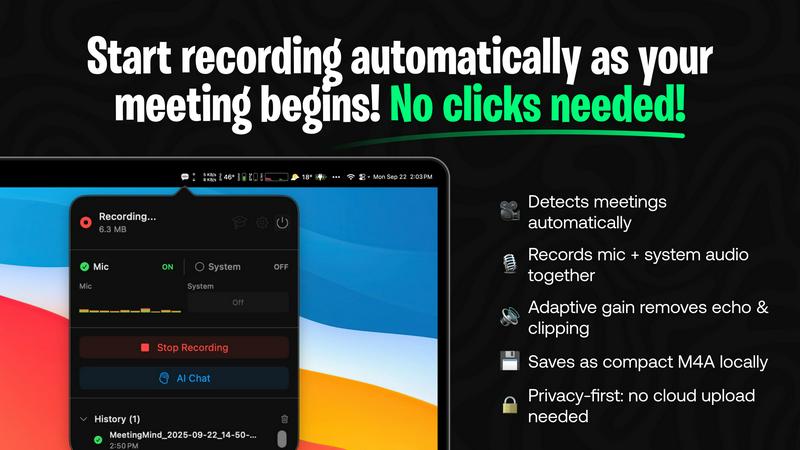
MeetingMind excels at automatically detecting Zoom meetings, ensuring that users do not have to click a single button to start recording. This feature allows for a worry-free meeting experience where professionals can focus entirely on the conversation without the distraction of manual operations.
Comprehensive Recording
The tool captures both microphone and system audio, employing adaptive gain to ensure crystal-clear recordings. This comprehensive audio capture allows users to relive meetings with perfect clarity, ensuring that no detail is overlooked.
AI Assistant Integration
MeetingMind provides users with a choice of AI tools for summarization and insights, whether it’s the local Ollama or the cloud-based OpenRouter. This flexibility allows users to select the AI assistant that best meets their needs, optimizing the quality of the summaries and insights generated from each meeting.
Markdown Export
Following the completion of a meeting, MeetingMind generates AI-powered summaries and transcripts that can be saved as formatted markdown files. This feature enhances usability and accessibility, allowing users to easily organize and share their meeting notes in a professional format.
Use Cases
Decode This Text
Clarifying Confusing Messages
Decode This Text is perfect for deciphering vague texts from friends or colleagues. If a friend says they had fun but goes quiet afterward, the tool helps you understand the underlying sentiment and decide how to follow up.
Professional Email Interpretation
When faced with terse emails from bosses or clients, this tool can help you gauge their mood and intentions, guiding you on how to respond effectively, whether it's with empathy or assertiveness.
Understanding Relationship Dynamics
For those navigating the complexities of personal relationships, Decode This Text can provide insights into messages that may seem ambiguous, helping you to avoid misunderstandings and improve communication.
Family Communication Clarity
Family dynamics can be challenging, especially when messages are misinterpreted. Use Decode This Text to analyze family group chats and ensure that everyone's intentions are clear, fostering healthier communication.
MeetingMind
Team Meetings
In regular team meetings, MeetingMind ensures that every participant can engage fully in discussions without the distraction of taking notes. The automatic recording and transcription mean that details can be revisited later, fostering a more productive environment.
Client Consultations
For consultants and client-facing professionals, MeetingMind captures critical insights and action items during consultations. This ensures that follow-ups are based on accurate records of client discussions, enhancing service delivery and client satisfaction.
Project Updates
Project managers can utilize MeetingMind during project update meetings to keep track of progress and decisions made. The generated transcripts serve as valuable documentation for future reference, streamlining project management efforts.
Training Sessions
In training environments, MeetingMind can record sessions and provide transcripts for participants to review later. This allows for better retention of information and offers the opportunity for trainees to revisit complex topics at their own pace.
Overview
About Decode This Text
Decode This Text is a revolutionary tool designed to help individuals decipher the often complex and ambiguous meanings behind various forms of communication. Whether you're receiving a cryptic email from your boss, an unclear text from a friend, or a puzzling message from a client, Decode This Text provides the clarity you need. By simply pasting the conversation or describing the situation, users can obtain a comprehensive analysis of the underlying intentions, emotional tones, and effective response strategies. This tool is ideal for anyone looking to enhance their communication skills, improve interpersonal relationships, and eliminate misunderstandings. With its intuitive interface and quick response time, Decode This Text empowers you to interact with confidence, alleviating the stress of second-guessing every word.
About MeetingMind
MeetingMind is the ultimate intelligent meeting assistant specifically designed for macOS users, revolutionizing the way professionals engage with their virtual conversations. This innovative tool caters to a wide range of users, including project managers, developers, consultants, and team leaders, all of whom require a seamless experience during their online meetings without the distractions of manual note-taking. The core value proposition of MeetingMind lies in its ability to deliver a fully automated, private, and intelligent recording solution that streamlines the entire meeting workflow. By harnessing the power of on-device AI, MeetingMind automatically detects Zoom meetings, capturing both microphone and system audio with exceptional clarity. It generates real-time, speaker-attributed transcripts that serve as a living document of your discussions, enabling users to query, summarize, and export crucial information effortlessly. With a commitment to continuous improvement, MeetingMind not only enhances its own functionality but also empowers users to refine their meeting hygiene. Each interaction helps professionals capture clearer takeaways and build a searchable knowledge base, ensuring that every meeting becomes a stepping stone toward enhanced productivity and clarity.
Frequently Asked Questions
Decode This Text FAQ
How does Decode This Text ensure privacy?
Your privacy is guaranteed as Decode This Text operates on a 100% anonymous basis. No human reads your texts, ensuring that your personal information remains confidential.
Can I use Decode This Text for professional communication?
Absolutely! Decode This Text is designed for both personal and professional contexts, helping you interpret emails and messages at work to enhance your communication skills in the workplace.
How quickly can I expect a response?
You will receive a comprehensive analysis within 30 seconds of submitting your text or description, providing you with timely insights to navigate your conversations.
Is there a limit to the length of text I can analyze?
There is no specific limit mentioned for text length, but concise messages often yield clearer analyses. For best results, try to focus on the key parts of the conversation you want to understand.
MeetingMind FAQ
How does MeetingMind ensure privacy?
MeetingMind processes all data locally on your Mac, meaning that your meetings and recordings never leave your device. This commitment to privacy ensures that sensitive information remains secure and confidential.
Can I use MeetingMind for meetings other than Zoom?
Currently, MeetingMind is designed specifically for Zoom meetings. Its automatic detection and recording features are optimized for the Zoom platform to provide the best user experience.
Is there a free trial available?
Yes, MeetingMind offers a free tier that allows users to record up to 60 minutes per day. This is an ideal way to experience the tool’s capabilities before deciding to upgrade for unlimited recording.
What happens if I exceed the 60-minute limit on the free plan?
Once you exceed the 60-minute recording limit on the free plan, you can either wait for the next day to record more or choose to upgrade to the unlimited plan for uninterrupted recording capabilities.
Alternatives
Decode This Text Alternatives
Decode This Text is an innovative tool designed to assist users in deciphering the often confusing nuances of conversations. Positioned within the Productivity & Management category, this tool serves those seeking clarity in communication, enabling them to understand messages that may otherwise leave them perplexed. Users frequently explore alternatives due to various factors such as pricing, desired features, and compatibility with their preferred platforms. When choosing an alternative, it's essential to consider the tool's user-friendliness, response time, and the range of features it offers. Look for solutions that not only provide quick analyses but also enhance your overall communication skills and foster better relationships. Ultimately, the right choice will empower you to engage confidently in conversations without the burden of misinterpretation.
MeetingMind Alternatives
MeetingMind is an intelligent meeting assistant tailored for macOS, designed to enhance productivity by automatically recording and summarizing Zoom meetings into private notes. This innovative tool suits various professionals, including project managers and consultants, who seek to engage fully in discussions without the distraction of manual note-taking. Users often explore alternatives due to factors such as pricing, feature sets, or specific platform compatibility. When selecting an alternative, it's essential to consider the ease of use, the quality of audio capture, and the ability to generate actionable insights from recorded meetings, ensuring that you continue to improve your workflow.