
Cosy vs WA Reminders
Side-by-side comparison to help you choose the right product.

Cosy automates member onboarding and introductions in Slack, boosting engagement and saving you time effortlessly.
Last updated: February 28, 2026

WA Reminders
WA Reminders continuously improves your workflow by scheduling WhatsApp messages to save you time and boost client engagement.
Last updated: April 4, 2026
Visual Comparison
Cosy
WA Reminders

Feature Comparison
Cosy
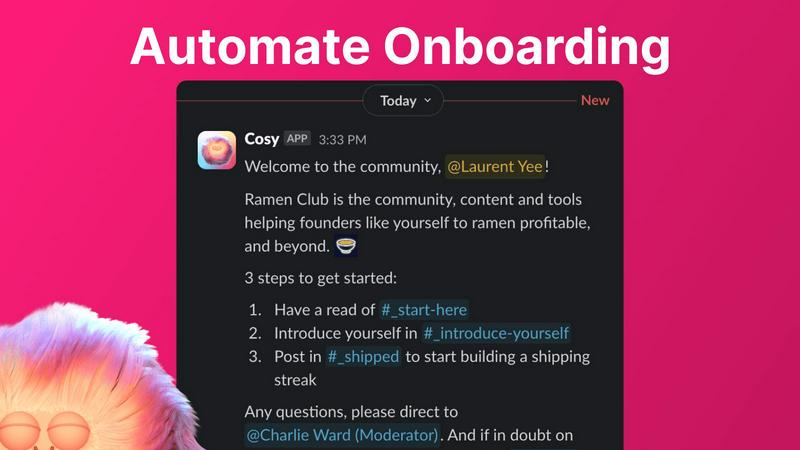
Automate Onboarding
Cosy allows you to create and automate personalized onboarding DM sequences for new members. You can set up to 10 distinct welcome messages that can be sent either immediately or delayed based on your preferences. This feature ensures that every new member receives a warm and tailored welcome, saving you the hassle of manual follow-ups.
Connect Your Members
This feature enhances community engagement by automatically introducing community members to each other via DMs. You can customize the frequency and timing of these introductions, ensuring that members can connect and network effortlessly, fostering a sense of belonging and collaboration within the community.
Member Directory
Cosy provides a simple yet powerful searchable directory of all community members, enabling easy access to profiles without leaving Slack. You can customize the fields that members fill out, making it easy for everyone to find and connect with individuals who share similar interests or expertise within the community.
Content Highlights
With Cosy, you can instantly surface the top 10 most engaging posts or identify public messages that have gone unanswered. This feature allows community managers to keep content alive and relevant, ensuring that valuable discussions remain visible and accessible to all members.
WA Reminders
Dual Scheduling Interface
Schedule your WhatsApp messages through two powerful, interconnected methods. You can work directly within the WA Reminders app for full control and contact list access, or you can seamlessly schedule from Google Calendar by simply adding a phone number to an event's details. This dual approach allows for continuous workflow improvement, letting you choose or combine methods based on your daily tasks for maximum efficiency and integration into your existing habits.
Direct WhatsApp Integration
Connect your personal or WhatsApp Business account securely via a QR code, just like WhatsApp Web. This foundational feature ensures all messages are sent directly from your own verified phone number, maintaining the personal touch and trust of your client relationships. Conversations initiated by a reminder continue naturally in your main WhatsApp inbox, allowing for a cohesive and iterative communication loop that feels authentic and professional.
Automated Contact Synchronization
Eliminate manual data entry and the risk of errors. When scheduling from the WA Reminders app, your device's full contact list is automatically imported and synced. This creates a dynamic, always-updated contact database, saving you significant time and ensuring you can quickly select recipients, allowing you to focus on crafting effective messages rather than managing lists.
Recurring & Calendar Sync Support
Automate ongoing client engagements with support for recurring messages, scheduled directly from the app or via recurring Google Calendar events. This feature is perfect for weekly appointments, monthly payment reminders, or regular follow-ups. It works with tools like Calendly through Google Calendar, enabling a cycle of automated reminders that evolve with your client's booking patterns, reducing administrative overhead consistently.
Use Cases
Cosy
Community Onboarding
When new members join your Slack workspace, Cosy automates the onboarding process by sending them personalized welcome messages. This not only saves time but also ensures that new members feel immediately included and informed about community norms and resources.
Member Introductions
Cosy can facilitate introductions among community members, making it easy for them to connect based on shared interests or roles. This feature encourages engagement and networking, fostering a stronger sense of community and collaboration.
Member Directory Utilization
Community members can utilize the searchable directory to find others who match their interests or expertise. This feature enhances interactions and collaborations, making your community more interconnected and engaging.
Content Engagement Monitoring
By using Cosy's content highlights feature, community managers can track engagement levels across different discussions. This allows them to promote popular posts or address unanswered queries, keeping the conversation flowing and encouraging active participation.
WA Reminders
Reducing Clinic Appointment No-Shows
Medical and wellness clinics can drastically cut down on missed appointments by sending automated WhatsApp reminders 24 or 48 hours before a scheduled session. This direct, personal channel has higher open rates than SMS or email, allowing clients to confirm, reschedule, or ask questions instantly. Over time, clinics can refine reminder timing and messaging based on client response, creating a continuously improving system that maximizes attendance and optimizes the practitioner's valuable time.
Managing Client Payments & Follow-ups
Freelancers, coaches, and service providers can automate payment reminders and post-service follow-ups. By scheduling a polite WhatsApp message after an invoice is sent or a project is delivered, you ensure timely payments and gather feedback without manual chasing. This iterative process helps maintain positive cash flow and client satisfaction, allowing you to analyze which messages are most effective and adapt your communication strategy for even better results.
Streamlining Small Shop Customer Engagement
Retail shops, salons, or repair services can use WA Reminders to notify customers when their order is ready, an appointment is available, or a promotion is happening. By syncing with a Google Calendar that manages bookings or order timelines, shops can automate these touchpoints. This continuous loop of proactive communication builds customer loyalty and frees up staff to focus on in-person service, constantly improving the customer experience cycle.
Coordinating Team Schedules & Reminders
Small business owners and team leaders can use the Google Calendar integration to manage internal or provider reminders. By adding a team member's number to a shared calendar event, WA Remitters can send automated shift reminders, meeting alerts, or task deadlines directly to WhatsApp. This creates a reliable, iterative communication system that ensures everyone is aligned, reducing internal miscommunication and improving operational consistency.
Overview
About Cosy
Cosy is an innovative tool designed for Slack, aimed at transforming your workspace into a vibrant community hub. It addresses the challenges of community management by streamlining the onboarding process for new members, fostering connections among existing members, and enhancing overall engagement through a suite of automated features. Targeted primarily at community managers and team leaders, Cosy combines efficiency with user-friendly functionality, allowing you to automate welcome messages, introduce members to one another, and create a searchable member directory—all within the familiar Slack environment. The core value proposition of Cosy lies in its capacity to help you build a thriving community effortlessly. With automated processes, you can ensure that every member feels welcomed, connected, and engaged right from their first interaction. By saving hours of manual effort each week, Cosy empowers community leaders to focus more on strategic initiatives while maintaining a lively and interactive community space.
About WA Reminders
WA Reminders is the dedicated WhatsApp scheduling solution designed to transform how clinics, independent professionals, and small businesses manage their client communications. It directly addresses the costly problem of missed appointments and forgotten follow-ups by automating reminders through the world's most popular messaging platform. The core value proposition is simple yet powerful: save valuable time, reduce no-shows, and enhance client relationships by sending timely, personalized WhatsApp messages from your own number, without needing to be manually online at the moment of sending. This tool is built for those who rely on appointments and timely communication, such as physiotherapists, consultants, salon owners, and coaches. By integrating seamlessly with your existing workflow—whether you prefer scheduling directly within the intuitive WA Reminders app or leveraging the familiar interface of Google Calendar—it creates a continuous cycle of improved efficiency. You can start, refine, and scale your reminder strategy, iterating on what works best to ensure your clients are always informed and your schedule runs smoothly, turning time-consuming administrative tasks into a streamlined, automated process.
Frequently Asked Questions
Cosy FAQ
What platforms does Cosy integrate with?
Cosy is designed specifically for Slack, allowing seamless integration within your existing Slack workspace to enhance community management without requiring additional tools.
How does the member directory work?
The member directory allows community members to create and customize their profiles, which can then be searched and filtered by other members. This helps facilitate connections and networking among community members.
Can I customize the onboarding messages?
Yes, you can fully customize the onboarding messages, including text, links, and emojis, as well as set time delays for when these messages are sent. This flexibility allows you to tailor the onboarding experience to fit your community's needs.
Is there a limit to the number of members I can add?
Cosy offers free usage for up to 250 members, with a 30-day trial available for unlimited members. This allows you to explore Cosy's features and assess its fit for your community before committing to a larger plan.
WA Reminders FAQ
Do you offer a free plan?
We do not offer an unlimited free plan due to the significant server costs required to reliably send messages on your behalf. However, we are confident in the value WA Reminders provides and offer a 14-day money-back guarantee on all paid plans. If the tool is not the right fit for your workflow, you can request a full refund, no questions asked, allowing you to test and iterate on your reminder process risk-free.
Can I import or use the contacts from my phone?
Yes, absolutely. When you schedule a message directly from the WA Reminders application, your device's full contact list is automatically imported and synced. This eliminates manual entry and ensures you have immediate access to all your clients' numbers, providing a seamless and continuously updated foundation for your communication cycles.
Can I send reminders directly from Google Calendar?
Yes, this is a core feature. You can schedule a WhatsApp message by simply creating an event in your Google Calendar and adding an internationally formatted phone number to the event's title or description. WA Reminders will detect this and automatically send the reminder at the event's scheduled time, allowing for an iterative workflow that integrates with tools you already use.
Do you have a Calendly integration?
Yes, WA Reminders integrates with Calendly through Google Calendar. When a client books an appointment via Calendly, the event (with their phone number, if collected) syncs to your Google Calendar. WA Reminders then reads this event and can send the automated WhatsApp reminder, creating a powerful, continuous cycle of automated scheduling and communication without any extra steps.
Alternatives
Cosy Alternatives
Cosy is a cutting-edge tool designed to enhance community engagement within Slack by automating member onboarding and introductions. As a productivity and management solution, it helps community managers and team leaders transform their Slack workspaces into dynamic hubs of interaction. Users often seek alternatives to Cosy for various reasons, including pricing considerations, specific feature requirements, or the need for compatibility with different platforms. When exploring alternatives, it's essential to evaluate the features offered, ease of use, and overall value to ensure they align with your community's goals and needs. When searching for a Cosy alternative, consider the functionalities that matter most to your team, such as automation capabilities, integration options, and user support. A comprehensive understanding of what each alternative offers in terms of community engagement and member connectivity will help you make an informed decision. Ultimately, selecting the right tool can significantly impact the effectiveness of your community management efforts.
WA Reminders Alternatives
WA Reminders is a productivity tool designed for businesses that rely on appointments. It operates in the category of communication and management software, specifically allowing users to schedule WhatsApp messages directly or via Google Calendar integration to reduce no-shows and improve client follow-up. Users often explore alternatives for various reasons. These can include budget constraints, the need for different feature sets like multi-platform messaging, or requirements that scale with a growing team. The search for the right tool is a natural part of optimizing business workflows. When evaluating other options, consider your core needs: seamless calendar synchronization, ease of use for non-technical staff, and reliable delivery. The goal is to find a system that evolves with your practice, turning client communication into a consistent, automated process that saves time and drives better results.