
Cosy
Cosy automates member onboarding and introductions in Slack, boosting engagement and saving you time effortlessly.
VisitPublished on:
November 13, 2025
Pricing:
About Cosy
Cosy is an innovative tool designed for Slack, aimed at transforming your workspace into a vibrant community hub. It addresses the challenges of community management by streamlining the onboarding process for new members, fostering connections among existing members, and enhancing overall engagement through a suite of automated features. Targeted primarily at community managers and team leaders, Cosy combines efficiency with user-friendly functionality, allowing you to automate welcome messages, introduce members to one another, and create a searchable member directory—all within the familiar Slack environment. The core value proposition of Cosy lies in its capacity to help you build a thriving community effortlessly. With automated processes, you can ensure that every member feels welcomed, connected, and engaged right from their first interaction. By saving hours of manual effort each week, Cosy empowers community leaders to focus more on strategic initiatives while maintaining a lively and interactive community space.
Features of Cosy
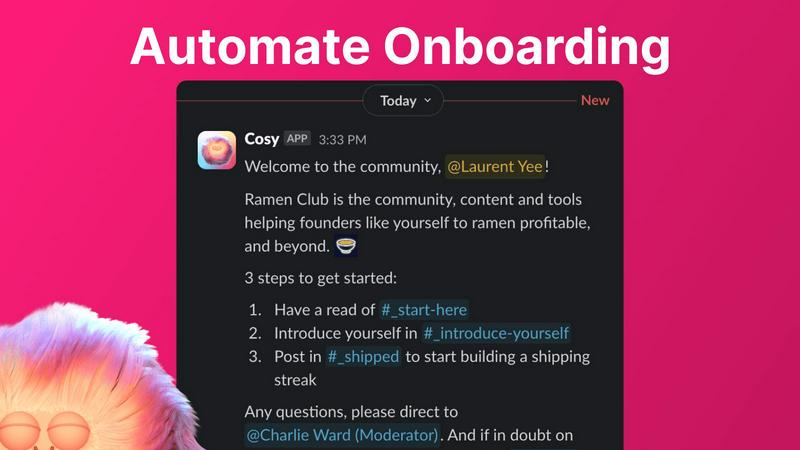
Automate Onboarding
Cosy allows you to create and automate personalized onboarding DM sequences for new members. You can set up to 10 distinct welcome messages that can be sent either immediately or delayed based on your preferences. This feature ensures that every new member receives a warm and tailored welcome, saving you the hassle of manual follow-ups.
Connect Your Members
This feature enhances community engagement by automatically introducing community members to each other via DMs. You can customize the frequency and timing of these introductions, ensuring that members can connect and network effortlessly, fostering a sense of belonging and collaboration within the community.
Member Directory
Cosy provides a simple yet powerful searchable directory of all community members, enabling easy access to profiles without leaving Slack. You can customize the fields that members fill out, making it easy for everyone to find and connect with individuals who share similar interests or expertise within the community.
Content Highlights
With Cosy, you can instantly surface the top 10 most engaging posts or identify public messages that have gone unanswered. This feature allows community managers to keep content alive and relevant, ensuring that valuable discussions remain visible and accessible to all members.
Use Cases of Cosy
Community Onboarding
When new members join your Slack workspace, Cosy automates the onboarding process by sending them personalized welcome messages. This not only saves time but also ensures that new members feel immediately included and informed about community norms and resources.
Member Introductions
Cosy can facilitate introductions among community members, making it easy for them to connect based on shared interests or roles. This feature encourages engagement and networking, fostering a stronger sense of community and collaboration.
Member Directory Utilization
Community members can utilize the searchable directory to find others who match their interests or expertise. This feature enhances interactions and collaborations, making your community more interconnected and engaging.
Content Engagement Monitoring
By using Cosy's content highlights feature, community managers can track engagement levels across different discussions. This allows them to promote popular posts or address unanswered queries, keeping the conversation flowing and encouraging active participation.
Frequently Asked Questions
What platforms does Cosy integrate with?
Cosy is designed specifically for Slack, allowing seamless integration within your existing Slack workspace to enhance community management without requiring additional tools.
How does the member directory work?
The member directory allows community members to create and customize their profiles, which can then be searched and filtered by other members. This helps facilitate connections and networking among community members.
Can I customize the onboarding messages?
Yes, you can fully customize the onboarding messages, including text, links, and emojis, as well as set time delays for when these messages are sent. This flexibility allows you to tailor the onboarding experience to fit your community's needs.
Is there a limit to the number of members I can add?
Cosy offers free usage for up to 250 members, with a 30-day trial available for unlimited members. This allows you to explore Cosy's features and assess its fit for your community before committing to a larger plan.
Explore more in this category:
Similar to Cosy

Residential and datacenter proxy provider with 50M+ ethically sourced IPs across 150+ countries. Unlimited from $4.08/hr, pay-per-GB from $1.64/GB.

Free collection of online developer utilities, code formatters, and digital converters designed to streamline your daily workflow.


Translate JSON, Markdown, and TXT files while preserving keys, nested paths, and project structure.

Visual financial timelines for couples and young professionals.

The #1 Native Form Builder Plugin for Framer - No Code, No Embeds, No External Platforms.

Practical, independent guides to home repairs, maintenance, costs, troubleshooting, and everyday fixes.

Highlight faster. Study in flow with custom shortcuts and a workflow built around you. Print smarter, or turn any page into a tiled poster.