
What Time
WhatTime.dev is your go-to tool for effortlessly comparing time zones and scheduling meetings across the globe, enhancing team collaboration.
Visit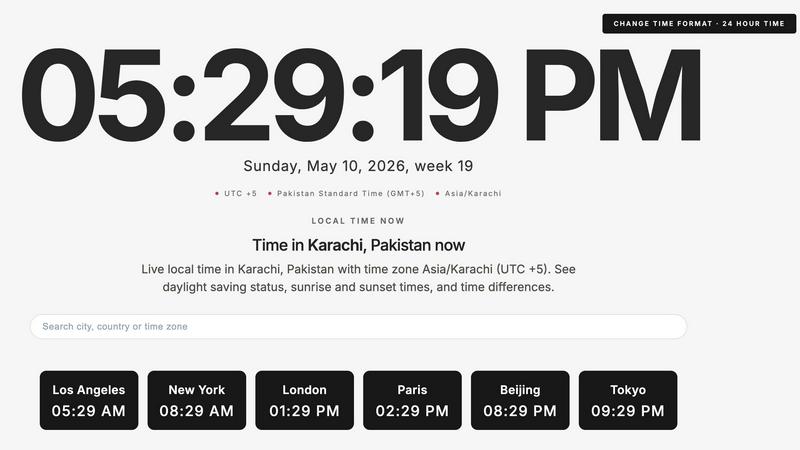
About What Time
WhatTime.dev is a cutting-edge time zone platform designed to simplify global time management for remote teams, freelancers, developers, and businesses operating across multiple countries. In today's interconnected world, managing time zones and scheduling meetings can be a daunting task, often leading to confusion and miscommunication. WhatTime.dev effectively addresses this challenge by providing users with intuitive tools to compare time zones, check UTC and GMT offsets, and view local times from around the globe. This platform is especially valuable for professionals who coordinate with clients, organize international meetings, or collaborate with distributed teams. The robust meeting planner feature streamlines the process of identifying overlapping working hours, ensuring that scheduling becomes hassle-free and efficient. With a focus on user experience, WhatTime.dev offers a clean and distraction-free interface that optimizes speed and usability, making it the go-to resource for anyone needing accurate time zone information.
Features of What Time
Time Zone Comparison
WhatTime.dev allows users to seamlessly compare time zones across cities and countries, ensuring that you can quickly understand the time differences when planning meetings or travel. This feature eliminates the guesswork often associated with coordinating across various time zones.
UTC and GMT Offset Lookup
The platform provides an easy-to-use lookup for current UTC and GMT offsets, helping you to understand the exact time differences without needing to perform manual calculations. This feature is crucial for businesses that operate globally and need to stay synchronized.
Meeting Planner for Remote Teams
The integrated meeting planner is a powerful tool that helps users find overlapping working hours between different locations. By quickly identifying suitable time slots for international calls or remote collaborations, this feature enhances productivity and reduces scheduling conflicts.
Fast, Mobile-Friendly Interface
WhatTime.dev is designed with a fast, mobile-friendly interface that ensures users can access time zone information on-the-go. The clean UI is tailored for quick access and readability, making it a practical tool for busy professionals.
Use Cases of What Time
Coordinating with Global Clients
For businesses and freelancers working with clients across different countries, WhatTime.dev provides a reliable way to check local times and schedule meetings effectively. This helps maintain professionalism and improves communication.
Managing Distributed Teams
Companies with remote teams spanning multiple time zones can utilize the meeting planner feature to simplify collaboration. By easily identifying overlapping hours, teams can coordinate more effectively, leading to better project outcomes.
Trading in Global Markets
Traders often need to be aware of global market hours and time zone differences. WhatTime.dev equips them with the necessary tools to make informed decisions, ensuring they can capitalize on market opportunities without missing critical updates.
Planning International Events
Event organizers aiming to host international conferences or webinars can leverage WhatTime.dev to schedule sessions that accommodate participants from various time zones. This ensures greater attendance and engagement from a global audience.
Frequently Asked Questions
How does WhatTime.dev ensure accuracy in time zone information?
WhatTime.dev relies on reputable time zone databases and regularly updates its information to reflect changes in daylight saving time and local regulations. This guarantees that users receive accurate and up-to-date time zone data.
Can I use WhatTime.dev on my mobile device?
Yes, WhatTime.dev is designed to be mobile-friendly, allowing users to access time zone information and planning tools from their smartphones or tablets without sacrificing functionality or usability.
Is there a limit to the number of time zones I can compare?
No, WhatTime.dev allows you to compare multiple time zones simultaneously, making it easy to manage extensive global operations without any restrictions.
Is there a subscription fee for using WhatTime.dev?
WhatTime.dev offers a free access model with essential features. For advanced functionalities and additional tools, users may explore premium subscription options that enhance their experience.
Similar to What Time

a SaaS solution that scores any website for AI agent readiness, MCP server security, and Domain Rating.

Unifyca centralizes WordPress agency management with automated audits, secure documentation, and proactive maintenance for continuous improvement.

Open User Map lets you build a map your visitors can add to, approve, and customize without coding or Google Maps API keys.

Monitoristic provides real-time website health tracking with instant alerts and customizable status pages for seamless uptime management.

Shadcn Examples offers ready-to-use React and Tailwind UI kits, featuring diverse components and layouts for building web apps efficiently.

Webleadr effortlessly connects you with web design leads and businesses lacking websites, enabling quick outreach from anywhere.

Idearium crafts memorable websites that grow your business through continuous refinement.

Effortlessly host and share files in seconds with FilexHost's simple drag-and-drop interface and automatic URL.