
Tailride
Tailride continuously automates invoice and receipt capture from your email and portals, saving you hundreds of hours.
Visit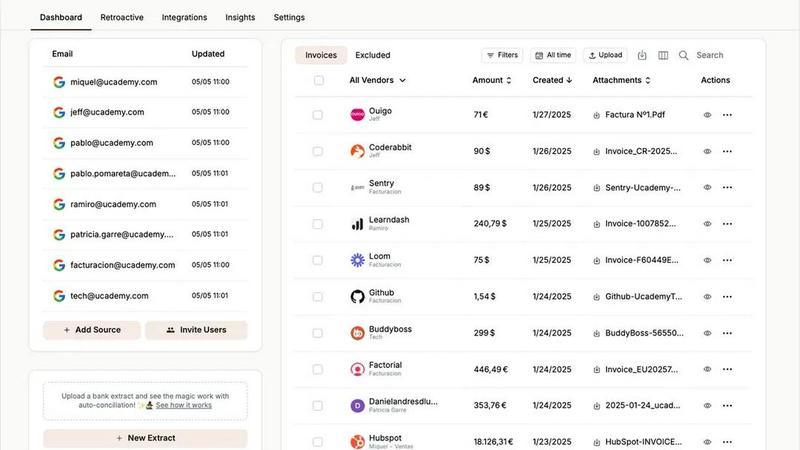
About Tailride
Tailride is an AI-powered accounting automation platform designed to eliminate the manual, time-consuming process of invoice and receipt management for businesses of all sizes. At its core, Tailride connects directly to your email inbox, automatically detecting and extracting invoices and receipts from emails, attachments, and even URLs. This goes beyond simple receipt scanning apps by offering a complete, end-to-end solution that replaces tools like Wellybox, SparkReceipt, and GetMyInvoices. The platform is built for business owners, finance teams, and accountants who want to completely forget about chasing invoices and manually entering data. Tailride's main value proposition is saving hundreds of hours every month by automating the entire invoice lifecycle, from detection and extraction to categorization, storage, and reconciliation. It integrates natively with Gmail, Outlook, and IMAP, and offers retroactive scanning to find past invoices. With a Chrome extension for one-click extraction from over 20 online platforms like Amazon, Meta Ads, Notion, and ChatGPT, plus seamless integrations with accounting software like QuickBooks and Xero, and cloud storage like Google Drive, Tailride provides a continuous improvement loop for your financial workflows. The platform also includes bank reconciliation features to match transactions with invoices and identify missing documents, ensuring your books are always accurate and up to date.
Features of Tailride
Inbox Scanning and Monitoring
Tailride monitors your inbox and your colleagues' inboxes to keep all incoming invoices up to date, whether they are in a PDF, an image, in the body of an email, or behind a URL. This feature replaces the need for forwarding invoices to random email addresses, offering a native connection that ensures your emails never leave your inbox. You can connect multiple users, track where invoices come from, and maintain complete visibility over your financial documents, eliminating the chaos of end-of-quarter invoice hunts.
Online Portals and Chrome Extension
Tailride includes a powerful Chrome extension that enables one-click invoice extraction from over 20 online platforms, including Amazon, Meta Ads, Adobe, Notion, Microsoft, and ChatGPT. This feature saves you time by directly pulling invoices from the websites you use for business, without needing to download, save, or manually forward them. It effectively replaces tools like GetMyInvoices and streamlines the collection of invoices from all your digital service providers.
AI Processing and Customizable Rules
The platform uses intelligent document recognition to automatically process extracted invoices and receipts. You can set up customizable AI rules for automatic categorization based on your company's specific needs, such as department, project, or expense type. This continuous improvement feature learns your preferences over time, making the automation more accurate and reducing the need for manual intervention, ensuring that every invoice is organized exactly how you want it.
Bank Reconciliation
Tailride includes a comprehensive bank reconciliation feature that matches transactions from your bank accounts with the invoices and receipts in your system. It automatically identifies missing documents and flags discrepancies, providing a complete audit trail. This feature closes the loop on your accounting workflow, ensuring that every payment is accounted for and that your financial records are always accurate and ready for tax filings or audits.
Use Cases of Tailride
Streamlining Invoice Collection for Growing Businesses
A fast-growing company with multiple employees and dozens of online subscriptions can use Tailride to automatically capture invoices from everyone's inboxes and online portals. Instead of asking colleagues to forward invoices or manually downloading them from Amazon, Meta Ads, and other platforms, the system does it all automatically. This eliminates manual work for tax filings, keeps the accountant happy, and ensures no invoice is ever missed.
Automating Expense Management for Remote Teams
A distributed team with employees submitting receipts from various locations can use Tailride's Telegram or WhatsApp bot to handle paper receipts. Employees simply take a picture of a physical receipt and send it to the bot, which processes it and adds it to the dashboard. Combined with inbox scanning for digital invoices, this creates a single source of truth for all expenses, making reimbursement and reporting effortless.
Catching Up on Historical Invoices for Tax Preparation
When tax season approaches, a business can use Tailride's retroactive scanning feature to find all invoices from the past year. By connecting to the inbox and selecting a custom date range, the platform scans for and extracts every invoice from that period. This saves hours of manual searching and ensures that all deductible expenses are captured, making tax preparation faster and more accurate.
Managing Invoices for Multiple Clients as an Accountant
An accountant with over 10 clients can use Tailride to connect to each client's inbox and extract their invoices automatically. The platform's integrations with QuickBooks and Xero allow for seamless data transfer, while customizable rules ensure invoices are categorized per each client's chart of accounts. This eliminates the back-and-forth of requesting documents and allows the accountant to focus on higher-value advisory work.
Frequently Asked Questions
How does Tailride connect to my email inbox?
Tailride connects natively to your email inbox using Gmail, Outlook, or IMAP. This means you do not need to forward invoices to a separate email address. Your emails never leave your inbox, and Tailride only scans for invoices and receipts based on your permissions. You can also connect your colleagues' inboxes to ensure all incoming invoices from your entire team are captured.
Can Tailride find invoices that I received in the past?
Yes, Tailride offers retroactive scanning. When you connect to your inbox, you can choose to scan for past invoices based on a custom date range, such as this month, this quarter, this year, or all time. This is particularly useful for catching up on historical documents for tax preparation or to ensure you have a complete record of all business expenses.
What online platforms does the Chrome extension support?
The Tailride Chrome extension supports one-click invoice extraction from over 20 online platforms, including Amazon, Meta Ads, Adobe, Notion, Microsoft, ChatGPT, and many more. This list is continuously expanding. The extension allows you to extract invoices directly from the website without needing to download, save, or manually forward them to the platform.
How does Tailride handle paper receipts?
Tailride handles paper receipts through a Telegram or WhatsApp bot. You simply take a picture of your physical receipt and send it to the bot. The platform then processes the image, extracts the relevant data, and adds it to your dashboard. You can link as many users as you want, making it easy for employees to submit their expenses from anywhere.
Similar to Tailride

All-in-One POS, Inventory & Accounting Software for Bangladeshi Businesses


IZIPAY is a virtual and physical crypto card service that lets users top up with digital assets and pay online like with a regular card.

Get 20% of your trading fees back, automatically, on OKX, Binance, Bitget and MEXC.

Venduris is a renewal intelligence platform that gives mid-size companies control over SaaS & AI contract renewals before leverage disappears.
