
Sketch To
Sketch To transforms your images into stunning AI sketches, offering tools for both casual and professional creators.
Visit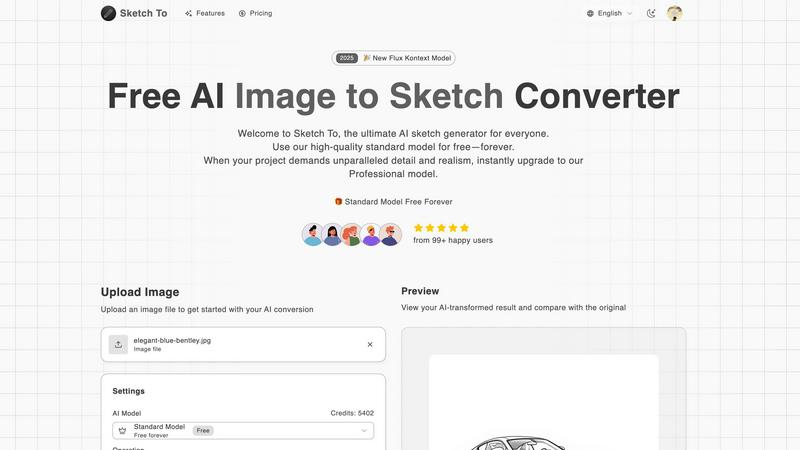
About Sketch To
Sketch To is the ultimate AI-powered creative platform that seamlessly transforms your artistic visions into tangible realities. This innovative tool caters to a broad audience, including students, hobbyists, professional artists, and commercial designers. With its advanced dual-functionality, Sketch To can convert any photograph into a stunning artistic sketch while also bringing simple drawings to life as photorealistic images. The core value of Sketch To lies in its commitment to fostering creativity through a continuous cycle of improvement, empowering users to iterate on their ideas. The platform offers a high-quality standard model for everyday users, which is free, complemented by a Professional model that provides unparalleled realism and detail for demanding projects. With no software installation required and a flexible credit system, Sketch To makes it easy and accessible for anyone to elevate their creative process, ensuring that every creation can serve as a launching pad for new artistic endeavors.
Features of Sketch To
Image to Sketch Conversion
Sketch To’s advanced AI technology allows users to convert images into beautiful pencil sketches effortlessly. This feature is perfect for artists and designers seeking to create artistic interpretations of their photos, providing a clean and visually appealing output that captures the essence of the original image.
Sketch to Image AI
Transform your sketches into realistic images with incredible detail and accuracy using Sketch To's Pro model. This feature is designed for those who want to elevate their hand-drawn designs, allowing them to present their ideas in a more lifelike manner, perfect for professional presentations or client work.
Trial Credits Model
New users can take advantage of the trial credits model, which allows them to explore the standard features of Sketch To without any financial commitment. This encourages personal use and experimentation, particularly beneficial for hobbyists looking to enhance their creative projects.
Instant Processing
With Sketch To's powerful cloud-based AI processing engine, users can generate their artistic creations in seconds. This instant processing capability ensures that the workflow remains smooth and efficient, enabling creators to focus on refining their concepts rather than waiting for results.
Use Cases of Sketch To
Social Media Content Creation
Artists and influencers can use Sketch To to create eye-catching content for social media platforms. Whether converting a photograph into a sketch or enhancing a simple drawing, the results can boost engagement and provide a unique flair to posts.
Educational Projects
Students can leverage Sketch To for school projects, transforming photographs into artistic sketches to illustrate reports or presentations. This feature allows for creative expression while meeting academic requirements, making learning more enjoyable.
Professional Artwork Presentation
Commercial designers can utilize Sketch To's Pro model to convert their sketches into highly detailed images. This is particularly useful for presenting concepts to clients, showcasing their ideas with exceptional realism that can impress stakeholders.
Personal Creative Hobbies
Hobbyists can explore their artistic side by using Sketch To for personal projects. From creating custom artwork to experimenting with different styles, the platform fosters creativity and allows users to develop their skills in a fun, accessible way.
Frequently Asked Questions
How do I get started with Sketch To?
To begin using Sketch To, simply sign up for an account. New users receive trial credits to explore the standard model, allowing you to upload images and start transforming them immediately.
What types of images can I upload to Sketch To?
Sketch To supports multiple image formats, including JPEG, PNG, and GIF. You can upload photographs or sketches for conversion, making it versatile for various creative needs.
Is there a limit to the number of images I can convert?
While there is no strict limit, each conversion using the standard model requires credits. New users receive trial credits to get started, and additional credits can be purchased as needed.
Can I download my creations in high resolution?
Yes, users can download their AI-generated images in high resolution, making them suitable for both print and professional use. This feature ensures that your artwork maintains quality regardless of its application.
Similar to Sketch To

Free AI image editor that edits, retouches, and transforms photos with natural-language text prompts.

GPT Image 2 API generates and edits production-ready images with clear text, reference images, and developer-friendly API workflows.

Private browser-based AI image generation and editing with text-to-image, targeted edits, and multi-image references.

An online AI image tool that enhances photos and illustrations at their original size or upscales them by 2x or 4x.


StopScroll is an AI thumbnail maker that generates, compares, and helps creators pick stronger cover images before publishing.

Ask is this AI image? Free online checker: upload a photo for AI-generated and deepfake scores plus a clear verdict band.

Swap faces in photos and videos with Best Face Swap's evolving AI workflows for video, free trials, and NSFW intent.