
retroshelf
Retroshelf automatically logs your retro gaming sessions, helping you track playtime, discover trends, and connect with fellow enthusiasts.
Visit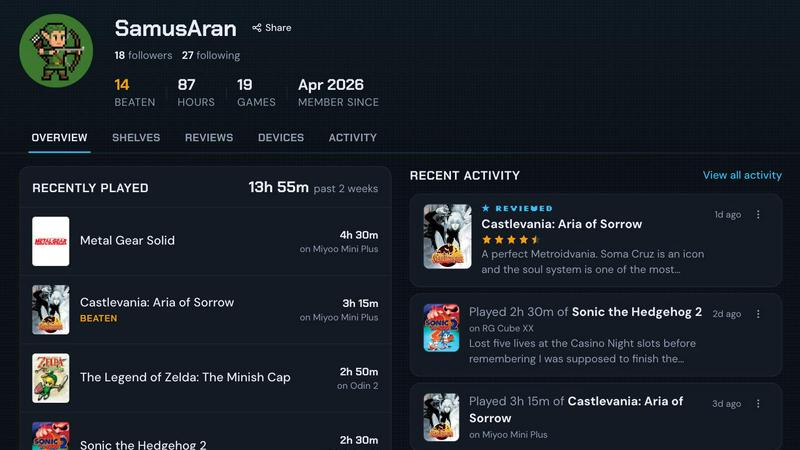
About retroshelf
retroshelf is an innovative play-tracking and discovery app specifically designed for retro handheld gaming enthusiasts. It serves as a digital companion that allows users to effortlessly track and manage their gaming experiences across various retro handheld devices. With retroshelf, players can create a public shelf showcasing the games they are currently playing, have finished, are reviewing, and are replaying, all while maintaining vital device context. This eliminates the need for cumbersome notes across multiple platforms, spreadsheets, or even memory. A tiny plugin automatically logs each gaming session, capturing essential details such as the game title, playtime, and the specific handheld device used. This creates a browsable history of gaming sessions, allowing players to reflect on their gaming journey and connect with a community of like-minded enthusiasts. By joining the closed beta, users can help shape the platform, making it a more comprehensive tool for tracking their gaming legacy.
Features of retroshelf
Automatic Session Logging
retroshelf simplifies the tracking process with an automatic logging feature. A tiny plugin runs on your handheld device, capturing every gaming session seamlessly. Users do not need to manually enter details; instead, the game title, playtime, and device are logged automatically, allowing for a hassle-free gaming experience.
Comprehensive Browsable History
With retroshelf, players can browse their entire gaming history in one place. The app organizes sessions into a timeline, making it easy to revisit what was played, where it was experienced, and the notes left along the way. This feature encourages reflection on past gaming experiences while providing a clear overview of each player's journey.
Community Insights and Trends
retroshelf fosters a sense of community among retro gamers by allowing users to discover which games are popular among their peers. The app showcases trending titles, helping players find new games to explore based on what others are picking up, finishing, and replaying. This social aspect enriches the gaming experience and fosters connections.
Device-Specific Reviews
The app enhances the review process by providing context to star ratings. Each review includes not only a rating but also the specific handheld device it was played on. This feature allows users to gauge the performance and experience of games on different devices, leading to more informed gaming decisions.
Use Cases of retroshelf
Tracking Gaming Progress
Players can use retroshelf to keep a detailed log of their gaming progress across various handheld devices. Whether they are diving into a new title or revisiting an old classic, they can track their playtime and accomplishments, ensuring they never lose sight of their gaming goals.
Discovering New Games
With retroshelf's trending features, users can easily find new games that are becoming popular within the community. By browsing what others are playing, they can discover hidden gems and anticipate upcoming titles that might be worth their time.
Sharing Experiences with Friends
retroshelf allows users to showcase their gaming journey publicly. By sharing their shelves with friends and the broader community, they can engage in discussions about gameplay, strategies, and recommendations, enriching their overall gaming experience.
Enhancing Game Selection
When considering which game to play next, users can reference their own logged history and community insights to make informed decisions. The combination of personal logging and community trends aids players in selecting games that align with their interests and preferences.
Frequently Asked Questions
How does retroshelf log my gaming sessions?
retroshelf utilizes a small plugin that runs on your handheld device to automatically log your gaming sessions. It captures essential information such as the game title, playtime, and device used, ensuring everything is recorded without any manual input.
Can I access retroshelf on multiple devices?
Yes, retroshelf is designed to support various retro handheld devices. Users can link multiple devices to their account, allowing for a unified gaming log across all platforms they use.
Is retroshelf available for all handheld gaming devices?
Currently, retroshelf supports specific operating systems, including muOS and OnionOS. Ensure your device is compatible by checking the list of supported systems before joining the beta.
How can I join the beta program for retroshelf?
To join the closed beta program of retroshelf, visit the official website and follow the instructions to sign up. The beta is being rolled out in waves, so keep an eye on updates for your chance to participate and help shape the community.
Explore more in this category:
Similar to retroshelf

Wery is an AI-powered virtual creative studio for entertainment content.

Snapkin is a calorie tracker you use by photographing your plate.

Visual financial timelines for couples and young professionals.

Adopt a virtual baby who grows, learns, and remembers you.


A quiet Islamic journaling app for the daily practice of muhasaba — written or spoken reflection, with guidance drawn from the Quran and Sunnah.

Anonymous Instagram viewer. Browse profiles, stories, and posts without an account or leaving a trace.

GeoRank compares places on sunshine, cost, tax, and visas, then lets you ask AI about your shortlist to end relocation research.