
Refbox
Refbox keeps your references visible and accessible right above your workspace for a smoother, faster workflow.
Visit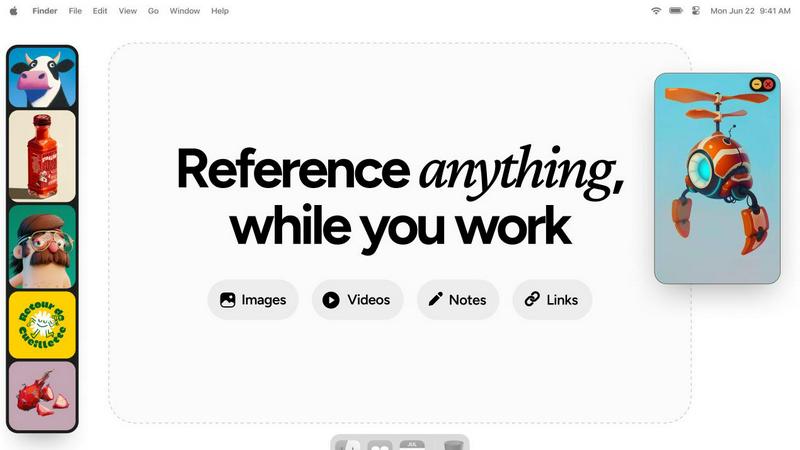
About Refbox
Refbox is the ultimate floating reference companion for creative professionals who demand an uninterrupted, focused workflow. It is an innovative application designed to end the constant, distracting cycle of alt-tabbing between folders, browser tabs, and your primary creative software. At its core, Refbox allows you to pin images, GIFs, videos, and notes into always-on-top, resizable frames that float above any other application on your desktop. This means your inspiration and critical references are perpetually visible, right where you need them, whether you're sketching, designing, animating, modeling, or illustrating. By centralizing your media into a customizable sidebar that you can populate instantly from the web, local storage, or your clipboard, Refbox transforms a fragmented process into a seamless flow. It champions a philosophy of continuous improvement for your creative process, eliminating friction points one by one. With powerful organizational features like Masonry Mode for dynamic layouts, full-screen galleries for dual-monitor setups, and markdown-enabled notes, Refbox ensures your tools adapt to your vision, not the other way around. It's built for the professional who can't afford distractions, empowering you to maintain a state of deep focus where creativity thrives.
Features of Refbox
Always-on-Top Floating Frames
Refbox’s signature feature allows you to pin any reference—images, GIFs, videos, or notes—into individual frames that hover above all other applications. These frames are fully resizable and can be minimized or locked in place, ensuring your references stay visible and accessible without ever blocking your workflow. This eliminates the need to constantly switch windows, creating a truly integrated and distraction-free creative environment that evolves with your project's needs.
Masonry Mode & Infinite Canvas
Organize your visual inspiration effortlessly with Masonry Mode, which arranges your references in a beautiful, Pinterest-style flowing grid on an infinite canvas. This layout maximizes space and provides a holistic view of your mood board or reference collection. You can also flip through items in a full-screen slideshow for quick comparison, making it perfect for iterative review and ensuring every visual element aligns with your creative direction.
Intelligent Media Handling & Notes
Refbox goes beyond simple image display with deep, thoughtful media controls. Step through GIFs frame-by-frame for detailed animation reference, take markdown-enabled notes with styling and checklists, and crop images to focus on specific details. You can also screenshot websites by pasting a link, view SVG files as images, and use a built-in color picker on any media to copy hex codes directly to your clipboard, continuously refining your asset management.
Streamlined Workflow Shortcuts
Designed for speed, Refbox is packed with shortcuts and smart features that shave seconds off repetitive tasks, which compound into hours saved. Quickly swap floating references with arrow keys, change entire collections with one click, or auto-hide the main sidebar to declutter your screen. These iterative improvements to your daily actions provide full control and keep you firmly in your creative flow, minimizing friction at every turn.
Use Cases of Refbox
Digital Illustration & Concept Art
Illustrators and concept artists can keep character sheets, environment photos, and color palettes pinned around their canvas in Photoshop or Clip Studio Paint. The ability to lock frames and step through GIF frames is invaluable for studying motion or expressions, allowing for continuous refinement of artwork without breaking concentration to search for files.
UI/UX & Web Design
Designers can float style guides, component libraries, competitor screenshots, and user flow diagrams directly over their design tool like Figma or Sketch. The website screenshot feature and easy color picking streamline the research and implementation phase, fostering an iterative design process where references directly inform each decision.
3D Modeling & Animation
3D artists and animators can reference orthographic drawings, texture maps, and video clips while working in complex software like Blender or Maya. Having model sheets and motion reference always visible accelerates the modeling and rigging process, enabling a continuous cycle of reference and creation that enhances accuracy and speed.
Motion Graphics & Video Editing
Editors and motion designers can pin storyboards, style frames, and asset lists above Premiere Pro or After Effects. The video playback in floating frames and the organized gallery view for mood boards help maintain visual consistency throughout a project, supporting an iterative creative workflow from concept to final render.
Frequently Asked Questions
What types of media can I use with Refbox?
Refbox supports a wide array of media types to serve as comprehensive references. You can directly add images (JPG, PNG, SVG, etc.), GIFs (with frame-by-frame control), and video files. Additionally, you can create and format text notes with markdown, take screenshots of websites by pasting URLs, and even use the application as a color picker on any displayed media.
How does Refbox improve my workflow compared to just using browser tabs?
Refbox eliminates the disruptive context-switching required when digging through folders or cycling through dozens of browser tabs. By keeping your references in always-on-top, organized frames directly over your work application, your focus remains locked on creation. Features like instant shortcuts, collections, and media tools further streamline actions, turning a fragmented process into a smooth, continuous, and iterative flow.
Can I use Refbox with multiple monitors?
Absolutely. Refbox is ideal for multi-monitor setups. You can use the full-screen gallery mode to turn a secondary display into a dedicated reference board, or simply drag and position your floating frames across any screen. This gives you expansive, organized visual space, keeping your primary screen clean for your main creative application while all your inspiration remains instantly accessible.
Is there a way to organize my references within Refbox?
Yes, organization is a core strength. You can create multiple Collections to separate references by project, client, or theme and switch between them with a single click. Within a collection, Masonry Mode automatically arranges items in an efficient layout, and you can always pin key items to floating frames. This system evolves with your project, keeping your visual research tidy and actionable.
Explore more in this category:
Similar to Refbox

Free collection of online developer utilities, code formatters, and digital converters designed to streamline your daily workflow.

Translate JSON, Markdown, and TXT files while preserving keys, nested paths, and project structure.

Visual financial timelines for couples and young professionals.

The #1 Native Form Builder Plugin for Framer - No Code, No Embeds, No External Platforms.

Practical, independent guides to home repairs, maintenance, costs, troubleshooting, and everyday fixes.

Highlight faster. Study in flow with custom shortcuts and a workflow built around you. Print smarter, or turn any page into a tiled poster.


A free launch checklist for SaaS, apps, AI tools and more. Every step says why it matters and when you can skip it.