
ReceiptsApps
Create professional receipts in under 60 seconds with 150+ templates, AI generation, and instant PDF download—no software needed.
Visit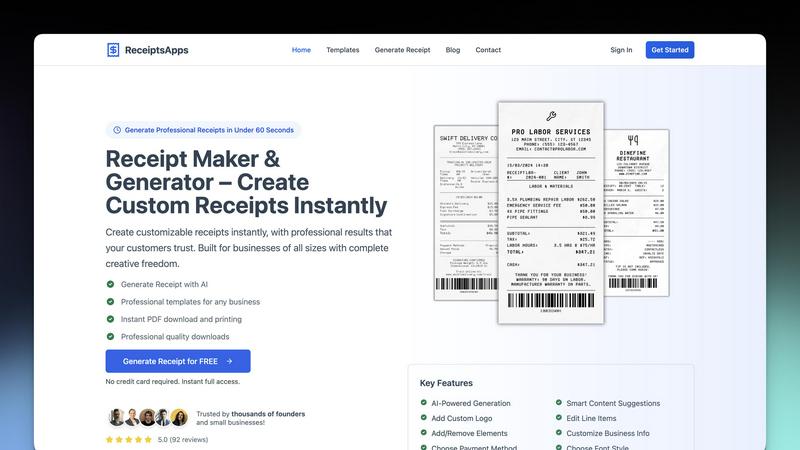
About ReceiptsApps
ReceiptsApps is a free online receipt maker and receipt generator built for small businesses, freelancers, and entrepreneurs who need to create professional receipts without the hassle. No complicated software, no design experience required. Just pick a template, customize it, and download your receipt in seconds. The platform runs entirely in your browser with no installation needed, and it works seamlessly on any device including desktop, tablet, and mobile. ReceiptsApps provides over 150 industry-specific templates covering retail, restaurants, hospitality, transportation, professional services, rentals, and more. You get full customization options including the ability to add your logo, business name, contact details, itemized line items, taxes, discounts, and payment method. Automatic calculations handle subtotals, taxes, and totals instantly, while instant PDF export lets you download print-ready receipts or share them digitally. The platform also features an AI-powered receipt generator that lets you describe your receipt in plain language and have it built instantly. Whether you are a landlord issuing rent receipts, a contractor confirming project payments, a salon owner providing service receipts, or a retailer generating daily transaction records, ReceiptsApps has a template for your exact use case. A free plan is available for everyone, and premium plans unlock watermark-free downloads, saved templates, AI-powered receipt creation, and priority support. The core value proposition is speed, simplicity, and professionalism, allowing any business to generate professional receipts in under 60 seconds.
Features of ReceiptsApps
AI-Powered Receipt Generation
Describe your receipt in plain language and let the AI build it for you instantly. This feature uses smart business-specific formatting to understand your needs and create a fully customized receipt based on your description. You can specify items, amounts, payment methods, and any special details, and the AI handles the rest. This is perfect for businesses that need to generate receipts quickly without navigating through multiple customization options.
150+ Professional Templates
Choose from a constantly updated collection of industry-specific designs that cover retail, restaurants, hospitality, transportation, professional services, rentals, and more. Each template is designed by professionals to meet the specific needs of different business types. Templates include delivery receipts, labor receipts, retail receipts, auto repair receipts, bakery receipts, camp receipts, and many others. You can preview any template before using it, ensuring you find the perfect match for your business.
Full Customization with 8 Block Types
Drag and drop interface gives you complete flexibility over every element of your receipt. You can add or remove blocks for your logo, business information, line items, payment details, terms and conditions, and more. Customize colors, font styles, and paper textures to match your brand identity. Choose from 5 professional thermal fonts that replicate real receipt fonts used in thermal printers. The platform supports 3 paper sizes including 80mm, 110mm, and A4, and you can export in both PDF and PNG formats.
Automatic Calculations and Instant Export
Smart totals, taxes, and discounts are computed instantly as you add or modify line items. The system automatically calculates subtotals, applies tax rates, deducts discounts, and provides the final total. Once your receipt is complete, you can download it as a high-quality PDF file instantly, ready for printing or sharing digitally. The export process takes seconds, and the resulting files are print-ready with professional formatting.
Use Cases of ReceiptsApps
Retail and Ecommerce Transactions
Retailers and ecommerce sellers can generate professional receipts for every sale, whether in-store or online. The retail receipt template includes fields for item descriptions, quantities, unit prices, and total amounts. You can add your store logo, business address, and return policy. The automatic calculation feature handles sales tax and discounts, ensuring accuracy. This is ideal for boutiques, grocery stores, electronics shops, and any business that sells physical products.
Service-Based Business Documentation
Freelancers, consultants, contractors, and service providers can create detailed receipts for their clients. The labor receipt template tracks hours worked, hourly rates, and total labor charges. You can itemize different services, add materials costs, and include payment terms. This use case covers web developers, graphic designers, plumbers, electricians, cleaning services, and any professional who bills for their time and expertise.
Hospitality and Food Service Operations
Restaurants, cafes, bakeries, and food delivery services can generate itemized receipts for dine-in, takeout, and delivery orders. The delivery receipt template tracks food items, delivery charges, and tips. The bakery receipt template is perfect for listing individual baked goods with prices. These receipts include fields for order numbers, table numbers, and special instructions, making them ideal for fast-paced food service environments.
Rental and Property Management
Landlords, property managers, and rental companies can issue professional rent receipts and rental agreements. The camp receipt template tracks summer camp fees, activities, and registration costs. For equipment rentals, you can create receipts that itemize rental periods, daily rates, and security deposits. This use case also covers car rentals, tool rentals, and any business that charges for temporary use of assets.
Frequently Asked Questions
Is ReceiptsApps really free to use?
Yes, ReceiptsApps offers a free plan that gives you full access to the receipt maker with professional templates. You can create and download receipts without any cost. The free plan includes all the core features like template selection, customization, automatic calculations, and PDF export. No credit card is required to get started, and you get instant full access. Premium plans are available for businesses that need watermark-free downloads, saved templates, AI-powered receipt creation, and priority support.
Can I add my business logo and customize the design?
Absolutely. ReceiptsApps provides full customization options including the ability to upload your company logo, adjust colors, and customize layouts to match your brand identity perfectly. You can choose from 5 professional thermal fonts, select different paper textures, and modify every element of the receipt. The platform supports 8 customizable block types that you can rearrange using a drag-and-drop interface. This ensures every receipt you create looks professional and branded.
What file formats and sizes are available for download?
You can download your receipts in both PDF and PNG formats. The platform supports 3 paper sizes including 80mm (standard thermal receipt size), 110mm (wider receipt format), and A4 (standard letter size). PDF downloads are print-ready and maintain professional formatting. PNG exports are perfect for digital sharing and embedding in emails or invoices. The instant download feature generates your file in seconds, ready for immediate use.
How does the AI receipt generator work?
The AI receipt generator lets you describe your receipt in plain language, and the AI builds it for you instantly. Simply type what you need, such as "a receipt for 3 hours of consulting at $150 per hour with 8% sales tax paid by credit card," and the AI creates a fully formatted receipt. The AI uses smart business-specific formatting to understand your requirements and populate all the relevant fields. This feature is ideal for businesses that create receipts regularly and want to save time on manual data entry.
Explore more in this category:
Similar to ReceiptsApps

Jev turns text or JSON into Choice, Score and Noul answers with probabilities. Build decision flows, process batches and call the API from one Console

Panzoe is an all-in-one AI platform for personal productivity, business automation, AI assistants, content creation, and custom AI solutions.

Novastart brings apps and files onto an infinite canvas where people and AI agents can work together.


AI Email Filter sorts incoming mail into folders using plain-language prompts you write. Works with any IMAP mailbox; bring your own LLM if you want.


Free collection of online developer utilities, code formatters, and digital converters designed to streamline your daily workflow.

Translate JSON, Markdown, and TXT files while preserving keys, nested paths, and project structure.