
QuickSigner
QuickSigner lets you eSign and collect signatures instantly with a secure, legally binding platform that continuously improves.
Visit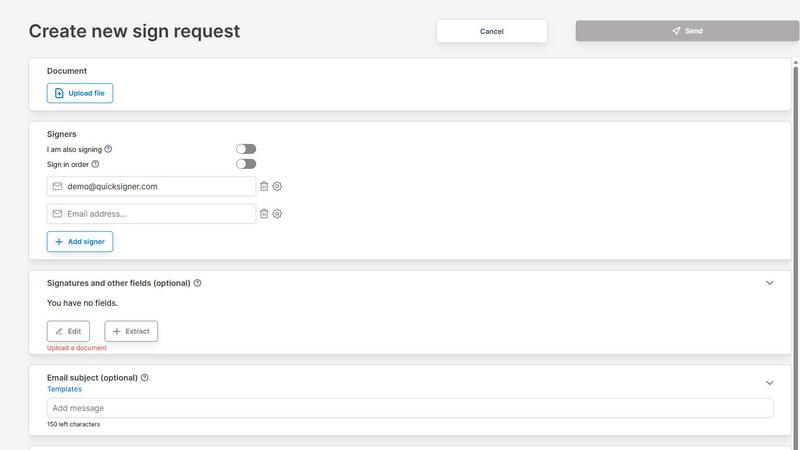
About QuickSigner
QuickSigner is a simple yet highly effective online application designed to transform the way you handle agreements and contracts. It is an end-to-end electronic signature platform that accelerates how you sign, send, and finalize documents, turning what often feels like days of back-and-forth into just a few minutes. The product is built for everyone from solo entrepreneurs and small teams to larger organizations looking for a cost-effective alternative to more expensive solutions. Its core value proposition is delivering legally binding, secure, and fast document workflows without the complexity or high cost of traditional platforms. QuickSigner is built on a foundation of trust and security, featuring Adobe Approved Trust List (AATL) electronic signatures and holding ISO 27001 certification. This ensures that every signature is not only compliant with global standards but also cryptographically secure. The platform is designed to be a continuous improvement engine for your business processes. By replacing slow, manual steps with a streamlined digital workflow, you can iterate on your agreement cycles, making them faster and more efficient with every use. Whether you are closing a sale, onboarding a new hire, or finalizing a partnership, QuickSigner provides the tools to get it done quickly and reliably. The platform is also API ready, allowing for seamless integration into your existing systems, and it supports a wide range of document types including PDF and Word. With a focus on user experience, it requires no account creation or software installation for recipients, making the signing process frictionless. QuickSigner is not just a tool; it is a partner in your journey toward operational excellence, helping you save time, reduce costs, and improve collaboration across your organization.
Features of QuickSigner
AATL Electronic Signatures and ISO 27001 Certification
QuickSigner provides legally binding electronic signatures that are part of the Adobe Approved Trust List (AATL). This means every signature is backed by a digital certificate that is trusted by Adobe Reader and other major PDF viewers, ensuring the authenticity and integrity of your documents. The platform is also ISO 27001 certified, demonstrating a world-class commitment to information security management. This dual layer of security and compliance means you can confidently sign, send, and store sensitive agreements, knowing they meet the highest legal and security standards. This feature is not a one-time setup but a continuous assurance that your document workflows are protected and compliant, allowing you to focus on business growth without worrying about legal vulnerabilities.
Intuitive Drag-and-Drop Document Upload and Field Placement
The process of getting a document ready for signature is remarkably simple. You can start by dragging and dropping your contract, agreement, or any document directly into the platform. QuickSigner supports PDF and Word formats, making it compatible with your existing files. Once uploaded, you can add recipients by entering their email addresses and then precisely place signature, date, text, and initial fields exactly where they are needed. This intuitive interface eliminates the need for complex setup or technical skills. It is designed to be a cyclical process where you can quickly iterate on document templates, refining the placement of fields for different scenarios to create a more efficient workflow over time.
Secure Online Signing Without Accounts or Installation
One of the most powerful features of QuickSigner is the frictionless experience it provides to signers. Recipients receive a secure link via email and can sign the document from any device, be it a desktop, tablet, or smartphone. There is no requirement to create an account, download software, or go through a lengthy registration process. This significantly reduces the barriers to completion, ensuring that your documents are signed faster. The signing process is secure, using encrypted links and robust authentication methods. This feature exemplifies the platform's iterative approach to efficiency: by removing every possible obstacle for the signer, you continuously improve your close rates and reduce the time it takes to finalize an agreement.
Real-Time Tracking and Instant Finalization
QuickSigner provides complete visibility into the signing process. You can monitor the progress of each document in real time, seeing who has opened it, who has signed, and who still needs to act. This eliminates the guesswork and follow-up emails that plague traditional document workflows. Once all parties have signed, the completed, legally binding document is instantly available for download. This feature turns a linear process into a dynamic, trackable one. You can analyze your historical data to identify bottlenecks and continuously refine your sending strategies, making each subsequent document cycle more effective than the last.
Use Cases of QuickSigner
Streamlining Sales Contract Approvals
Sales teams can use QuickSigner to dramatically accelerate the contract approval process. Instead of printing, scanning, and emailing contracts back and forth, a sales representative can upload a proposal, add the customer's email, and place signature fields in seconds. The customer signs from their phone or computer without any hassle. The sales team can then track the progress in real time and receive the finalized contract instantly. This use case is a continuous cycle of improvement: by closing deals faster, the sales team can iterate on their sales strategies more quickly, analyze which contract terms are most effective, and ultimately increase revenue. The 80% improvement in process effectiveness reported by users directly translates to a faster, more agile sales operation.
Efficient Employee Onboarding and HR Documentation
Human Resources departments can transform the onboarding process with QuickSigner. From offer letters and employment contracts to non-disclosure agreements and policy acknowledgments, every document can be sent, signed, and stored digitally. New hires can complete all necessary paperwork before their first day, from the comfort of their home. HR teams can create templates for common documents, ensuring consistency and saving time with every new employee. This is a perfect example of iterative improvement: as you onboard more employees, you refine your template library, identify the most efficient field placements, and create a smoother, more welcoming experience for new team members, while reducing the administrative burden on HR staff.
Simplifying Vendor and Partner Agreements
Businesses that work with multiple vendors, freelancers, or partners can use QuickSigner to manage agreements at scale. Instead of chasing down signatures for service contracts, statements of work, or partnership agreements, you can send them all from a single platform. The ability to track progress in real time means you can proactively follow up with those who haven't signed, keeping projects on schedule. This use case is built on a cycle of continuous collaboration. By making it easy for external parties to sign, you foster stronger relationships and faster project starts. You can also analyze which types of agreements take the longest to sign and iterate on your communication or document design to improve the process.
Enabling Remote Client Service and Consent Forms
For service-based businesses like travel agencies, healthcare providers, or legal firms, QuickSigner is essential for managing client agreements remotely. Clients can sign consent forms, service agreements, and waivers from anywhere in the world, on any device. This eliminates the need for in-person meetings just to sign paperwork, saving time for both the client and the business. The secure, legally binding nature of AATL signatures ensures compliance with industry regulations. This use case creates a positive feedback loop: a faster, more convenient signing experience leads to higher client satisfaction, which in turn leads to more referrals and repeat business. You can continuously refine your service agreements based on client feedback, making them clearer and more effective over time.
Frequently Asked Questions
How does QuickSigner ensure my documents are legally binding?
QuickSigner uses Adobe Approved Trust List (AATL) electronic signatures, which are recognized as legally binding in most countries around the world, including the United States under the ESIGN Act and the European Union under eIDAS. Each signature is backed by a digital certificate that provides a tamper-evident seal, proving the document has not been altered after signing. The platform is also ISO 27001 certified, ensuring that your data and documents are handled with the highest security standards. This combination of technology and certification provides a robust legal foundation for all your agreements.
Can recipients sign without creating an account?
Yes, one of the core features of QuickSigner is that recipients do not need to create an account or install any software to sign a document. They simply receive a secure link via email, click on it, and are taken directly to the document where they can place their signature and any other required fields. This frictionless experience is designed to maximize completion rates and minimize delays, making it ideal for sending documents to clients, partners, or new hires who may not want to go through a registration process.
What file types does QuickSigner support for upload?
QuickSigner supports the most common document formats, specifically PDF and Word files (.doc and .docx). You can drag and drop these files directly onto the platform to begin the signing process. This compatibility ensures that you can work with the documents you already have without needing to convert them to a different format. The platform is designed to be a seamless part of your existing workflow, not an additional step that requires file conversion.
How does the 14-day free trial for the Business plan work?
The Business plan offers a 14-day free trial that gives you full access to all its features, including unlimited documents per month, up to 10 signers per request, and the ability to send up to 3 documents per request. You can sign up for the trial without providing any payment information. After the 14-day period, if you choose to continue, you will be charged the monthly or yearly subscription fee. This allows you to thoroughly test the platform with your real-world documents and workflows to ensure it meets your needs before making a commitment.
Pricing of QuickSigner
QuickSigner offers two main pricing tiers designed to fit different usage levels.
The Personal plan is Free and is intended for occasional use. It includes 3 documents per month, with up to 3 signers per sign request and 1 document per sign request. You get a 5 MB maximum document size, support for PDF documents, and access to signature and stamp fields.
The Business plan is $5 per month per user, with a 14-day free trial available. It is designed for small teams that sign every week. You can save 20% by choosing yearly payment, which brings the cost to $48 per year. This plan includes all features from the Free plan, plus unlimited documents per month, up to 10 signers per sign request, up to 3 documents per sign request, and a 10 MB maximum document size.
Explore more in this category:
Similar to QuickSigner

Private email. Pure. Secure. Exclusive. No ads, no tracking, no data selling. GDPR compliant, EU-hosted.


Jev turns text or JSON into Choice, Score and Noul answers with probabilities. Build decision flows, process batches and call the API from one Console

Panzoe is an all-in-one AI platform for personal productivity, business automation, AI assistants, content creation, and custom AI solutions.

Novastart brings apps and files onto an infinite canvas where people and AI agents can work together.


AI Email Filter sorts incoming mail into folders using plain-language prompts you write. Works with any IMAP mailbox; bring your own LLM if you want.
