
Picture Enhancer
Picture Enhancer uses AI to deblur, upscale, and restore your photos in your browser with no software needed.
Visit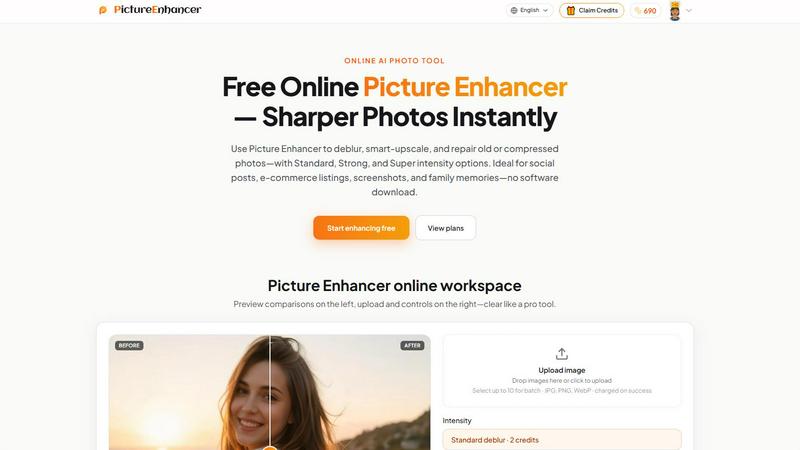
About Picture Enhancer
Picture Enhancer is a free online AI photo enhancement tool designed for creators, sellers, and everyday users who need sharper, clearer images without the complexity of desktop software. This product transforms blurry, compressed, or damaged photos into high-quality visuals through three core capabilities: deblurring, smart upscaling, and photo restoration. The workflow is intentionally simple: upload a JPG, PNG, or WebP image, select a mode and intensity level, preview the before-and-after comparison, then download a watermark-free result. Picture Enhancer operates entirely in the browser with no download required, making it accessible to anyone with an internet connection. The platform offers three intensity tiers for each mode: Standard, Strong, and Super, allowing users to dial in exactly the level of enhancement needed for their specific image. Guest users receive three free lifetime tries per IP address without any signup, while signed-in users access a credit-based system where new accounts receive starter credits. Credits are only charged when an enhancement succeeds, ensuring users never pay for failed attempts. The tool is ideal for social media content, e-commerce product listings, screenshots and UI captures, and preserving family photo memories. Picture Enhancer prioritizes privacy with secure, private processing used only to complete each enhancement request, and results are delivered in seconds. The platform also supports batch processing for paid users, enabling up to 10 images at once, and offers both subscription plans and permanent credit packs to suit different usage patterns.
Features of Picture Enhancer
AI Deblur with Intensity Tiers
Picture Enhancer uses artificial intelligence to rebuild edges and texture from common image issues including camera shake, soft focus, and mild motion blur. Users can choose from Standard, Strong, or Super deblur intensity levels to match the severity of the blur in their image. Standard deblur handles minor softness, Strong deblur tackles moderate blur from movement, and Super deblur addresses heavy blur where details are significantly compromised. This tiered approach ensures that faces and text read clearly again without overprocessing the image. The AI analyzes the entire photo and intelligently reconstructs lost detail while maintaining natural-looking results, making it suitable for portraits, product shots, and any image where clarity matters.
Smart Upscale for Enlargement
The smart upscale feature enables users to enlarge images by 2x or 4x while adding detail rather than simply stretching pixels. This capability is particularly valuable when starting from a small file and needing a larger image for social media covers, product hero shots, or print previews. The AI analyzes the original image content and generates new pixel information that matches the existing textures, patterns, and edges, resulting in enlargements that appear natural rather than pixelated. Standard upscale provides clean enlargement for most use cases, Strong upscale adds more detail for demanding applications, and Super upscale delivers maximum quality for professional outputs. This feature transforms low-resolution images into usable assets without requiring expensive desktop software.
Old Photo and Damage Restoration
Picture Enhancer includes dedicated restoration capabilities that reduce scratches, fade, and compression artifacts from older or damaged photos. The AI identifies common imperfections in scanned prints and digitally reconstructs the missing or degraded areas. Strong restore handles moderate damage like light scratches and color fading, while Super restore tackles heavier damage on scanned family prints where significant deterioration has occurred. The restoration process preserves the original character and authenticity of the photo while removing distracting imperfections. This feature makes it possible to revive treasured family memories, historical images, and vintage photographs that might otherwise be lost to time and physical wear.
Batch Processing and My Assets Library
Paid users unlock the ability to batch enhance up to 10 images simultaneously, dramatically improving workflow efficiency for creators and sellers who need to process multiple photos. The batch feature applies the same mode and intensity settings across all selected images, ensuring consistent results. Additionally, signed-in users can revisit their enhanced results in the My Assets library, providing a centralized location to access, download, and manage all previously processed images. This feature eliminates the need to re-upload or search through downloads, making it easy to retrieve and reuse enhanced photos for different purposes. The combination of batch processing and asset management creates a streamlined workflow for regular users.
Use Cases of Picture Enhancer
Portraits and Everyday Photos
Picture Enhancer excels at reducing mild blur in portraits and everyday photos so faces and clothing look cleaner for social media feeds, personal portfolios, or family albums. The AI deblur feature specifically targets soft focus and slight camera shake that often occurs in candid shots or photos taken with smartphones. Users can select Standard deblur for subtle improvements that maintain a natural appearance, or Strong deblur for images where blur is more pronounced. The before-and-after comparison slider allows users to inspect the quality improvement before downloading, ensuring satisfaction with the result. This use case is ideal for anyone who wants to salvage slightly blurry photos that would otherwise be discarded, transforming them into shareable, high-quality images.
E-commerce and Product Shots
Online sellers and e-commerce professionals use Picture Enhancer to upscale product detail and tame compression noise so their listings stand out in crowded marketplaces. The smart upscale feature enlarges product images by 2x or 4x while adding detail, making small items appear crisp and professional. The deblur and restore modes also help clean up images that were compressed during upload or shot in less-than-ideal conditions. Strong and Super intensity tiers provide the level of enhancement needed for hero shots where every detail matters. By improving image quality without requiring expensive photography equipment or software, Picture Enhancer helps sellers present their products in the best possible light, potentially increasing click-through rates and sales.
Screenshots and UI Captures
Content creators, technical writers, and support professionals use Picture Enhancer to sharpen text edges in screenshots for tutorials, support threads, documentation archives, and social media posts. Screenshots often suffer from compression artifacts and slightly blurred text, especially when captured from video or scaled down. The deblur mode with Standard or Strong intensity effectively cleans up these issues, making text readable and interfaces look professional. This use case is particularly valuable for creating clear instructional content where every detail must be visible. Users can process screenshots quickly in the browser without installing additional software, and the watermark-free output ensures clean integration into documentation and online resources.
Old Photo Memories
Picture Enhancer helps users repair fade and scratches in old family photos so scans are ready to share with relatives or print for preservation. The restore mode specifically targets the common issues found in aged photographs: yellowing, fading, scratches, dust spots, and compression artifacts from scanning. Strong and Super restore intensities handle heavier damage on scanned family prints where significant deterioration has occurred over decades. The AI intelligently fills in missing areas while preserving the original character and emotional content of the photo. This use case transforms treasured but damaged memories into clean, shareable digital files that can be enjoyed by future generations, printed for display, or shared across social media and messaging platforms.
Frequently Asked Questions
What is Picture Enhancer?
Picture Enhancer is a free online AI photo enhancement tool that deblurs, upscales, and restores images directly in your browser. It supports JPG, PNG, and WebP formats and offers three intensity tiers (Standard, Strong, Super) for each mode. The tool is designed for creators, sellers, and everyday users who need sharper images without downloading software. Guest users get three free lifetime tries per IP, while signed-in users use credits that are only charged on successful enhancements.
Can I try Picture Enhancer without signing in?
Yes, guests receive three free lifetime tries per IP address with no signup required. This allows you to test the tool and evaluate the quality of enhancements before committing to an account. After using your three guest tries, you can sign in to continue using credits. New accounts receive starter credits upon registration, giving you additional opportunities to enhance images without immediate payment.
How does billing work after sign-in?
After signing in, you use credits to enhance images. Credits are charged only when an enhancement succeeds, so you never pay for failed attempts. Standard intensity costs 2 credits, Strong costs 4 credits, and Super costs 6 credits. You can purchase monthly subscription plans that grant credits each billing cycle, or permanent credit packs that never expire. Paid users also unlock Super intensity tiers and batch processing capabilities for up to 10 images.
Which modes does Picture Enhancer support?
Picture Enhancer supports three primary modes: Deblur, which rebuilds edges and texture from camera shake and soft focus; Upscale, which enlarges images by 2x or 4x while adding detail; and Restore, which reduces scratches, fade, and compression artifacts from old or damaged photos. Each mode offers Standard, Strong, and Super intensity tiers to match the severity of the image issue. Super tiers are available exclusively to paid users.
Will downloads include a watermark?
No, all successful enhancements from Picture Enhancer are downloaded watermark-free. This ensures your enhanced images are clean and professional, suitable for direct use in social media posts, e-commerce listings, documentation, or printing. The before-and-after preview allows you to inspect the quality before downloading, and signed-in users can revisit their results in the My Assets library for future access.
What is the difference between subscription and permanent credit packs?
Subscription plans grant credits each billing cycle (monthly), providing a recurring supply for regular users who enhance images frequently. Permanent credit packs are a one-time purchase that never expires, making them ideal for occasional users who want credits available whenever needed without ongoing payments. Both options unlock Super intensity tiers and batch processing for up to 10 images. Choose based on your usage frequency and budget preferences.
Are my photos safe?
Yes, Picture Enhancer uses private processing specifically to complete your enhancement request. Your images are not stored, shared, or used for any other purpose beyond the enhancement you request. The platform prioritizes security and privacy, ensuring your photos remain confidential throughout the process. After downloading your results, you can delete any uploaded images from your account if desired.
Where do I check balance and history?
Signed-in users can check their credit balance and enhancement history in the My Assets section of the website. This centralized dashboard displays your remaining credits, past enhancements, and allows you to re-download previous results. The balance updates immediately after each successful enhancement, and purchase history is available for tracking subscription cycles or permanent pack usage.
Explore more in this category:
Similar to Picture Enhancer

Fast, simple image creation and editing with accurate details, readable text, consistent characters, and up to 14 reference images.

AI image generation and editing with precise typography, native 2K output, and localized edits.

AIPetGen turns a photo of your dog, cat, or other pet, or a written description, into a new picture or a short animation.

Genjutsu AI turns your ideas into cinematic videos, product ads, social shorts, and high-quality images in minutes.

ImageGPT is an all-in-one AI creative platform for generating, editing and transforming images and videos using AI.

Create release-ready album covers from a prompt or photo. Generate, refine, and export art for singles, EPs, mixtapes, and playlists.

A free browser-based toolkit for creating, cutting, converting, and previewing sprite sheet animations.

Z Image Turbo is an online AI image generator for photorealistic images, bilingual posters, ecommerce visuals, ads, and social content.