
Opal
Opal is a visual workspace that instantly organizes all your projects and notes, ensuring you never lose track of important information.
Visit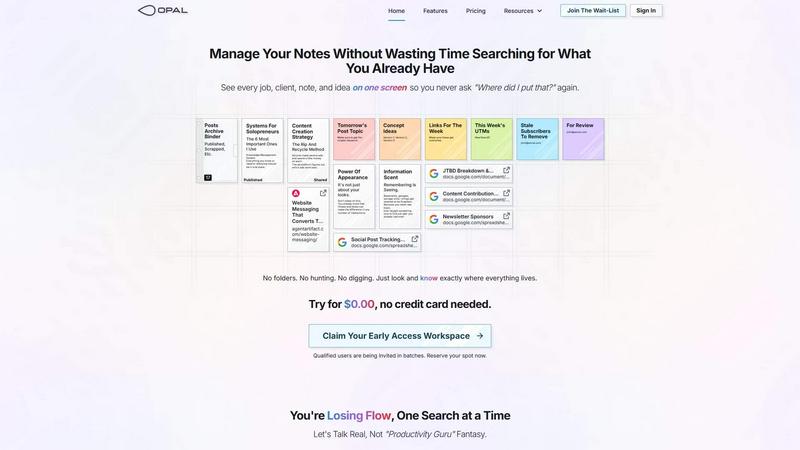
About Opal
Opal is a visual knowledge and project management workspace designed specifically for individuals who think spatially. Unlike traditional note-taking and project management apps that often lead to lost ideas and disorganized information, Opal provides an infinite digital canvas for users to visually arrange their notes, documents, and links. This innovative approach allows users to organize their thoughts just as they would on a physical desk, enhancing memory retention by focusing on the spatial location of information rather than merely what it is called. Ideal for solopreneurs, consultants, agency owners, and writers, Opal ensures that all active projects, client details, and creative ideas are visible and easily accessible. By eliminating the need to search for information, Opal helps users concentrate on doing their best work without interruptions, enabling seamless flow in their daily tasks.
Features of Opal
Infinite Digital Canvas
Opal offers an infinite digital canvas that allows users to drag and drop notes, files, and links anywhere on the screen. This flexibility enables a personalized workspace tailored to individual preferences.
Visual Organization
With Opal, users can organize their information visually, grouping related ideas and projects in a way that makes sense to them. This spatial organization helps users quickly locate what they need without wasting time searching.
Side-by-Side Viewing
Users can open multiple notes or documents side by side, enhancing their ability to compare information or reference different materials simultaneously. This feature is particularly useful during brainstorming sessions or client meetings.
Instant Retrieval
The unique spatial memory approach of Opal means users can remember where their information is located rather than just its title. This instant retrieval minimizes frustration and maximizes productivity, allowing users to focus on their tasks.
Use Cases of Opal
Client Management
For consultants and agency owners, Opal serves as a centralized hub for managing client details, project timelines, and action items. All relevant information is displayed on one screen, ensuring nothing falls through the cracks.
Creative Projects
Writers and creative professionals benefit from Opal's visual organization for brainstorming and outlining projects. They can easily arrange ideas, notes, and references in a manner that stimulates creativity and keeps inspiration at the forefront.
Research and Development
Researchers can utilize Opal to compile and organize information from various sources. By visually mapping out their findings, they can quickly retrieve references and insights without sifting through endless documents.
Content Strategy
Marketers and content creators can manage their content calendars and strategies within Opal. The ability to see all planned content, drafts, and ideas in one place helps streamline the content creation process.
Frequently Asked Questions
How does Opal improve my productivity?
Opal enhances productivity by providing a visual workspace where information is easily accessible and organized. This reduces the time spent searching for notes and allows users to maintain their flow.
Can I use Opal for team collaboration?
Yes, Opal is designed to be used by individuals and small teams, making it an excellent tool for collaboration. Team members can share their workspaces and contribute to projects in real time.
Is there a mobile version of Opal?
Currently, Opal is optimized for desktop use, providing a robust experience on larger screens. However, the development of a mobile version is something the team is actively considering to enhance accessibility.
What makes Opal different from other productivity tools?
Opal stands out by focusing on visual organization and spatial memory. Unlike traditional tools that require filing and searching, Opal allows users to place information where they can easily see and access it, improving recall and efficiency.
Similar to Opal

Panzoe is an all-in-one AI platform for personal productivity, business automation, AI assistants, content creation, and custom AI solutions.

Novastart brings apps and files onto an infinite canvas where people and AI agents can work together.

AI Email Filter sorts incoming mail into folders using plain-language prompts you write. Works with any IMAP mailbox; bring your own LLM if you want.

Free collection of online developer utilities, code formatters, and digital converters designed to streamline your daily workflow.

Translate JSON, Markdown, and TXT files while preserving keys, nested paths, and project structure.

Visual financial timelines for couples and young professionals.

The #1 Native Form Builder Plugin for Framer - No Code, No Embeds, No External Platforms.

Practical, independent guides to home repairs, maintenance, costs, troubleshooting, and everyday fixes.