
EditTextImage
Edit text in images online seamlessly, keeping font, color, and perspective intact in just 30 seconds without Photoshop.
Visit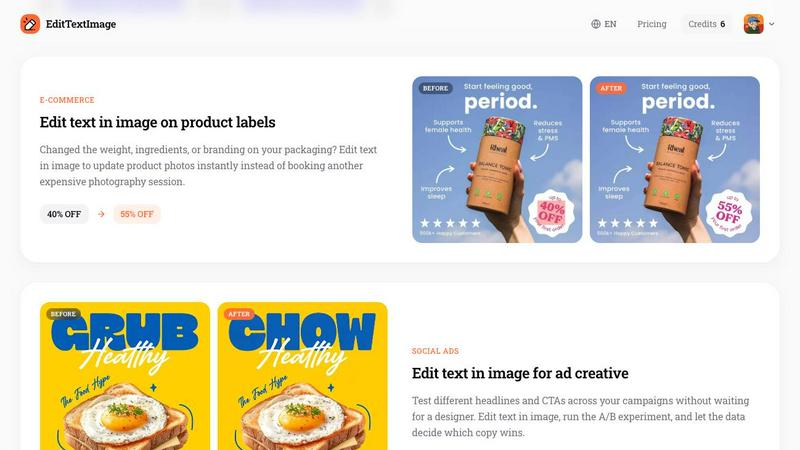
About EditTextImage
EditTextImage is an online AI tool that lets you edit text in image files without Photoshop or design skills. Upload any image, type the original text and its replacement, and the AI samples the typography straight from the pixels. This means the font, color, drop shadow, perspective, and background all stay intact, even for paid fonts you do not have installed or hand-lettering that would be impossible to replicate manually. The entire process takes about 10 seconds and outputs at 2K resolution. It is built for anyone who has ever needed to change one word on a finished poster, screenshot, product photo, or document but lost the source design file. No subscription is required, no font files to hunt down, and no complex software to learn. The first edit is free with no credit card needed, and then it is a one-time payment of 9.90 for 30 edits. Commercial use is included, and credits never expire. Whether you are a marketer running A/B tests on ad creative, a designer updating event materials, or a business owner fixing a typo on a product label, EditTextImage delivers pixel-perfect text replacement every time. The tool is designed for continuous improvement, letting you iterate on your images quickly and efficiently without waiting for a designer or reopening expensive design software.
Features of EditTextImage
Pixel-Perfect AI Typography Sampling
The core technology of EditTextImage samples the typeface directly from the pixels of your uploaded image. Instead of guessing or using generic font replacements, the AI analyzes the exact font, color, size, drop shadow, perspective, and background texture around the existing text. This means the replacement text blends in seamlessly, as if it were part of the original design. Paid fonts you do not own, custom hand-lettering, and unique typography styles all work without any extra effort on your part.
Lightning-Fast Processing
Edit text in a photo in approximately 10 seconds. There is no waiting for complex renders or batch processing. Simply upload your image, type the original text and the replacement, and the AI delivers the result almost instantly. This speed makes it ideal for production workflows where time is critical, such as updating ad creative for a campaign launch or fixing a last-minute typo in a document before printing.
High-Resolution 2K Output
Every edit outputs at 2K resolution, ensuring your images remain sharp and professional for both digital and print use. Unlike free online tools that compress or degrade image quality, EditTextImage preserves the full resolution of your original upload. This is essential for product photography, high-resolution screenshots, and printed materials where clarity and detail matter.
No Subscription, Credits Never Expire
EditTextImage operates on a simple credit system. You get one free credit to start with no credit card required. After that, it is a one-time payment of 9.90 for 30 credits. Credits never expire, so you can use them at your own pace. There is no monthly subscription, no recurring fees, and no hidden costs. Commercial use is included in every credit, making it a cost-effective solution for businesses of all sizes.
Use Cases of EditTextImage
Document Fixes and Corrections
Lost the source file for an important document? Only have a screenshot or scan? EditTextImage lets you edit text directly on the image. Update invoice numbers, fix typos in contracts, correct dates on official documents, or change names on certificates without needing the original design file. This is invaluable for administrative tasks, legal revisions, and quick document updates.
Poster and Flyer Updates
The date changed, the speaker dropped out, or the venue moved, but your designer is offline. Instead of reopening the design file or recreating the poster from scratch, use EditTextImage to edit the text right on the finished image. Update event details, swap headlines, or change promotional copy in seconds. This saves hours of work and hundreds of dollars in redesign costs every season.
App Screenshot Localization
App Store and Google Play require screenshots in 10 or more languages for global distribution. Instead of rebuilding every UI mockup for each language, use EditTextImage to swap languages on existing screenshots. The AI preserves the exact font, color, and layout of the original UI, so your localized screenshots look pixel-perfect every time. This dramatically reduces the time and cost of app localization projects.
E-Commerce Product Label Updates
Changed the weight, ingredients, or branding on your packaging? Edit text directly on product photos instead of booking another expensive photography session. Update pricing, promotional badges, or ingredient lists on existing product images. This is perfect for A/B testing different offers, updating seasonal packaging, or correcting errors on product labels without reshooting the entire catalog.
Frequently Asked Questions
What image formats does EditTextImage support?
EditTextImage supports PNG, JPEG, and WebP formats up to 10 MB in file size. These are the most common image formats used for posters, screenshots, documents, and product photos. If your image is larger than 10 MB, you may need to compress it before uploading. The tool processes images quickly and outputs the result in the same format as the original upload.
Is my data secure and what are the acceptable use policies?
EditTextImage takes data security seriously. The platform does not process IDs, passports, visa support letters, official seals, bank statements, or tampered receipts. By using the tool, you confirm you own or are licensed to edit the image, and that the edit is not intended to deceive a third party. Violations of these policies result in account termination without refund, and request logs may be preserved and shared with law enforcement.
Do I need design skills or font files to use this tool?
No design skills or font files are required. EditTextImage uses AI to sample the typography directly from the pixels of your image. This means paid fonts you do not have installed, custom hand-lettering, and unique typography styles all work automatically. You simply upload the image, type the original text and the replacement, and the AI handles the rest. It is designed for anyone, from complete beginners to professional designers.
How does the pricing and credit system work?
You get one free credit to start with no credit card required. After that, it is a one-time payment of 9.90 for 30 credits. Credits never expire, so you can use them at your own pace. There is no monthly subscription or recurring fees. Commercial use is included in every credit, meaning you can use the edited images for business purposes, marketing materials, and client projects without any additional licensing costs.
Pricing of EditTextImage
EditTextImage operates on a simple, transparent credit system. You get one free credit to start with no credit card required. After your free edit, it is a one-time payment of 9.90 for 30 credits. Credits never expire, so you can use them over weeks, months, or years without pressure. There is no monthly subscription, no hidden fees, and no recurring charges. Commercial use is included in every credit, making it a cost-effective solution for individuals, freelancers, and businesses alike.
Similar to EditTextImage

Z Image Turbo is an online AI image generator for photorealistic images, bilingual posters, ecommerce visuals, ads, and social content.


Enhance photos, create images, and generate videos with AI workflows, effects, and production-tested models.

AI image and video studio. Generate from a prompt, animate stills, swap faces, restyle clips and edit — one credit pool, no subscription.

NanoEditor is an AI-powered D&D portrait generator that turns character details like ancestry, class and gear into focused fantasy RPG art.

Create polished AI images and videos from prompts or references for social posts, ads, flyers, album covers, and campaigns.

GPT Image 2 API generates and edits production-ready images with clear text, reference images, and developer-friendly API workflows.

Private browser-based AI image generation and editing with text-to-image, targeted edits, and multi-image references.