
DocuExtractor
DocuExtractor transforms messy receipts and invoices into clean, structured data, streamlining your accounting process.
Visit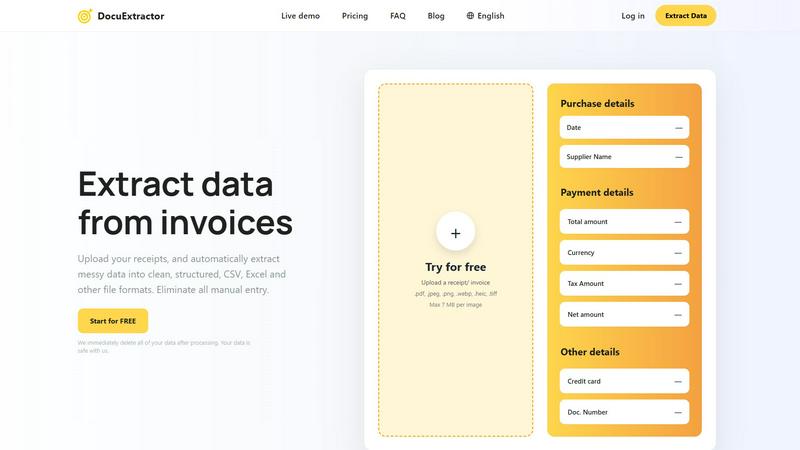
About DocuExtractor
DocuExtractor is a revolutionary document conversion software tailored specifically for accountants, bookkeepers, and finance professionals looking to streamline their operations. By automating the extraction of data from unstructured financial documents like invoices, receipts, bank statements, and PDFs, it eliminates the tedious and error-prone cycle of manual data entry. Leveraging advanced technologies such as Optical Character Recognition (OCR), Deep Learning (DL), and Large Language Models (LLM), DocuExtractor achieves an exceptional accuracy rate of 99.6% in identifying and extracting crucial information including dates, supplier names, totals, taxes, and document numbers. The platform is designed for continuous improvement, learning from each processed document to enhance future performance. With quick batch uploads, users can download their extracted data in popular formats like CSV or Excel. Additionally, DocuExtractor ensures data security by deleting all processed information, thus protecting user privacy while supporting over 45 languages. This scalable solution is ideal for businesses of all sizes, significantly saving time and reducing manual errors in financial workflows.
Features of DocuExtractor
Advanced Data Extraction
DocuExtractor employs cutting-edge OCR and AI technologies to automatically extract key information from various financial documents with remarkable accuracy. This eliminates the need for manual entry, reducing errors and freeing up valuable time for finance professionals.
Batch Processing Capability
Users can upload multiple documents simultaneously, allowing for efficient processing of invoices, receipts, and other financial statements. This feature is particularly beneficial for businesses handling large volumes of documents, enabling them to streamline operations significantly.
User-Friendly Interface
The platform is designed with simplicity in mind, allowing users to easily drag and drop documents for upload. Its intuitive interface ensures that even those with minimal technical skills can navigate the extraction process effortlessly, enhancing overall user experience.
Enterprise-Grade Security
DocuExtractor prioritizes data security by automatically deleting all user-uploaded data after processing. This ensures that sensitive financial information remains protected, giving users peace of mind while benefiting from the software's powerful features.
Use Cases of DocuExtractor
Streamlined Invoice Processing
Accountants can use DocuExtractor to automate the extraction of information from invoices, significantly reducing the time spent on data entry. By quickly converting messy data into structured formats, they can focus on more strategic tasks and improve accuracy.
Efficient Receipt Management
Bookkeepers can upload receipts in bulk and extract relevant data, such as totals and supplier names, without manual intervention. This not only saves hours of work but also minimizes the risk of errors associated with manual entry.
Simplified Bank Statement Analysis
Finance professionals can utilize DocuExtractor to process bank statements swiftly. By extracting critical data like transaction dates and amounts, they can enhance their financial analysis and reporting capabilities.
Enhanced Reporting for Operations Managers
Operations managers can leverage the structured data extracted by DocuExtractor to generate insightful reports. This allows them to make data-driven decisions and improve operational efficiency within their teams.
Frequently Asked Questions
How does DocuExtractor ensure data accuracy?
DocuExtractor combines advanced Optical Character Recognition (OCR), Deep Learning (DL), and Large Language Models (LLM) to achieve a high accuracy rate of 99.6% in extracting data from documents. Continuous learning from processed documents further enhances this accuracy over time.
Is my data safe with DocuExtractor?
Yes, DocuExtractor prioritizes data security. All uploaded documents are deleted immediately after processing, ensuring that your sensitive financial information is protected and not stored on any servers.
What types of documents can I upload?
DocuExtractor supports various document types, including receipts, invoices, bank statements, and more, in formats such as PDF, JPG, PNG, and TIFF. This versatility makes it suitable for a wide range of financial documentation.
Can I use DocuExtractor for multiple languages?
Absolutely! DocuExtractor supports over 45 languages, featuring automatic language detection, making it an ideal solution for international businesses or those dealing with diverse financial documents.
Explore more in this category:
Similar to DocuExtractor

Free collection of online developer utilities, code formatters, and digital converters designed to streamline your daily workflow.

All-in-One POS, Inventory & Accounting Software for Bangladeshi Businesses

Translate JSON, Markdown, and TXT files while preserving keys, nested paths, and project structure.

Visual financial timelines for couples and young professionals.

The #1 Native Form Builder Plugin for Framer - No Code, No Embeds, No External Platforms.


Practical, independent guides to home repairs, maintenance, costs, troubleshooting, and everyday fixes.

Highlight faster. Study in flow with custom shortcuts and a workflow built around you. Print smarter, or turn any page into a tiled poster.