
AskFormulas
AskFormulas generates and validates Excel and Sheets formulas, testing each one to guarantee it works perfectly.
Visit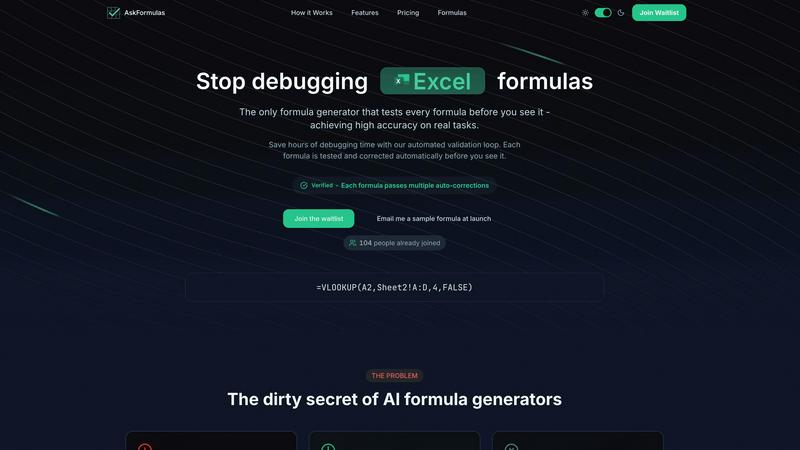
About AskFormulas
AskFormulas is a revolutionary AI-driven tool engineered to end the frustration of broken spreadsheet formulas. It transforms the way professionals interact with Excel and Google Sheets by generating, validating, and delivering ready-to-use formulas with guaranteed accuracy. At its core is a unique, iterative validation loop that rigorously tests every single formula against real data in a secure sandbox environment, automatically correcting errors until a verified, working formula is produced. This process directly addresses the critical flaw of other AI generators, which can have error rates as high as 40-60%, by ensuring users only see formulas that have already been proven to work. The tool is built for a wide range of users, from financial analysts and revenue managers conducting complex data analysis to small business owners and students who need reliable results without becoming formula syntax experts. Its value proposition is simple yet powerful: save hours of tedious debugging time. With a minimalist interface, users simply describe their goal in plain English, toggle between Excel or Google Sheets, and instantly receive a formula marked with a green "Verified" badge, giving them immediate confidence to copy, paste, and apply it directly to their live data.
Features of AskFormulas
The Validation Loop
This is the foundational, cyclical engine of AskFormulas. Every user request undergoes a rigorous three-step process: natural language is parsed into formula intent, the proposed formula is auto-tested on synthetic template data in a sandbox, and any errors are automatically corrected through multiple iterations. This continuous improvement cycle doesn't stop until the formula is fully validated, guaranteeing the high accuracy that sets the tool apart from competitors who provide untested, often broken, outputs.
Natural Language to Formula
The tool eliminates the need to memorize complex formula syntax. Users can input their needs using simple, plain English descriptions, such as "sum all values in column B where column A contains the word Sales." AskFormulas' AI understands the context and intent behind the request, converting everyday language into precise spreadsheet function logic, making advanced data manipulation accessible to everyone regardless of their technical expertise.
Cross-Platform Syntax Toggle
AskFormulas seamlessly supports both Microsoft Excel and Google Sheets with a simple one-click toggle. The system automatically adjusts the generated formula's syntax to be natively compatible with the selected platform. It intelligently handles the differences between functions, like VLOOKUP for Excel and ARRAYFORMULA combinations for Sheets, ensuring you get a correct formula for your specific spreadsheet environment every time.
Smart Error Detection & Correction
Instead of handing users a formula that results in #REF! or #VALUE! errors, AskFormulas proactively identifies and fixes these issues during its validation phase. The system simulates the formula's execution, catches potential errors, and runs through auto-correction cycles to resolve them. This means the user receives a pre-debugged, working formula, effectively transferring the burden of troubleshooting from the human to the AI's iterative validation process.
Use Cases of AskFormulas
Financial Reporting & Analysis
Financial analysts and accountants can rapidly generate complex formulas for tasks like quarterly revenue summation, expense categorization using SUMIFS, or intricate XLOOKUP formulas for consolidating data from multiple sheets. The validation loop ensures that every financial calculation is accurate from the start, eliminating risky errors in reports and saving countless hours otherwise spent manually auditing and debugging formula chains.
Sales & Revenue Data Management
Revenue managers and sales operations specialists can use AskFormulas to quickly create formulas for calculating commissions, tracking pipeline growth, or analyzing sales performance by region. Describing a need like "calculate average deal size for closed-won opportunities in Q3" yields a verified formula instantly, allowing teams to maintain accurate, real-time dashboards without formula-related delays or mistakes.
Small Business Bookkeeping
Small business owners and freelancers who may not be spreadsheet experts can streamline their bookkeeping. They can easily generate formulas to calculate taxes, total monthly expenses, or project cash flow by simply asking in natural language. The guaranteed accuracy of the verified formulas provides peace of mind, ensuring their financial records are correct without needing to learn advanced Excel functions.
Academic Research & Data Compilation
Students and researchers compiling data for theses, papers, or projects can use AskFormulas to handle data manipulation tasks. Whether it's standardizing data sets, performing statistical calculations, or merging information from various sources, the tool allows them to focus on their analysis rather than the technical hurdle of writing and debugging error-prone formulas from scratch.
Frequently Asked Questions
How accurate are the generated formulas?
AskFormulas is built for exceptionally high accuracy. Unlike other AI tools that provide untested formulas with high error rates, every formula generated by AskFormulas passes through a proprietary validation loop. This process involves auto-testing the formula on synthetic data and running iterative auto-corrections until it works flawlessly. The result is a "Verified" formula that has been proven to execute correctly before you ever see it, dramatically reducing the chance of errors.
Does it work with both Excel and Google Sheets?
Yes, absolutely. AskFormulas is designed as a universal formula assistant. With a simple one-click toggle in the interface, you can switch between Microsoft Excel and Google Sheets syntax. The AI automatically adjusts the generated formula to use the correct functions and structure for your chosen platform, providing seamless compatibility whether you use one, the other, or both in your workflow.
How many formulas can I generate?
The number of formulas depends on your subscription plan. The Starter plan offers 500 validated formulas per month, the Pro plan provides 2,000 per month, and the Team plan includes 6,000 formulas per month to be shared among up to 5 users. This tiered system ensures there's a plan suitable for individual casual users, power users, and collaborative small teams.
What happens if my formula has an error?
With AskFormulas, you should rarely, if ever, receive a formula with an error. Its core innovation is the pre-emptive validation and correction cycle. If an initial formula draft contains an error like #REF!, the system detects it during the auto-test phase and triggers an auto-correction iteration. It will continuously refine and retest the formula until it passes all checks and earns the "Verified" status, ensuring you only get working, error-free results.
Explore more in this category:
Similar to AskFormulas

Free collection of online developer utilities, code formatters, and digital converters designed to streamline your daily workflow.

Translate JSON, Markdown, and TXT files while preserving keys, nested paths, and project structure.

Visual financial timelines for couples and young professionals.

The #1 Native Form Builder Plugin for Framer - No Code, No Embeds, No External Platforms.

Practical, independent guides to home repairs, maintenance, costs, troubleshooting, and everyday fixes.

Highlight faster. Study in flow with custom shortcuts and a workflow built around you. Print smarter, or turn any page into a tiled poster.


A free launch checklist for SaaS, apps, AI tools and more. Every step says why it matters and when you can skip it.