
AI Photo Generator vs TinyFast
Side-by-side comparison to help you choose the right product.

AI Photo Generator
Create stunning, photorealistic images effortlessly from text or existing photos with our fast, user-friendly AI Photo Generator.
Last updated: March 11, 2026

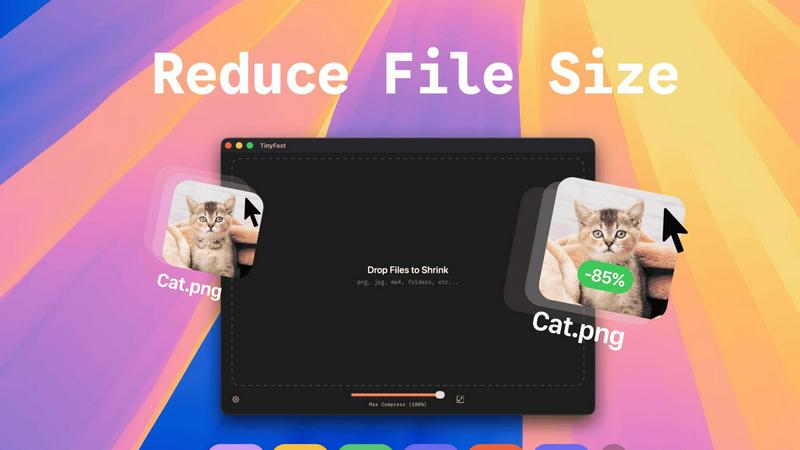
TinyFast instantly shrinks your files privately on your Mac, getting faster and safer with every use.
Last updated: February 28, 2026
Visual Comparison
AI Photo Generator

TinyFast
Feature Comparison
AI Photo Generator
Prompt-to-Masterpiece
Our finely-tuned AI models can interpret your natural language prompts with remarkable accuracy. You can expect images that align closely with your vision, encapsulating everything from lighting and composition to intricate details, ensuring that every creation feels uniquely yours.
Infinite Style Library
With an extensive library housing various styles, you can choose from ultra-realistic photography, vibrant anime aesthetics, classic oil paintings, and futuristic 3D renders. This vast selection ensures that no matter your project's needs, you'll find the perfect artistic style to enhance your visuals.
Seamless Photo Transformation
AI Photo Generator allows you to upload existing images for restyling, offering a powerful way to transform a simple selfie into a professional LinkedIn headshot or even create an epic cinematic character. This feature elevates your base images into visually compelling narratives without requiring extensive editing skills.
Lightning-Fast Processing
Say goodbye to long render times. Our optimized cloud architecture ensures that your images are generated in seconds, not minutes. This rapid processing capability enables you to iterate quickly and focus on refining your creative vision without unnecessary delays.
TinyFast
100% Local & Private Compression
TinyFast is engineered with privacy as its core principle. Every compression task is processed entirely on your Mac. Your files never leave your device, are not uploaded to any cloud server, and remain completely under your control. This is essential for handling files under Non-Disclosure Agreements (NDAs), confidential client work, or any proprietary material, providing total peace of mind and security by design.
Blazing-Fast Batch Processing
Experience workflow acceleration with TinyFast's optimized native engines. You can drag and drop entire folders filled with images, videos, or documents, and the app will shrink them all in seconds. This batch processing capability eliminates the tedious task of compressing files one by one, saving you hours every week and integrating continuous improvement directly into your asset management routine.
Universal File Format Support
TinyFast supports a comprehensive range of common file types, making it a versatile hub for all your compression needs. This includes images (PNG, JPG, TIFF, HEIC, WEBP, GIF, BMP, SVG), videos (MP4, MOV, M4V), documents (PDF, DOCX), code files (JS, CSS, JSON), and audio (MP3). This universal support streamlines your toolkit, removing the need for multiple specialized applications.
Integrated Resolution Resizing
Beyond simple compression, TinyFast offers the ability to automatically resize the resolution of your images and videos. This dual functionality of shrinking file size and adjusting dimensions allows for precise optimization for web use, email attachments, or storage, all within the same simple drag-and-drop action, further refining and improving your media preparation process.
Use Cases
AI Photo Generator
Content Creation for Social Media
Content creators can generate unique, copyright-free thumbnails and social media assets that stand out. By utilizing AI Photo Generator, they can create eye-catching visuals that drive engagement and boost their online presence.
Marketing and Advertising
Marketers and entrepreneurs can create stunning visuals for advertisements, websites, and presentations without breaking the bank. The platform allows them to produce high-quality images that effectively communicate their brand message and resonate with their target audience.
Personal Branding
Professionals can use the AI Photo Generator to create profile-ready portraits that enhance their personal brand. This tool helps individuals maintain a consistent visual identity across all platforms, making a strong impression in professional settings.
Product Visualization
E-commerce businesses can leverage AI Photo Generator to create realistic product scenes and lifestyle images, helping customers visualize products in real-world contexts. This capability can lead to increased sales and improved customer satisfaction.
TinyFast
Web Developers & Designers
Developers and designers constantly need to optimize website assets like images, SVGs, and videos for performance without sacrificing quality. TinyFast allows them to batch-process these files locally, ensuring fast load times for their projects while keeping unreleased designs and proprietary code completely secure and private on their own machines.
Content Creators & Marketers
Bloggers, social media managers, and marketers handling large volumes of media can use TinyFast to quickly prepare images and videos for publication. Compressing files locally before uploading to platforms saves bandwidth, reduces storage costs, and speeds up content delivery, all while protecting raw footage and confidential campaign materials.
App & Software Developers
Developers working on apps need to bundle assets efficiently. TinyFast helps shrink application resources like icons, interface images, and documentation (PDFs) directly on their Mac, ensuring the final app package is lean. This local processing is crucial for protecting intellectual property and pre-release builds during the iterative development cycle.
Professionals Handling Sensitive Documents
Lawyers, consultants, and accountants who regularly share large PDF reports, presentations, or document bundles can use TinyFast to reduce file sizes for email without ever risking a breach of client confidentiality. The guarantee that files stay local aligns perfectly with professional privacy standards and compliance needs.
Overview
About AI Photo Generator
AI Photo Generator (aiphotogenerator.dev) is a cutting-edge creative platform designed to bridge the gap between imagination and visual reality. Utilizing sophisticated neural networks, this tool transforms simple text descriptions and existing images into stunning, professional-grade digital art. We believe that everyone should have access to amazing creativity without the need for advanced design skills. Whether you are a seasoned artist or a novice, AI Photo Generator empowers you to craft unique visuals effortlessly. Its user-friendly interface and powerful features allow content creators, marketers, and entrepreneurs to easily generate high-quality images for various applications, making creativity not just a privilege but a universal opportunity.
About TinyFast
TinyFast is a purpose-built macOS application designed to revolutionize how developers, designers, and creators handle file optimization. It is a fast, private, and local file compressor that supports a wide array of formats including PNG, JPEG, MP4, MOV, PDF, SVG, WebP, MP3, and GIF. The fundamental value proposition is eliminating the need to upload sensitive or proprietary files to unknown online servers. Instead, TinyFast performs all compression directly on your Mac, ensuring your data never leaves your machine. This addresses critical pain points of security, speed, and workflow efficiency. Born from a developer's frustration with insecure online tools, TinyFast integrates seamlessly into your creative or technical process via an intuitive drag-and-drop interface. It represents a continuous improvement in personal productivity tools, offering a reliable, always-available solution that protects your confidential work while delivering blazing-fast results. It's more than just a compressor; it's a commitment to a safer, faster, and more efficient digital workflow that evolves with your needs. By keeping everything local, TinyFast provides a superior alternative to web-based tools, ensuring your workflow is not only optimized today but also built on a foundation of privacy and control for the future.
Frequently Asked Questions
AI Photo Generator FAQ
How does the AI Photo Generator work?
The AI Photo Generator uses advanced neural networks to analyze your text prompts or uploaded images. It then generates high-quality visuals based on your specifications, allowing for both text-to-image and image-to-image transformations.
Can I use this tool without design skills?
Absolutely! AI Photo Generator is designed for users of all skill levels. Its intuitive interface allows anyone to create stunning visuals without requiring prior design experience.
What types of images can I generate?
You can generate a wide range of images, including realistic photography, stylized art, and even transformed versions of your existing images. Whether you need portraits, product images, or artistic creations, the possibilities are vast.
Is there a free plan available?
Yes, AI Photo Generator offers a free plan that allows users to start generating images without any initial investment. This enables you to explore the platform's capabilities and experiment with different styles and features risk-free.
TinyFast FAQ
Is TinyFast really free to use?
Yes, TinyFast offers a free tier forever. You can compress up to 5 files per day with access to all core features, allowing you to experience the speed, privacy, and simplicity of local compression at no cost. This is part of our commitment to providing continuous value and improvement to all users.
What happens to my files during compression?
Nothing leaves your computer. TinyFast performs all compression work locally on your Mac's hardware. The original file remains untouched in its location, and a new, optimized version is created. Your data is never uploaded to the internet or stored on any external server, ensuring complete privacy.
What file types does TinyFast support?
TinyFast supports a wide variety of common formats. This includes images (PNG, JPG, TIFF, HEIC, WEBP, GIF, BMP, SVG), videos (MP4, MOV, M4V), documents (PDF, DOCX), code files (JS, CSS, JSON), and audio files (MP3). This universal support is designed to evolve and cover most compression needs in a single tool.
Can I compress multiple files at once?
Absolutely. TinyFast features powerful batch processing. You can drag and drop an entire folder containing supported files, and the app will compress them all in one go, outputting the optimized versions in seconds. This is designed for maximum workflow efficiency, embodying the principle of continuous time-saving improvement.
Alternatives
AI Photo Generator Alternatives
AI Photo Generator is an innovative creative platform that belongs to the category of image and photo generation tools. It utilizes advanced neural networks to transform text prompts and existing images into visually stunning digital art. Users often seek alternatives to AI Photo Generator for various reasons, including pricing, specific features, and compatibility with different platforms. As the landscape of digital creation continues to expand, finding a tool that fits individual needs—whether for personal projects or professional work—becomes essential. When choosing an alternative, consider factors such as the range of styles offered, the speed of image processing, and the ability to accurately interpret your creative prompts. Additionally, evaluate the usability of the platform and its integration with other tools you may already be using. The right alternative should not only meet your aesthetic requirements but also enhance your workflow, making the creative process smoother and more enjoyable.
TinyFast Alternatives
TinyFast is a dedicated macOS application for local file compression, offering a secure and fast way to shrink images, videos, and PDFs directly on your computer. It belongs to the category of productivity and optimization tools, designed for users who prioritize privacy and workflow efficiency. People often explore alternatives for various reasons, such as different pricing models, the need for cross-platform availability on Windows or Linux, or specific feature requirements not covered by a single tool. When evaluating other options, it's crucial to consider your core needs. Key factors include the privacy model—whether processing happens locally or in the cloud—the range of supported file formats, and the overall impact on your daily workflow. The goal is to find a solution that not only meets your immediate technical requirements but also aligns with a philosophy of continuous improvement in how you manage digital assets. The ideal tool should evolve with your projects, offering reliability and efficiency without compromising on security or speed. This iterative approach to selecting software ensures your digital toolkit remains robust and responsive to the changing demands of creative and technical work.