
LuxSign vs Refbox
Side-by-side comparison to help you choose the right product.

LuxSign simplifies document signing with secure, legally valid electronic signatures, ensuring compliance and.
Last updated: February 26, 2026

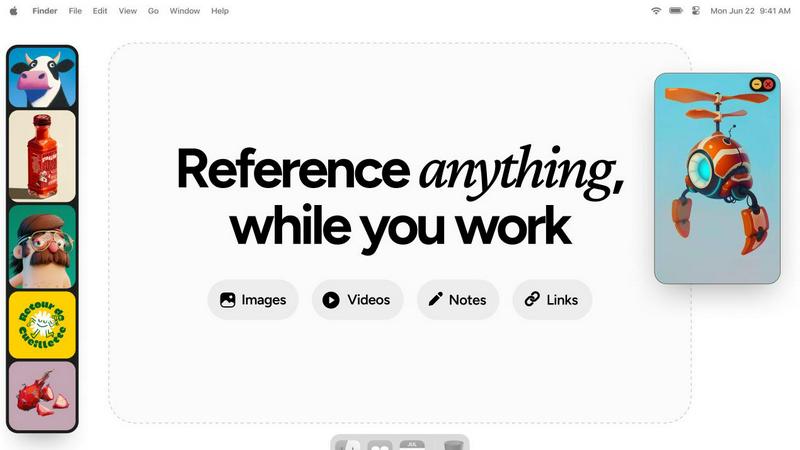
Refbox keeps your references visible and accessible right above your workspace for a smoother, faster workflow.
Last updated: February 28, 2026
Visual Comparison
LuxSign

Refbox
Feature Comparison
LuxSign
Multiple Signature Methods
LuxSign provides various signature options, allowing users to draw their signature with a mouse, type their name, or upload an image. This flexibility ensures that signing documents aligns with personal preferences and enhances the user experience. Custom initials are also supported for quick and efficient document signing.
Advanced Security
At LuxSign, security is paramount. The platform employs industry-standard encryption to protect documents during upload, storage, and transmission. With secure servers located in Luxembourg, LuxSign ensures compliance with EU data protection regulations, providing users with peace of mind regarding the safety of their sensitive information.
Collaboration Workspaces
LuxSign fosters teamwork by offering collaboration workspaces where users can organize documents in shared folders. This feature allows team members to manage access rights and collaborate seamlessly on signing workflows, streamlining the process and enhancing productivity.
Complete Audit Trail
LuxSign maintains a detailed audit trail for every document, logging actions with timestamps, IP addresses, and signer information. This feature not only enhances transparency but also provides the necessary confirmation for compliance and verification, which is crucial for businesses operating in regulated industries.
Refbox
Always-on-Top Floating Frames
Refbox’s signature feature allows you to pin any reference—images, GIFs, videos, or notes—into individual frames that hover above all other applications. These frames are fully resizable and can be minimized or locked in place, ensuring your references stay visible and accessible without ever blocking your workflow. This eliminates the need to constantly switch windows, creating a truly integrated and distraction-free creative environment that evolves with your project's needs.
Masonry Mode & Infinite Canvas
Organize your visual inspiration effortlessly with Masonry Mode, which arranges your references in a beautiful, Pinterest-style flowing grid on an infinite canvas. This layout maximizes space and provides a holistic view of your mood board or reference collection. You can also flip through items in a full-screen slideshow for quick comparison, making it perfect for iterative review and ensuring every visual element aligns with your creative direction.
Intelligent Media Handling & Notes
Refbox goes beyond simple image display with deep, thoughtful media controls. Step through GIFs frame-by-frame for detailed animation reference, take markdown-enabled notes with styling and checklists, and crop images to focus on specific details. You can also screenshot websites by pasting a link, view SVG files as images, and use a built-in color picker on any media to copy hex codes directly to your clipboard, continuously refining your asset management.
Streamlined Workflow Shortcuts
Designed for speed, Refbox is packed with shortcuts and smart features that shave seconds off repetitive tasks, which compound into hours saved. Quickly swap floating references with arrow keys, change entire collections with one click, or auto-hide the main sidebar to declutter your screen. These iterative improvements to your daily actions provide full control and keep you firmly in your creative flow, minimizing friction at every turn.
Use Cases
LuxSign
Streamlining Contract Negotiations
Businesses can use LuxSign to facilitate contract negotiations by enabling multiple stakeholders to sign documents in either parallel or sequential order. This speeds up the process, eliminating the delays associated with traditional signing methods, and ensuring all parties can finalize agreements swiftly.
Secure Client Onboarding
LuxSign is ideal for client onboarding processes where multiple documents need to be signed quickly and securely. By using the platform, organizations can ensure that all necessary agreements are signed in compliance with legal standards, enhancing the onboarding experience for new clients.
Efficient Document Management
Organizations benefit from LuxSign's document management capabilities, which allow users to upload, organize, and track documents easily. The ability to send automatic email notifications keeps all parties informed about the status of documents, ensuring that nothing falls through the cracks.
Enhancing Compliance in Regulated Industries
For businesses operating in highly regulated industries, LuxSign provides the assurance of compliance through its secure document handling and detailed audit trails. This makes it an invaluable tool for organizations looking to maintain rigorous standards in legal documentation.
Refbox
Digital Illustration & Concept Art
Illustrators and concept artists can keep character sheets, environment photos, and color palettes pinned around their canvas in Photoshop or Clip Studio Paint. The ability to lock frames and step through GIF frames is invaluable for studying motion or expressions, allowing for continuous refinement of artwork without breaking concentration to search for files.
UI/UX & Web Design
Designers can float style guides, component libraries, competitor screenshots, and user flow diagrams directly over their design tool like Figma or Sketch. The website screenshot feature and easy color picking streamline the research and implementation phase, fostering an iterative design process where references directly inform each decision.
3D Modeling & Animation
3D artists and animators can reference orthographic drawings, texture maps, and video clips while working in complex software like Blender or Maya. Having model sheets and motion reference always visible accelerates the modeling and rigging process, enabling a continuous cycle of reference and creation that enhances accuracy and speed.
Motion Graphics & Video Editing
Editors and motion designers can pin storyboards, style frames, and asset lists above Premiere Pro or After Effects. The video playback in floating frames and the organized gallery view for mood boards help maintain visual consistency throughout a project, supporting an iterative creative workflow from concept to final render.
Overview
About LuxSign
LuxSign is a cutting-edge electronic signature platform designed to meet the stringent compliance needs of businesses across Europe. Developed in Luxembourg, this secure, cloud-based solution ensures that all documents undergo end-to-end encryption and are stored exclusively within the country, fully adhering to GDPR regulations. LuxSign empowers organizations to sign and manage documents digitally, streamlining workflows while maintaining the highest security standards. With support for eIDAS SES standards, LuxSign guarantees the legal validity of contracts throughout the European Union. Its user-friendly interface offers robust features such as customizable signing workflows, automated notifications, and a variety of signing methods, making it an ideal choice for professionals, small teams, and large enterprises alike. LuxSign not only simplifies the signing process but also enhances collaboration and document management, making it an essential tool for modern businesses seeking efficiency and compliance.
About Refbox
Refbox is the ultimate floating reference companion for creative professionals who demand an uninterrupted, focused workflow. It is an innovative application designed to end the constant, distracting cycle of alt-tabbing between folders, browser tabs, and your primary creative software. At its core, Refbox allows you to pin images, GIFs, videos, and notes into always-on-top, resizable frames that float above any other application on your desktop. This means your inspiration and critical references are perpetually visible, right where you need them, whether you're sketching, designing, animating, modeling, or illustrating. By centralizing your media into a customizable sidebar that you can populate instantly from the web, local storage, or your clipboard, Refbox transforms a fragmented process into a seamless flow. It champions a philosophy of continuous improvement for your creative process, eliminating friction points one by one. With powerful organizational features like Masonry Mode for dynamic layouts, full-screen galleries for dual-monitor setups, and markdown-enabled notes, Refbox ensures your tools adapt to your vision, not the other way around. It's built for the professional who can't afford distractions, empowering you to maintain a state of deep focus where creativity thrives.
Frequently Asked Questions
LuxSign FAQ
What types of documents can I sign with LuxSign?
LuxSign supports a variety of document formats, including PDF, DOC, and DOCX. Users can upload files up to 10MB, ensuring versatility for different business needs.
How does LuxSign ensure the security of my documents?
LuxSign employs industry-standard encryption methods during the entire lifecycle of a document, from upload to storage and transmission. Additionally, all documents are hosted on secure servers in Luxembourg, complying with strict EU data protection laws.
Can I customize the signing workflow in LuxSign?
Yes, LuxSign allows users to choose between parallel and sequential signing workflows. You can add multiple signers to each document and customize the order in which they should sign, providing great flexibility in managing document approvals.
Is LuxSign compliant with EU regulations?
Absolutely. LuxSign is built in compliance with eIDAS regulations, providing Simple Electronic Signatures (SES) that are legally valid across all EU member states. For transactions requiring higher legal assurance, Advanced (AES) or Qualified Electronic Signatures (QES) can also be facilitated.
Refbox FAQ
What types of media can I use with Refbox?
Refbox supports a wide array of media types to serve as comprehensive references. You can directly add images (JPG, PNG, SVG, etc.), GIFs (with frame-by-frame control), and video files. Additionally, you can create and format text notes with markdown, take screenshots of websites by pasting URLs, and even use the application as a color picker on any displayed media.
How does Refbox improve my workflow compared to just using browser tabs?
Refbox eliminates the disruptive context-switching required when digging through folders or cycling through dozens of browser tabs. By keeping your references in always-on-top, organized frames directly over your work application, your focus remains locked on creation. Features like instant shortcuts, collections, and media tools further streamline actions, turning a fragmented process into a smooth, continuous, and iterative flow.
Can I use Refbox with multiple monitors?
Absolutely. Refbox is ideal for multi-monitor setups. You can use the full-screen gallery mode to turn a secondary display into a dedicated reference board, or simply drag and position your floating frames across any screen. This gives you expansive, organized visual space, keeping your primary screen clean for your main creative application while all your inspiration remains instantly accessible.
Is there a way to organize my references within Refbox?
Yes, organization is a core strength. You can create multiple Collections to separate references by project, client, or theme and switch between them with a single click. Within a collection, Masonry Mode automatically arranges items in an efficient layout, and you can always pin key items to floating frames. This system evolves with your project, keeping your visual research tidy and actionable.
Alternatives
LuxSign Alternatives
LuxSign is a cloud-based electronic signature platform based in Luxembourg, designed to meet the needs of businesses seeking high compliance and legal validity for their documents across the European Union. With its eIDAS SES compliance, LuxSign ensures that signatures are recognized and enforceable in all EU member states. Users often seek alternatives to LuxSign for various reasons, such as pricing considerations, specific feature requirements, or the need for integration with existing platforms. When searching for an alternative to LuxSign, it's essential to evaluate several key factors. Look for platforms that offer similar compliance standards, robust security features, user-friendly interfaces, and flexibility in signing workflows. Additionally, consider the availability of advanced features like document templates, collaboration options, and integration capabilities, as these can significantly enhance the overall user experience.
Refbox Alternatives
Refbox is a specialized productivity tool designed to streamline creative workflows. It operates as a floating reference manager, allowing users to keep images, videos, and notes visible above their primary workspace. This eliminates disruptive window switching, making it a powerful asset for designers, animators, and other visual professionals. Users often explore alternatives for various reasons, including budget constraints, specific feature needs, or compatibility with different operating systems. The quest for the right tool is a natural part of refining one's creative process, as needs evolve and new workflows emerge. When evaluating alternatives, consider core functionality like always-on-top windows, media support, and organizational features. The goal is to find a solution that integrates seamlessly into your existing routine, fostering a cycle of continuous improvement and sustained creative focus.