
HeyVid vs Learniverse
Side-by-side comparison to help you choose the right product.

HeyVid AI simplifies content creation by generating stunning videos and images from text and images, all in one powerful platform.
Last updated: April 4, 2026

Learniverse
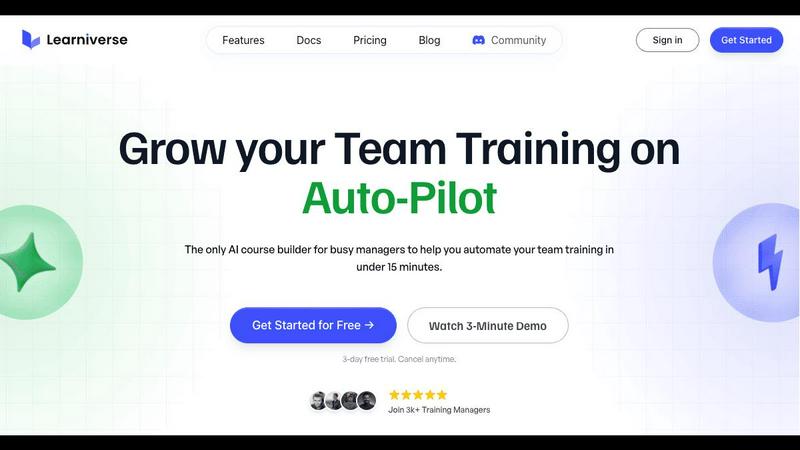
Learniverse transforms your documents into engaging training courses in minutes, simplifying knowledge sharing for busy.
Last updated: February 28, 2026
Visual Comparison
HeyVid

Learniverse
Feature Comparison
HeyVid
Text to Video
HeyVid's text-to-video feature allows users to convert written scripts into engaging videos seamlessly. By simply inputting text, the platform generates visually appealing content, complete with animations, images, and voiceovers, making it ideal for marketers and educators.
Image to Video
The image-to-video functionality enables users to transform static images into dynamic video presentations. This feature is perfect for creating captivating storytelling experiences, marketing campaigns, or social media content that captures audience attention.
AI Image Generation
With HeyVid's AI image generation capabilities, users can create stunning visuals using leading models like Midjourney and Dall-E. This feature empowers creators to produce unique graphics tailored to their specific needs, enhancing their branding and visual storytelling.
AI Music and Voice Integration
HeyVid offers AI-generated music and voiceover options to complement your visual content. Choose from a variety of styles and tones to ensure that your videos resonate with your audience, adding emotional depth and enhancing viewer engagement.
Learniverse
Effortless Course Creation
Learniverse enables users to upload various types of content such as PDFs, videos, and recordings, transforming them into interactive lessons with minimal effort. This feature significantly reduces the time and labor involved in manual course creation.
AI-Powered Structuring
The platform's intelligent AI assistant automatically structures uploaded content into engaging courses, complete with quizzes and progress tracking. This ensures that training materials are not only consistent but also captivating for learners.
Custom Branded Portals
With Learniverse, organizations can launch a professional training portal that showcases their brand colors, logos, and domains. This customization helps create a polished experience for users, making training feel relevant and contemporary.
Progress Tracking and Analytics
Learniverse allows training managers to monitor progress, engagement, and assessment results through a comprehensive dashboard. This feature provides insights into who has completed training, identifies areas where learners struggle, and highlights overdue tasks.
Use Cases
HeyVid
Marketing Campaigns
Marketers can leverage HeyVid to create impactful promotional videos that highlight products or services. The platform's fast turnaround and high-quality output make it a valuable tool for driving conversions and capturing attention in competitive markets.
Educational Content
Educators can utilize HeyVid to develop engaging instructional videos, tutorials, and presentations. By transforming static materials into dynamic visual content, teachers can enhance student learning and retention, making lessons more interactive and enjoyable.
Social Media Content
Content creators can revolutionize their social media strategy using HeyVid to produce short-form videos, eye-catching thumbnails, and podcast clips. The ease of use and quick results allow creators to maintain a consistent posting schedule and grow their audience.
Corporate Communication
Businesses can harness HeyVid to create professional corporate videos for internal communications, team updates, and onboarding materials. This ensures that all stakeholders are informed and engaged, fostering a collaborative and productive work environment.
Learniverse
Onboarding New Employees
Learniverse can streamline the onboarding process for new hires by consolidating essential training materials into engaging courses. New employees can quickly get up to speed with company policies, procedures, and culture in a structured manner.
Continuous Skill Development
Organizations can leverage Learniverse to provide ongoing training and skill development for their existing teams. By regularly updating courses with new content, teams can ensure they remain proficient and informed in their respective fields.
Compliance Training
For industries that require regular compliance training, Learniverse simplifies the process by allowing organizations to create and update compliance courses quickly. This ensures that all employees are informed of the latest regulations and policies, reducing the risk of non-compliance.
Knowledge Sharing Across Teams
Learniverse fosters collaboration and knowledge sharing by enabling teams to contribute to the training content. This feature encourages a culture of continuous improvement and allows for the collective expertise of the organization to be harnessed.
Overview
About HeyVid
HeyVid is an innovative all-in-one AI video and image generator designed to streamline the content creation process for professionals and beginners alike. By harnessing advanced artificial intelligence, HeyVid empowers users to generate high-quality videos and images quickly and effortlessly. Whether you're a marketer, educator, entrepreneur, or creator, HeyVid provides you with the tools you need to bring your ideas to life. The platform supports various content formats, including text-to-video, image-to-video, text-to-image, and image-to-image transformations. With its user-friendly interface and sophisticated models, such as Veo 3 and Sora 2, HeyVid ensures that even those without editing skills can produce professional-grade content. Its main value proposition lies in its ability to save time and enhance creativity, allowing you to focus on what matters most—your message and audience.
About Learniverse
Learniverse is a groundbreaking AI-powered training platform designed specifically for busy teams and training managers. Its primary goal is to simplify and streamline the process of creating and managing training programs, allowing organizations to scale effective learning without the traditional complexities. By converting scattered knowledge—such as Google Docs, PDFs, videos, and meeting recordings—into a cohesive and branded learning academy in just minutes, Learniverse saves valuable time and resources. The platform eliminates the tedious manual course creation process, inconsistent training materials, and the reliance on cumbersome spreadsheets for tracking progress. With a smart conversational AI assistant, Learniverse automates the structuring of content, generation of interactive lessons, and incorporation of assessments, ensuring a dynamic and evolving training experience. This means your academy remains current and engaging, all delivered through a polished portal that reflects your brand identity, empowering your team to focus on what matters most.
Frequently Asked Questions
HeyVid FAQ
What types of content can I create with HeyVid?
You can create a variety of content, including videos from text or images, images from text, and animations. The platform supports multiple formats to cater to different creative needs.
Is HeyVid suitable for beginners?
Absolutely! HeyVid is designed with an intuitive interface that caters to users of all skill levels. Whether you are a novice or a professional, you will find it easy to create high-quality content.
Can I customize the videos I create?
Yes, you can customize your videos by adjusting parameters such as resolution, aspect ratio, and visual styles. This allows you to align the content with your brand identity and target audience.
Are there any limitations on the number of projects I can create?
HeyVid offers flexible options for users, allowing for multiple projects to be created simultaneously. However, specific limitations may depend on the plan you choose, so it's advisable to review your subscription details.
Learniverse FAQ
What types of content can I upload to Learniverse?
You can upload various content formats including PDFs, videos, audio recordings, Google Docs, and SOPs. Learniverse will automatically transform this content into interactive training modules.
How does the AI assistant work in Learniverse?
The AI assistant helps automate the course creation process by structuring uploaded content into engaging lessons, generating quizzes, and tracking learner progress. This significantly reduces manual effort for training managers.
Can I customize my training portal?
Yes, Learniverse allows for extensive customization of your training portal. You can incorporate your brand colors, logos, and even customize the domain to create a professional and branded learning experience.
Is there a free trial available for Learniverse?
Absolutely! Learniverse offers a 7-day free trial, allowing you to explore the platform's features and capabilities without any financial commitment. You can easily cancel if it does not meet your needs.
Alternatives
HeyVid Alternatives
HeyVid is an innovative all-in-one AI video and image generator designed to streamline the creative process. As part of the productivity and management category, it empowers users to produce high-quality visuals quickly and efficiently. Despite its robust features, users often seek alternatives due to reasons such as pricing concerns, specific platform compatibility, and varying feature sets that may better align with their unique needs. When exploring alternatives to HeyVid, it’s essential to consider factors such as the range of features, ease of use, pricing models, and the ability to integrate with existing workflows. Prioritizing these aspects can lead to finding a solution that not only meets your current demands but also evolves alongside your creative aspirations, ensuring continuous improvement in your projects.
Learniverse Alternatives
Learniverse is an AI-powered training platform that transforms your documents into automated training courses in minutes, streamlining the process for busy teams and training managers. As organizations seek to scale effective learning, users often look for alternatives to address specific needs such as pricing, feature sets, or platform compatibility. A comprehensive solution should not only ease the course creation process but also offer robust analytics, branded deployment options, and user-friendly interfaces to enhance the learning experience. When exploring alternatives to Learniverse, consider factors such as the ease of content integration, customization capabilities, automation features, and ongoing support. It's essential to evaluate how well a platform aligns with your organization's training goals and whether it can adapt to your evolving needs without excessive manual intervention.