
Dreamflow vs TemplateFox
Side-by-side comparison to help you choose the right product.

Dreamflow
Dreamflow seamlessly turns your AI prompts into real, deployable apps through an iterative visual and code canvas.
Last updated: March 1, 2026

TemplateFox
Effortlessly design and automate stunning PDFs with TemplateFox's intuitive templates and seamless API integration.
Last updated: February 28, 2026
Visual Comparison
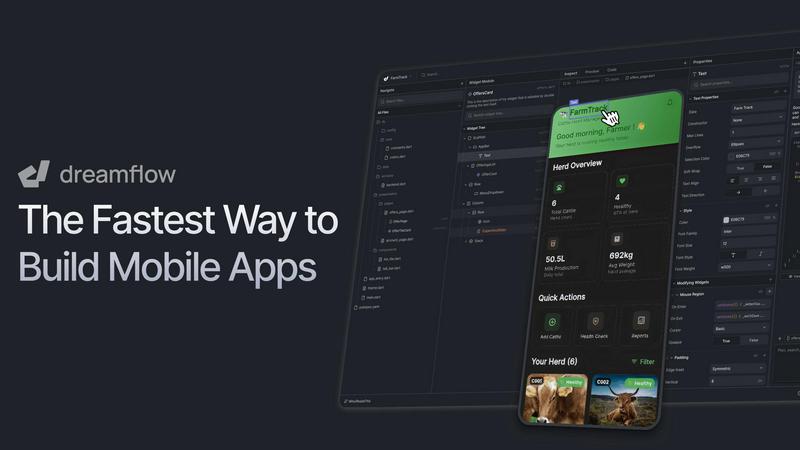
Dreamflow
TemplateFox

Feature Comparison
Dreamflow
Tri-Surface Editing
Dreamflow's revolutionary workflow synchronizes three distinct but interconnected surfaces: an AI Agent, a Visual Canvas, and full Flutter Code. You can initiate a build with a simple prompt, adjust components visually with drag-and-drop ease, and then seamlessly switch to the underlying code for precise customization. Every modification in one view is instantly reflected in the others, ensuring your project is perpetually in a shippable state and eliminating the friction of traditional, linear development paths.
AI-Powered Development
The platform features a context-aware AI agent that understands app patterns and best practices. It goes beyond simple code generation to intelligently scaffold entire features, suggest improvements, and implement changes based on your natural language prompts. This AI assistance accelerates the initial build and supports continuous refinement, learning from your project to provide increasingly relevant suggestions as you iterate.
Build for Any Screen
Powered by Flutter, Dreamflow enables you to build robust, responsive applications that automatically adapt to every device size. From mobile phones and tablets to web browsers, your app maintains a polished user experience. The platform simplifies deployment, allowing you to publish your app to the Apple App Store, Google Play Store, and the web with just a few clicks from a single codebase.
Integrated Backend & Deployment
Dreamflow integrates backend services like Firebase and Supabase out of the box, allowing you to build full-stack applications with real-time databases, authentication, and storage from day one. Combined with one-click deployment for web and mobile app stores, the platform handles the entire pipeline from initial idea to live, scalable product, removing infrastructure complexity and letting you focus on building and improving your app.
TemplateFox
User-Friendly Drag-and-Drop Editor
TemplateFox provides a user-friendly drag-and-drop editor that empowers users to create professional-grade templates effortlessly. This feature eliminates the need for coding skills, allowing anyone to design documents with a professional look and feel.
Dynamic Data Binding
With dynamic data binding capabilities, TemplateFox enables users to seamlessly inject various data types into their templates. This means that names, addresses, prices, and other critical information can be updated automatically, enhancing efficiency and accuracy in document generation.
Automated Table Management
TemplateFox features tables that automatically adjust to accommodate varying amounts of data. Whether a user has 3 items or 300, the table grows dynamically, spanning multiple pages if necessary, ensuring that all relevant information is effectively displayed.
Built-in QR Codes and Barcodes
The platform includes the ability to generate QR codes and barcodes on-the-fly based on user data. This feature supports multiple formats, including Code128 and EAN-13, making it easy to create scanner-ready labels directly from the template.
Use Cases
Dreamflow
Rapid Prototyping and MVPs
Entrepreneurs and product managers can use Dreamflow to transform a concept into a functional Minimum Viable Product (MVP) in hours, not weeks. By describing the core idea to the AI and visually refining the UI, teams can quickly create a tangible app to validate market fit, gather user feedback, and iterate based on real-world data before committing extensive resources.
Professional App Development
Professional developers and agencies can leverage Dreamflow to accelerate client projects and internal tools. The platform streamlines the initial scaffolding and UI development, allowing developers to focus their expertise on complex business logic, custom animations, and performance optimization within the clean, exported Flutter code, significantly reducing time-to-market.
Cross-Platform App Creation
Startups and businesses aiming to reach users on iOS, Android, and the web can use Dreamflow to build once and deploy everywhere. The Flutter foundation ensures native performance and a consistent interface across all platforms, managed through a single, synchronized project that eliminates the need to maintain separate codebases for each operating system.
Educational Tool for Learning Development
Aspiring developers and students can use Dreamflow as a powerful educational bridge. They can start by visualizing how app components connect, use AI to understand code structure, and then examine and modify the generated Flutter (Dart) code. This cyclical process of seeing the visual result of code changes demystifies app development and provides a practical, hands-on learning environment.
TemplateFox
Invoice Generation for Businesses
Businesses can utilize TemplateFox to automate the generation of invoices. By creating a standard template, companies can quickly produce invoices that include dynamic customer data, ensuring accuracy and saving valuable time.
Educational Certificates
Educational institutions can leverage TemplateFox to generate certificates of achievement and completion. With customizable templates, schools can automatically produce certificates that reflect the specifics of each student's accomplishments.
E-commerce Order Fulfillment
E-commerce businesses can benefit from TemplateFox by generating packing slips and shipping labels efficiently. The platform allows for the integration of order details, ensuring that each shipment is accompanied by the correct documentation.
Asset Tracking with QR Codes
Companies managing inventory can use TemplateFox to create QR code sheets for asset tracking. This functionality helps organizations maintain accurate records of their assets while facilitating quick access to information through scanning.
Overview
About Dreamflow
Dreamflow is the next evolution in app development, a visual AI builder designed to transform ideas into production-ready mobile applications with unprecedented speed and flexibility. It empowers a diverse spectrum of builders—from solo founders and entrepreneurs to professional developers and enterprise teams—to create real, scalable apps. The core innovation is a seamless, non-linear workflow that breaks free from traditional constraints. Instead of being locked into a single method like prototyping, no-code, or manual coding, Dreamflow synchronizes three powerful surfaces: AI-driven prompting, a visual canvas editor, and full Flutter code. You can start by simply describing your app idea, visually refine the layout and logic, and dive directly into clean, production-ready Dart code for granular control. Every change is instantly reflected across all surfaces, ensuring your work is always in a deployable state. Built by the team behind FlutterFlow and trusted by over 2 million builders, Dreamflow is designed for continuous iteration, allowing you to build, refine, and improve your app in a natural, cyclical flow of creative development without installation lock-in.
About TemplateFox
TemplateFox is a robust Software as a Service (SaaS) platform that simplifies the process of generating professional PDFs from WYSIWYG templates via API. Tailored for indie hackers, developers, and businesses, TemplateFox enables users to create visually appealing templates without needing any prior knowledge of HTML or CSS. The platform's intuitive drag-and-drop editor allows users to design complex documents, such as invoices, reports, and certificates, quickly and efficiently. With the ability to produce high-quality PDFs in just 1-3 seconds, whether by signed URLs or direct binary downloads, TemplateFox excels in automating document workflows. Additionally, users can start with a free plan that allows the generation of 100 PDFs monthly, providing an excellent opportunity to explore the tool's capabilities. As their needs grow, users can transition to affordable paid plans, ensuring flexibility for various document generation requirements.
Frequently Asked Questions
Dreamflow FAQ
How does Dreamflow handle code quality and customization?
Dreamflow generates clean, production-ready Flutter (Dart) code that follows best practices. The code is fully accessible and customizable. You can dive into the code editor at any point to make granular changes, add custom functions, or integrate third-party packages. Any code you write manually is synchronized back to the visual canvas, maintaining the seamless connection between all surfaces.
Can I export my app and own the code?
Yes. On the Hobby plan and above, Dreamflow provides full code export. You can download the complete Flutter project, own the source code outright, and continue development in your preferred IDE (like VS Code or Android Studio). This ensures there is no vendor lock-in, and you have complete freedom to host, modify, and scale your application independently.
What backend services does Dreamflow support?
Dreamflow offers managed backend integrations with Firebase and Supabase out of the box. These services handle essential infrastructure like authentication, real-time databases, cloud storage, and serverless functions. The platform provides a visual interface to set up and connect these services, allowing you to build full-stack applications without managing server infrastructure.
Is Dreamflow suitable for building complex, large-scale applications?
Absolutely. Dreamflow is designed for continuous iteration and scales from simple prototypes to complex, enterprise-grade applications. Features like version control (Git) on the Pro plan, clean code architecture, and the ability to integrate custom code and packages make it robust enough for professional, large-scale development workflows used by teams.
TemplateFox FAQ
How does TemplateFox work?
TemplateFox operates by allowing users to create templates using a drag-and-drop editor, which can then be filled with dynamic data through an API or integrations with platforms like Zapier.
Is there a free trial available?
Yes, TemplateFox offers a free plan that allows users to generate up to 100 PDFs per month, providing a risk-free opportunity to explore the platform's features and capabilities.
Can I customize the templates?
Absolutely! TemplateFox provides extensive customization options for each component of the templates, including borders, colors, sizes, and positions, allowing users to create documents tailored to their brand.
What types of documents can I generate with TemplateFox?
TemplateFox is versatile and can be used to generate a wide range of documents, including invoices, certificates, packing slips, reports, and any other professional business documents needed for various purposes.
Alternatives
Dreamflow Alternatives
Dreamflow is a visual AI builder for production-ready mobile applications, representing a new category of development tools that unify AI prompting, visual design, and clean code generation. It's designed for a cyclical, iterative workflow where changes sync seamlessly across all editing surfaces. Builders often explore alternatives for various reasons, such as specific budget constraints, a need for different platform support like web or desktop, a preference for a purely code-centric environment, or a requirement for particular third-party integrations not yet available. The search for the right tool is a natural part of the development journey. When evaluating other platforms, consider your core needs: the required output platform (iOS, Android, web), the desired balance between visual speed and code control, the importance of true production-ready code generation, and how the tool supports your team's continuous improvement cycle from idea to deployment and beyond.
TemplateFox Alternatives
TemplateFox is a sophisticated Software as a Service (SaaS) solution designed to streamline the creation and automation of professional PDF documents through an intuitive template editor and robust API integration. Users often seek alternatives to TemplateFox for various reasons, including pricing concerns, specific feature requirements, or compatibility with their existing platforms. When exploring alternatives, it is essential to consider the ease of use, flexibility in design, integration capabilities, and the quality of PDF output to ensure the chosen solution meets your document generation needs effectively.