
AskFormulas vs Receipt Generator
Side-by-side comparison to help you choose the right product.

AskFormulas
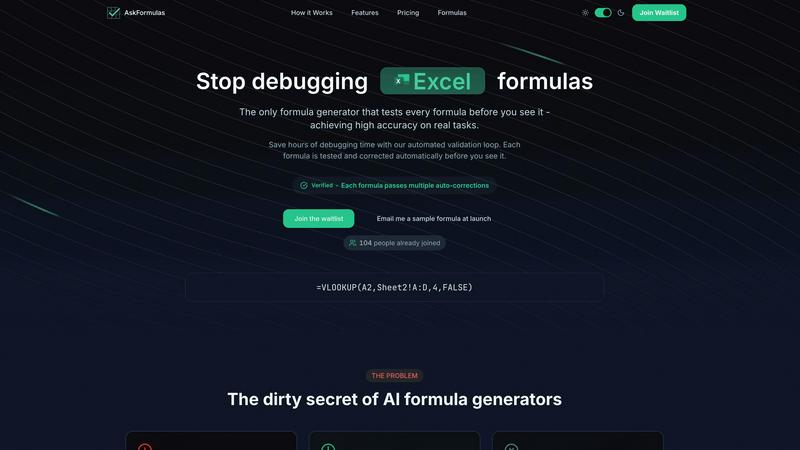
AskFormulas generates and validates Excel and Sheets formulas, testing each one to guarantee it works perfectly.
Last updated: February 28, 2026

Receipt Generator
Effortlessly create realistic custom receipts in seconds with 400+ templates, perfect for business or personal use, all for free.
Last updated: April 4, 2026
Visual Comparison
AskFormulas
Receipt Generator

Feature Comparison
AskFormulas
The Validation Loop
This is the foundational, cyclical engine of AskFormulas. Every user request undergoes a rigorous three-step process: natural language is parsed into formula intent, the proposed formula is auto-tested on synthetic template data in a sandbox, and any errors are automatically corrected through multiple iterations. This continuous improvement cycle doesn't stop until the formula is fully validated, guaranteeing the high accuracy that sets the tool apart from competitors who provide untested, often broken, outputs.
Natural Language to Formula
The tool eliminates the need to memorize complex formula syntax. Users can input their needs using simple, plain English descriptions, such as "sum all values in column B where column A contains the word Sales." AskFormulas' AI understands the context and intent behind the request, converting everyday language into precise spreadsheet function logic, making advanced data manipulation accessible to everyone regardless of their technical expertise.
Cross-Platform Syntax Toggle
AskFormulas seamlessly supports both Microsoft Excel and Google Sheets with a simple one-click toggle. The system automatically adjusts the generated formula's syntax to be natively compatible with the selected platform. It intelligently handles the differences between functions, like VLOOKUP for Excel and ARRAYFORMULA combinations for Sheets, ensuring you get a correct formula for your specific spreadsheet environment every time.
Smart Error Detection & Correction
Instead of handing users a formula that results in #REF! or #VALUE! errors, AskFormulas proactively identifies and fixes these issues during its validation phase. The system simulates the formula's execution, catches potential errors, and runs through auto-correction cycles to resolve them. This means the user receives a pre-debugged, working formula, effectively transferring the burden of troubleshooting from the human to the AI's iterative validation process.
Receipt Generator
Extensive Template Library
Receipt Generator boasts a vast collection of over 400 professionally designed templates tailored for various industries, ensuring that users can find the perfect fit for their needs. This extensive library allows for quick and easy selection, saving valuable time while providing a polished look.
AI "Place in Scene" Feature
With the unique AI "Place in Scene" feature, users can generate photorealistic images of their receipts on any surface. This capability eliminates the need for printing while providing a realistic presentation, making it ideal for inventory documentation and content creation.
Full Customization Options
The tool offers complete customization options, enabling users to edit line items, prices, taxes, payment methods, and store information to match specific requirements. This level of detail ensures that every receipt reflects the user’s needs accurately.
Instant Download and User-Friendly Interface
Receipt Generator provides a lightning-fast download experience, allowing users to export their receipts as high-resolution PNG or PDF files in just one click. Its intuitive drag-and-drop editor makes it easy to rearrange and customize receipt elements without any coding knowledge.
Use Cases
AskFormulas
Financial Reporting & Analysis
Financial analysts and accountants can rapidly generate complex formulas for tasks like quarterly revenue summation, expense categorization using SUMIFS, or intricate XLOOKUP formulas for consolidating data from multiple sheets. The validation loop ensures that every financial calculation is accurate from the start, eliminating risky errors in reports and saving countless hours otherwise spent manually auditing and debugging formula chains.
Sales & Revenue Data Management
Revenue managers and sales operations specialists can use AskFormulas to quickly create formulas for calculating commissions, tracking pipeline growth, or analyzing sales performance by region. Describing a need like "calculate average deal size for closed-won opportunities in Q3" yields a verified formula instantly, allowing teams to maintain accurate, real-time dashboards without formula-related delays or mistakes.
Small Business Bookkeeping
Small business owners and freelancers who may not be spreadsheet experts can streamline their bookkeeping. They can easily generate formulas to calculate taxes, total monthly expenses, or project cash flow by simply asking in natural language. The guaranteed accuracy of the verified formulas provides peace of mind, ensuring their financial records are correct without needing to learn advanced Excel functions.
Academic Research & Data Compilation
Students and researchers compiling data for theses, papers, or projects can use AskFormulas to handle data manipulation tasks. Whether it's standardizing data sets, performing statistical calculations, or merging information from various sources, the tool allows them to focus on their analysis rather than the technical hurdle of writing and debugging error-prone formulas from scratch.
Receipt Generator
Small Business Operations
Small business owners can utilize Receipt Generator to create professional receipts that enhance their brand image and provide customers with a clear record of their purchases. This tool simplifies the billing process, allowing for quick adjustments and easy downloads.
Freelance Invoicing
Freelancers can take advantage of Receipt Generator to create customized invoices and receipts for their clients. This feature ensures that payments are documented accurately, fostering trust and professionalism in their business dealings.
Content Creation and Visual Projects
Content creators can use the AI "Place in Scene" feature to generate realistic receipts for their blogs, videos, or social media posts. This capability allows for enhanced visual storytelling and adds credibility to their projects without the hassle of printing.
Inventory and Expense Documentation
Businesses looking to maintain accurate inventory records can use Receipt Generator to document purchases efficiently. The tool allows for the creation of receipts that can be used for expense tracking and financial reporting, making bookkeeping straightforward.
Overview
About AskFormulas
AskFormulas is a revolutionary AI-driven tool engineered to end the frustration of broken spreadsheet formulas. It transforms the way professionals interact with Excel and Google Sheets by generating, validating, and delivering ready-to-use formulas with guaranteed accuracy. At its core is a unique, iterative validation loop that rigorously tests every single formula against real data in a secure sandbox environment, automatically correcting errors until a verified, working formula is produced. This process directly addresses the critical flaw of other AI generators, which can have error rates as high as 40-60%, by ensuring users only see formulas that have already been proven to work. The tool is built for a wide range of users, from financial analysts and revenue managers conducting complex data analysis to small business owners and students who need reliable results without becoming formula syntax experts. Its value proposition is simple yet powerful: save hours of tedious debugging time. With a minimalist interface, users simply describe their goal in plain English, toggle between Excel or Google Sheets, and instantly receive a formula marked with a green "Verified" badge, giving them immediate confidence to copy, paste, and apply it directly to their live data.
About Receipt Generator
Receipt Generator is the ultimate online tool designed for creating realistic and professional receipts with ease and efficiency. With an extensive library of over 400 store-specific templates, including popular brands like Walmart, Target, Starbucks, CVS, and McDonald's, it caters to diverse user needs. Whether you are a small business owner, freelancer, content creator, or reseller, this tool is tailored to help you customize every detail of your receipts, such as items, prices, dates, and payment methods, and download high-resolution PNG files instantly.
One of the standout features of Receipt Generator is the innovative AI "Place in Scene" feature, allowing users to generate photorealistic images of their receipts on various surfaces, making it perfect for content creators and visual projects. The tool's lightning-fast performance ensures that users can create and download receipts without delays. Plus, with no account required to get started, Receipt Generator is accessible to anyone looking to streamline their receipt creation process while maintaining high standards of authenticity and professionalism.
Frequently Asked Questions
AskFormulas FAQ
How accurate are the generated formulas?
AskFormulas is built for exceptionally high accuracy. Unlike other AI tools that provide untested formulas with high error rates, every formula generated by AskFormulas passes through a proprietary validation loop. This process involves auto-testing the formula on synthetic data and running iterative auto-corrections until it works flawlessly. The result is a "Verified" formula that has been proven to execute correctly before you ever see it, dramatically reducing the chance of errors.
Does it work with both Excel and Google Sheets?
Yes, absolutely. AskFormulas is designed as a universal formula assistant. With a simple one-click toggle in the interface, you can switch between Microsoft Excel and Google Sheets syntax. The AI automatically adjusts the generated formula to use the correct functions and structure for your chosen platform, providing seamless compatibility whether you use one, the other, or both in your workflow.
How many formulas can I generate?
The number of formulas depends on your subscription plan. The Starter plan offers 500 validated formulas per month, the Pro plan provides 2,000 per month, and the Team plan includes 6,000 formulas per month to be shared among up to 5 users. This tiered system ensures there's a plan suitable for individual casual users, power users, and collaborative small teams.
What happens if my formula has an error?
With AskFormulas, you should rarely, if ever, receive a formula with an error. Its core innovation is the pre-emptive validation and correction cycle. If an initial formula draft contains an error like #REF!, the system detects it during the auto-test phase and triggers an auto-correction iteration. It will continuously refine and retest the formula until it passes all checks and earns the "Verified" status, ensuring you only get working, error-free results.
Receipt Generator FAQ
Is Receipt Generator free to use?
Yes, Receipt Generator offers a free tier that allows users to create receipts with a watermark. For unlimited downloads and additional features, users can opt for Pro plans.
Can I customize the templates?
Absolutely! Receipt Generator provides full customization options, enabling users to edit every detail of the receipt, including items, prices, taxes, and payment methods.
How does the AI "Place in Scene" feature work?
The AI "Place in Scene" feature generates photorealistic images of your receipts on various surfaces without the need for printing. Users can visualize their receipts in real-world scenarios, enhancing their presentations.
What types of receipts can I create?
You can create a wide range of receipts using Receipt Generator, including those for retail stores, restaurants, pharmacies, and more. The extensive template library ensures there is a suitable option for virtually any need.
Alternatives
AskFormulas Alternatives
AskFormulas is a specialized AI productivity tool designed to generate and validate spreadsheet formulas for Excel and Google Sheets. It belongs to the category of productivity and management software, specifically targeting the automation and simplification of complex spreadsheet tasks. Users often seek alternatives for various reasons, including budget constraints, the need for different feature sets, or specific platform integrations not offered by their current solution. When evaluating alternatives, it's crucial to consider your core needs. Look for tools that not only generate formulas but also ensure their accuracy, as a high error rate can negate any time savings. The ideal solution should adapt to your workflow, offering support for your preferred spreadsheet platform and providing features that foster continuous improvement in your data management processes. The search for the right tool is an iterative journey. The best choice is one that evolves with your skills, reducing friction and building confidence with each use. Prioritize reliability and a user-centric design that turns formula creation from a chore into a streamlined, error-free component of your daily productivity cycle.
Receipt Generator Alternatives
Receipt Generator is a leading online tool in the productivity and management category, offering users the ability to create custom receipts with over 400 store-specific templates. This innovative platform is especially popular among small business owners, freelancers, and content creators who need a reliable solution for generating receipts quickly and efficiently. However, users often seek alternatives due to various reasons, such as pricing structures, specific features that may better suit their needs, or compatibility with different platforms. When looking for an alternative to Receipt Generator, it's essential to consider several factors. Evaluate the variety of templates available, ease of customization, and the quality of generated images. Additionally, assess the pricing tiers, any limitations on downloads, and whether a free version with useful features exists. A well-rounded alternative should align with your specific requirements while maintaining a user-friendly experience.