
AI Formatter vs LuxSign
Side-by-side comparison to help you choose the right product.
AI Formatter
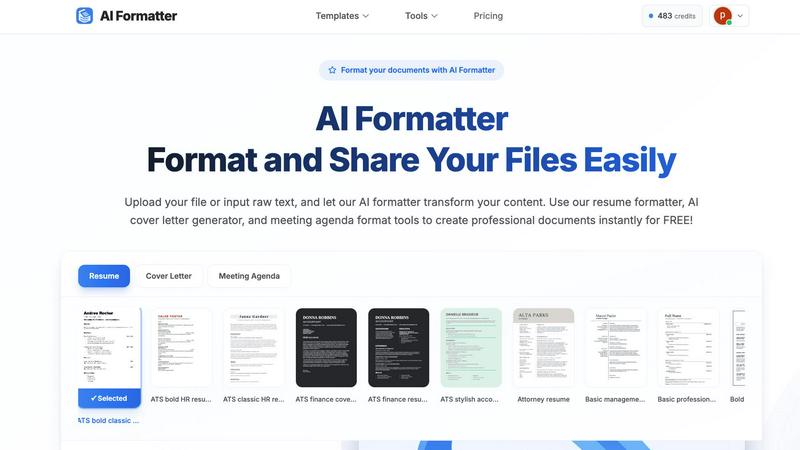
AI Formatter polishes your raw text into professional documents, continuously improving your content.
Last updated: March 1, 2026

LuxSign simplifies document signing with secure, legally valid electronic signatures, ensuring compliance and.
Last updated: February 26, 2026
Visual Comparison
AI Formatter
LuxSign

Feature Comparison
AI Formatter
AI-Powered Document Transformation
At the heart of AI Formatter is its sophisticated artificial intelligence engine. This feature intelligently processes any raw text or uploaded file (supporting PDF, DOC, DOCX, and TXT formats up to 10MB) and automatically structures it into a professionally formatted document. The AI understands context and content hierarchy, applying optimal formatting, spacing, and layout to create a polished final product. This continuous, iterative process ensures your documents improve with every use, saving you significant time and effort while guaranteeing a professional outcome.
Extensive Template Library with ATS Optimization
AI Formatter provides access to a curated library of over 162 professional templates tailored for resumes, cover letters, meeting agendas, and invoices. Each template is meticulously designed to be ATS-friendly, ensuring your resume passes through automated screening systems used by over 95% of large companies. This feature allows for cyclical refinement; you can start with a base template and iteratively customize it to perfection, knowing the foundational structure is already optimized for success and professional appeal.
Real-Time Online Editor & Customization
After the AI performs its initial formatting, users gain full control through a powerful, intuitive online editor. This feature allows for deep customization of fonts, colors, layouts, and content. You can tweak every detail to match your personal brand or company guidelines. This editor facilitates an iterative workflow—format, review, edit, and improve—enabling continuous enhancement of your documents until they meet your exact specifications, all within the same seamless platform.
Multi-Format Export & Secure Sharing
Once your document is perfected, AI Formatter offers flexible export options to download your work in multiple formats including Word and PDF, ensuring compatibility with any application or submission portal. Additionally, secure sharing features allow you to collaborate or present your work directly from the platform. This completes the cyclical document journey: from creation and iterative editing to final distribution, all while maintaining the security and integrity of your professional information.
LuxSign
Multiple Signature Methods
LuxSign provides various signature options, allowing users to draw their signature with a mouse, type their name, or upload an image. This flexibility ensures that signing documents aligns with personal preferences and enhances the user experience. Custom initials are also supported for quick and efficient document signing.
Advanced Security
At LuxSign, security is paramount. The platform employs industry-standard encryption to protect documents during upload, storage, and transmission. With secure servers located in Luxembourg, LuxSign ensures compliance with EU data protection regulations, providing users with peace of mind regarding the safety of their sensitive information.
Collaboration Workspaces
LuxSign fosters teamwork by offering collaboration workspaces where users can organize documents in shared folders. This feature allows team members to manage access rights and collaborate seamlessly on signing workflows, streamlining the process and enhancing productivity.
Complete Audit Trail
LuxSign maintains a detailed audit trail for every document, logging actions with timestamps, IP addresses, and signer information. This feature not only enhances transparency but also provides the necessary confirmation for compliance and verification, which is crucial for businesses operating in regulated industries.
Use Cases
AI Formatter
Job Seekers Crafting ATS-Optimized Applications
For individuals navigating a career transition or job search, AI Formatter is indispensable. Users can upload an existing resume or input raw career history, and the platform's AI resume formatter will transform it into a polished, ATS-optimized document designed to pass automated screenings. The iterative process allows job seekers to continuously refine their resumes and cover letters using the AI cover letter generator, dramatically improving their chances of landing interviews and saving countless hours of manual formatting.
Professionals Standardizing Business Documents
Business professionals, from managers to freelancers, can use AI Formatter to create consistent, on-brand documents. Whether it's transforming meeting notes into a structured meeting agenda format with the agenda formatter or generating polished invoices using the AI invoice generator, the tool ensures all business communications are professional. This enables a cycle of continuous improvement in document quality, streamlining internal and external communications and presenting a unified, professional image.
Students and Academics Preparing Formal Submissions
Students, researchers, and academics can leverage AI Formatter to ensure their papers, theses, and project submissions adhere to strict formatting guidelines. By inputting raw text, they can quickly structure their work into a professionally formatted document, allowing them to focus on content quality rather than layout struggles. The platform supports an iterative drafting process, where documents can be formatted, reviewed, and refined repeatedly to achieve publication-ready quality.
Businesses Creating Cohesive Internal Templates
Companies can utilize AI Formatter to develop and standardize internal document templates for proposals, reports, and agendas. By using the platform's tools, teams can ensure every document leaving the organization maintains a consistent, professional format. This creates a cycle of efficiency and brand cohesion, as employees can quickly generate on-brand documents from drafts or notes, improving overall productivity and corporate presentation.
LuxSign
Streamlining Contract Negotiations
Businesses can use LuxSign to facilitate contract negotiations by enabling multiple stakeholders to sign documents in either parallel or sequential order. This speeds up the process, eliminating the delays associated with traditional signing methods, and ensuring all parties can finalize agreements swiftly.
Secure Client Onboarding
LuxSign is ideal for client onboarding processes where multiple documents need to be signed quickly and securely. By using the platform, organizations can ensure that all necessary agreements are signed in compliance with legal standards, enhancing the onboarding experience for new clients.
Efficient Document Management
Organizations benefit from LuxSign's document management capabilities, which allow users to upload, organize, and track documents easily. The ability to send automatic email notifications keeps all parties informed about the status of documents, ensuring that nothing falls through the cracks.
Enhancing Compliance in Regulated Industries
For businesses operating in highly regulated industries, LuxSign provides the assurance of compliance through its secure document handling and detailed audit trails. This makes it an invaluable tool for organizations looking to maintain rigorous standards in legal documentation.
Overview
About AI Formatter
AI Formatter is an innovative, AI-driven document formatting platform developed by Sun Sky LLC, designed to revolutionize how professionals create and manage their documents. This cloud-based SaaS tool serves as a powerful solution for job seekers, professionals, businesses, and academics who need to produce polished, professional documents efficiently. The core value proposition lies in its ability to transform raw, unformatted text or uploaded files—including Word, PDF, and TXT documents—into beautifully structured, ATS-optimized documents in mere seconds. With a proven 95%+ pass rate on Applicant Tracking Systems, AI Formatter significantly enhances your chances in the job market while saving over two hours of manual formatting work per document. The platform embodies a cyclical and iterative approach to document creation, enabling continuous improvement and refinement of your professional materials. By offering a vast library of over 100 professional templates and an intuitive real-time editor, AI Formatter ensures that every document you create not only meets but exceeds industry standards, streamlining your workflow and elevating your professional presentation with each use.
About LuxSign
LuxSign is a cutting-edge electronic signature platform designed to meet the stringent compliance needs of businesses across Europe. Developed in Luxembourg, this secure, cloud-based solution ensures that all documents undergo end-to-end encryption and are stored exclusively within the country, fully adhering to GDPR regulations. LuxSign empowers organizations to sign and manage documents digitally, streamlining workflows while maintaining the highest security standards. With support for eIDAS SES standards, LuxSign guarantees the legal validity of contracts throughout the European Union. Its user-friendly interface offers robust features such as customizable signing workflows, automated notifications, and a variety of signing methods, making it an ideal choice for professionals, small teams, and large enterprises alike. LuxSign not only simplifies the signing process but also enhances collaboration and document management, making it an essential tool for modern businesses seeking efficiency and compliance.
Frequently Asked Questions
AI Formatter FAQ
What file formats does AI Formatter support for upload?
AI Formatter supports a wide range of common document formats for upload, including PDF, DOC (Microsoft Word), DOCX, and plain text (TXT) files. This ensures you can start the formatting process from almost any existing document you have. The maximum file size for uploads is 10MB, which accommodates most standard professional documents.
How does the AI ensure my resume passes ATS (Applicant Tracking Systems)?
Our AI is specifically trained on the parsing algorithms used by popular ATS software. It structures your resume with clean, machine-readable formatting, optimal keyword placement, and standard section headers that ATS systems expect. The templates in our library are pre-designed to avoid common ATS pitfalls like complex columns, graphics, or unusual fonts, contributing to our platform's 95%+ ATS pass rate through continuous algorithmic refinement.
Can I edit my document after the AI formats it?
Absolutely. Once the AI performs the initial formatting, your document opens in our full-featured, real-time online editor. Here, you have complete control to edit text, customize fonts and colors, adjust the layout, and make any other changes you see fit. This facilitates an iterative workflow where you can continuously review and improve the AI's output until the document is perfect for your needs.
Is there a free trial or a free version available?
Yes, AI Formatter offers a free tier that allows users to access core formatting tools. You can upload your file or input raw text, select from professional templates, and use our AI to format documents like resumes, cover letters, and agendas at no cost. This lets you experience the power of our iterative formatting cycle and see the professional results before committing to any premium features.
LuxSign FAQ
What types of documents can I sign with LuxSign?
LuxSign supports a variety of document formats, including PDF, DOC, and DOCX. Users can upload files up to 10MB, ensuring versatility for different business needs.
How does LuxSign ensure the security of my documents?
LuxSign employs industry-standard encryption methods during the entire lifecycle of a document, from upload to storage and transmission. Additionally, all documents are hosted on secure servers in Luxembourg, complying with strict EU data protection laws.
Can I customize the signing workflow in LuxSign?
Yes, LuxSign allows users to choose between parallel and sequential signing workflows. You can add multiple signers to each document and customize the order in which they should sign, providing great flexibility in managing document approvals.
Is LuxSign compliant with EU regulations?
Absolutely. LuxSign is built in compliance with eIDAS regulations, providing Simple Electronic Signatures (SES) that are legally valid across all EU member states. For transactions requiring higher legal assurance, Advanced (AES) or Qualified Electronic Signatures (QES) can also be facilitated.
Alternatives
AI Formatter Alternatives
AI Formatter is a leading AI-powered document formatting tool in the productivity and management category. It transforms raw text into polished, professional documents using a vast library of templates, saving users significant time and effort. This focus on continuous improvement and streamlined output defines its core value. Users often explore alternatives for various reasons, seeking tools that better align with their specific budget, desired feature set, or platform compatibility. Needs evolve, and finding a solution that offers the right balance of automation, customization, and value is a key part of the iterative search for the optimal productivity workflow. When evaluating other options, consider factors like template quality and variety, the depth of real-time editing capabilities, and supported export formats. A tool that grows with your needs, offering both powerful automation and the flexibility for personal refinement, often provides the most sustainable value for ongoing professional document creation.
LuxSign Alternatives
LuxSign is a cloud-based electronic signature platform based in Luxembourg, designed to meet the needs of businesses seeking high compliance and legal validity for their documents across the European Union. With its eIDAS SES compliance, LuxSign ensures that signatures are recognized and enforceable in all EU member states. Users often seek alternatives to LuxSign for various reasons, such as pricing considerations, specific feature requirements, or the need for integration with existing platforms. When searching for an alternative to LuxSign, it's essential to evaluate several key factors. Look for platforms that offer similar compliance standards, robust security features, user-friendly interfaces, and flexibility in signing workflows. Additionally, consider the availability of advanced features like document templates, collaboration options, and integration capabilities, as these can significantly enhance the overall user experience.