
Yume Comic
Yume Comic turns your story ideas into consistent manga panels and pages instantly with AI, no drawing skills needed.
Visit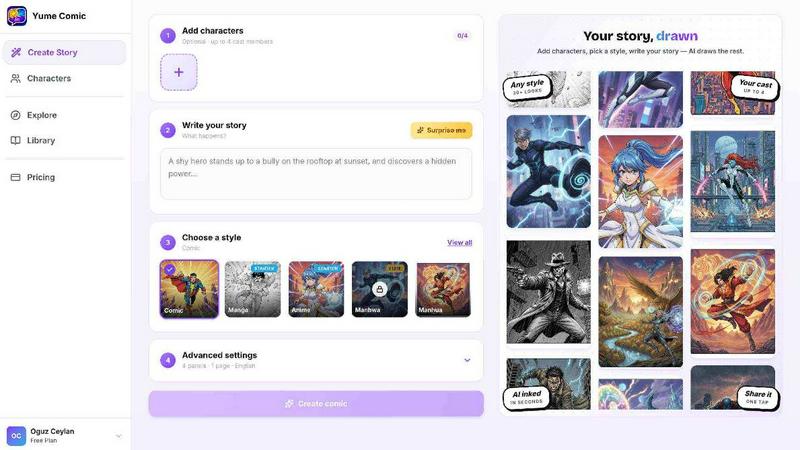
About Yume Comic
Yume Comic is an AI-powered comic creation tool designed to democratize visual storytelling. It is built for anyone who has ever had a story idea but lacked the traditional drawing skills to bring it to life. The platform allows users to describe their ideas, characters, or story concepts in plain text, and the AI transforms those prompts into full comic-style images, scenes, and multi-panel pages. This tool is for storytellers, social media creators, manga fans, and anyone exploring the world of visual narratives. The core value proposition is that it removes the technical barriers of sketching, perspective, and anatomy, allowing users to focus purely on their creativity. Yume Comic supports a wide range of popular styles including classic shonen manga, moody manhwa, vibrant webtoons, and comic strips. It is a free tool that works directly in a browser, making it accessible from any device. The iterative process is central to the experience: users start with a simple prompt, see a first draft in seconds, and then refine it. This cyclical workflow of prompt, generate, review, and improve empowers users to become the director and writer of their own worlds without needing a studio of artists. Whether you are crafting a high-energy action sequence or a soft emotional scene, Yume Comic provides the framework to see your imagination come to life, panel by panel. It is about turning that fleeting idea in your head into a tangible, shareable masterpiece that you can be proud of, and then making it even better with each iteration.
Features of Yume Comic
Prompt to Page Generation
This feature lets you turn a one-line story idea into a full comic layout in seconds. You simply type a description of your character and the action, and the AI reads your prompt to build a multi-panel page complete with dialogue bubbles and cinematic angles. It removes the need for sketching or understanding perspective, allowing you to generate a first draft instantly. The process is cyclical: you generate a page, review it, and then refine your prompt to improve the output until it matches your vision.
Consistent Character Design
One of the hardest parts of creating a series is ensuring your main character looks the same from panel to panel. Yume Comic handles this heavy lifting for you. Once you define your protagonist through a text description, the AI ensures their hair, outfit, and facial features remain perfectly on model across the entire story. This consistency allows you to focus on the plot and dialogue, trusting that your hero will look like themselves in every scene, from the first panel to the last.
Multi-Style Exploration
Why stick to one look when you can try them all? This feature lets you switch between dozens of artistic styles with a single click. You can experiment with classic black-and-white shonen manga, moody noir, vibrant vertical manhwa, or bright webtoon aesthetics. It is like having a whole studio of artists ready to work on your script. This iterative exploration allows you to test different vibes for your characters and scenes, ensuring you find the perfect aesthetic for your world before committing to a final look.
Browser-Based Free Tool
Yume Comic works entirely in your browser, meaning there is no need for expensive tablets, powerful computers, or complicated software that takes years to learn. You can start creating on your phone, laptop, or tablet from anywhere. This accessibility removes the financial and technical barriers to entry. The free nature of the tool supports a cyclical improvement process: you can create, share, get feedback, and then jump back in to make revisions without any subscription pressure, continuously refining your work until it is perfect.
Use Cases of Yume Comic
Rapid Prototyping for Storytellers
Writers and storytellers can use Yume Comic to quickly visualize scenes from their novels or scripts. Instead of describing a dramatic rainy standoff in text alone, they can generate a visual panel in seconds. This helps them see if the composition and pacing work before investing time in full production. The iterative process allows them to generate a scene, critique the visual flow, adjust the prompt, and generate an improved version, effectively storyboarding their narrative with AI assistance.
Social Media Content Creation
Social media users and influencers can create unique, eye-catching comic strips to tell micro-stories or illustrate posts. Whether it is a funny anecdote, a motivational quote, or a short narrative for a platform like Instagram or Twitter, Yume Comic allows for the rapid generation of professional-looking visuals. The cyclical improvement loop is perfect here: create a comic, share it, see the engagement, and then iterate on the style or story for the next post to continuously improve audience connection.
Manga and Webtoon Fan Projects
Fans of manga and webtoons can use this tool to create fan art, alternate scenes, or even their own original short series. They can explore their favorite styles, like classic shonen or modern manhwa, without needing professional drawing skills. The consistent character feature is crucial here, allowing fans to keep their original characters looking the same across multiple pages. The iterative process lets them build a full chapter over time, refining each page as they go.
Educational and Instructional Comics
Teachers, trainers, and educators can use Yume Comic to create simple, engaging instructional comics. A complex concept can be broken down into a visual step-by-step narrative that is easier for students to understand. For example, a science teacher could create a comic strip explaining the water cycle. The free, browser-based nature of the tool makes it easy to create and share these materials. The cyclical workflow allows educators to generate a draft, test it with students, and then improve it based on feedback.
Frequently Asked Questions
Do I need any drawing skills to use Yume Comic?
No, you do not need any drawing skills whatsoever. Yume Comic is built specifically to remove that barrier. You simply describe your idea, character, or scene using text prompts. The AI handles all the visual generation, including sketching, perspective, and anatomy. The tool is designed so that your imagination and ability to describe a scene are the only skills required.
How does the character consistency feature work?
You define your character through a text description, such as "a young hero with spiky black hair, a red scarf, and a determined expression." The AI then uses this description as a reference for every panel it generates. When you create a new page, the system recalls this core description to ensure your hero's hair, outfit, and face stay consistent across the entire story, from the first panel to the last.
What styles can I create with this tool?
Yume Comic supports a wide variety of popular comic and manga styles. You can choose from classic black-and-white shonen manga, moody and detailed manhwa, vibrant and vertical-scroll webtoons, and traditional comic strips. The tool allows you to switch between these styles with a single click, letting you experiment and find the perfect aesthetic for your story.
Is Yume Comic really free to use?
Yes, Yume Comic is a free tool. You can start creating comics directly in your browser without any upfront cost or subscription. The tool is designed to be accessible to everyone, removing both the skill and financial barriers to entry. You can create, share, and iterate on your projects without worrying about pricing tiers or usage limits.
Similar to Yume Comic

Create release-ready album covers from a prompt or photo. Generate, refine, and export art for singles, EPs, mixtapes, and playlists.

Z Image Turbo is an online AI image generator for photorealistic images, bilingual posters, ecommerce visuals, ads, and social content.


Enhance photos, create images, and generate videos with AI workflows, effects, and production-tested models.

AI image and video studio. Generate from a prompt, animate stills, swap faces, restyle clips and edit — one credit pool, no subscription.

NanoEditor is an AI-powered D&D portrait generator that turns character details like ancestry, class and gear into focused fantasy RPG art.

Create polished AI images and videos from prompts or references for social posts, ads, flyers, album covers, and campaigns.

GPT Image 2 API generates and edits production-ready images with clear text, reference images, and developer-friendly API workflows.