
TaleHug AI Story Generator for Kids
Turn a child's voice, drawing, or idea into a safe, illustrated AI storybook for co-reading, then refine it together endlessly.
Visit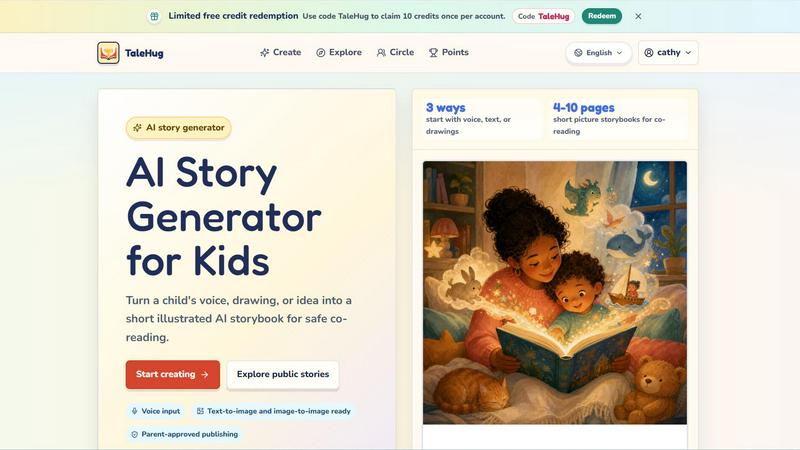
About TaleHug AI Story Generator for Kids
TaleHug is an AI-powered storytelling tool designed specifically for children, turning a child's voice, drawing, or simple idea into a short, illustrated AI storybook for safe co-reading. The platform emphasizes kid-friendly interaction and colorful illustrations to make story creation engaging and approachable for young readers and writers. With TaleHug, children can craft their own illustrated stories using AI-assisted ideas, drawings, and imagination, all within a parent-approved and privacy-first environment. The product is built for preschool and kindergarten ages (3-6 years old) and produces 4 to 10 page picture storybooks perfect for co-reading between parents and children. TaleHug offers three distinct ways to start a story: voice input, text prompts, or uploaded drawings, making it accessible for children who cannot yet write fluently. Every story draft begins as private by default, and any public or circle sharing requires adult review and approval. The platform also features a public gallery where approved examples from young creators are showcased, inspiring continuous creativity. TaleHug operates on a limited free credit model, with users able to redeem a code for 10 credits per account to begin their storytelling journey. The ultimate goal is to provide a safe, iterative, and continuously improving space where children can explore their imagination, build early literacy skills, and enjoy the magic of creating their own stories with the gentle guidance of AI.
Features of TaleHug AI Story Generator for Kids
Three Ways to Start a Story: Voice, Text, or Drawings
Children can begin their story creation journey using three distinct input methods that cater to different developmental stages and preferences. They can speak their idea aloud using voice input, type a simple text prompt, or upload an original drawing to serve as the foundation for their story. This flexibility ensures that even pre-literate children can participate fully, turning their verbal imagination or artistic creations into a fully illustrated storybook. Each method is designed to be intuitive and kid-friendly, reducing frustration and encouraging repeated creative attempts.
AI-Powered Picture and Story Generation
Each page of the storybook is generated with a strong, colorful illustration paired with one short, age-appropriate sentence. The AI stores the original prompt for each page, allowing parents and children to regenerate images or text if they wish to refine the story. This feature supports an iterative creative process where children can experiment with different visual styles and narrative directions, learning that storytelling is a dynamic and improvable craft. The text-to-image and image-to-image capabilities ensure that every story is visually rich and engaging.
Parent-Approved Publishing and Visibility Controls
TaleHug prioritizes safety with three distinct visibility modes: private, circle, and public. All drafts start as private by default, giving children a safe space to create without external visibility. Before a story can be shared with a circle of trusted friends or published to the public gallery, an adult must review and approve the content. The platform uses safe display names instead of full child names, does not collect school names, addresses, or contact details, and has no public comments in the MVP version. This layered safety system ensures that sharing is always parent-guided and age-appropriate.
Public Gallery and Story Prompts for Inspiration
The platform includes a public gallery where approved story examples from young creators are displayed, providing a source of inspiration for new users. Additionally, TaleHug offers a library of pre-made picture worlds and story prompts, such as "Moon rabbit bedtime," "Sharing the red truck," and "First school morning." These prompts are designed to spark ideas for children who may feel stuck, covering themes like friendship, bravery, bedtime, and classroom social stories. This feature continuously encourages children to explore new narrative territories and build upon existing ideas.
Use Cases of TaleHug AI Story Generator for Kids
Bedtime Story Creation for Co-Reading
Parents can use TaleHug to create personalized bedtime stories that feature their child's own ideas, drawings, or voice recordings. A child might say "a moon rabbit who is scared of the dark" and watch as the AI generates a 4-10 page picture storybook that they can read together at bedtime. This process turns the nightly routine into an interactive creative session, strengthening the parent-child bond and making reading a more engaging and personalized experience. The stories can be saved and revisited, creating a growing library of family-created content.
Classroom Social Story Development for Kindergarten
Teachers can use TaleHug to help young students create social stories that address specific classroom situations, such as taking turns, sharing toys, or managing first-day nerves. For example, a teacher might guide a child to create a story about "sharing the red truck" to reinforce positive social behavior. The visual and textual output provides a concrete, personalized tool for discussing emotions and social rules in a way that is accessible to preschool and kindergarten children. The private draft mode allows for safe experimentation before any sharing with the class.
Encouraging Reluctant Writers Through Art and Voice
For children who are hesitant to write or struggle with spelling and sentence formation, TaleHug offers an alternative entry point through drawing and voice input. A child can upload a picture they drew of a "brave soldier and a star witch" and watch as the AI transforms it into a short story with illustrations. This reduces the pressure of writing while still engaging the child in narrative thinking, sequencing, and creative expression. The iterative regeneration feature allows them to tweak the story until it feels like their own, building confidence over time.
Family Storybook Creation for Special Occasions
Families can use TaleHug to create personalized storybooks for holidays, birthdays, or family events by inputting specific characters, settings, and events from their own lives. A child might describe "a little train going to grandma's house" and the AI will generate a storybook that can be shared with relatives via the circle visibility mode. This use case turns storytelling into a collaborative family activity, producing keepsakes that can be revisited and cherished. The parent approval step ensures that only appropriate content is shared with extended family or the public gallery.
Frequently Asked Questions
How does TaleHug ensure the safety and privacy of my child?
TaleHug is designed with privacy and safety as core principles. All story drafts start as private by default and are only visible to the child and their parent. Any sharing to a circle or the public gallery requires explicit adult review and approval. The platform uses safe display names instead of full child names and does not collect school names, addresses, or any contact details for children. Additionally, there are no public comments in the MVP version, eliminating the risk of unwanted interaction. The public gallery only displays approved examples that have been vetted for appropriateness.
Can my child use TaleHug if they cannot read or write yet?
Absolutely. TaleHug offers three ways to start a story: voice input, text, and drawings. Children who cannot yet read or write can speak their story idea aloud using the voice input feature, or they can upload a drawing they have made. The AI then transforms that voice recording or drawing into a fully illustrated storybook with one short sentence per page. This makes the tool accessible to children as young as three years old, allowing them to participate in storytelling regardless of their literacy level.
How many stories can my child create with the free credits?
Each account can redeem a code to claim 10 credits, and each credit typically allows the creation of one storybook. The platform operates on a limited free credit model to allow families to try the service. Additional credits may be available through promotional codes or future subscription plans. The 10 free credits provide enough opportunities for a child to explore the different input methods, experiment with regeneration, and create several storybooks to share with family.
What age range is TaleHug designed for?
TaleHug is specifically designed for preschool and kindergarten ages, typically children between 3 and 6 years old. The storybooks generated are 4 to 10 pages long, which is an ideal length for short co-reading sessions with a parent or caregiver. The language used in the generated stories is age-appropriate, and the illustrations are colorful and engaging. However, older children who enjoy creative storytelling and illustration may also find the tool enjoyable, especially if they are developing their writing skills.
Explore more in this category:
Similar to TaleHug AI Story Generator for Kids

Turn two photos of people or pets into Hotel Lobby-style duo videos with generated audio.

Free AI video generator to turn text prompts and photos into clips, with free starter credits and watermark-free downloads.

One API key and one credit balance for Reddit and X data. REST endpoints and a hosted MCP server, so your code and your agents call the same tools.

AI SEO agent that finds pages ranking for your keywords, pitches the people behind them from your inbox, and follows up. You approve every send.

AI social listening agent: finds people on Reddit and X describing your problem, scores buying intent and drafts a reply you approve.

Free ad creative hub: 1,750+ prompts behind viral AI ads, 118 hook frameworks, teardowns, swipe files and 27 free AI tools.

Compare social media scheduling, content creation and monetization tools with verified pricing, ranked by open scorecards.

DiscoverLaunches is a weekly launch board for indie makers and SaaS founders. Paste your URL and AI fills in your listing. Every product gets a perman