
Online Audio Converter
Effortlessly convert audio and video files to various formats online for free with high quality and no software installations required.
Visit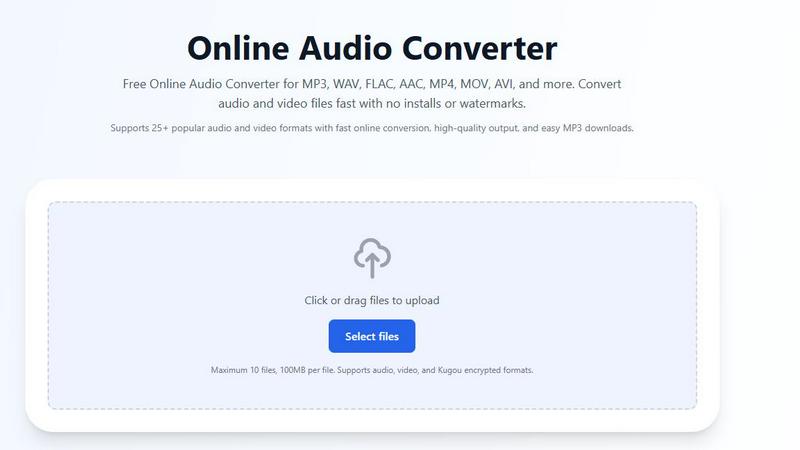
About Online Audio Converter
Online Audio Converter is a versatile, web-based tool designed to empower users to convert audio and video files effortlessly. Whether you need to convert MP3, WAV, FLAC, AAC, or various video formats, this platform caters to your needs without requiring any software installation. It is ideal for anyone from casual users looking to convert a single file, to professionals in need of a robust solution for batch processing multiple files. The primary value proposition lies in its simplicity: a user-friendly interface, fast conversion times, and no hidden fees or watermarks. With support for over 25 popular audio and video formats, Online Audio Converter stands out as a reliable and efficient choice for all your audio conversion needs.
Features of Online Audio Converter
Comprehensive Format Support
Online Audio Converter supports more than 25 audio and video formats, including MP3, WAV, FLAC, MP4, MOV, AVI, and more. This extensive range ensures that you can convert files regardless of their original format, all in one place.
No Installation Required
One of the standout features of this tool is its entirely online interface. Users can convert files directly from their browser without needing to download or install any software. This means that you can access the converter from any device, anywhere, at any time.
High-Quality Output
The converter guarantees high-quality output for all converted files. Users can adjust various settings such as bitrate, sample rate, and resolution to tailor the audio quality to their specific needs. This level of control ensures that professionals and hobbyists alike can achieve the desired sound quality.
Secure File Handling
User security is a top priority for Online Audio Converter. All file transfers are conducted over secure HTTPS connections, ensuring that your data remains private and protected throughout the conversion process. Additionally, files are automatically deleted from the server after conversion, providing peace of mind.
Use Cases of Online Audio Converter
Converting Music Files
Music enthusiasts can easily convert their favorite tracks from one format to another, ensuring compatibility with various devices. Whether you want MP3 for your smartphone or WAV for professional audio editing, this converter handles it all.
Preparing Audio for Podcasts
Podcasters can utilize the Online Audio Converter to transform their audio files into the optimal format for distribution. With options to adjust bitrate and quality, users can ensure their podcasts sound great across all platforms.
Extracting Audio from Videos
If you have video files containing audio that you want to extract, such as soundtracks or dialogue, this tool allows you to convert formats like MP4 or MOV directly into MP3. This is perfect for content creators looking to repurpose audio.
Handling Kugou Encrypted Files
For users dealing with Kugou encrypted audio files, Online Audio Converter simplifies the process by allowing uploads of KGM, KGG, KGMA, and VPR files. It decrypts these formats during processing, making it easier to convert them into standard audio formats.
Frequently Asked Questions
Is the audio converter really free?
Yes, Online Audio Converter is completely free to use. There are no hidden charges, subscriptions, or limits on conversions, allowing users to convert as many files as needed without any watermarks.
How long does audio conversion take?
The conversion process is typically very quick, often completing within moments depending on file size and format. Users can multitask during conversion, as the tool notifies them when the process is complete.
Can I convert multiple files at once?
Absolutely! Online Audio Converter allows users to upload and convert up to 10 files simultaneously, with a maximum file size of 100MB per file. This feature is convenient for those needing to process multiple files in one go.
What happens to my files after conversion?
All files uploaded to Online Audio Converter are automatically deleted from the server post-conversion. This practice ensures your data privacy and security, allowing you to convert files without worrying about lingering data.
Explore more in this category:
Similar to Online Audio Converter


Melodank turns your memories and special occasions into unique German or English songs you can preview and share as digital gifts.


VideoAny is your all-in-one AI studio to iteratively create videos, images, and audio from text or photos, evolving every project with continuous.

InstaSong turns any text prompt into a full royalty-free song with vocals and beats in under a minute, starting free with no credit card needed.

MusicAny transforms text prompts into original songs, background music, and video-ready audio, continuously improving your creative workflow.

Create studio-quality, royalty-free music in just 60 seconds by transforming your text ideas into captivating songs effortlessly.