
VideoAny
VideoAny is your all-in-one AI studio to iteratively create videos, images, and audio from text or photos, evolving every project with continuous.
VisitPublished on:
July 23, 2026
Pricing:
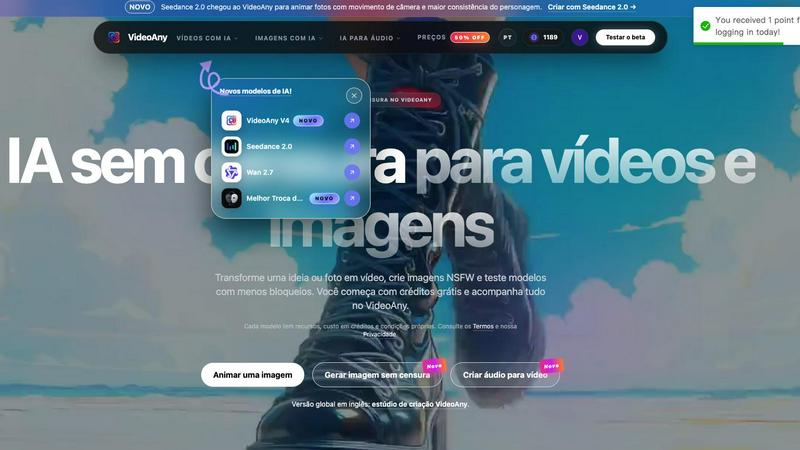
About VideoAny
VideoAny is a comprehensive AI creative platform designed to empower users with an uncensored, all-in-one studio for generating videos, images, and audio directly from text prompts or visual references. Available in Brazilian Portuguese and now in a global English version, this tool breaks down traditional barriers by offering a wide array of models with fewer restrictions, allowing for the creation of NSFW and adult content. The platform is built around a cyclical and iterative workflow, meaning you can start with a simple idea, generate a rough draft, refine the prompt or reference, and continuously improve the output until it matches your vision. From transforming a static photo into a dynamic video with Seedance 2.0 to creating fluid image-to-video animations with Wan 2.7, VideoAny provides the tools to explore creative possibilities without censorship. It is designed for artists, content creators, marketers, and anyone who needs a flexible, powerful, and unrestricted environment to bring their ideas to life. With promotional credits for new accounts and a transparent credit system, users can experiment freely, compare different AI models side-by-side, and manage all their projects from a single, intuitive online studio, ensuring every creation is a step toward a better final product.
Features of VideoAny
Unrestricted AI Video Generation
VideoAny offers a powerful suite for generating videos without the typical censorship found on other platforms. You can create videos from text, transform images into moving scenes, or convert one video style into another. The platform supports models like the new Seedance 2.0 for animating photos with camera movement and character consistency, and Wan 2.7 for fluid motion directed by prompts. This feature is perfect for exploring adult or NSFW content, allowing you to describe a scene from scratch or use a visual reference to maintain control over character appearance, framing, and style, with the ability to iterate on your prompt for continuous improvement.
Comprehensive AI Image Creation and Editing
The image workspace within VideoAny allows for prompt-based generation and sophisticated editing, all without censorship. You can create new images from text, including NSFW scenes, or use a reference image to transform and prepare a base for video generation. With the integration of GPT Image 2, you can describe a scene, choose a format, and generate new visuals. This cyclical process lets you generate an image, edit it, and then use it as a starting point for a video, refining both the visual and the motion in an iterative loop until the result is perfect.
Integrated Audio and Voiceover Tools
VideoAny completes the creative workflow with complementary audio tools. You can generate background music, create voiceovers, or add sound effects directly within the same account and studio. This integration ensures that your video production is a seamless, iterative process from start to finish. Instead of juggling multiple software, you can generate the audio that fits your video, listen to it, and then tweak either the audio prompt or the video settings to achieve a cohesive final product, all while tracking your credit usage.
Multi-Model Comparison and Flexible Settings
A key feature of VideoAny is the ability to compare available AI models directly within the studio. You can choose from a wide range, including Runway, Pika, Luma, Kling, Vidu, HeyGen, and Synthesia. For each model, you can select formats, generation settings, and view the credit cost before generating. This transparency allows for an experimental and iterative approach: test the same idea with different models, compare fidelity, motion, and adherence to your prompt, and then choose the best result or use the insights to refine your next attempt. This continuous improvement cycle helps you find the perfect tool for each unique project.
Use Cases of VideoAny
Creating Uncensored Adult and NSFW Content
VideoAny is a primary tool for creators who need to produce adult or NSFW videos and images without platform restrictions. Whether you are a digital artist exploring mature themes or a content creator for an adult audience, you can use text-to-video to invent new scenes or image-to-video to animate specific characters with controlled poses and settings. The iterative process allows you to start with a rough concept, generate a sample, adjust the prompt for more detail or a different style, and regenerate until the content matches your specific vision, all while managing your credits efficiently.
Animating Existing Photos for Social Media
Marketers and social media managers can use VideoAny to breathe life into static images. With features like Seedance 2.0, you can take a product photo or a brand image and animate it with subtle camera movements and character consistency. This turns a simple image into an engaging short video for platforms like Instagram or TikTok. The cyclical nature of the tool means you can try different models to see which creates the most natural motion, then refine the prompt to match your brand's aesthetic, continuously improving the engagement potential of your content.
Producing Multilingual Video Content with Voiceovers
Content creators can leverage the integrated audio tools to produce videos in multiple languages. By generating a video from a prompt and then creating a voiceover in a different language using the audio tools, you can quickly localize content for a global audience. This use case thrives on iteration: you can first generate the visual sequence, then create a voiceover, listen to the sync, and go back to adjust the video's length or the voice's tone. This all-in-one workflow saves time and ensures a polished, cohesive final product.
Rapid Prototyping for Creative Projects
Artists and filmmakers can use VideoAny as a rapid prototyping tool to visualize scenes before committing to full production. By inputting a text description of a scene, they can generate a low-fidelity video to test composition, lighting, and motion. They can then iterate by changing the prompt, swapping models, or using an image reference to refine the concept. This continuous improvement cycle allows for exploring multiple creative directions quickly and cost-effectively, helping to solidify a vision before moving to more resource-intensive production methods.
Frequently Asked Questions
What is an uncensored AI, and how does VideoAny implement it?
An uncensored AI is a system that accepts a wider variety of ideas and applies fewer blocks to the creative process. VideoAny implements this by offering a dedicated studio for videos, images, and audio with reduced restrictions, specifically allowing for the creation of NSFW and adult content. The platform provides multiple models, each with its own capabilities and credit costs, and users are encouraged to test and compare them. It is important to consult the platform's Terms and Privacy policy, as each model may have its own conditions.
Can I test the uncensored AI for free on VideoAny?
Yes. New accounts on VideoAny receive promotional credits that allow you to try the service without an initial purchase. Before generating any content, the platform clearly displays the credit cost for the chosen model, which can vary based on duration and settings. This allows you to experiment with different ideas and models to find what works best for you, and you can purchase additional credit packages once your initial credits are used.
Is it better to start creating NSFW videos with text or an image?
It depends on your goal. You should start with an image when you need to maintain control over specific details like the character's face, body, clothing, pose, or setting. Using an image as a reference ensures these elements remain recognizable in the final video. You should use text when your priority is to explore a completely new scene without being tied to a specific visual reference. VideoAny supports both methods, allowing you to iterate by switching between them.
Where are my generated images and videos stored?
All generations associated with your account are saved in your personal history within the VideoAny studio. From the history section, you can open previous versions, review the results, and download the final files once processing is complete. This feature supports an iterative workflow, allowing you to look back at past attempts, compare them with new generations, and continuously improve your projects over time.
Similar to VideoAny


AI growth tool for X and LinkedIn: write posts in your voice, schedule at your best times, find leads on X and see what works.

Create and edit AI images online with multiple models, text-to-image, image-to-image, background removal, and upscaling.

AI video-to-video editor for swapping people, outfits, products, and scenes or restyling existing clips.

Fast, simple image creation and editing with accurate details, readable text, consistent characters, and up to 14 reference images.

AI image generation and editing with precise typography, native 2K output, and localized edits.

AIPetGen turns a photo of your dog, cat, or other pet, or a written description, into a new picture or a short animation.

Genjutsu AI turns your ideas into cinematic videos, product ads, social shorts, and high-quality images in minutes.