
CustomTattoo AI
Design your tattoo, preview it on skin, and refine the idea until it's artist-ready.
Visit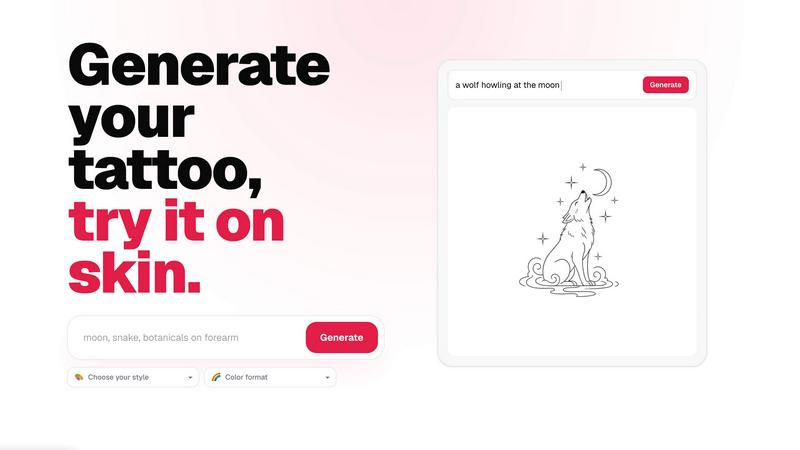
About CustomTattoo AI
CustomTattoo AI is an advanced, AI-powered platform designed to transform how people plan, visualize, and finalize their next tattoo. It serves as a comprehensive digital studio where users can move from a vague idea to a polished, artist-ready design concept. The core value proposition is eliminating the guesswork and anxiety that often accompanies the decision to get a permanent tattoo. Instead of relying on generic images or rough sketches, users can generate highly specific, custom tattoo concepts based on their own descriptions, preferred styles, and desired color formats. The platform goes beyond simple generation by offering a unique on-skin preview feature, allowing users to see how a design will look and fit on their actual body before committing. This iterative process of generating, refining, previewing, and saving designs empowers users to compare multiple artistic directions, test different placements, and develop a clear visual direction they can confidently bring to a professional tattoo artist. CustomTattoo AI is built for a wide audience, from first-time clients who are nervous about their choice to seasoned tattoo enthusiasts looking for fresh inspiration and a way to refine complex ideas. The product is particularly valuable for anyone who wants to ensure their tattoo concept is exactly right, saving time, money, and potential regret. By providing a risk-free environment with free starting credits, the platform encourages exploration and continuous improvement of the design, making the entire process more deliberate, informed, and satisfying.
Features of CustomTattoo AI
AI-Powered Tattoo Generator
The core of the platform is its intelligent generator that translates your verbal or written ideas into visual tattoo concepts. Simply describe the subject, placement, and mood of your desired tattoo, and the AI produces a range of unique designs. This feature allows for continuous iteration, where users can refine their prompts based on initial results, exploring subtle variations until the design perfectly captures their vision. It turns abstract thoughts into tangible, artist-ready artwork.
On-Skin Preview
This transformative feature allows users to visualize their generated tattoo designs directly on their own body. By uploading a photo of the intended placement area, such as an arm, leg, or back, the AI superimposes the tattoo concept onto the image. This provides a realistic, proportional preview of how the design will look in real life, considering body contours and skin tone. It is an essential tool for testing placement and scale, giving users immense confidence before booking a session.
Style and Format Selection
CustomTattoo AI offers extensive control over the artistic direction of your tattoo. Users can choose from a wide array of tattoo styles, including Gothic blackwork, traditional, watercolor, neo-traditional, and many more. Additionally, the platform allows you to select the color format, such as black and grey, full color, or sepia. This iterative selection process lets you compare how the same core idea evolves across different aesthetics, helping you pinpoint the exact look you want.
Personal Design Library
All generated and previewed designs are saved to a secure, personal library within your account. This feature acts as a digital mood board, allowing you to collect, organize, and compare your favorite concepts over time. You can revisit old ideas, track the evolution of a design through iterations, and easily share the final, refined direction with your tattoo artist. This library ensures that no creative spark is lost and that your decision-making process is well-documented.
Use Cases of CustomTattoo AI
First-Time Tattoo Planning
For individuals getting their first tattoo, the decision can be overwhelming. CustomTattoo AI provides a safe, low-pressure environment to explore possibilities. A first-timer can start with a simple idea, generate multiple style variations, and use the on-skin preview to test different placements and sizes. This iterative process builds confidence, reduces anxiety about the final result, and ensures the first tattoo is a well-considered piece of art they will love.
Refining a Complex Tattoo Concept
Enthusiasts with a detailed or complex idea often struggle to articulate it visually. Using the AI generator, they can input specific elements like "a gothic dragon with wide wings in a blackwork style" and see how the AI interprets their brief. They can then refine the prompt, adjust the placement on their body via the preview, and iteratively work towards a cohesive design that perfectly balances all their requested components before presenting it to an artist.
Comparing Artistic Styles for a Single Idea
Many people are unsure which tattoo style best suits their chosen subject. CustomTattoo AI allows users to generate the same idea in multiple styles, such as traditional, watercolor, and geometric. By saving these variations to their personal library and previewing them on skin, users can directly compare the visual impact of each style. This iterative comparison is invaluable for making an informed aesthetic decision that aligns with their personal taste.
Preparing a Clear Artist Reference
Tattoo artists often work best with a clear, visual direction. A user can use CustomTattoo AI to generate a design, refine it through several iterations, preview it on the intended body part, and save the final version. This "artist-ready direction" provides a concrete reference, minimizing back-and-forth communication and misinterpretation. It empowers the user to walk into the studio with confidence and gives the artist a strong foundation to create the final tattoo.
Frequently Asked Questions
Is CustomTattoo AI free to try?
Yes, CustomTattoo AI offers a completely free trial to new users. Upon signing up, you are immediately granted 3 free credits. These credits allow you to generate tattoo designs, use the on-skin preview feature, and explore the platform's capabilities without any initial payment or commitment. This risk-free test is designed to help you see the value before deciding to purchase more credits.
How does the on-skin preview work?
The on-skin preview is a simple, three-step process. First, you generate your desired tattoo design using the AI generator. Second, you upload a clear photo of the body part where you want the tattoo. Third, the AI technology intelligently maps and superimposes the generated design onto your uploaded photo, adjusting for perspective and body contours. This creates a realistic preview that shows you exactly how the tattoo will look and fit on your specific skin.
Will there be hidden subscriptions?
No, CustomTattoo AI operates on a straightforward credit-based system, not a subscription model. There are no hidden fees or recurring charges. You start with free credits, and if you need more, you can purchase additional credit packs as needed. This pay-as-you-go approach ensures you only pay for the designs you generate and preview, with complete transparency and no unexpected bills.
Can I take the design to my tattoo artist?
Absolutely. The designs you generate and refine are saved to your personal library and are intended to be used as a strong visual reference. We recommend bringing your final, refined design to your tattoo artist as a starting point for discussion. It provides a clear direction for the subject, style, and placement, which helps the artist understand your vision and create the final, professional tattoo artwork.
Similar to CustomTattoo AI

AI-native presentation and visual content platform that turns prompts, documents, images, videos, and data into polished, shareable decks.


Create polished AI videos from text or images online with Seedance 2.5 Free.


StopScroll is an AI thumbnail maker that generates, compares, and helps creators pick stronger cover images before publishing.

HubVanta is a free AI creative toolkit for generating images, videos, voices, and visual edits from one browser workspace.

Ask is this AI image? Free online checker: upload a photo for AI-generated and deepfake scores plus a clear verdict band.