
AgentOp
AgentOp lets you build and share private AI agents as single HTML files that run real LLMs entirely in your browser with no servers or installs.
VisitPublished on:
June 21, 2026
Pricing:
About AgentOp
AgentOp is a browser-based platform that lets you build, test, and ship private AI agents as a single file -- with no servers, no installs, and no API keys required. Born from the frustration of spinning up infrastructure just to demo a small agent, pasting keys into random apps, and shipping data to third parties for simple answers, AgentOp delivers a radically different approach. You write your agent's logic in Python, test it against real open models running locally in your browser via WebGPU, and export the whole thing as a standalone HTML file. That one file contains the model loader, your Python code, the user interface, and encryption. You can email it, drop it on a USB stick, or open it offline on another machine. It just runs, with nothing to set up. AgentOp is for developers, researchers, educators, and anyone who wants to build and share AI agents without compromising on privacy or simplicity. The platform supports models like Llama, Qwen, Gemma, Phi, and DeepSeek, all running 100% on-device. Your prompts never leave the tab. If you prefer cloud models, you can bring your own key for GPT-4 or Claude -- it gets encrypted in the browser and never hits AgentOp's servers. There is also a newer AI agent generator where you describe your agent in plain English and the platform writes the entire template for you. It is free to start, and the creator is actively seeking blunt feedback to improve it. Every shared agent is the whole app in one file -- model loader, Python runtime, and UI included. It is cyclical, iterative, and built for continuous improvement.
Features of AgentOp
100% On-Device Local Models
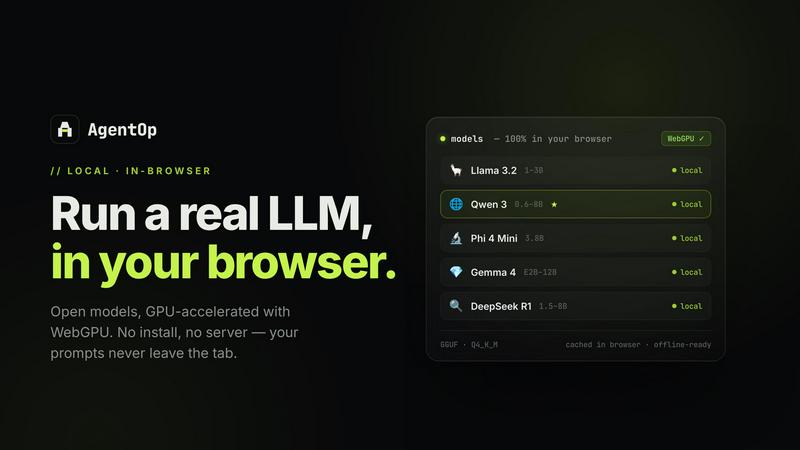
Run open models like Llama 3.2, Qwen 3, Phi 4 Mini, Gemma 4, DeepSeek R1, and Hermes 3 entirely in your browser using WebGPU. No server, no install, no API key needed. Models are cached in browser and work offline. Your data never leaves your device. Open your network tab while chatting with a local model and it is empty -- nothing leaves the page. This feature is GPU-accelerated on Chrome, Edge, or Apple Silicon, and runs in all modern browsers.
Single File Export and Sharing
Export your entire agent as one standalone HTML file. This bundle includes the model loader, your Python tools, the user interface, and encryption. Share it by email, embed it on a website, drop it on a USB drive for air-gapped machines, or publish it to the marketplace. The recipient installs nothing -- they just double-click the file and it runs offline. It does not expire and has zero dependencies. It is yours, and it goes anywhere.
Python Tools with In-Browser Execution
Define tool schemas and handlers in Python using the Pyodide 0.29 runtime. AgentOp executes them in-browser with the full CPython scientific stack, no install required. Grammar-constrained (GBNF) function calling behaves identically whether you are on a local model or a cloud one. Test as you type against a local model with one click. The same schema works across every model family, making development seamless and iterative.
AI Agent Generator
Describe your agent in plain English and AI builds the complete template for you. Bring your own OpenAI or Anthropic key -- it goes straight from your browser to the LLM and is never sent to AgentOp's servers. The complete agent, including HTML, Python tools, prompts, and UI, is generated in seconds entirely in your browser. You land on a working agent ready to try, customize, download, or publish as a reusable template. It is not perfect yet, so the creator encourages you to try and break it.
Use Cases of AgentOp
Private Research Assistant
Build an AI agent that summarizes academic papers and extracts key findings, running entirely on your device. No data ever leaves your machine. You can export the agent as a single HTML file and share it with colleagues who also value privacy. They open the file, and it just works offline. This is ideal for researchers in sensitive fields or anyone working with confidential documents who needs AI assistance without cloud exposure.
Offline Code Reviewer
Create an agent that reviews code snippets for bugs, style issues, and security vulnerabilities. Run it locally with a small model like Phi 4 Mini, and test your Python tools in real time. Export the agent to a USB drive for use on air-gapped development machines. Perfect for security-conscious developers, teams in regulated industries, or anyone who needs code review capabilities without an internet connection.
Interactive Educational Tutor
Design an agent that teaches students a subject like math or science, using local models to generate explanations and quizzes. The agent runs in the browser with no install, making it accessible to students on any device. Export it as a single file and email it to a class, or embed it on a learning management system. Students can interact with the AI tutor offline, and their questions never leave the page.
Custom Data Analysis Tool
Build an agent with Python tools that analyze local datasets, generate charts, and produce insights. Test it against a local model instantly without needing an API key. Export the agent as a standalone HTML file and share it with your team. They can run it on their own machines, offline, with no backend to deploy. This is great for analysts, data scientists, and business users who need quick, private data exploration.
Frequently Asked Questions
Do I need to install anything to use AgentOp?
No, you do not need to install anything. AgentOp runs entirely in your browser. Models are loaded via WebGPU and cached locally. You just open the website, choose a model, and start building or chatting. The exported agent file also requires no installation on the recipient's machine -- they simply open the HTML file in their browser.
Is my data private when using local models?
Yes, completely. When you use local models, your prompts and data never leave your device. You can verify this by opening your browser's network tab while chatting with a local model -- it will be empty. Nothing is sent to any server. If you choose to use a cloud model like GPT-4 or Claude with your own key, that key is encrypted in your browser and never hits AgentOp's servers.
What models are available and do they work offline?
AgentOp supports Llama 3.2 (1-3B), Qwen 3 (0.6-8B), Phi 4 Mini (3.8B), Gemma 4 (E2B-12B), DeepSeek R1 (1.5-8B), and Hermes 3 (3B). All models are cached in your browser after the first load and are ready for offline use. They run via WebGPU, which works best on Chrome, Edge, or Apple Silicon devices. The exported agent file also runs offline on any modern browser.
How does the AI agent generator work and is my key safe?
Describe your agent in plain English, and the AI agent generator writes the complete HTML, Python tools, prompts, and UI for you. You bring your own OpenAI or Anthropic API key. That key is used directly from your browser to make one call to the LLM -- it is never sent to AgentOp's servers. The generated agent is then ready to run, customize, or export immediately. The feature is new and the creator welcomes feedback to improve it.
Similar to AgentOp

Moderation, routing, intent and scoring for any text over one Jev-compatible API, hosted in the EU.

All-in-One POS, Inventory & Accounting Software for Bangladeshi Businesses


a SaaS solution that scores any website for AI agent readiness, MCP server security, and Domain Rating.

