
voicebrief.io vs Zovo
Side-by-side comparison to help you choose the right product.

voicebrief.io
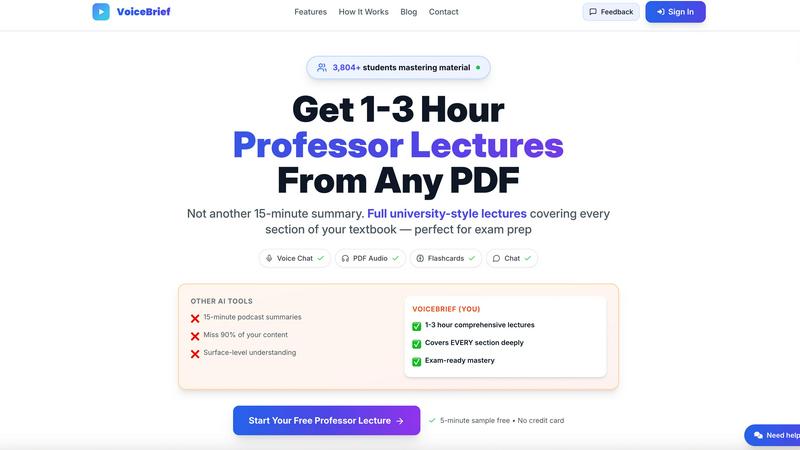
VoiceBrief turns your PDFs into audio lectures with an AI tutor for smarter, faster learning.
Last updated: February 28, 2026

Unlock 20 privacy-first Chrome extensions for developers and writers, crafted by a solo developer with your needs in.
Last updated: February 26, 2026
Visual Comparison
voicebrief.io
Zovo

Feature Comparison
voicebrief.io
AI-Generated Audio Lectures
Voicebrief.io's core feature is transforming static documents into dynamic, natural-sounding audio lectures. Unlike simple text-to-speech that just reads words aloud, the AI analyzes, structures, and explains the content in an engaging, lecture-style format. These comprehensive explanations can cover the full depth of a document, lasting from one to three hours to ensure no critical concept is missed, facilitating a deeper, more contextual understanding of the material.
Interactive Voice & Text Chat
This feature allows for a true dialogue with your documents. When you encounter a confusing concept while listening or reviewing, you can ask questions via voice or text directly within the platform. The AI, trained specifically on your uploaded content, provides instant, detailed answers with citations, acting as a 24/7 personal tutor that continuously helps you clarify and deepen your knowledge through iterative questioning.
Smart Flashcards with Spaced Repetition
To reinforce learning and combat forgetting, Voicebrief.io automatically generates quizzes and flashcards from your document's key points. These flashcards utilize spaced repetition techniques, a scientifically proven method that schedules review sessions at optimal intervals to move information from short-term to long-term memory, ensuring continuous improvement and mastery of the material over time.
Multi-Format Document Processing
The platform supports a wide range of input formats to accommodate various learning materials. You can upload standard PDFs, images of textbook pages, handwritten notes (using OCR technology), and even URLs. This flexibility ensures that no matter the source, your content can be cycled into the audio learning and interactive ecosystem, making all your study materials uniformly accessible and interactive.
Zovo
BeLikeNative
BeLikeNative is a powerful writing assistant that allows users to effortlessly rewrite text to sound like a native speaker. Supporting 80 languages, this feature provides instant rewrites with a single keystroke, ensuring that users can communicate effectively and confidently across linguistic barriers.
Tab Suspender Pro
Tab Suspender Pro intelligently manages memory usage by automatically suspending inactive tabs, which helps keep your browser running smoothly. With smart detection and memory tracking capabilities, it optimizes resource allocation, allowing users to maintain productivity without the hassle of slow performance.
JSON Formatter Pro
JSON Formatter Pro is an essential tool for developers and data enthusiasts, enabling them to format, validate, and explore JSON data directly from their browser. It offers features like beautification, minification, and a tree explorer, making it easier to work with complex data structures.
Clipboard History Pro
Clipboard History Pro ensures that users never lose important copied text again by storing up to 10,000 clips. With instant search functionality and smart paste options, it allows users to quickly retrieve and utilize their copied content, enhancing productivity and efficiency in everyday tasks.
Use Cases
voicebrief.io
Auditory Learning for Students
Students can upload their dense textbooks, academic papers, and lecture notes to convert them into audio lectures. This allows them to study effectively during previously unproductive times like commuting, exercising, or doing chores. The interactive Q&A feature helps them instantly resolve doubts, creating a continuous study loop that enhances comprehension and retention for exam preparation.
Professional Development On-The-Go
Busy professionals can use Voicebrief.io to stay current with industry trends by processing lengthy reports, whitepapers, and research papers into audio briefings. They can learn during their daily commute or downtime, turning wasted time into productive upskilling sessions. The ability to ask specific questions about the content ensures they grasp complex business or technical concepts relevant to their field.
Accessible Learning for Diverse Needs
The platform is ideal for individuals with reading difficulties, ADHD, or visual impairments, as well as those who simply retain information better through listening. By providing an audio-first, interactive alternative to traditional reading, Voicebrief.io creates an equitable and efficient learning pathway that adapts to different cognitive styles and needs, allowing for continuous engagement with material.
Lifelong Learning and Personal Enrichment
Lifelong learners can transform any PDF of interest—be it a history book, self-help guide, or scientific article—into a personalized audiobook. The AI-generated summaries provide quick overviews, while the deep-dive lectures and interactive Q&A allow for an exploratory and iterative learning journey on any topic, making personal education more flexible and deeply engaging.
Zovo
Writing Enhancement
BeLikeNative can be a game-changer for non-native speakers who want to improve their writing skills. By using this extension, users can effortlessly transform their text, making it sound more natural and fluent, which is especially beneficial for professional communication.
Memory Management
Tab Suspender Pro is ideal for users who often have multiple tabs open and struggle with browser performance. By automatically suspending tabs that are not in use, it helps users manage their memory efficiently, allowing them to focus on the tasks that matter most without lag.
Data Handling
Developers and analysts can leverage JSON Formatter Pro to handle JSON data seamlessly. This tool simplifies the process of formatting and validating JSON, making it easier to read and debug complex datasets, which is crucial for effective data management and application development.
Clipboard Management
Clipboard History Pro is perfect for anyone who regularly copies and pastes information, such as writers, researchers, and students. By maintaining a history of copied items, it allows users to quickly access previous clips, enhancing their workflow and reducing repetitive tasks.
Overview
About voicebrief.io
Voicebrief.io is an innovative AI-powered learning platform designed to transform the way students and professionals engage with dense academic and professional materials. It moves beyond basic text-to-speech by converting PDFs, textbooks, research papers, and even handwritten notes into comprehensive, lecture-style audio explanations. This cyclical approach to learning—listen, interact, question, and reinforce—enables users to absorb complex information more efficiently and accessibly. The platform is built for students in demanding fields like medicine, law, engineering, and business, as well as professionals and lifelong learners seeking to optimize their study time. Its core value proposition is turning passive reading into an active, interactive dialogue. Instead of re-reading text, users can listen to AI-generated lectures during commutes or workouts and then ask specific questions to receive real-time, cited explanations, mimicking a conversation with a personal tutor. This continuous improvement loop of listening, questioning, and testing with AI-generated tools like smart flashcards ensures deeper understanding and long-term retention, maximizing academic and professional potential.
About Zovo
Zovo is a comprehensive suite of 20 Chrome extensions crafted by a dedicated solo developer with over a decade of experience in software development and a remarkable track record of generating over $400K on Upwork with a flawless success rate. Designed for users who value efficiency and privacy, Zovo's flagship extension, BeLikeNative, empowers more than 3,300 users to write like native speakers in 80 languages with just a single keystroke. This collection of tools includes essential utilities such as Tab Suspender Pro, JSON Formatter Pro, Clipboard History Pro, and Form Filler Pro, among others. Each extension is built with a 100% privacy-first approach, ensuring that user data remains on their devices without any data harvesting or investor influence. Zovo fosters community engagement by allowing users to vote on new features, shaping the development roadmap collaboratively. With new tools released monthly, Zovo is committed to continuous improvement, making every user's input vital for future enhancements.
Frequently Asked Questions
voicebrief.io FAQ
How is Voicebrief.io different from simple text-to-speech apps like Speechify?
Voicebrief.io goes far beyond basic text-to-speech. While apps like Speechify simply read text aloud, our AI first comprehends your document's content and then generates a structured, explanatory lecture in natural voices. Most importantly, we add an interactive layer: you can ask questions and get detailed answers about the material, turning passive listening into an active learning dialogue for continuous improvement.
What kinds of documents can I upload?
You can upload a wide variety of document formats to create your audio lectures. This includes standard PDFs (textbooks, research papers), image files of book pages or notes, and even handwritten notes through our OCR (Optical Character Recognition) technology. We also support uploading content directly from URLs, offering maximum flexibility for your learning materials.
Can I ask the AI questions about my uploaded documents?
Absolutely. This is a key feature of Voicebrief.io. You can ask questions via text or voice about any concept within your uploaded documents. The AI is specifically trained on your content and will provide instant, detailed explanations with citations, just like a personal tutor. This iterative Q&A process is designed to continuously clarify and deepen your understanding.
Does Voicebrief.io help with memorization and exam prep?
Yes, it does. Beyond audio lectures, the platform automatically generates smart flashcards and quizzes based on the key points from your documents. These tools use a spaced repetition system, which is a proven technique to enhance long-term memory by scheduling review sessions at optimal intervals. This creates a powerful cycle for reinforcing knowledge and preparing for exams.
Zovo FAQ
How does Zovo ensure privacy?
Zovo prioritizes user privacy by implementing a 100% privacy-first approach. This means that no data is ever harvested or transmitted off the user's device, ensuring complete confidentiality and security.
Can I request new features for the extensions?
Absolutely! Zovo encourages users to submit feature requests directly. The most requested features are prioritized for development, allowing users to shape the roadmap and influence future updates.
Is there a community for Zovo users?
Yes, Zovo has an active Discord community where users can connect, share feedback, and discuss ideas. This platform fosters collaboration and enhances the overall user experience.
How often are new extensions released?
New extensions are typically released on a monthly basis. Members receive early access to these tools, often 1-2 weeks before they are made available to the public, ensuring that they can take full advantage of the latest features.
Alternatives
voicebrief.io Alternatives
VoiceBrief.io is an AI-powered productivity tool designed to transform dense academic PDFs into comprehensive audio lectures. It belongs to the category of learning and study aids, helping students absorb complex information through audio and interactive features. Users often explore alternatives for various reasons, such as budget constraints, the need for different feature sets like video summaries or note integration, or compatibility with specific devices and workflows. When evaluating other tools, it's crucial to consider your core learning objectives. Look for solutions that not only convert text to speech but also enhance comprehension through interactive elements, effective review systems, and support for your specific document formats. The goal is to find a platform that adapts to your study habits, offering a cyclical learning process where understanding is continuously reinforced and improved upon, much like the iterative nature of mastering a subject itself.
Zovo Alternatives
Zovo is a comprehensive suite of 20 privacy-first Chrome extensions designed specifically for developers and writers. With tools like JSON Formatter, Tab Suspender, and Clipboard History, Zovo enhances productivity and management while ensuring user data remains private and secure. The innovative nature of Zovo, built by a solo developer with extensive experience, attracts many users seeking efficient solutions for their everyday tasks. As users delve into Zovo's features, they may find themselves exploring alternatives for various reasons, including pricing, specific feature sets, or compatibility with different platforms. When seeking an alternative, it’s essential to consider the functionality, user experience, and commitment to data privacy. Look for tools that not only meet your immediate needs but also offer scalability and community-driven development to ensure continuous improvement.