
Gomotion vs SimpleDraw
Side-by-side comparison to help you choose the right product.

Gomotion
Gomotion empowers creators to effortlessly turn text into stunning animations for captivating marketing and.
Last updated: February 28, 2026

SimpleDraw
SimpleDraw evolves your ideas into precise floor plans, making every project better.
Last updated: March 1, 2026
Visual Comparison
Gomotion

SimpleDraw
Feature Comparison
Gomotion
Transform Words Into Motion
With Gomotion, animating text is as simple as typing a prompt. Skip the tedious keyframes and let the platform instantly bring your titles, captions, and logos to life with cinematic flair. This feature is ideal for product demos and creators who desire professional results without the hassle, enabling quick and captivating animations that resonate with audiences.
Discover the Narrative Mode
Gomotion's Narrative Mode allows users to create comprehensive, ready-to-publish ads by transforming scripts into full animated stories. This feature syncs images and videos with the narrative, making it exceptionally easy to produce ads or short videos in minutes. The Narrative Mode streamlines the animation process, ensuring that your storytelling is engaging and visually compelling.
Design for Any Screen
In today's multi-device world, Gomotion ensures that your animations look stunning on every screen, from mobile devices to desktop displays. Whether you're crafting a product teaser for TikTok or a detailed presentation for a desktop audience, this feature guarantees that your content is perfectly aligned with the intended viewing experience, maximizing engagement across platforms.
Complex Animations Made Simple
Gomotion allows users to create intricate animations, such as animated charts and simulations, from any dataset. This feature is particularly useful for explainers, educational content, and impactful presentations, enabling users to convey complex information in a visually appealing manner. It streamlines the creation of detailed animations while maintaining clarity and engagement.
SimpleDraw
Dedicated Floor Plan Mode
This specialized mode is tailored for architectural drawing, allowing you to create accurate floor plans of rooms, apartments, and entire houses with ease. Draw walls, and add windows and doors with a single click. A comprehensive library of interior fixtures for kitchens, bathrooms, living rooms, and bedrooms is available to populate your plans. Real-time measurements update dynamically as you adjust your layout, providing immediate feedback for perfect planning and iteration.
Smart Alignment & Precision Control
The smart alignment system assists in placing points and lines exactly where you want them, snapping to logical points and providing clear visual guides. For ultimate control, you can zoom in for greater precision or use keyboard shortcuts to lock lines to vertical or horizontal axes. The system's sensitivity adapts to your zoom level, but can also be controlled independently, giving you precise command over every detail of your drawing as you work.
Non-Destructive Editing & Complete Control
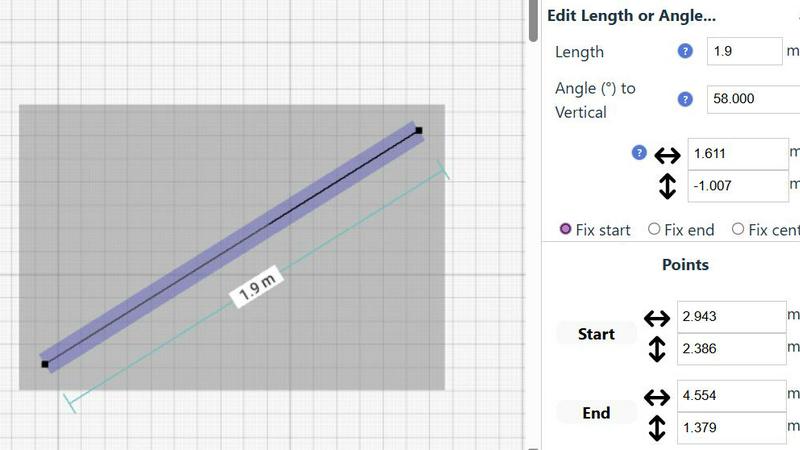
Every element in your drawing is fully editable at any time. Move, adjust, or modify walls, furniture, and annotations without starting over. Utilize undo/redo functions (with keyboard shortcuts) to experiment freely. You can group elements to move, copy, and paste them together, streamlining repetitive tasks. For numerical precision, you can input positions, line lengths, and angles directly via keyboard for any element.
Comprehensive Measurement System
Work seamlessly in your preferred units with a choice between metric and standard US (feet and inches). The system displays contextual measurements dynamically as you draw, helping you maintain accuracy. You have fine-grained control over which measurements are displayed on your final plan, ensuring clarity and professionalism for any project, from a simple room sketch to a complex home layout.
Use Cases
Gomotion
Social Media Marketing
Gomotion is a game-changer for social media marketers looking to create eye-catching animations that engage audiences. By utilizing its text-to-motion capabilities, marketers can produce dynamic ads and promotional content that stand out in crowded feeds, driving higher engagement and conversion rates.
Product Launches
For businesses planning a product launch, Gomotion provides an efficient way to create compelling promotional videos. The platform’s ability to animate brand elements and showcase product features through professional-grade animations helps convey the brand message effectively, generating excitement and anticipation among potential customers.
Educational Content
Educators and content creators can leverage Gomotion to produce engaging educational videos that simplify complex topics through animated visuals. By using animated charts and narratives, educators can enhance their storytelling, making learning more interactive and enjoyable for students.
Corporate Presentations
Gomotion is ideal for professionals preparing corporate presentations. The platform allows users to create animated slides that visualize data and concepts, making presentations more engaging and impactful. This capability helps in capturing the audience's attention and conveying messages more effectively.
SimpleDraw
Home Renovation Planning
Plan your kitchen or bathroom remodel with confidence. Create a scale-accurate floor plan to visualize new layouts, experiment with appliance and fixture placement, and ensure everything fits perfectly before making purchases or starting construction. This iterative planning process helps avoid costly mistakes and allows for continuous refinement of your design ideas.
Furniture & Room Layout Design
Design the optimal layout for your bedroom, living room, or home office. Test different furniture arrangements on a scaled drawing to see what will fit and how traffic will flow. This is invaluable for planning new purchases or simply making the most of your existing space, allowing you to iterate on designs until you find the perfect setup.
Creating Real Estate Listings
Generate clear and professional floor plans for apartment or house listings. Accurately represent room sizes, layouts, and flow to attract potential buyers or renters. A well-drawn plan provides essential information at a glance, improving listing quality and helping your property stand out in the market through clear, iterative visual communication.
DIY Project Visualization
Plan and visualize any DIY project, from building a shed to designing a garden layout. Use scale drawings to calculate material needs, understand spatial relationships, and communicate your vision to helpers. SimpleDraw allows you to tweak and improve your plans continuously, ensuring your project is well-thought-out before the first cut is made.
Overview
About Gomotion
Gomotion is an innovative AI motion design tool that represents the pinnacle of motion graphics technology, seamlessly blending professional animation principles with cutting-edge generative AI. This platform is designed to cater to a diverse audience, including content creators, marketers, social media managers, and businesses of all sizes. Gomotion empowers users to effortlessly produce stunning and brand-consistent animations utilizing straightforward text prompts or image inputs as their creative foundation. The core value proposition revolves around a cyclical process of creation and refinement, where users can generate, iterate, and enhance their animations continuously. The intelligent engine learns from every interaction, allowing users to evolve their projects toward perfection while ensuring that each output aligns with their unique brand identity and creative vision. Gomotion democratizes high-quality motion graphics, eliminating the traditional barriers associated with steep learning curves and expensive software, making professional-grade animation accessible to everyone.
About SimpleDraw
SimpleDraw is a powerful, free online tool designed to facilitate the creation of precise and accurate scale drawings, including detailed floor plans and technical illustrations. This innovative platform caters to a diverse audience, from DIY enthusiasts and homeowners planning renovations to professional designers and architects seeking a straightforward drawing solution. With its user-friendly interface and an array of intuitive features, SimpleDraw enables users to produce high-quality drawings quickly and effortlessly. The main value proposition lies in its combination of simplicity and precision—offering the familiarity of traditional drawing tools while enhancing the experience with advanced digital functionalities. Best of all, SimpleDraw is entirely free, requiring no registration or software installation, which makes it accessible to anyone with an internet connection. The tool is built on a philosophy of continuous improvement, constantly evolving through real user feedback to refine its features and enhance the user experience, ensuring it becomes more powerful and intuitive with every iteration.
Frequently Asked Questions
Gomotion FAQ
What is Gomotion?
Gomotion is an AI-powered motion design tool that enables users to create stunning animations quickly and easily, using text prompts or images. It combines advanced animation principles with generative AI to democratize high-end motion graphics.
Who can use Gomotion?
Gomotion is designed for a wide range of users, including content creators, marketers, social media managers, educators, and businesses of all sizes. Its user-friendly interface makes it accessible to both experienced animators and those new to motion design.
How does the iterative feedback process work?
Gomotion’s intelligent engine learns from each user interaction, allowing for a continuous cycle of creation and refinement. Users can generate animations, receive feedback, and make adjustments, ensuring that each output aligns closely with their creative vision and brand identity.
Can I create animations for different screen sizes?
Yes, Gomotion is designed to create animations that look great on any screen, from mobile devices to desktop displays. This feature ensures that your content is versatile and optimized for various platforms, maximizing audience engagement.
SimpleDraw FAQ
Is SimpleDraw really free to use?
Yes, SimpleDraw is completely free. There is no cost to use any of its core features for creating scale drawings and floor plans. The platform requires no registration, software download, or subscription, making it immediately accessible to everyone directly in a web browser as part of our commitment to providing powerful tools without barriers.
Do I need any CAD or design experience to use SimpleDraw?
No prior CAD or technical drawing experience is required. SimpleDraw is built with an intuitive, user-friendly interface that guides you through the process. Features like the smart alignment system, dedicated floor plan mode, and click-to-add symbols make it easy for beginners to start creating accurate drawings immediately, with complexity that grows with your skill.
Can I use SimpleDraw on any device?
SimpleDraw is a web-based application that runs directly in your browser. This means you can use it on any device with a modern internet browser and an internet connection, including Windows PCs, Macs, Chromebooks, and tablets. There is no specific app to download, ensuring easy access and a consistent experience across platforms.
How do I provide feedback or suggest new features?
User feedback is central to our continuous improvement cycle. You can join the SimpleDraw Discord community to share your ideas, report issues, and request new features directly with the development team and other users. This community-driven approach ensures the tool evolves based on real-world use and needs.
Alternatives
Gomotion Alternatives
Gomotion is an innovative tool that lies at the intersection of design and technology, specifically in the realm of AI-driven motion graphics. It allows creators and marketers to effortlessly transform their ideas into stunning animations by leveraging advanced generative AI. As users navigate the evolving landscape of digital content creation, they often seek alternatives for various reasons, including pricing structures, feature sets, and compatibility with different platforms. When exploring alternatives, it's essential to consider factors such as ease of use, the ability to generate high-quality outputs, and the flexibility to adapt to specific creative workflows. Assessing how well an alternative aligns with your creative vision and operational needs can significantly enhance your motion design experience.
SimpleDraw Alternatives
SimpleDraw is a free, web-based tool for creating accurate scale drawings and floor plans. It belongs to the category of design tools, specifically those focused on technical illustration and space planning. Users often seek alternatives to find a solution that better fits their evolving project requirements, whether they need more advanced features, a different pricing model, or software that integrates with other platforms in their workflow. When evaluating other options, it's wise to consider your specific needs for precision, collaboration, and output formats. The goal is to find a tool that not only meets your current demands but also adapts to your growing skills and more complex projects. This process of assessment and selection is a natural part of improving your design process. The search for the right tool is iterative. You might start with a basic need, outgrow a feature set, and seek a new solution that offers a better fit. This cycle of learning and upgrading ensures your tools continuously enhance your ability to execute ideas with greater efficiency and detail.