
Shrinkpad vs Skene
Side-by-side comparison to help you choose the right product.

Shrinkpad
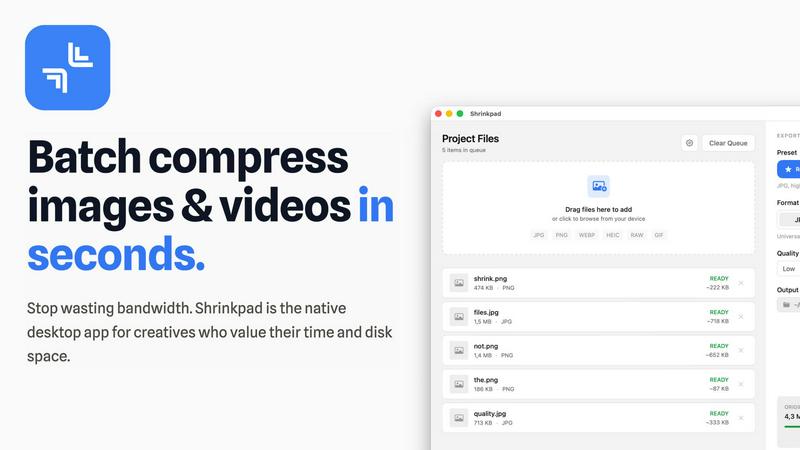
Shrinkpad continuously optimizes your images and videos in bulk, saving you time and space with every use.
Last updated: February 28, 2026

Skene automates growth by seamlessly integrating onboarding and retention directly into your codebase for effortless.
Last updated: February 28, 2026
Visual Comparison
Shrinkpad
Skene

Feature Comparison
Shrinkpad
Intelligent Batch Processing
Shrinkpad revolutionizes asset management by allowing you to process thousands of images and videos in a single, seamless batch. Simply drag and drop an entire folder; the app automatically detects over 30 media formats, including RAW photos and 4K videos, and adds them to the queue. This eliminates the need to manually select individual files, saving hours of repetitive work and enabling a continuous, improved workflow where bulk optimization becomes a simple, one-click task.
Smart Quality Detection & Compression
Stop guessing compression settings. Shrinkpad employs an advanced algorithm that automatically analyzes the visual complexity of each image and video frame. It then applies the optimal compression ratio to drastically reduce file size—often by up to 90%—without introducing noticeable artifacts or compromising the visual fidelity you require for professional work. This smart, iterative analysis ensures the best possible result every time.
Complete Local Processing & Privacy
In an era of cloud dependencies, Shrinkpad champions a privacy-first philosophy. All compression happens locally on your Mac, leveraging the full power of Apple Silicon for lightning-fast performance. Your original files, project assets, and sensitive client work are never uploaded to a remote server. This commitment to local processing provides peace of mind and represents a fundamental improvement in how creative tools handle your data.
Advanced Workflow Utilities
Beyond core compression, Shrinkpad includes powerful features designed for professional, iterative workflows. It offers automatic renaming conventions, processes files within subfolders to maintain your project structure, and can strip metadata for cleaner, web-ready assets. The ability to handle mixed media batches—photos and videos together—further refines and accelerates your optimization pipeline from start to finish.
Skene
Automated Growth Insights
Skene utilizes advanced analytics derived directly from your codebase, identifying critical growth signals and user journey friction points. This feature enables developers to gain actionable insights without manual data crunching.
Contextual User Flows
By analyzing user behavior, Skene automatically generates personalized onboarding and activation flows tailored to individual user needs. This ensures a smoother user experience and increases the likelihood of achieving key milestones.
Real-Time Analytics Dashboard
Skene provides a comprehensive analytics dashboard that tracks real-time user progress and engagement metrics. This feature allows developers to monitor completion rates, identify bottlenecks, and measure the impact of optimizations for continuous improvement.
Secure Codebase Integration
With a focus on security, Skene only requires read-only access to your code repository, ensuring that sensitive data remains protected while still allowing for comprehensive analysis and growth optimization.
Use Cases
Shrinkpad
Optimizing Web and App Assets
Developers and web designers can use Shrinkpad to batch-compress entire directories of interface elements, product images, and promotional videos. This drastically reduces bundle sizes and improves website load times, with users reporting faster Largest Contentful Paint (LCP) scores. It's an essential, iterative step in the development cycle to enhance user experience and performance metrics continuously.
Managing Photographer and Videographer Libraries
Photographers and videographers dealing with massive libraries of high-resolution RAW files and 4K footage can use Shrinkpad to create optimized, shareable versions without sacrificing quality. Quickly prepare client galleries, social media previews, or archive projects to free up terabytes of storage, allowing for a more efficient and ongoing management of your creative portfolio.
Streamlining Design-to-Export Workflows
Designers can export full sets of assets from tools like Figma or Photoshop at 2x or 4x resolution and then use Shrinkpad's folder mode to batch-optimize and auto-rename everything in one go. This removes a significant bottleneck, turning a manual, error-prone process into an automated, iterative step that saves countless hours and ensures consistently delivered assets.
Preparing Content for Distribution
Content creators, marketers, and social media managers can process weeks' worth of content in minutes. Shrinkpad makes it easy to compress videos for email campaigns, reduce image sizes for faster website uploads, and prepare media for various platforms without worrying about format compatibility or uploading sensitive content to third-party websites.
Skene
Streamlining Onboarding Processes
Indie developers can utilize Skene to automate and optimize their onboarding processes, reducing the time it takes for new users to achieve their first successful action within the product.
Enhancing User Activation
Startups can leverage Skene to identify and address activation drop-offs in real time, allowing them to implement targeted strategies that encourage users to explore and adopt key features more effectively.
Optimizing Retention Strategies
By continuously analyzing user behavior, Skene helps organizations maintain optimized retention loops, ensuring that users remain engaged and satisfied with the product over the long term.
Reducing Development Overhead
With Skene managing growth strategies autonomously, developers can allocate more time and resources to product development, allowing for faster iterations and improved feature delivery without the need for dedicated growth personnel.
Overview
About Shrinkpad
Shrinkpad is the definitive native macOS application for batch compression, engineered for the modern creative who demands both speed and quality. It is a powerful, privacy-first tool that allows photographers, designers, developers, and content creators to compress hundreds of images and videos simultaneously, directly on their Mac. The core value proposition is a continuous cycle of improvement: reclaiming precious disk space, accelerating website and application performance, and streamlining digital workflows without the tedious, manual effort typically involved. By processing files locally, Shrinkpad ensures your sensitive assets never leave your device, eliminating the security risks and bandwidth waste associated with cloud-based tools. It intelligently analyzes visual complexity to apply the perfect compression, achieving reductions of up to 90% while preserving perceptual quality. This iterative approach to asset optimization means you can work faster, store more, and deliver better-performing projects, establishing a new, more efficient standard for your creative process.
About Skene
Skene is a revolutionary, fully automated Product-Led Growth (PLG) iteration engine that empowers products to scale without relying on specialized growth teams. Designed specifically for indie developers and early-stage startups, Skene continuously optimizes key processes such as onboarding, activation, and retention. By leveraging insights directly obtained from the customer codebase, Skene effectively identifies friction points and activation drop-offs through meticulous user behavior analysis. This robust platform not only automates the creation and testing of enhanced user flows but also measures their effectiveness, deploying the configurations that yield the best results. As a result, onboarding becomes a self-improving process, activation is streamlined, and retention loops are continuously optimized. Skene eliminates the need for complex dashboards and manual growth meetings, providing developers with a self-learning growth engine that allows them to focus on product development while Skene seamlessly manages growth. This makes Skene an invaluable asset for startups aiming to enhance customer engagement and lifetime value without the overhead of expanding their teams.
Frequently Asked Questions
Shrinkpad FAQ
Can I use Shrinkpad for free?
Yes, Shrinkpad offers a Free Starter plan that includes standard compression for common formats like JPG and PNG, with a limit of 10 files per batch and a maximum 1GB file size. This allows you to test the core functionality and experience the iterative improvement in your workflow before upgrading to unlock unlimited processing and advanced features.
What file formats does Shrinkpad support?
Shrinkpad supports a wide range of over 30 image and video formats. This includes common types like JPG, PNG, MP4, and MOV, as well as professional formats such as WEBP, AVIF, HEIC, and RAW camera files. Its smart detection automatically identifies and optimally compresses each file type within a mixed batch.
Does Shrinkpad support video compression?
Absolutely. Shrinkpad is a powerful batch tool for both images and videos. It supports major video formats like MP4 and MOV, applying efficient compression to reduce file sizes significantly—often by 65% or more—while maintaining visual quality, making it perfect for optimizing demo reels, promotional content, and video libraries.
How many files can I process at once?
With the Personal or Team license, you can process an unlimited number of files in a single batch. Unlike web-based tools that often crash with large queues, Shrinkpad is built as a native desktop app to handle thousands of assets with ease, enabling true iterative, large-scale optimization projects without limits.
Skene FAQ
What is PLG software?
PLG (Product-Led Growth) software is designed to help users discover the value of a product autonomously, without manual intervention from sales or customer success teams. It automates the user journey, guiding users to activation and driving feature adoption through the product itself.
How is Skene different from traditional customer experience software?
Unlike traditional customer experience tools that rely on manual tour creation and maintenance, Skene automatically generates onboarding and lifecycle automation by reading your codebase. When you push code, everything updates seamlessly without additional effort.
How long does it take to set up?
Setting up Skene is remarkably quick and can be completed in less than 60 seconds. Simply connect your GitHub or GitLab repository in read-only mode, and Skene will automatically analyze your codebase to generate PLG flows without requiring code changes.
Is my code secure?
Yes, your code is secure. Skene requires only read-only access to your repository, and all analysis occurs in a secure, isolated environment to ensure that sensitive information remains protected.
Alternatives
Shrinkpad Alternatives
Shrinkpad is a dedicated batch compression tool for macOS, operating within the image and video optimization category. It streamlines workflows by allowing users to process hundreds of files locally, ensuring privacy and significant storage savings without quality loss. Users often explore alternatives for various reasons, such as budget constraints, needing support for different operating systems, or seeking a different balance between advanced features and simplicity. The search for the right tool is a natural part of refining one's digital toolkit. When evaluating alternatives, consider core needs like platform compatibility, the range of supported formats, and the importance of local versus cloud processing. The goal is to find a solution that integrates seamlessly into your existing workflow, enabling continuous improvement in how you manage media assets.
Skene Alternatives
Skene is a cutting-edge Product-Led Growth (PLG) iteration engine that automates the processes of onboarding, activation, and retention from within your codebase. Designed primarily for indie developers and early-stage startups, it helps businesses scale their growth without the necessity of dedicated growth teams. Users often seek alternatives to Skene due to various reasons such as pricing structures, specific feature sets, or compatibility with different platforms that better suit their unique needs. When considering alternatives, it is essential to assess the functionality that aligns with your business goals, the pricing model that matches your budget, and the scalability of the solution. Look for platforms that offer robust automation capabilities, insightful analytics, and a user-friendly interface to ensure a seamless transition and continued growth optimization. The right choice will enhance your product's performance while minimizing manual intervention.