
RocketShare vs TinyFast
Side-by-side comparison to help you choose the right product.

RocketShare
RocketShare enables secure file sharing with zero-knowledge encryption, ensuring your privacy is protected at all times.
Last updated: March 4, 2026

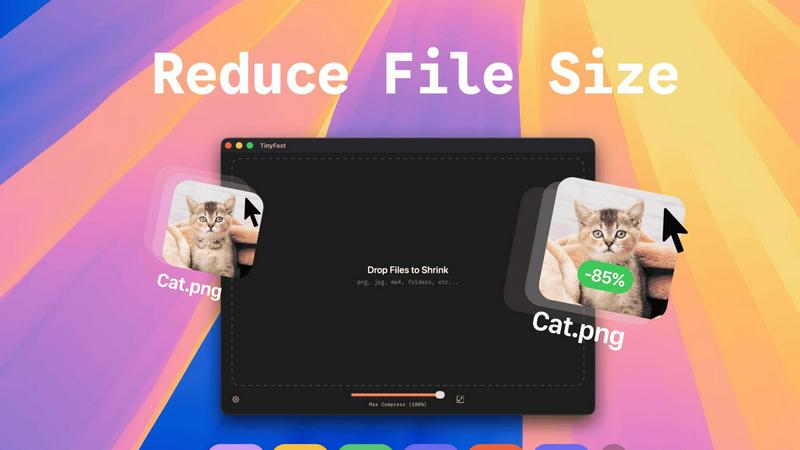
TinyFast instantly shrinks your files privately on your Mac, getting faster and safer with every use.
Last updated: February 28, 2026
Visual Comparison
RocketShare

TinyFast
Feature Comparison
RocketShare
Zero-Knowledge Encryption
RocketShare employs a zero-knowledge encryption model, ensuring that your files are encrypted before they leave your device. This means that only you hold the encryption key, making your data completely secure from unauthorized access.
Cloud and Local Sharing Options
Users have the flexibility to choose between cloud-based sharing and local peer-to-peer transfers. This versatility allows you to select the method that best fits your needs, whether for convenience or enhanced security.
Secure EU Data Storage
All files shared through RocketShare are stored securely within the EU. This not only complies with strict data protection regulations but also provides peace of mind that your information is in a secure environment.
User-Friendly Interface
RocketShare boasts an intuitive and user-friendly interface, designed for simplicity. Uploading files is as easy as dragging and dropping, allowing users of any technical level to share files securely without a steep learning curve.
TinyFast
100% Local & Private Compression
TinyFast is engineered with privacy as its core principle. Every compression task is processed entirely on your Mac. Your files never leave your device, are not uploaded to any cloud server, and remain completely under your control. This is essential for handling files under Non-Disclosure Agreements (NDAs), confidential client work, or any proprietary material, providing total peace of mind and security by design.
Blazing-Fast Batch Processing
Experience workflow acceleration with TinyFast's optimized native engines. You can drag and drop entire folders filled with images, videos, or documents, and the app will shrink them all in seconds. This batch processing capability eliminates the tedious task of compressing files one by one, saving you hours every week and integrating continuous improvement directly into your asset management routine.
Universal File Format Support
TinyFast supports a comprehensive range of common file types, making it a versatile hub for all your compression needs. This includes images (PNG, JPG, TIFF, HEIC, WEBP, GIF, BMP, SVG), videos (MP4, MOV, M4V), documents (PDF, DOCX), code files (JS, CSS, JSON), and audio (MP3). This universal support streamlines your toolkit, removing the need for multiple specialized applications.
Integrated Resolution Resizing
Beyond simple compression, TinyFast offers the ability to automatically resize the resolution of your images and videos. This dual functionality of shrinking file size and adjusting dimensions allows for precise optimization for web use, email attachments, or storage, all within the same simple drag-and-drop action, further refining and improving your media preparation process.
Use Cases
RocketShare
Legal Document Sharing
Lawyers can send sensitive case files and legal documents through RocketShare, ensuring that client confidentiality is maintained at all times. The zero-knowledge encryption adds an extra layer of security that is essential in the legal field.
Healthcare Data Transmission
Healthcare professionals can securely share patient records and sensitive medical information without fear of breaches. This is critical for compliance with regulations such as HIPAA, making RocketShare a valuable tool for the healthcare industry.
Creative Project Collaboration
Photographers and videographers can deliver high-resolution files and collaborate on projects without the worry of data interception. RocketShare's secure sharing capabilities ensure that creative works are protected throughout the process.
Marketing Campaign Materials
Marketing agencies can easily share campaign assets, presentations, and confidential client information securely. The platform's robust security features ensure that proprietary materials remain confidential during collaboration.
TinyFast
Web Developers & Designers
Developers and designers constantly need to optimize website assets like images, SVGs, and videos for performance without sacrificing quality. TinyFast allows them to batch-process these files locally, ensuring fast load times for their projects while keeping unreleased designs and proprietary code completely secure and private on their own machines.
Content Creators & Marketers
Bloggers, social media managers, and marketers handling large volumes of media can use TinyFast to quickly prepare images and videos for publication. Compressing files locally before uploading to platforms saves bandwidth, reduces storage costs, and speeds up content delivery, all while protecting raw footage and confidential campaign materials.
App & Software Developers
Developers working on apps need to bundle assets efficiently. TinyFast helps shrink application resources like icons, interface images, and documentation (PDFs) directly on their Mac, ensuring the final app package is lean. This local processing is crucial for protecting intellectual property and pre-release builds during the iterative development cycle.
Professionals Handling Sensitive Documents
Lawyers, consultants, and accountants who regularly share large PDF reports, presentations, or document bundles can use TinyFast to reduce file sizes for email without ever risking a breach of client confidentiality. The guarantee that files stay local aligns perfectly with professional privacy standards and compliance needs.
Overview
About RocketShare
RocketShare is a cutting-edge file-sharing platform that prioritizes your privacy above all else. Built on the foundation of zero-knowledge encryption, it allows both individuals and businesses to transmit files of any size securely. With RocketShare, your files are encrypted directly on your device before they are uploaded, ensuring that no one—neither unauthorized users nor even RocketShare—can access the content. This makes it an ideal solution for professionals who handle sensitive information, such as lawyers, healthcare providers, and marketers. The main value proposition of RocketShare lies in its unique combination of robust security features and user-friendly interface, allowing you to share files with confidence and ease. Whether you require cloud-based sharing or prefer local peer-to-peer transfers, RocketShare guarantees that your data remains private and protected. Furthermore, with data storage located securely within the EU, you can trust that your intellectual property and private information are safeguarded without compromise.
About TinyFast
TinyFast is a purpose-built macOS application designed to revolutionize how developers, designers, and creators handle file optimization. It is a fast, private, and local file compressor that supports a wide array of formats including PNG, JPEG, MP4, MOV, PDF, SVG, WebP, MP3, and GIF. The fundamental value proposition is eliminating the need to upload sensitive or proprietary files to unknown online servers. Instead, TinyFast performs all compression directly on your Mac, ensuring your data never leaves your machine. This addresses critical pain points of security, speed, and workflow efficiency. Born from a developer's frustration with insecure online tools, TinyFast integrates seamlessly into your creative or technical process via an intuitive drag-and-drop interface. It represents a continuous improvement in personal productivity tools, offering a reliable, always-available solution that protects your confidential work while delivering blazing-fast results. It's more than just a compressor; it's a commitment to a safer, faster, and more efficient digital workflow that evolves with your needs. By keeping everything local, TinyFast provides a superior alternative to web-based tools, ensuring your workflow is not only optimized today but also built on a foundation of privacy and control for the future.
Frequently Asked Questions
RocketShare FAQ
How does RocketShare ensure my files are secure?
RocketShare uses zero-knowledge encryption, meaning your files are encrypted on your device before they are uploaded, and only you hold the encryption key. This guarantees that no one else can access your data.
Can I share large files with RocketShare?
Yes, RocketShare allows you to share files of any size securely. Whether you're sending large video files or extensive documents, you can do so with confidence.
Is there a limit on the number of files I can share?
RocketShare does not impose limits on the number of files you can share. You can send multiple files in a single transfer, providing flexibility for your sharing needs.
Where is my data stored when I use RocketShare?
All data shared through RocketShare is stored securely within the EU. This ensures compliance with strict data protection laws, safeguarding your information in a reliable environment.
TinyFast FAQ
Is TinyFast really free to use?
Yes, TinyFast offers a free tier forever. You can compress up to 5 files per day with access to all core features, allowing you to experience the speed, privacy, and simplicity of local compression at no cost. This is part of our commitment to providing continuous value and improvement to all users.
What happens to my files during compression?
Nothing leaves your computer. TinyFast performs all compression work locally on your Mac's hardware. The original file remains untouched in its location, and a new, optimized version is created. Your data is never uploaded to the internet or stored on any external server, ensuring complete privacy.
What file types does TinyFast support?
TinyFast supports a wide variety of common formats. This includes images (PNG, JPG, TIFF, HEIC, WEBP, GIF, BMP, SVG), videos (MP4, MOV, M4V), documents (PDF, DOCX), code files (JS, CSS, JSON), and audio files (MP3). This universal support is designed to evolve and cover most compression needs in a single tool.
Can I compress multiple files at once?
Absolutely. TinyFast features powerful batch processing. You can drag and drop an entire folder containing supported files, and the app will compress them all in one go, outputting the optimized versions in seconds. This is designed for maximum workflow efficiency, embodying the principle of continuous time-saving improvement.
Alternatives
RocketShare Alternatives
RocketShare is a secure file-sharing platform that prioritizes user privacy through its zero-knowledge encryption model. As a part of the productivity and management category, it enables individuals and businesses to share files of any size while ensuring that the content remains inaccessible to anyone, including RocketShare itself. Users often seek alternatives to RocketShare for reasons such as pricing considerations, feature requirements, or compatibility with specific platforms. When searching for an alternative, it's essential to evaluate the security measures in place, ease of use, and the level of customer support offered. Understanding your unique file-sharing needs will help you make the best choice for a solution that aligns with your privacy and operational requirements.
TinyFast Alternatives
TinyFast is a dedicated macOS application for local file compression, offering a secure and fast way to shrink images, videos, and PDFs directly on your computer. It belongs to the category of productivity and optimization tools, designed for users who prioritize privacy and workflow efficiency. People often explore alternatives for various reasons, such as different pricing models, the need for cross-platform availability on Windows or Linux, or specific feature requirements not covered by a single tool. When evaluating other options, it's crucial to consider your core needs. Key factors include the privacy model—whether processing happens locally or in the cloud—the range of supported file formats, and the overall impact on your daily workflow. The goal is to find a solution that not only meets your immediate technical requirements but also aligns with a philosophy of continuous improvement in how you manage digital assets. The ideal tool should evolve with your projects, offering reliability and efficiency without compromising on security or speed. This iterative approach to selecting software ensures your digital toolkit remains robust and responsive to the changing demands of creative and technical work.