
poseup vs Rendery3D
Side-by-side comparison to help you choose the right product.

poseup
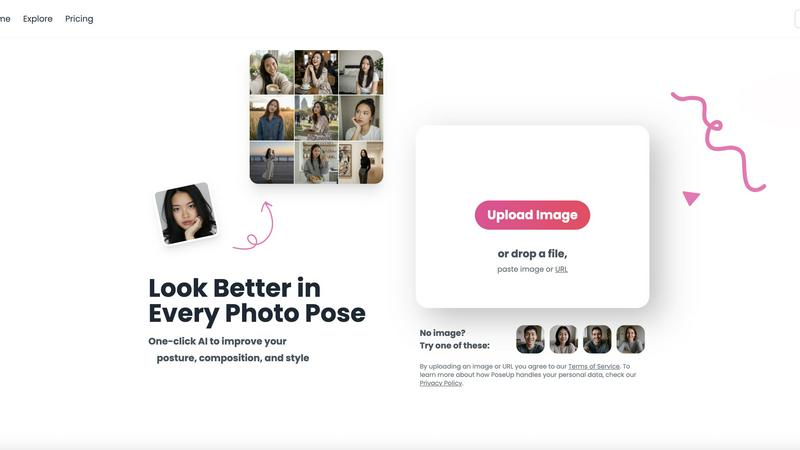
PoseUp uses AI to enhance your photo poses and posture for stunning, professional-looking images in just one click.
Last updated: February 28, 2026

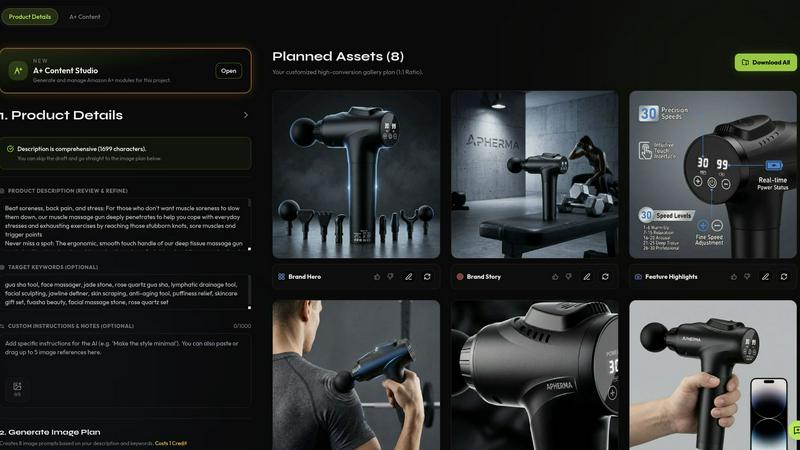
Rendery3D instantly generates professional, conversion-focused product images from a single photo, continuously refining your ecommerce visuals.
Last updated: April 13, 2026
Visual Comparison
poseup
Rendery3D
Feature Comparison
poseup
One-Click Enhancement
PoseUp's one-click enhancement feature allows users to instantly improve their photos with minimal effort. By simply uploading an image, users can leverage AI technology to analyze and optimize posture, composition, and overall visual appeal. This feature is perfect for individuals who want professional results without the need for extensive editing skills.
AI-Powered Pose Correction
With its AI-powered pose correction capabilities, PoseUp intelligently identifies and rectifies awkward poses in photos. This feature ensures that users can present themselves in the best light, whether in casual settings or more formal portraits. It takes the guesswork out of posing, making it easy for anyone to achieve flattering angles and positions.
Customizable Settings
PoseUp offers customizable settings to allow users to tailor enhancements according to their preferences. Users can adjust parameters such as brightness, contrast, and saturation, giving them control over the final look of their images. This flexibility ensures that every photo can reflect the user’s unique style and personality.
Versatile Use Cases
PoseUp is designed for a wide range of use cases, including selfies, group photos, professional headshots, and lifestyle shots. Its versatility allows users to enhance any type of image, making it a valuable tool for social media creators, photographers, and everyday users alike. No matter the occasion, PoseUp can help elevate the quality of photos effortlessly.
Rendery3D
Smart Shot Planning & Auto Art Direction
This foundational feature automates the entire creative strategy. By analyzing your uploaded product photo, Rendery3D's AI automatically generates a structured, optimized 9-image shot plan tailored to your specific item. It intelligently plans hero shots, lifestyle contexts, detail close-ups, infographics, and comparison images without requiring any manual prompting or creative direction from the user. This eliminates guesswork and ensures every critical angle for conversion is covered from the start, establishing a consistent and iterative framework for all your products.
Scene Generation with 3D-Rendered Aesthetic
Unlike generic AI tools that produce flat imagery, Rendery3D is engineered to place your product into any scene with a polished, photorealistic 3D-rendered look that drives higher click-through rates. You can use text prompts for customization or let the AI handle it automatically. Crucially, the technology is logo-safe, meticulously preserving key product details, labels, and branding elements to maintain accuracy and professional integrity in every generated image.
Listing & A+ Content Copy Generator
Rendery3D extends its AI capabilities beyond visuals to create the textual components of a high-performing listing. It generates compelling, SEO-optimized titles, bullet points, keyword suggestions, and full HTML descriptions that are strategically aligned with the visual story created for the product. For Amazon sellers, it also builds Premium A+ Content modules—including hero banners, comparison charts, and brand stories—sized to exact specifications, creating a unified and persuasive brand experience.
Custom Presets & Brand Style Management
For agencies and brands requiring absolute consistency, this feature allows you to upload 6-9 competitor or reference images to extract a complete style system. Rendery3D then locks generated output to match this preset, ensuring a cohesive look across an entire catalog or client portfolio. You can also save brand colors, logos, and style preferences, which the AI applies iteratively across all projects, streamlining workflow and reinforcing brand identity with every new set of images.
Use Cases
poseup
Social Media Enhancement
For social media creators, PoseUp is a game-changer. Users can upload their photos and achieve polished, professional-looking images that stand out in crowded feeds. With one-click enhancements, they can maintain a consistent aesthetic that attracts followers and engagement.
Professional Headshots
Professionals looking to improve their online presence can utilize PoseUp for enhancing headshots. The platform's AI algorithms ensure that users present themselves in the best possible light, leading to more impactful profiles on platforms like LinkedIn and other professional networks.
Family and Group Photos
PoseUp simplifies the process of capturing memorable family and group photos. By correcting poses and enhancing compositions, users can create stunning images that encapsulate special moments, making them perfect for sharing with loved ones or preserving memories.
Fitness and Wellness Imagery
For fitness enthusiasts and wellness coaches, PoseUp offers a way to enhance imagery related to fitness activities. Whether it’s a workout selfie or a dynamic group class photo, users can ensure their images convey energy and professionalism, enhancing their brand image and appeal.
Rendery3D
Amazon Product Launches
Accelerate time-to-market for new products. Instead of waiting weeks for a photoshoot and editing, sellers can upload a prototype or sample photo and generate a full set of Amazon-compliant, visually striking listing images and copy in minutes. This rapid, iterative cycle allows for quick testing and refinement, ensuring the listing is optimized for conversions from day one, giving new products a competitive edge immediately.
Catalog-Wide Creative Refreshes
Breath new life into an existing product catalog without the prohibitive cost of reshooting every item. Brands can systematically update old, low-quality images with a consistent, modern 3D-rendered aesthetic across hundreds of SKUs. This continuous improvement loop elevates the entire brand's storefront, potentially boosting click-through and conversion rates uniformly, which is essential for maintaining market relevance.
Ecommerce Agency Client Workflows
Agencies can dramatically scale their service delivery and profitability. Rendery3D enables the handling of multiple client projects simultaneously, delivering studio-quality assets at a fraction of the traditional time and cost. The project management tools and brand style presets ensure each client receives consistent, on-brand results, improving client satisfaction and allowing the agency to take on more business iteratively.
A/B Visual Testing & Portfolio Operations
Data-driven sellers and aggregators can use Rendery3D to quickly generate multiple visual variants (e.g., different backgrounds, compositions, or infographic styles) for rigorous A/B testing. This iterative process of create-test-optimize helps identify the highest-converting imagery with precision. For portfolio operators managing many brands, the tool standardizes quality and speeds up the asset production cycle across diverse product lines.
Overview
About poseup
PoseUp is an innovative AI-powered photo enhancement platform that revolutionizes the way we capture and present our images. Designed to convert ordinary snapshots into stunning professional-looking portraits, PoseUp acts as a virtual photography coach. By analyzing uploaded images, it identifies areas needing improvement, such as pose, posture, and composition, and applies advanced AI algorithms to implement optimal corrections effortlessly. The platform caters to a diverse audience, including social media influencers aiming for a visually appealing feed, individuals wanting to enhance their selfies, photographers seeking quick enhancement solutions, and professionals in need of refined headshots for their portfolios. The core value proposition lies in delivering high-quality photo results with just a single click. This eliminates the necessity for technical photography skills, expensive equipment, or time-consuming manual editing. Embracing a philosophy of continuous improvement, PoseUp encourages users to iterate on their photography, making exceptional images accessible to everyone.
About Rendery3D
Rendery3D is a purpose-built AI platform that revolutionizes product listing creation for the modern ecommerce seller. It is engineered specifically for Amazon sellers, DTC brands, and ecommerce agencies who need to move fast and convert at a higher rate. The platform's core mission is to eliminate the traditional bottlenecks of product photography—costly studios, lengthy photoshoots, and inconsistent results—by transforming a single product photo into a complete, conversion-optimized visual suite. This cyclical process of upload, AI analysis, generation, and refinement ensures continuous improvement in listing quality. Rendery3D delivers more than just images; it generates a structured 9-image shot plan including compliant hero shots, engaging lifestyle scenes, benefit-focused infographics, and scale comparisons, all wrapped in a premium 3D-rendered aesthetic that stands out in crowded marketplaces. Furthermore, it closes the creative loop by producing SEO-optimized listing copy and A+ Content, aligning text and visuals into a cohesive, high-converting story. The platform's iterative feedback systems, like the Automatic Feedback Loop (AFL), audit and self-correct outputs, guaranteeing professional, logo-safe, and marketplace-ready assets every time, enabling brands to scale their visual identity efficiently and effectively.
Frequently Asked Questions
poseup FAQ
How does PoseUp enhance my photos?
PoseUp utilizes advanced AI technology to analyze uploaded images, identifying areas for improvement in terms of pose, posture, and composition. It then applies intelligent adjustments to enhance the overall quality and visual appeal of the photo.
What types of images can I upload?
You can upload various image formats, including JPG, PNG, WEBP, and HEIC files, with a maximum size of 5MB per image. This makes it convenient for users to enhance their pictures effortlessly.
Do I need any photography skills to use PoseUp?
No, PoseUp is designed for users of all skill levels. Its one-click enhancement feature allows anyone to achieve professional-grade photo results without needing extensive photography knowledge or experience.
Is my personal data safe when using PoseUp?
PoseUp is committed to user privacy and data protection. By uploading images, you agree to their Terms of Service, and you can learn more about how your personal data is handled in their Privacy Policy.
Rendery3D FAQ
What kind of input photo do I need?
You only need one clean product photo on a plain background to start. Even a basic smartphone photo can work effectively. The AI analyzes this image to understand your product's shape, details, and key features. For best results, ensure the product is well-lit and in focus. The platform is designed to iteratively improve from this starting point, building a complete visual set regardless of the initial photo's simplicity.
How does Rendery3D ensure brand consistency and logo safety?
Rendery3D uses advanced AI models specifically trained for ecommerce that prioritize the accurate preservation of logos, text, and critical product details. The Automatic Feedback Loop (AFL) audits each generated image for errors before delivery. Furthermore, the Brand Styles and Custom Preset features allow you to lock in colors, styles, and compositional rules, which the AI applies consistently across all future projects, creating a continuous cycle of on-brand output.
Can I customize the AI-generated images?
Yes, you have full control. You can fine-tune any image using custom text prompts, adjust scenes, or modify elements. Alternatively, you can set up brand preferences and let the AI handle everything automatically for a hands-off, scalable workflow. This balance between automation and customization supports an iterative creative process where you can generate a base set quickly and then refine specific images as needed.
Is there a free plan or trial?
Yes, Rendery3D offers a free plan that allows you to generate your first set of listing images without requiring a credit card. This lets you experience the full workflow—from upload to download—and see the quality of the 3D-rendered outputs firsthand. Paid plans with more extensive features, higher generation limits, and advanced tools like Custom Presets start at $45 per month.
Alternatives
poseup Alternatives
PoseUp is an innovative AI-powered photo enhancement platform that specializes in improving posture, composition, and overall image quality with minimal user intervention. It is designed for a diverse audience, including social media enthusiasts, professionals, and photographers, aiming to elevate their images to a more polished and professional level. Users often seek alternatives to PoseUp due to various reasons, such as pricing structures, specific feature sets, or the need for compatibility with different platforms and devices. When searching for an alternative, it's essential to consider the key features that matter most to you, such as ease of use, the effectiveness of AI enhancements, and whether the tool meets your specific photography needs. Look for platforms that offer robust pose correction, posture adjustments, and composition optimization while ensuring a seamless user experience.
Rendery3D Alternatives
Rendery3D is a conversion-first AI visual engine designed for ecommerce brands. It belongs to the specialized category of AI-powered product photography and listing creative platforms. Its core function is to transform basic product photos into a complete suite of Amazon-compliant and conversion-optimized visuals, including hero shots, lifestyle scenes, and infographics, while also generating aligned listing copy. Users often explore alternatives for several common reasons. These can include budget constraints, the need for different feature sets like video generation or 3D modeling, or a requirement to integrate with specific ecommerce platforms beyond Amazon. Some may seek more manual creative control or solutions tailored for very high-volume enterprise operations. When evaluating an alternative, it's crucial to assess its core specialization. Look for a tool engineered specifically for ecommerce quality and compliance, not just a generic AI image generator. Key considerations should include automated workflows for scaling production, consistency mechanisms to ensure brand and quality standards, and whether the platform offers a holistic solution that ties visuals to performance-driven copy.