
poseup vs RemoveTexts
Side-by-side comparison to help you choose the right product.

poseup
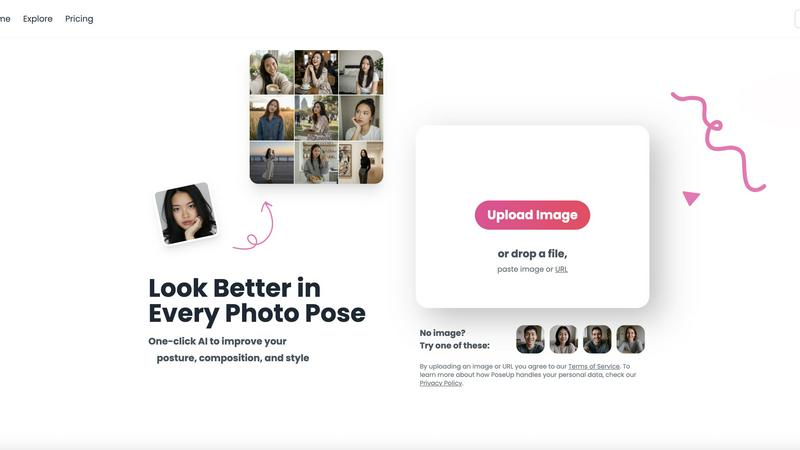
PoseUp uses AI to enhance your photo poses and posture for stunning, professional-looking images in just one click.
Last updated: February 28, 2026

RemoveTexts
RemoveTexts instantly erases any text from images using AI, making professional editing effortless for everyone.
Last updated: March 11, 2026
Visual Comparison
poseup
RemoveTexts

Feature Comparison
poseup
One-Click Enhancement
PoseUp's one-click enhancement feature allows users to instantly improve their photos with minimal effort. By simply uploading an image, users can leverage AI technology to analyze and optimize posture, composition, and overall visual appeal. This feature is perfect for individuals who want professional results without the need for extensive editing skills.
AI-Powered Pose Correction
With its AI-powered pose correction capabilities, PoseUp intelligently identifies and rectifies awkward poses in photos. This feature ensures that users can present themselves in the best light, whether in casual settings or more formal portraits. It takes the guesswork out of posing, making it easy for anyone to achieve flattering angles and positions.
Customizable Settings
PoseUp offers customizable settings to allow users to tailor enhancements according to their preferences. Users can adjust parameters such as brightness, contrast, and saturation, giving them control over the final look of their images. This flexibility ensures that every photo can reflect the user’s unique style and personality.
Versatile Use Cases
PoseUp is designed for a wide range of use cases, including selfies, group photos, professional headshots, and lifestyle shots. Its versatility allows users to enhance any type of image, making it a valuable tool for social media creators, photographers, and everyday users alike. No matter the occasion, PoseUp can help elevate the quality of photos effortlessly.
RemoveTexts
Paint to Remove
This feature offers precise, user-controlled removal. Simply upload your image and use a digital brush to paint directly over the specific text, watermark, or element you want gone. The AI then works only on the selected areas, giving you granular control for complex edits where you need to preserve surrounding text or intricate background details. It's the perfect tool for targeted cleanup without affecting the rest of your image.
Auto Remove All Text
For maximum speed and convenience, this one-click feature automatically detects and removes every text element in your image. The AI scans the entire picture, identifying watermarks, captions, subtitles, date stamps, and branded overlays across 50+ languages, and erases them all simultaneously. It delivers a completely clean canvas in seconds, embodying the tool's core promise of effortless, intelligent automation for bulk editing tasks.
Edit & Replace Text
Go beyond simple removal by editing existing text directly within your image. This advanced AI feature allows you to change words or phrases, and it will intelligently generate new text that matches the original font, size, color, and style. This seamless replacement maintains the visual integrity of the image, making it ideal for updating memes, correcting labels, or modifying graphics without starting from scratch.
Remove Objects
Extending its capability beyond text, this mode empowers users to erase any unwanted object, person, logo, or visual element from a photo. By painting over the object, the AI analyzes the surrounding pixels to reconstruct a believable and natural background. This feature is continuously refined through iterative learning, improving its ability to handle complex objects and varied scenes for truly traceless removal.
Use Cases
poseup
Social Media Enhancement
For social media creators, PoseUp is a game-changer. Users can upload their photos and achieve polished, professional-looking images that stand out in crowded feeds. With one-click enhancements, they can maintain a consistent aesthetic that attracts followers and engagement.
Professional Headshots
Professionals looking to improve their online presence can utilize PoseUp for enhancing headshots. The platform's AI algorithms ensure that users present themselves in the best possible light, leading to more impactful profiles on platforms like LinkedIn and other professional networks.
Family and Group Photos
PoseUp simplifies the process of capturing memorable family and group photos. By correcting poses and enhancing compositions, users can create stunning images that encapsulate special moments, making them perfect for sharing with loved ones or preserving memories.
Fitness and Wellness Imagery
For fitness enthusiasts and wellness coaches, PoseUp offers a way to enhance imagery related to fitness activities. Whether it’s a workout selfie or a dynamic group class photo, users can ensure their images convey energy and professionalism, enhancing their brand image and appeal.
RemoveTexts
Cleaning Product Photos for E-Commerce
Online sellers can use RemoveTexts to clean up product images by removing distracting watermarks from supplier photos, erasing promotional text overlays, or deleting price tags and labels. This results in professional, brand-consistent visuals for their storefronts, improving customer focus on the product itself and enhancing overall presentation quality for higher conversion rates.
Preparing Professional Screenshots and Presentations
Professionals creating tutorials, reports, or presentations often need clean screenshots. RemoveTexts effortlessly erases unwanted UI elements, browser tabs, system notifications, or personal data from screenshots. This ensures that the focus remains on the intended content, creating polished and distraction-free materials suitable for client-facing or educational purposes.
Redacting Sensitive Information
Legal, real estate, and administrative professionals can utilize the tool for redaction. Instead of using crude black bars that destroy the document's layout, RemoveTexts can seamlessly erase sensitive text like names, addresses, or account numbers from scanned documents or photos while preserving the natural background texture, maintaining a neat and professional appearance.
Revitalizing Personal and Stock Photography
Photographers and content creators can breathe new life into images by removing date stamps, intrusive logos, photobombers, or outdated signage. This allows for the repurposing of old photos or the customization of stock imagery to better fit a specific project's needs, all while achieving a natural look that appears untouched.
Overview
About poseup
PoseUp is an innovative AI-powered photo enhancement platform that revolutionizes the way we capture and present our images. Designed to convert ordinary snapshots into stunning professional-looking portraits, PoseUp acts as a virtual photography coach. By analyzing uploaded images, it identifies areas needing improvement, such as pose, posture, and composition, and applies advanced AI algorithms to implement optimal corrections effortlessly. The platform caters to a diverse audience, including social media influencers aiming for a visually appealing feed, individuals wanting to enhance their selfies, photographers seeking quick enhancement solutions, and professionals in need of refined headshots for their portfolios. The core value proposition lies in delivering high-quality photo results with just a single click. This eliminates the necessity for technical photography skills, expensive equipment, or time-consuming manual editing. Embracing a philosophy of continuous improvement, PoseUp encourages users to iterate on their photography, making exceptional images accessible to everyone.
About RemoveTexts
RemoveTexts is an AI-powered online tool designed to intelligently and seamlessly remove unwanted text from any image in seconds, eliminating the need for complex software like Photoshop. It leverages state-of-the-art deep learning inpainting technology, similar to that pioneered by industry leaders, to analyze an image's background and reconstruct it flawlessly after text removal. This process ensures professional, traceless results where no one can tell text was ever present. The tool is built for a global audience of creators, marketers, e-commerce sellers, designers, and professionals who need to clean up visuals quickly. Whether it's erasing watermarks from stock photos, cleaning up screenshots for presentations, redacting sensitive information, or removing subtitles and date stamps, RemoveTexts delivers high-quality 4K output with no design skills required. Its core value proposition lies in its iterative improvement cycle; the AI continuously learns from processing over 100,000 images, ensuring ever-more precise and seamless background reconstruction with each use. This commitment to cyclical enhancement makes it a reliable and evolving solution for anyone looking to achieve perfect, clean images effortlessly.
Frequently Asked Questions
poseup FAQ
How does PoseUp enhance my photos?
PoseUp utilizes advanced AI technology to analyze uploaded images, identifying areas for improvement in terms of pose, posture, and composition. It then applies intelligent adjustments to enhance the overall quality and visual appeal of the photo.
What types of images can I upload?
You can upload various image formats, including JPG, PNG, WEBP, and HEIC files, with a maximum size of 5MB per image. This makes it convenient for users to enhance their pictures effortlessly.
Do I need any photography skills to use PoseUp?
No, PoseUp is designed for users of all skill levels. Its one-click enhancement feature allows anyone to achieve professional-grade photo results without needing extensive photography knowledge or experience.
Is my personal data safe when using PoseUp?
PoseUp is committed to user privacy and data protection. By uploading images, you agree to their Terms of Service, and you can learn more about how your personal data is handled in their Privacy Policy.
RemoveTexts FAQ
What image formats does RemoveTexts support?
RemoveTexts supports common image formats including JPG, PNG, and WebP. You can upload files up to 10 MB in size. The tool processes these files and allows you to download the cleaned result in a high-quality format without adding any watermarks to your final image.
How does the AI remove text without leaving a trace?
The tool uses advanced deep learning inpainting technology. When text is selected for removal, the AI analyzes the pixels, colors, patterns, and textures surrounding the text area. It then intelligently reconstructs the background by generating new pixels that blend seamlessly with the existing image, ensuring no visible artifacts, blurring, or harsh edges remain.
Is RemoveTexts completely free to use?
Yes, RemoveTexts is a free online tool. You can upload images, use features like Paint to Remove or Auto Remove All Text, and download your results without any cost or subscription. The platform is committed to continuous, iterative improvement to keep providing this accessible service to its global community of users.
Can I use it to remove text from complex backgrounds?
Absolutely. The AI is specifically engineered to handle complex backgrounds including gradients, patterns, textures, and detailed scenery. Its iterative learning process from processing vast numbers of images enhances its ability to perform perfect edge blending and context-aware reconstruction, making it effective even on challenging backgrounds.
Alternatives
poseup Alternatives
PoseUp is an innovative AI-powered photo enhancement platform that specializes in improving posture, composition, and overall image quality with minimal user intervention. It is designed for a diverse audience, including social media enthusiasts, professionals, and photographers, aiming to elevate their images to a more polished and professional level. Users often seek alternatives to PoseUp due to various reasons, such as pricing structures, specific feature sets, or the need for compatibility with different platforms and devices. When searching for an alternative, it's essential to consider the key features that matter most to you, such as ease of use, the effectiveness of AI enhancements, and whether the tool meets your specific photography needs. Look for platforms that offer robust pose correction, posture adjustments, and composition optimization while ensuring a seamless user experience.
RemoveTexts Alternatives
RemoveTexts is a leading AI-powered image editing tool in the text removal category. It allows users to effortlessly erase watermarks, subtitles, and other unwanted text from images without needing complex software like Photoshop. Users often seek alternatives for various reasons, including budget constraints, the need for different feature sets, or specific platform compatibility like desktop versus web-based tools. When evaluating other options, it's crucial to consider several key factors. Look at the core AI capability for clean, seamless background reconstruction after text removal. Assess the balance between automated features and manual control, the supported output quality, and the overall user experience. The goal is to find a solution that evolves with your needs, offering continuous improvement in both power and simplicity. The ideal alternative should provide a straightforward, iterative workflow that gets better with use. It should handle a variety of image types and text complexities, delivering professional-grade results that save time and effort. Prioritizing tools that focus on user-friendly innovation ensures your editing process becomes more efficient and effective over time.