
Phishly vs Zovo
Side-by-side comparison to help you choose the right product.

Phishly
Phishly uses AI to continuously improve your email security by instantly detecting phishing threats.

Unlock 20 privacy-first Chrome extensions for developers and writers, crafted by a solo developer with your needs in.
Last updated: February 26, 2026
Visual Comparison
Phishly
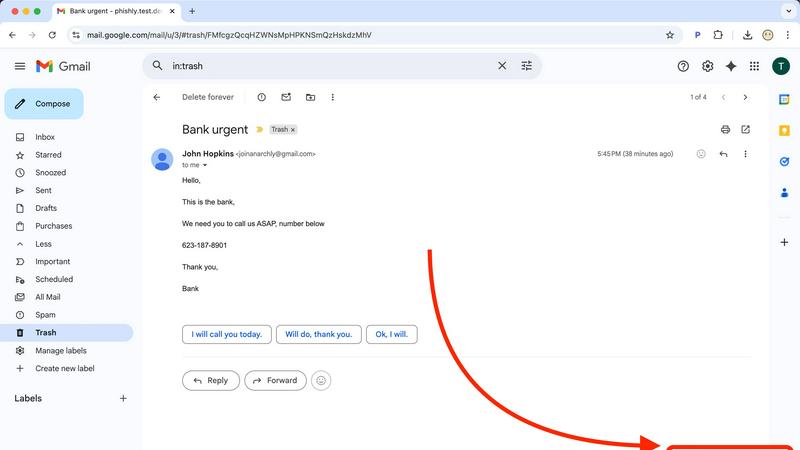
Zovo

Feature Comparison
Phishly
AI-Powered Phishing Detection Engine
At the heart of Phishly is a sophisticated AI engine trained to identify the nuanced hallmarks of phishing attempts. It goes beyond simple spam filters, analyzing email content, headers, and metadata for suspicious domains, grammatical inconsistencies, spoofed sender information, and psychological triggers like urgency or fear. This engine engages in a continuous cycle of learning, iteratively improving its detection capabilities with every scan to stay ahead of emerging threats and provide you with the most accurate risk assessment possible.
Seamless Gmail Integration via Chrome Extension
Phishly integrates directly into your daily workflow with a lightweight and intuitive Chrome extension for Gmail. This feature eliminates the need to switch between applications or copy-paste content. Simply open any email in your Gmail inbox and click the "Scan with Phishly" button. Within seconds, you receive an analysis without ever leaving your email client, making security checks a effortless and habitual part of your email management routine.
Web-Based Tool for Universal Email Analysis
For emails received outside of Gmail or for users who prefer a dedicated portal, Phishly offers a versatile web tool. This platform allows you to paste the full headers and content of any suspicious email—from any client or source—for a comprehensive, instant analysis. This flexibility ensures that no matter where a phishing attempt lands, you have a reliable and consistent method to vet its legitimacy, closing security gaps across your entire digital communication spectrum.
Clear, Actionable Risk Assessment & Explanations
Phishly translates complex threat analysis into simple, actionable intelligence. Every scan results in a clear, color-coded risk rating: Safe, Medium Risk, or High Risk. More importantly, each rating is accompanied by a detailed breakdown explaining why the email received that score, highlighting specific detected indicators like a mismatched "Reply-To" address or deceptive link. This educational component is crucial for user awareness, fostering a cycle of continuous learning and improvement in personal threat recognition.
Zovo
BeLikeNative
BeLikeNative is a powerful writing assistant that allows users to effortlessly rewrite text to sound like a native speaker. Supporting 80 languages, this feature provides instant rewrites with a single keystroke, ensuring that users can communicate effectively and confidently across linguistic barriers.
Tab Suspender Pro
Tab Suspender Pro intelligently manages memory usage by automatically suspending inactive tabs, which helps keep your browser running smoothly. With smart detection and memory tracking capabilities, it optimizes resource allocation, allowing users to maintain productivity without the hassle of slow performance.
JSON Formatter Pro
JSON Formatter Pro is an essential tool for developers and data enthusiasts, enabling them to format, validate, and explore JSON data directly from their browser. It offers features like beautification, minification, and a tree explorer, making it easier to work with complex data structures.
Clipboard History Pro
Clipboard History Pro ensures that users never lose important copied text again by storing up to 10,000 clips. With instant search functionality and smart paste options, it allows users to quickly retrieve and utilize their copied content, enhancing productivity and efficiency in everyday tasks.
Use Cases
Phishly
For Individuals Managing Personal Inboxes
Everyday users receive a barrage of emails from banks, retailers, and services, making it easy for phishing attempts to blend in. Phishly acts as a personal security advisor, allowing individuals to instantly check emails claiming to be from their bank, a shipping company, or a social media platform. This proactive habit builds a stronger, more iterative defense against identity theft and financial fraud, turning uncertainty into confident action with every suspicious message.
For Small Business Teams and Remote Workers
Small businesses often lack dedicated IT security staff, leaving employees as the first line of defense. Phishly equips every team member with an easy-to-use tool to verify emails requesting sensitive data, invoice payments, or credential changes. By integrating this check into their workflow, businesses can create a culture of security awareness, continuously improving their collective resilience against business email compromise (BEC) and other targeted attacks without complex training or infrastructure.
For Verifying Urgent or High-Stakes Communications
Phishing attacks frequently use urgency to bypass rational scrutiny. When you receive an email demanding immediate action—like a password reset you didn't request, an urgent wire transfer from a "CEO," or a warning about an expiring account—Phishly provides a critical moment of pause. Scanning the email delivers an objective risk assessment, helping you avoid panic-driven mistakes and ensuring you only act on legitimate, high-priority communications.
For Educational Purposes and Security Awareness Training
Phishly serves as an excellent real-time educational tool. By scanning both obvious and subtle phishing attempts, users can review the detailed explanations of detected risks. This process helps them learn to identify suspicious patterns themselves, such as generic greetings, slight domain misspellings, or unusual tone. This cyclical feedback loop of scan, learn, and recognize fosters continuous improvement in personal cybersecurity hygiene and threat detection skills.
Zovo
Writing Enhancement
BeLikeNative can be a game-changer for non-native speakers who want to improve their writing skills. By using this extension, users can effortlessly transform their text, making it sound more natural and fluent, which is especially beneficial for professional communication.
Memory Management
Tab Suspender Pro is ideal for users who often have multiple tabs open and struggle with browser performance. By automatically suspending tabs that are not in use, it helps users manage their memory efficiently, allowing them to focus on the tasks that matter most without lag.
Data Handling
Developers and analysts can leverage JSON Formatter Pro to handle JSON data seamlessly. This tool simplifies the process of formatting and validating JSON, making it easier to read and debug complex datasets, which is crucial for effective data management and application development.
Clipboard Management
Clipboard History Pro is perfect for anyone who regularly copies and pastes information, such as writers, researchers, and students. By maintaining a history of copied items, it allows users to quickly access previous clips, enhancing their workflow and reducing repetitive tasks.
Overview
About Phishly
In the ever-evolving digital landscape, where phishing attacks grow more sophisticated by the day, Phishly emerges as your vigilant, AI-powered sentinel. It is a purpose-built phishing detection platform designed to demystify email security for everyone. Available as a convenient Chrome extension for Gmail and a straightforward web tool, Phishly empowers you to take control of your inbox safety with a single click. The core mission is simple: to provide instant, clear, and actionable risk assessments for any email that raises suspicion. By leveraging advanced artificial intelligence, the platform continuously scans for a comprehensive range of phishing indicators—from subtly spoofed sender addresses and deceptive domains to manipulative urgent language and complex social engineering tactics. This cyclical process of analysis and learning ensures the detection engine is always improving, adapting to new threats as they emerge. Tailored for individuals, remote workers, and small to medium-sized businesses, Phishly delivers enterprise-grade security insights without the associated complexity or cost. It respects your privacy fundamentally by only analyzing emails you explicitly choose to scan, putting you in complete control. With no technical knowledge required and a free-to-use model, Phishly is the definitive tool for achieving continuous improvement in your personal and organizational cybersecurity posture, offering peace of mind in an instant.
About Zovo
Zovo is a comprehensive suite of 20 Chrome extensions crafted by a dedicated solo developer with over a decade of experience in software development and a remarkable track record of generating over $400K on Upwork with a flawless success rate. Designed for users who value efficiency and privacy, Zovo's flagship extension, BeLikeNative, empowers more than 3,300 users to write like native speakers in 80 languages with just a single keystroke. This collection of tools includes essential utilities such as Tab Suspender Pro, JSON Formatter Pro, Clipboard History Pro, and Form Filler Pro, among others. Each extension is built with a 100% privacy-first approach, ensuring that user data remains on their devices without any data harvesting or investor influence. Zovo fosters community engagement by allowing users to vote on new features, shaping the development roadmap collaboratively. With new tools released monthly, Zovo is committed to continuous improvement, making every user's input vital for future enhancements.
Frequently Asked Questions
Phishly FAQ
How does Phishly protect my privacy?
Phishly is built on a foundation of user privacy and explicit consent. The platform only analyzes emails that you actively and deliberately choose to scan. When using the Chrome extension, the analysis is performed on the specific email you open and click to scan. We do not access, read, or store emails from your inbox automatically. Your data is processed securely for the sole purpose of providing the phishing risk assessment.
Is Phishly really free to use?
Yes, Phishly is currently free to use. Our goal is to make essential phishing protection accessible to everyone, from individuals to small businesses, helping to build a more secure internet community. We believe in providing this core security service without barriers, supporting a continuous cycle of improvement in user safety and awareness for all our users.
What makes Phishly different from my email's spam filter?
Traditional spam filters operate automatically in the background and primarily catch bulk, low-effort spam. Phishly is a targeted tool for analyzing sophisticated phishing emails that often bypass these filters because they appear to come from trusted sources. It gives you on-demand, deep analysis with clear explanations, focusing on deception and social engineering rather than just bulk content, putting investigative power directly in your hands.
Do I need technical skills to use Phishly?
Absolutely not. Phishly is designed for complete ease of use, requiring zero technical knowledge. The interface is straightforward: either click one button in Gmail or paste text into our website. The AI handles all the complex analysis and presents the results in a simple, color-coded format with plain-English explanations. It's built to empower anyone to make safer decisions instantly.
Zovo FAQ
How does Zovo ensure privacy?
Zovo prioritizes user privacy by implementing a 100% privacy-first approach. This means that no data is ever harvested or transmitted off the user's device, ensuring complete confidentiality and security.
Can I request new features for the extensions?
Absolutely! Zovo encourages users to submit feature requests directly. The most requested features are prioritized for development, allowing users to shape the roadmap and influence future updates.
Is there a community for Zovo users?
Yes, Zovo has an active Discord community where users can connect, share feedback, and discuss ideas. This platform fosters collaboration and enhances the overall user experience.
How often are new extensions released?
New extensions are typically released on a monthly basis. Members receive early access to these tools, often 1-2 weeks before they are made available to the public, ensuring that they can take full advantage of the latest features.