
Image3D AI vs Proofapp
Side-by-side comparison to help you choose the right product.

Image3D AI
Transform 2D images into high-quality 3D models in minutes, perfect for 3D printing and game development.
Last updated: March 1, 2026

Proofapp
Proofapp simplifies design feedback by allowing visual comments directly on your website for faster, clearer.
Last updated: March 4, 2026
Visual Comparison
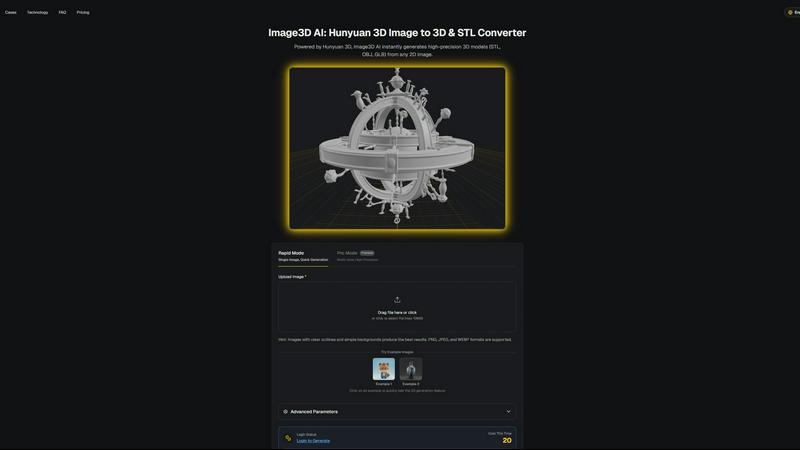
Image3D AI
Proofapp

Feature Comparison
Image3D AI
Rapid Mode
The Rapid Mode allows users to generate 3D models from a single image quickly and effortlessly. This feature is especially beneficial for those who need quick results, making it ideal for logos or simple designs. Users can expect a fast turnaround without sacrificing quality, enabling them to iterate on their ideas in a matter of minutes.
Pro Mode
In contrast to Rapid Mode, Pro Mode is designed for users who require higher precision and detail. By allowing the upload of multiple images taken from various angles, this mode generates high-fidelity 3D models suitable for professional applications. It is perfect for users who demand quality and complexity in their 3D assets.
Advanced Parameters
Image3D AI includes advanced parameters that enable users to customize their 3D generation process. This feature allows users to adjust settings based on their specific needs, ensuring that the generated models meet their project requirements. This level of customization is crucial for professionals looking to fine-tune their assets for various applications.
Multi-View Mode
The Multi-View Mode is essential for accurately reconstructing real-world objects. By providing multiple perspectives of an object, users can achieve a more realistic and detailed 3D model. This feature is particularly useful for complex shapes, ensuring that the final product is both true to life and visually appealing.
Proofapp
Visual Commenting
With Proofapp, users can click anywhere on a screenshot to leave contextual feedback. This direct approach eliminates the confusion often associated with vague instructions, such as "top left" or "under the nav." It ensures that all comments are pinned exactly where they matter most, fostering clear and effective communication.
Multi-Breakpoint Testing
Proofapp automatically captures screenshots at both desktop and mobile breakpoints, allowing teams to review their designs across various devices effortlessly. This feature ensures that feedback is relevant and considers the user experience on different screen sizes, thus enhancing the overall quality of web projects.
Real-time Collaboration
The platform facilitates real-time collaboration, enabling team members to see comments and feedback as they are made. Users can reply, resolve issues, and track progress together, reducing the time spent waiting for responses and improving overall project efficiency.
Secure Share Links
Proofapp allows users to generate secure, expirable links to share projects with clients. This feature keeps feedback confidential and organized, ensuring that only authorized reviewers can access the project while enabling easy commenting and collaboration.
Use Cases
Image3D AI
For Game Developers
Game developers can leverage Image3D AI to rapidly generate 3D assets for their projects. With built-in support for PBR materials, users can import their models directly into game engines like Unity or Unreal Engine. This capability significantly speeds up the asset creation process, allowing developers to focus on gameplay and design.
For E-commerce
E-commerce businesses can transform product images into interactive 3D models that enhance customer engagement. With AR previews and online 3D showcases, customers can explore products in an immersive way, leading to improved sales and customer satisfaction.
For 3D Printing
Image3D AI serves as an efficient STL converter, delivering high-precision, print-ready files powered by Hunyuan 3D technology. This feature is a game changer for 3D printing enthusiasts who need reliable and accurate models for their printing projects, reducing the time spent on manual modeling.
For Architecture & Design
Architects and designers can utilize Image3D AI to quickly generate architectural models, saving valuable time in the design process. By converting 2D plans or sketches into 3D representations, users can visualize their concepts more effectively and make informed design decisions.
Proofapp
Freelance Projects
Freelancers can utilize Proofapp to streamline client feedback on web designs. By using visual commenting, they can receive precise instructions directly on the designs, reducing the time spent clarifying vague requests and enabling faster project completion.
Agency Workflows
Agencies managing multiple projects can benefit from Proofapp's multi-page support and real-time collaboration features. This allows teams to keep feedback organized and visible, ensuring that all comments are actionable and easily tracked throughout the revision process.
Marketing Campaign Reviews
Marketing teams can leverage Proofapp to review landing pages and campaigns visually. By allowing team members to pin comments directly on the designs, they can ensure that all feedback is relevant, making it easier to implement changes that enhance campaign effectiveness.
Design Team Approvals
Design teams can use Proofapp to gather precise feedback from stakeholders. By eliminating the back-and-forth of traditional email communication, teams can focus on making improvements based on visual feedback, leading to quicker approvals and reduced revision cycles.
Overview
About Image3D AI
Image3D AI is an innovative tool designed to revolutionize the way users create 3D models from 2D images. Utilizing Tencent's advanced Hunyuan 3D engine, this software allows users to convert static images into production-ready 3D models in seconds, without requiring any prior 3D modeling skills. Whether you are a seasoned designer, a 3D printing enthusiast, or a novice game developer, Image3D AI opens up new avenues for creativity and productivity. By leveraging artificial intelligence, the platform simplifies the often complex process of 3D model creation, making it accessible for everyone. The main value proposition of Image3D AI lies in its ability to quickly transform ideas into tangible 3D assets, thus enhancing creative exploration and efficiency in various projects—from gaming to product design.
About Proofapp
Proofapp is an innovative visual feedback and website review platform designed to streamline the collaboration process between designers, developers, and their clients. By allowing users to upload any website URL, Proofapp automatically captures screenshots for both desktop and mobile views, enabling precise feedback. This platform is especially beneficial for freelancers, agencies, and small teams who face challenges with traditional feedback methods, such as endless email chains and vague revision notes. With features like real-time commenting, file attachments, and multi-page support, Proofapp transforms feedback into a visual and organized experience. The platform empowers users to resolve issues collaboratively without the need for extensive back-and-forth communication, enhancing productivity and reducing the time spent on revisions. By keeping all feedback actionable and visual, Proofapp not only simplifies the review process but also drives projects toward successful completion efficiently.
Frequently Asked Questions
Image3D AI FAQ
How quickly can I generate a 3D model with Image3D AI?
Using the Rapid Mode, you can generate a 3D model from a single image in just seconds. For more complex models using Pro Mode, the generation may take slightly longer but is still optimized for speed.
What types of images work best for 3D generation?
Images with clear outlines, high contrast, and simple backgrounds yield the best results. Avoid blurry or low-light images, as they can hinder the AI's ability to accurately reconstruct the 3D model.
Can I use Image3D AI for different file formats?
Yes, Image3D AI supports multiple file formats including STL for 3D printing, OBJ for traditional 3D editing, and GLB for modern web and AR applications. You can choose the format that best fits your project needs.
Is there a limit to the image size I can upload?
Currently, Image3D AI supports image uploads of up to 10MB in size. Ensure that your images are within this limit to successfully use the platform's features.
Proofapp FAQ
How does Proofapp improve the feedback process?
Proofapp enhances the feedback process by allowing users to leave visual comments directly on screenshots, eliminating miscommunication and confusion associated with traditional email chains.
Is there a requirement for clients to create an account?
No, clients do not need to create an account to leave feedback on the designs. They can access the project through secure share links provided by the user.
Can I use Proofapp for both desktop and mobile reviews?
Yes, Proofapp automatically captures screenshots for both desktop and mobile views, allowing comprehensive testing and feedback across different devices.
What kind of security measures does Proofapp offer?
Proofapp includes enterprise-level security features such as role-based permissions, audit logs, and secure data handling to ensure that all feedback and projects are kept confidential and secure.
Alternatives
Image3D AI Alternatives
Image3D AI is a groundbreaking tool in the realm of design, specifically tailored for transforming 2D images into high-quality 3D models. It caters to a wide spectrum of users, from 3D printing aficionados to aspiring game developers. However, as users explore the capabilities of Image3D AI, they often find themselves seeking alternatives due to various factors, such as pricing structures, specific feature sets, or compatibility with different platforms. When searching for an alternative, it’s essential to consider several key aspects, including the ease of use, versatility in output formats, and the quality of generated 3D models. Additionally, users should evaluate whether the alternative provides sufficient support for their specific creative needs and project requirements, ensuring a smooth transition and continued productivity in their creative endeavors.
Proofapp Alternatives
Proofapp is a visual feedback and website review platform that belongs to the design tools category. It facilitates collaboration between designers, developers, and clients by allowing users to upload website URLs and receive automatically captured screenshots for review. This streamlined process helps eliminate confusion arising from scattered emails and vague feedback. Users often seek alternatives to Proofapp for various reasons, including pricing, specific feature requirements, or compatibility with other platforms they are using. When choosing an alternative, consider factors such as ease of use, integration capabilities, and whether the tool meets your specific design and review needs. A thorough evaluation of these aspects will help you find a solution that enhances your collaborative workflow.