
Image3D AI
Transform 2D images into high-quality 3D models in minutes, perfect for 3D printing and game development.
Visit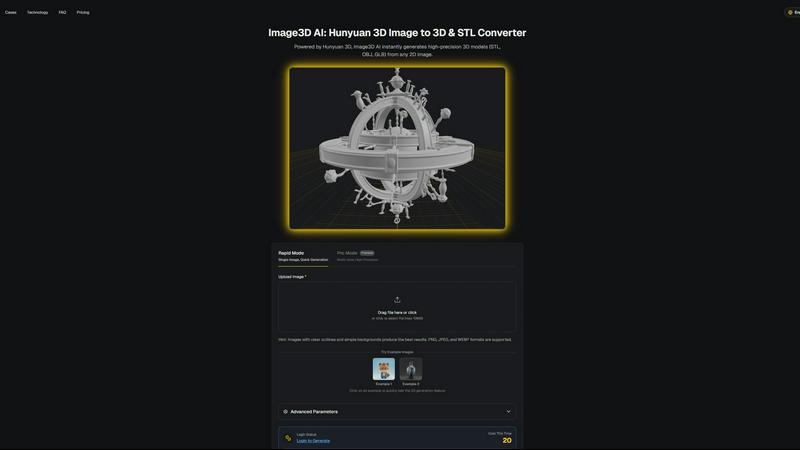
About Image3D AI
Image3D AI is an innovative tool designed to revolutionize the way users create 3D models from 2D images. Utilizing Tencent's advanced Hunyuan 3D engine, this software allows users to convert static images into production-ready 3D models in seconds, without requiring any prior 3D modeling skills. Whether you are a seasoned designer, a 3D printing enthusiast, or a novice game developer, Image3D AI opens up new avenues for creativity and productivity. By leveraging artificial intelligence, the platform simplifies the often complex process of 3D model creation, making it accessible for everyone. The main value proposition of Image3D AI lies in its ability to quickly transform ideas into tangible 3D assets, thus enhancing creative exploration and efficiency in various projects—from gaming to product design.
Features of Image3D AI
Rapid Mode
The Rapid Mode allows users to generate 3D models from a single image quickly and effortlessly. This feature is especially beneficial for those who need quick results, making it ideal for logos or simple designs. Users can expect a fast turnaround without sacrificing quality, enabling them to iterate on their ideas in a matter of minutes.
Pro Mode
In contrast to Rapid Mode, Pro Mode is designed for users who require higher precision and detail. By allowing the upload of multiple images taken from various angles, this mode generates high-fidelity 3D models suitable for professional applications. It is perfect for users who demand quality and complexity in their 3D assets.
Advanced Parameters
Image3D AI includes advanced parameters that enable users to customize their 3D generation process. This feature allows users to adjust settings based on their specific needs, ensuring that the generated models meet their project requirements. This level of customization is crucial for professionals looking to fine-tune their assets for various applications.
Multi-View Mode
The Multi-View Mode is essential for accurately reconstructing real-world objects. By providing multiple perspectives of an object, users can achieve a more realistic and detailed 3D model. This feature is particularly useful for complex shapes, ensuring that the final product is both true to life and visually appealing.
Use Cases of Image3D AI
For Game Developers
Game developers can leverage Image3D AI to rapidly generate 3D assets for their projects. With built-in support for PBR materials, users can import their models directly into game engines like Unity or Unreal Engine. This capability significantly speeds up the asset creation process, allowing developers to focus on gameplay and design.
For E-commerce
E-commerce businesses can transform product images into interactive 3D models that enhance customer engagement. With AR previews and online 3D showcases, customers can explore products in an immersive way, leading to improved sales and customer satisfaction.
For 3D Printing
Image3D AI serves as an efficient STL converter, delivering high-precision, print-ready files powered by Hunyuan 3D technology. This feature is a game changer for 3D printing enthusiasts who need reliable and accurate models for their printing projects, reducing the time spent on manual modeling.
For Architecture & Design
Architects and designers can utilize Image3D AI to quickly generate architectural models, saving valuable time in the design process. By converting 2D plans or sketches into 3D representations, users can visualize their concepts more effectively and make informed design decisions.
Frequently Asked Questions
How quickly can I generate a 3D model with Image3D AI?
Using the Rapid Mode, you can generate a 3D model from a single image in just seconds. For more complex models using Pro Mode, the generation may take slightly longer but is still optimized for speed.
What types of images work best for 3D generation?
Images with clear outlines, high contrast, and simple backgrounds yield the best results. Avoid blurry or low-light images, as they can hinder the AI's ability to accurately reconstruct the 3D model.
Can I use Image3D AI for different file formats?
Yes, Image3D AI supports multiple file formats including STL for 3D printing, OBJ for traditional 3D editing, and GLB for modern web and AR applications. You can choose the format that best fits your project needs.
Is there a limit to the image size I can upload?
Currently, Image3D AI supports image uploads of up to 10MB in size. Ensure that your images are within this limit to successfully use the platform's features.
Similar to Image3D AI

AI-native presentation and visual content platform that turns prompts, documents, images, videos, and data into polished, shareable decks.


Create polished AI videos from text or images online with Seedance 2.5 Free.


StopScroll is an AI thumbnail maker that generates, compares, and helps creators pick stronger cover images before publishing.

HubVanta is a free AI creative toolkit for generating images, videos, voices, and visual edits from one browser workspace.

Ask is this AI image? Free online checker: upload a photo for AI-generated and deepfake scores plus a clear verdict band.