
Geekflare Connect vs SimpleDraw
Side-by-side comparison to help you choose the right product.

Geekflare Connect
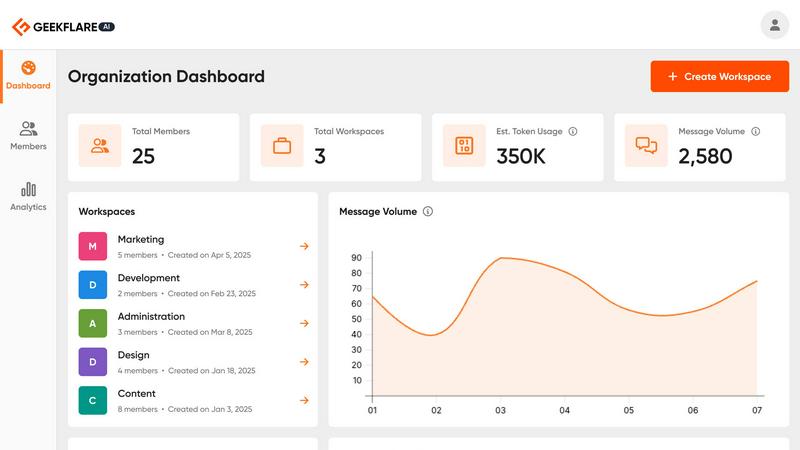
Unify your AI tools to cut costs and collaborate seamlessly, continuously improving team workflows.
Last updated: March 1, 2026

SimpleDraw
SimpleDraw evolves your ideas into precise floor plans, making every project better.
Last updated: March 1, 2026
Visual Comparison
Geekflare Connect
SimpleDraw
Feature Comparison
Geekflare Connect
Multi-Model Comparison
Instantly compare responses from top-tier models like GPT-5.2, Claude 4.5, and Gemini 3 in a single, side-by-side view. This feature allows you to test different prompts and see which AI provider delivers the best output for any specific task, from creative writing to complex coding. It eliminates guesswork and enables data-driven decisions on model selection, ensuring quality and cost-effectiveness with every query.
Collaborative Workspaces
Move beyond individual AI chats and organize work into shared project-based workspaces. Teams can seamlessly collaborate, manage member access, and securely share conversations and insights. This keeps everyone—from strategists to developers—aligned, promotes knowledge sharing, and turns AI from a personal tool into a centralized team asset that drives consistent, improved results across all departments.
Your Private AI Brain
Securely upload your internal documents, PDFs, and data files to create a private, contextual knowledge base. The AI models within Geekflare Connect can then reference this proprietary information to generate highly relevant and accurate answers. This transforms the platform into an intelligent extension of your company's data, enabling secure, insightful analysis without exposing sensitive information to public models.
Live Web Access & Prompt Library
Supercharge AI interactions with real-time data. Powered by integrations like Parallel and Exa, this feature allows models to perform web searches and incorporate the latest information into their responses. Coupled with a curated and shareable prompt library, teams can kickstart any task with best-practice templates and maintain a cycle of continuous improvement by building upon successful prompt strategies.
SimpleDraw
Dedicated Floor Plan Mode
This specialized mode is tailored for architectural drawing, allowing you to create accurate floor plans of rooms, apartments, and entire houses with ease. Draw walls, and add windows and doors with a single click. A comprehensive library of interior fixtures for kitchens, bathrooms, living rooms, and bedrooms is available to populate your plans. Real-time measurements update dynamically as you adjust your layout, providing immediate feedback for perfect planning and iteration.
Smart Alignment & Precision Control
The smart alignment system assists in placing points and lines exactly where you want them, snapping to logical points and providing clear visual guides. For ultimate control, you can zoom in for greater precision or use keyboard shortcuts to lock lines to vertical or horizontal axes. The system's sensitivity adapts to your zoom level, but can also be controlled independently, giving you precise command over every detail of your drawing as you work.
Non-Destructive Editing & Complete Control
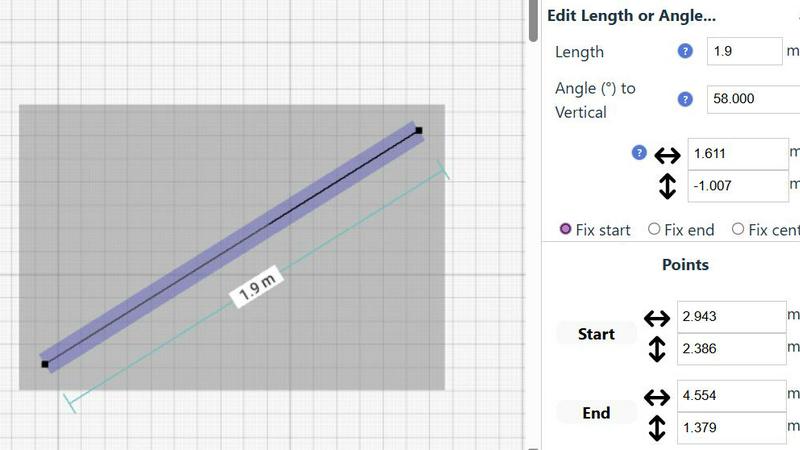
Every element in your drawing is fully editable at any time. Move, adjust, or modify walls, furniture, and annotations without starting over. Utilize undo/redo functions (with keyboard shortcuts) to experiment freely. You can group elements to move, copy, and paste them together, streamlining repetitive tasks. For numerical precision, you can input positions, line lengths, and angles directly via keyboard for any element.
Comprehensive Measurement System
Work seamlessly in your preferred units with a choice between metric and standard US (feet and inches). The system displays contextual measurements dynamically as you draw, helping you maintain accuracy. You have fine-grained control over which measurements are displayed on your final plan, ensuring clarity and professionalism for any project, from a simple room sketch to a complex home layout.
Use Cases
Geekflare Connect
Content Creation & Strategy
Marketing and writing teams can use the multi-model comparison to generate and refine content drafts, headlines, and campaign ideas. By testing prompts across different AIs simultaneously, they can quickly identify the most creative or effective output, significantly speeding up the content development cycle while ensuring the highest quality for blogs, ads, and social media.
Technical Development & Support
Developers and SREs can leverage different models for code generation, explanation, debugging, and documentation. Support teams can use the private AI brain to upload knowledge bases and get instant, accurate answers to technical queries. This unified approach streamlines problem-solving and maintains consistency in technical responses.
Business Analysis & Research
Analysts and product managers can conduct comprehensive market research by using Live Web Access for real-time data gathering across multiple sources. They can compare analytical summaries from different AI models on the same dataset, leading to more nuanced insights and robust reports that drive smarter, iterative business strategies.
Cross-Departmental Project Management
Project leads can create a shared workspace for initiatives that involve multiple stakeholders. Sales, marketing, and product teams can collaborate on messaging, analyze customer feedback, and track AI usage metrics together. This breaks down silos, optimizes shared resources, and creates a continuous feedback loop for project improvement.
SimpleDraw
Home Renovation Planning
Plan your kitchen or bathroom remodel with confidence. Create a scale-accurate floor plan to visualize new layouts, experiment with appliance and fixture placement, and ensure everything fits perfectly before making purchases or starting construction. This iterative planning process helps avoid costly mistakes and allows for continuous refinement of your design ideas.
Furniture & Room Layout Design
Design the optimal layout for your bedroom, living room, or home office. Test different furniture arrangements on a scaled drawing to see what will fit and how traffic will flow. This is invaluable for planning new purchases or simply making the most of your existing space, allowing you to iterate on designs until you find the perfect setup.
Creating Real Estate Listings
Generate clear and professional floor plans for apartment or house listings. Accurately represent room sizes, layouts, and flow to attract potential buyers or renters. A well-drawn plan provides essential information at a glance, improving listing quality and helping your property stand out in the market through clear, iterative visual communication.
DIY Project Visualization
Plan and visualize any DIY project, from building a shed to designing a garden layout. Use scale drawings to calculate material needs, understand spatial relationships, and communicate your vision to helpers. SimpleDraw allows you to tweak and improve your plans continuously, ensuring your project is well-thought-out before the first cut is made.
Overview
About Geekflare Connect
Geekflare Connect is the definitive Bring Your Own Key (BYOK) AI platform engineered for modern businesses that demand agility, cost control, and superior collaboration. It solves the critical challenge of AI tool fragmentation by providing a single, unified workspace where teams can access and leverage the world's best AI models—including OpenAI's GPT, Google's Gemini, Anthropic's Claude, and others—all at once. This platform is designed for forward-thinking organizations across marketing, sales, development, and support departments that are tired of juggling multiple subscriptions, interfaces, and billing reports. The core value proposition is twofold: dramatically reduce AI spending by up to 65% through intelligent cost management and provider comparison, while simultaneously enhancing team output by fostering a collaborative environment for AI-driven work. Geekflare Connect embodies a philosophy of continuous improvement, constantly evolving to integrate new models and features, ensuring your business doesn't just keep pace with AI innovation but leverages it strategically and efficiently.
About SimpleDraw
SimpleDraw is a powerful, free online tool designed to facilitate the creation of precise and accurate scale drawings, including detailed floor plans and technical illustrations. This innovative platform caters to a diverse audience, from DIY enthusiasts and homeowners planning renovations to professional designers and architects seeking a straightforward drawing solution. With its user-friendly interface and an array of intuitive features, SimpleDraw enables users to produce high-quality drawings quickly and effortlessly. The main value proposition lies in its combination of simplicity and precision—offering the familiarity of traditional drawing tools while enhancing the experience with advanced digital functionalities. Best of all, SimpleDraw is entirely free, requiring no registration or software installation, which makes it accessible to anyone with an internet connection. The tool is built on a philosophy of continuous improvement, constantly evolving through real user feedback to refine its features and enhance the user experience, ensuring it becomes more powerful and intuitive with every iteration.
Frequently Asked Questions
Geekflare Connect FAQ
What is a BYOK (Bring Your Own Key) AI platform?
A BYOK platform like Geekflare Connect allows you to use your own existing API keys from AI providers such as OpenAI, Anthropic, and Google. You are not locked into a single vendor or forced to pay marked-up subscription fees through the platform. Instead, Geekflare Connect provides the superior interface, collaboration tools, and analytics, while you maintain direct control and billing with your preferred AI model providers, leading to significant cost savings.
How does Geekflare Connect help reduce AI costs by up to 65%?
The platform reduces costs through several mechanisms. Centralized usage analytics provide full visibility into token consumption across all models, preventing waste and surprise bills. The multi-model comparison feature allows you to choose the most cost-effective model for each task, as prices per token vary between providers. Furthermore, eliminating the need for multiple individual team subscriptions to different AI interfaces consolidates spending and unlocks better management.
Is my data safe and private on Geekflare Connect?
Yes. Geekflare Connect is designed with security and privacy as a core principle. When you use your own API keys, your prompts and conversations are sent directly to the respective AI provider under their privacy policy. For documents uploaded to your Private AI Brain, you maintain full control. The platform itself acts as a secure conduit and workspace, not a data warehouse, and we are committed to continuous improvement of our security protocols.
Can my entire team use one Geekflare Connect workspace?
Absolutely. Geekflare Connect is built for team collaboration. You can invite team members to shared workspaces, control their access levels, and collaborate on chats and projects in real time. This unified approach ensures everyone is using the best AI tools for the job, shares successful prompts, and stays aligned, which collectively elevates the team's productivity and output quality through ongoing collaboration.
SimpleDraw FAQ
Is SimpleDraw really free to use?
Yes, SimpleDraw is completely free. There is no cost to use any of its core features for creating scale drawings and floor plans. The platform requires no registration, software download, or subscription, making it immediately accessible to everyone directly in a web browser as part of our commitment to providing powerful tools without barriers.
Do I need any CAD or design experience to use SimpleDraw?
No prior CAD or technical drawing experience is required. SimpleDraw is built with an intuitive, user-friendly interface that guides you through the process. Features like the smart alignment system, dedicated floor plan mode, and click-to-add symbols make it easy for beginners to start creating accurate drawings immediately, with complexity that grows with your skill.
Can I use SimpleDraw on any device?
SimpleDraw is a web-based application that runs directly in your browser. This means you can use it on any device with a modern internet browser and an internet connection, including Windows PCs, Macs, Chromebooks, and tablets. There is no specific app to download, ensuring easy access and a consistent experience across platforms.
How do I provide feedback or suggest new features?
User feedback is central to our continuous improvement cycle. You can join the SimpleDraw Discord community to share your ideas, report issues, and request new features directly with the development team and other users. This community-driven approach ensures the tool evolves based on real-world use and needs.
Alternatives
Geekflare Connect Alternatives
Geekflare Connect is a unified AI collaboration platform in the productivity and management category. It centralizes access to multiple AI models, enabling teams to optimize usage and reduce costs through a single, collaborative interface. Users often explore alternatives for various reasons, such as specific budget constraints, the need for different feature sets, or integration requirements with their existing tech stack. The search for the right tool is a natural part of the continuous improvement process for any team. When evaluating options, consider core needs like multi-model support, real-time data capabilities, and robust collaboration features. The goal is to find a solution that not only fits current workflows but also adapts to your team's evolving journey toward greater efficiency and innovation.
SimpleDraw Alternatives
SimpleDraw is a free, web-based tool for creating accurate scale drawings and floor plans. It belongs to the category of design tools, specifically those focused on technical illustration and space planning. Users often seek alternatives to find a solution that better fits their evolving project requirements, whether they need more advanced features, a different pricing model, or software that integrates with other platforms in their workflow. When evaluating other options, it's wise to consider your specific needs for precision, collaboration, and output formats. The goal is to find a tool that not only meets your current demands but also adapts to your growing skills and more complex projects. This process of assessment and selection is a natural part of improving your design process. The search for the right tool is iterative. You might start with a basic need, outgrow a feature set, and seek a new solution that offers a better fit. This cycle of learning and upgrading ensures your tools continuously enhance your ability to execute ideas with greater efficiency and detail.