
FilexHost vs Geekflare Connect
Side-by-side comparison to help you choose the right product.

FilexHost
Effortlessly host and share files in seconds with FilexHost's simple drag-and-drop interface and automatic URL.
Last updated: February 26, 2026

Geekflare Connect
Unify your AI tools to cut costs and collaborate seamlessly, continuously improving team workflows.
Last updated: March 1, 2026
Visual Comparison
FilexHost

Geekflare Connect
Feature Comparison
FilexHost
Universal File Support
FileXHost supports a broad range of file types, allowing you to host PDFs, Excel sheets, images, audio, video, ZIP archives, and HTML projects effortlessly. This versatility ensures that you can share any file type without worrying about compatibility issues.
Instant Subdomains
With FileXHost, each file you upload is automatically assigned an instant subdomain (your-file.filex.host), making it easy to share your content with a simple link. This feature eliminates the need for complex setups, allowing for immediate access to your hosted files.
Secure by Default
Every link generated by FileXHost comes with free SSL encryption, ensuring that your files are protected during transmission. This security measure provides peace of mind to both you and your recipients, making it a reliable choice for sharing sensitive information.
Built-In Viewers
FileXHost includes built-in viewers for various file types, ensuring that your documents, images, and media are rendered correctly in-browser. This feature allows recipients to interact with your files directly, enhancing their experience and engagement without the need for additional downloads.
Geekflare Connect
Multi-Model Comparison
Instantly compare responses from top-tier models like GPT-5.2, Claude 4.5, and Gemini 3 in a single, side-by-side view. This feature allows you to test different prompts and see which AI provider delivers the best output for any specific task, from creative writing to complex coding. It eliminates guesswork and enables data-driven decisions on model selection, ensuring quality and cost-effectiveness with every query.
Collaborative Workspaces
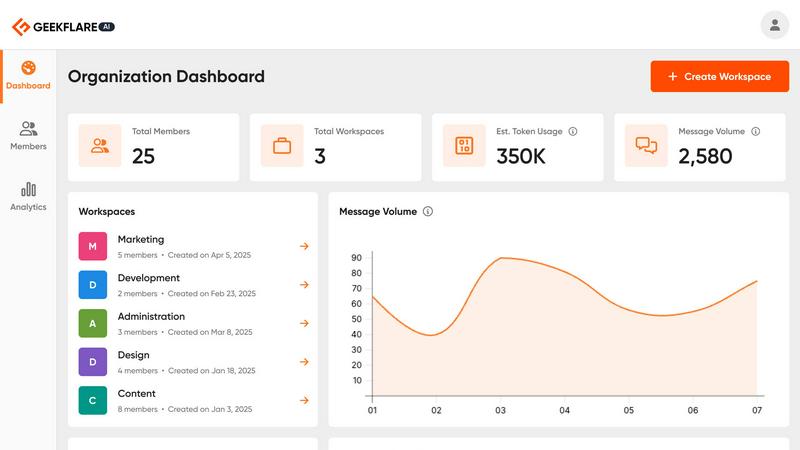
Move beyond individual AI chats and organize work into shared project-based workspaces. Teams can seamlessly collaborate, manage member access, and securely share conversations and insights. This keeps everyone—from strategists to developers—aligned, promotes knowledge sharing, and turns AI from a personal tool into a centralized team asset that drives consistent, improved results across all departments.
Your Private AI Brain
Securely upload your internal documents, PDFs, and data files to create a private, contextual knowledge base. The AI models within Geekflare Connect can then reference this proprietary information to generate highly relevant and accurate answers. This transforms the platform into an intelligent extension of your company's data, enabling secure, insightful analysis without exposing sensitive information to public models.
Live Web Access & Prompt Library
Supercharge AI interactions with real-time data. Powered by integrations like Parallel and Exa, this feature allows models to perform web searches and incorporate the latest information into their responses. Coupled with a curated and shareable prompt library, teams can kickstart any task with best-practice templates and maintain a cycle of continuous improvement by building upon successful prompt strategies.
Use Cases
FilexHost
Professional Document Sharing
Professionals can leverage FileXHost to easily share client reports and presentations without the hassle of email attachments. The instant URLs facilitate quick access, making it ideal for business communications.
Developer Resource Hosting
Developers can utilize FileXHost to host landing pages or mock APIs, allowing for easy sharing with clients or team members. The simple drag-and-drop interface eliminates the need for complicated setups, enabling faster project iterations.
Creative Product Distribution
Creators and artists can use FileXHost to distribute digital products, such as e-books or multimedia content, effortlessly. The platform’s file support and rendering capabilities ensure that their work is presented in the best light.
Friction-Free File Delivery
Anyone needing to share files without cumbersome "request access" emails can benefit from FileXHost. The service allows users to send files directly with a secure link, streamlining the sharing process for all types of users.
Geekflare Connect
Content Creation & Strategy
Marketing and writing teams can use the multi-model comparison to generate and refine content drafts, headlines, and campaign ideas. By testing prompts across different AIs simultaneously, they can quickly identify the most creative or effective output, significantly speeding up the content development cycle while ensuring the highest quality for blogs, ads, and social media.
Technical Development & Support
Developers and SREs can leverage different models for code generation, explanation, debugging, and documentation. Support teams can use the private AI brain to upload knowledge bases and get instant, accurate answers to technical queries. This unified approach streamlines problem-solving and maintains consistency in technical responses.
Business Analysis & Research
Analysts and product managers can conduct comprehensive market research by using Live Web Access for real-time data gathering across multiple sources. They can compare analytical summaries from different AI models on the same dataset, leading to more nuanced insights and robust reports that drive smarter, iterative business strategies.
Cross-Departmental Project Management
Project leads can create a shared workspace for initiatives that involve multiple stakeholders. Sales, marketing, and product teams can collaborate on messaging, analyze customer feedback, and track AI usage metrics together. This breaks down silos, optimizes shared resources, and creates a continuous feedback loop for project improvement.
Overview
About FilexHost
FileXHost is your go-to solution for instant file hosting and sharing, designed to simplify the way you manage and distribute your files. Whether you need to share documents, media, spreadsheets, or even entire websites, FileXHost provides a seamless experience with its innovative "Drop & Share" workflow. With no server configurations or logins required for recipients, you can simply drag your file into the platform and receive an instant, secure URL to share. This service is perfect for professionals, developers, and creators who require a hassle-free method of file delivery, eliminating the frustration of attachment limits and "request access" emails. FileXHost supports a wide array of file types and uses a smart rendering engine to ensure that all files are displayed optimally, providing an engaging experience for your audience. The service is built with a focus on viewer experience, ensuring that your files are beautifully presented without the need for cumbersome downloads or plugins.
About Geekflare Connect
Geekflare Connect is the definitive Bring Your Own Key (BYOK) AI platform engineered for modern businesses that demand agility, cost control, and superior collaboration. It solves the critical challenge of AI tool fragmentation by providing a single, unified workspace where teams can access and leverage the world's best AI models—including OpenAI's GPT, Google's Gemini, Anthropic's Claude, and others—all at once. This platform is designed for forward-thinking organizations across marketing, sales, development, and support departments that are tired of juggling multiple subscriptions, interfaces, and billing reports. The core value proposition is twofold: dramatically reduce AI spending by up to 65% through intelligent cost management and provider comparison, while simultaneously enhancing team output by fostering a collaborative environment for AI-driven work. Geekflare Connect embodies a philosophy of continuous improvement, constantly evolving to integrate new models and features, ensuring your business doesn't just keep pace with AI innovation but leverages it strategically and efficiently.
Frequently Asked Questions
FilexHost FAQ
What is FileXHost?
FileXHost is a user-friendly file hosting and sharing platform that allows you to upload a variety of file types and generate instant shareable links without complex configurations.
Is it really free?
Yes, FileXHost offers a free plan that allows you to host up to 1,000 files with a maximum size of 25MB each. This plan is ad-supported and is perfect for quick sharing and testing.
What file types are supported?
FileXHost supports a wide range of file types, including documents (PDF, TXT), spreadsheets (XLSX, CSV), images (JPG, PNG), media (MP4, MP3), archives (ZIP), and code/text files, ensuring versatility for users.
How do I update my site?
To update your hosted content on FileXHost, simply upload a new version of your file or website ZIP. The platform will generate a new link, allowing you to share the updated content with your audience easily.
Geekflare Connect FAQ
What is a BYOK (Bring Your Own Key) AI platform?
A BYOK platform like Geekflare Connect allows you to use your own existing API keys from AI providers such as OpenAI, Anthropic, and Google. You are not locked into a single vendor or forced to pay marked-up subscription fees through the platform. Instead, Geekflare Connect provides the superior interface, collaboration tools, and analytics, while you maintain direct control and billing with your preferred AI model providers, leading to significant cost savings.
How does Geekflare Connect help reduce AI costs by up to 65%?
The platform reduces costs through several mechanisms. Centralized usage analytics provide full visibility into token consumption across all models, preventing waste and surprise bills. The multi-model comparison feature allows you to choose the most cost-effective model for each task, as prices per token vary between providers. Furthermore, eliminating the need for multiple individual team subscriptions to different AI interfaces consolidates spending and unlocks better management.
Is my data safe and private on Geekflare Connect?
Yes. Geekflare Connect is designed with security and privacy as a core principle. When you use your own API keys, your prompts and conversations are sent directly to the respective AI provider under their privacy policy. For documents uploaded to your Private AI Brain, you maintain full control. The platform itself acts as a secure conduit and workspace, not a data warehouse, and we are committed to continuous improvement of our security protocols.
Can my entire team use one Geekflare Connect workspace?
Absolutely. Geekflare Connect is built for team collaboration. You can invite team members to shared workspaces, control their access levels, and collaborate on chats and projects in real time. This unified approach ensures everyone is using the best AI tools for the job, shares successful prompts, and stays aligned, which collectively elevates the team's productivity and output quality through ongoing collaboration.
Alternatives
FilexHost Alternatives
FilexHost is a user-friendly file hosting and sharing solution that enables users to quickly upload and share files through simple drag-and-drop functionality. This platform falls under the productivity and management category, streamlining the process of file delivery for various media types and documents. Users often seek alternatives to FilexHost for various reasons, including pricing, specific feature requirements, or compatibility with different platforms. When selecting an alternative, it is essential to consider factors such as ease of use, security features, storage limits, and the ability to share files without cumbersome access requests. A seamless user experience and robust functionality should be at the forefront of your decision-making process.
Geekflare Connect Alternatives
Geekflare Connect is a unified AI collaboration platform in the productivity and management category. It centralizes access to multiple AI models, enabling teams to optimize usage and reduce costs through a single, collaborative interface. Users often explore alternatives for various reasons, such as specific budget constraints, the need for different feature sets, or integration requirements with their existing tech stack. The search for the right tool is a natural part of the continuous improvement process for any team. When evaluating options, consider core needs like multi-model support, real-time data capabilities, and robust collaboration features. The goal is to find a solution that not only fits current workflows but also adapts to your team's evolving journey toward greater efficiency and innovation.