
Dreamflow vs PUNKU.AI
Side-by-side comparison to help you choose the right product.

Dreamflow
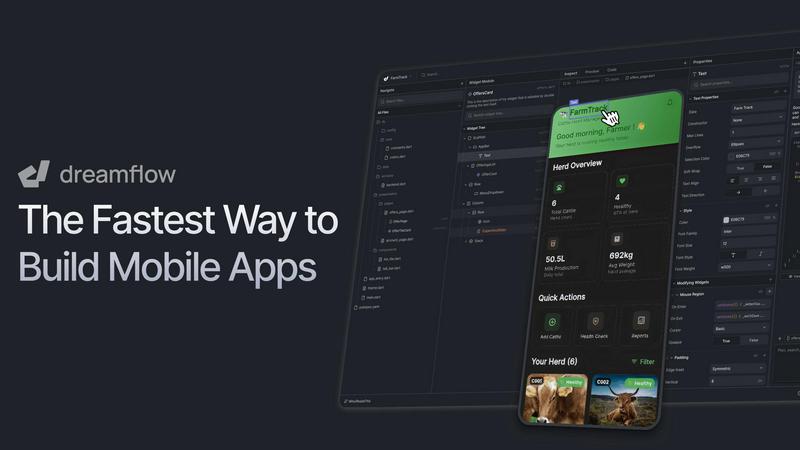
Dreamflow seamlessly turns your AI prompts into real, deployable apps through an iterative visual and code canvas.
Last updated: March 1, 2026

PUNKU.AI
PUNKU.AI simplifies and enhances your AI automations in plain English, optimizing them for seamless performance.
Last updated: February 28, 2026
Visual Comparison
Dreamflow
PUNKU.AI

Feature Comparison
Dreamflow
Tri-Surface Editing
Dreamflow's revolutionary workflow synchronizes three distinct but interconnected surfaces: an AI Agent, a Visual Canvas, and full Flutter Code. You can initiate a build with a simple prompt, adjust components visually with drag-and-drop ease, and then seamlessly switch to the underlying code for precise customization. Every modification in one view is instantly reflected in the others, ensuring your project is perpetually in a shippable state and eliminating the friction of traditional, linear development paths.
AI-Powered Development
The platform features a context-aware AI agent that understands app patterns and best practices. It goes beyond simple code generation to intelligently scaffold entire features, suggest improvements, and implement changes based on your natural language prompts. This AI assistance accelerates the initial build and supports continuous refinement, learning from your project to provide increasingly relevant suggestions as you iterate.
Build for Any Screen
Powered by Flutter, Dreamflow enables you to build robust, responsive applications that automatically adapt to every device size. From mobile phones and tablets to web browsers, your app maintains a polished user experience. The platform simplifies deployment, allowing you to publish your app to the Apple App Store, Google Play Store, and the web with just a few clicks from a single codebase.
Integrated Backend & Deployment
Dreamflow integrates backend services like Firebase and Supabase out of the box, allowing you to build full-stack applications with real-time databases, authentication, and storage from day one. Combined with one-click deployment for web and mobile app stores, the platform handles the entire pipeline from initial idea to live, scalable product, removing infrastructure complexity and letting you focus on building and improving your app.
PUNKU.AI
Natural Language Automation
PUNKU.AI allows users to describe their automation needs in plain English, making it easy for anyone to create complex workflows without needing to understand programming or technical jargon.
Comprehensive API Integrations
The platform connects with over 3,000 popular applications, ensuring that businesses can integrate PUNKU.AI into their existing tool stack seamlessly, enhancing productivity and efficiency.
Proactive Workflow Monitoring
Once your workflows are live, PUNKU.AI does not just run them; it actively monitors for errors and performance issues, ensuring that your automations are running smoothly and effectively.
Iterative Improvement Suggestions
PUNKU.AI continuously learns from your workflows and suggests iterative improvements based on your performance goals, helping to optimize processes over time and ensuring that they evolve with your business needs.
Use Cases
Dreamflow
Rapid Prototyping and MVPs
Entrepreneurs and product managers can use Dreamflow to transform a concept into a functional Minimum Viable Product (MVP) in hours, not weeks. By describing the core idea to the AI and visually refining the UI, teams can quickly create a tangible app to validate market fit, gather user feedback, and iterate based on real-world data before committing extensive resources.
Professional App Development
Professional developers and agencies can leverage Dreamflow to accelerate client projects and internal tools. The platform streamlines the initial scaffolding and UI development, allowing developers to focus their expertise on complex business logic, custom animations, and performance optimization within the clean, exported Flutter code, significantly reducing time-to-market.
Cross-Platform App Creation
Startups and businesses aiming to reach users on iOS, Android, and the web can use Dreamflow to build once and deploy everywhere. The Flutter foundation ensures native performance and a consistent interface across all platforms, managed through a single, synchronized project that eliminates the need to maintain separate codebases for each operating system.
Educational Tool for Learning Development
Aspiring developers and students can use Dreamflow as a powerful educational bridge. They can start by visualizing how app components connect, use AI to understand code structure, and then examine and modify the generated Flutter (Dart) code. This cyclical process of seeing the visual result of code changes demystifies app development and provides a practical, hands-on learning environment.
PUNKU.AI
Customer Service Automation
Businesses can create customer service chatbots that handle common inquiries 24/7, freeing up human agents to focus on more complex issues while ensuring customer satisfaction.
Lead Generation
PUNKU.AI can automate lead generation processes, capturing and qualifying leads in real-time, which helps sales teams focus their efforts on high-value prospects.
Meeting Coordination
By automating meeting scheduling and follow-ups, PUNKU.AI ensures that teams stay organized and efficient, reducing the time spent on logistical tasks and improving productivity.
Marketing Campaign Management
Marketers can leverage PUNKU.AI to automate email marketing campaigns and social media posting, allowing them to reach their audience effectively without getting bogged down in repetitive tasks.
Overview
About Dreamflow
Dreamflow is the next evolution in app development, a visual AI builder designed to transform ideas into production-ready mobile applications with unprecedented speed and flexibility. It empowers a diverse spectrum of builders—from solo founders and entrepreneurs to professional developers and enterprise teams—to create real, scalable apps. The core innovation is a seamless, non-linear workflow that breaks free from traditional constraints. Instead of being locked into a single method like prototyping, no-code, or manual coding, Dreamflow synchronizes three powerful surfaces: AI-driven prompting, a visual canvas editor, and full Flutter code. You can start by simply describing your app idea, visually refine the layout and logic, and dive directly into clean, production-ready Dart code for granular control. Every change is instantly reflected across all surfaces, ensuring your work is always in a deployable state. Built by the team behind FlutterFlow and trusted by over 2 million builders, Dreamflow is designed for continuous iteration, allowing you to build, refine, and improve your app in a natural, cyclical flow of creative development without installation lock-in.
About PUNKU.AI
PUNKU.AI is an innovative intelligent automation platform that bridges the gap between simplicity and control, making it accessible for businesses and individuals alike. It empowers users to create sophisticated AI automations without the need for coding, effectively acting as a senior engineer. By simply articulating your goals in plain English, PUNKU.AI conducts a clarifying interview to gather your requirements, ensuring a robust understanding of your needs. The platform builds a visual, node-based graph of your automation, providing clarity and transparency that is often missing in traditional "black-box" AI solutions. With seamless integration to over 3,000 popular APIs such as Gmail, Slack, Notion, and Zoom, PUNKU.AI fits effortlessly into your existing workflow. Beyond just executing tasks, PUNKU.AI continuously monitors your workflows for errors, suggesting improvements based on performance metrics. Trusted by over 200 businesses, PUNKU.AI is designed to eliminate busywork, enabling teams in customer support, sales, operations, and marketing to focus on strategic, high-impact work instead.
Frequently Asked Questions
Dreamflow FAQ
How does Dreamflow handle code quality and customization?
Dreamflow generates clean, production-ready Flutter (Dart) code that follows best practices. The code is fully accessible and customizable. You can dive into the code editor at any point to make granular changes, add custom functions, or integrate third-party packages. Any code you write manually is synchronized back to the visual canvas, maintaining the seamless connection between all surfaces.
Can I export my app and own the code?
Yes. On the Hobby plan and above, Dreamflow provides full code export. You can download the complete Flutter project, own the source code outright, and continue development in your preferred IDE (like VS Code or Android Studio). This ensures there is no vendor lock-in, and you have complete freedom to host, modify, and scale your application independently.
What backend services does Dreamflow support?
Dreamflow offers managed backend integrations with Firebase and Supabase out of the box. These services handle essential infrastructure like authentication, real-time databases, cloud storage, and serverless functions. The platform provides a visual interface to set up and connect these services, allowing you to build full-stack applications without managing server infrastructure.
Is Dreamflow suitable for building complex, large-scale applications?
Absolutely. Dreamflow is designed for continuous iteration and scales from simple prototypes to complex, enterprise-grade applications. Features like version control (Git) on the Pro plan, clean code architecture, and the ability to integrate custom code and packages make it robust enough for professional, large-scale development workflows used by teams.
PUNKU.AI FAQ
What makes PUNKU.AI different from other AI platforms?
PUNKU.AI stands out due to its user-friendly approach that allows non-technical users to create complex automations simply by describing their needs in plain English, without the hurdles of coding.
Do I need technical knowledge to use PUNKU.AI?
No, you do not need any technical knowledge. PUNKU.AI is designed for everyone, allowing users to instruct the platform in natural language, making automation accessible to all.
How long does it take to get started?
Getting started with PUNKU.AI is quick and straightforward. Users can set up their first automation within minutes, allowing them to dive into productivity without delay.
How secure is my data on PUNKU.AI?
PUNKU.AI prioritizes user data security, employing robust security measures to protect sensitive information, giving users peace of mind as they automate their workflows.
Alternatives
Dreamflow Alternatives
Dreamflow is a visual AI builder for production-ready mobile applications, representing a new category of development tools that unify AI prompting, visual design, and clean code generation. It's designed for a cyclical, iterative workflow where changes sync seamlessly across all editing surfaces. Builders often explore alternatives for various reasons, such as specific budget constraints, a need for different platform support like web or desktop, a preference for a purely code-centric environment, or a requirement for particular third-party integrations not yet available. The search for the right tool is a natural part of the development journey. When evaluating other platforms, consider your core needs: the required output platform (iOS, Android, web), the desired balance between visual speed and code control, the importance of true production-ready code generation, and how the tool supports your team's continuous improvement cycle from idea to deployment and beyond.
PUNKU.AI Alternatives
PUNKU.AI is an intelligent automation platform that falls within the No Code & Low Code category, designed to streamline and enhance AI automations using plain English descriptions. Users often seek alternatives to PUNKU.AI for various reasons, including pricing structures, feature sets, or specific platform needs that better align with their business operations. When exploring alternatives, it is essential to consider factors such as ease of use, integration capabilities, and the level of transparency offered by the automation tool, ensuring it meets your unique workflow requirements. Choosing the right automation platform can significantly impact productivity and efficiency. Look for solutions that provide a balance between user-friendliness and advanced functionality, enabling you to build and optimize workflows without needing extensive technical knowledge. Additionally, prioritize platforms that offer proactive monitoring and continuous improvement features, which are crucial for maintaining effective automations over time.