
DreamFace vs Seedance 2.0
Side-by-side comparison to help you choose the right product.

DreamFace continuously evolves to create immersive AI avatar videos and photos from your text in seconds.
Last updated: February 28, 2026

Seedance 2.0
Seedance 2.0 transforms text and images into stunning, high-quality videos with seamless motion and consistent style.
Last updated: February 27, 2026
Visual Comparison
DreamFace
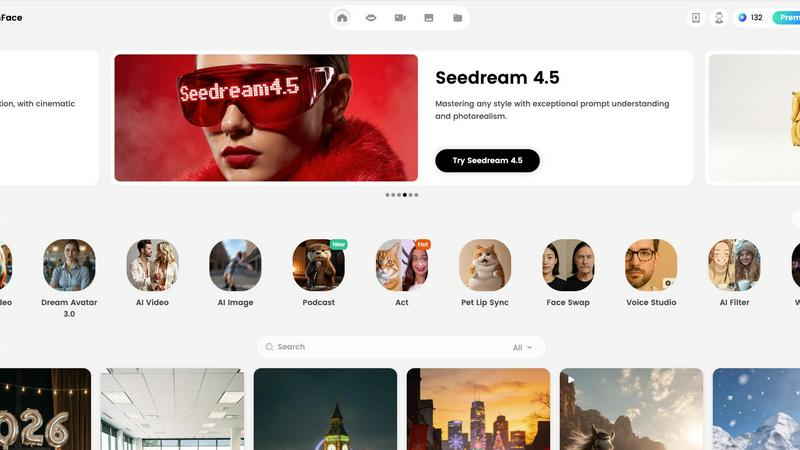
Seedance 2.0

Feature Comparison
DreamFace
Dream Avatar 3.0 & Avatar Video
This flagship feature represents the continuous evolution of AI avatar technology. Users can generate high-quality videos featuring realistic digital avatars that lip-sync perfectly to any uploaded audio or text input. The iterative improvements in this tool ensure increasingly natural movements, expressions, and voice synthesis, eliminating the need for actors or video recording equipment. It’s designed for creating engaging explainer videos, personalized messages, and dynamic social media content with professional polish.
AI Video Generator (Text to Video)
Unleash creativity by turning written ideas into stunning videos in just one click. This feature embodies the platform's commitment to simplifying complex processes. Users input a text description, and the AI iteratively interprets and visualizes the scene, generating coherent and high-quality video footage. It's perfect for quickly prototyping concepts, creating short promotional clips, or producing visual content for stories and presentations without any video editing expertise.
AI Photo Suite (Text to Image & AI Filter)
This comprehensive photo toolkit allows for the cyclical creation and refinement of images. The "Text to Image" function generates unique visuals from descriptive prompts, while the "AI Filter" can iteratively apply extraordinary art styles to transform any photo. Additional tools like "Photo Enhancer" and "Background Remover" work in tandem to automatically improve image quality, restore details, and clean up compositions, enabling rapid creation of perfect visuals for ads, social posts, or design projects.
Voice Studio & Lip Sync Tools
DreamFace offers a sophisticated suite for audio-driven creation, featuring continuous improvements in voice cloning and synchronization. Voice Studio allows users to generate or clone realistic voices for content. This pairs seamlessly with various lip-sync tools—for human faces, pets, and even photos—which iteratively analyze audio to produce perfectly timed facial animations. This creates dynamic, talking-head videos, fun pet videos, and animated photographs that captivate audiences.
Seedance 2.0
Text-to-Video
Seedance 2.0’s text-to-video feature allows users to turn a simple sentence into a complete cinematic scene. This capability ensures coherent motion and narrative flow, making it ideal for creators looking to produce engaging content quickly. Users can input descriptive text, and the AI will generate a video that visually interprets the words, providing a dynamic storytelling experience.
Image-to-Video
With the image-to-video feature, users can transform static reference images into animated videos. This functionality guides the composition, character identity, and overall visual style, allowing for a high level of creative control. Whether it’s a photograph or a digital artwork, Seedance 2.0 brings images to life, offering an innovative way to showcase visuals in motion.
Integrated Audio Generation
The Pro version of Seedance 2.0 includes integrated audio generation, which produces synchronized video and audio in a single pass. This feature incorporates sound effects, background music, speech synthesis, and multilingual lip-sync, thereby eliminating the need for separate audio post-production. This streamlined workflow enhances productivity and ensures that audio and visuals harmonize perfectly.
Physics-Aware Motion
Seedance 2.0 excels in understanding and simulating physical dynamics, such as cloth movement, water splashes, and realistic fire and smoke effects. This physics-aware motion feature enhances the authenticity of the generated videos, making them visually impressive. Users can create scenes that feel alive and believable, capturing the nuances of motion that are critical for high-quality video production.
Use Cases
DreamFace
Social Media Marketing & Brand Engagement
Marketers and influencers can iteratively produce a constant stream of fresh, engaging content. From creating talking-avatar announcements for new products to generating eye-catching AI video clips for Reels and TikTok, DreamFace enables rapid A/B testing of different visual styles. The easy background removal and photo enhancement tools also ensure brand-consistent, high-quality imagery for posts, driving higher engagement and follower growth without a large production budget.
Personalized Video Messaging & Greetings
Individuals and businesses can create unique, memorable messages that feel personal and modern. Using the Avatar Video or Photo Lip Sync tools, users can make digital avatars or photos of loved ones deliver birthday wishes, festive greetings, or special announcements. The platform's iterative ease-of-use allows for quick customization and refinement, adding a layer of innovative, heartfelt communication that stands out in a digital inbox.
Educational Content & Explainer Videos
Educators, trainers, and coaches can simplify complex topics through engaging AI-generated videos. The Dream Avatar feature is perfect for creating a consistent, knowledgeable presenter for course materials or tutorials. The Text-to-Video tool can iteratively generate visual examples for concepts. This use case demonstrates how DreamFace continuously improves the accessibility of information, transforming static lessons into dynamic, easy-to-understand visual experiences.
Creative Photo Restoration & Enhancement
This use case focuses on revitalizing memories and improving visual assets. The "Old Photo Restoration" tool iteratively repairs damage, colorizes black-and-white photos, and brings historical images back to life. Meanwhile, the "Photo Enhancer" and "AI Filter" tools allow photographers and hobbyists to continuously refine their digital images, automatically improving clarity or applying artistic styles to create gallery-worthy pieces from simple snapshots.
Seedance 2.0
Marketing Campaigns
Marketers can leverage Seedance 2.0 to create compelling video advertisements from simple prompts. By generating high-quality videos quickly, brands can enhance their promotional strategies and engage their target audience effectively. The ability to produce visually stunning content without extensive resources is a game-changer for marketing teams.
Educational Content
Educators can utilize Seedance 2.0 to create engaging learning materials. By transforming text or images into animated videos, teachers can present complex topics in a more digestible format. This dynamic approach to education fosters better understanding and retention among students, revolutionizing traditional teaching methods.
Social Media Content Creation
Content creators on platforms like Instagram and TikTok can benefit from the rapid video generation capabilities of Seedance 2.0. With features like text-to-video and image-to-video, creators can produce eye-catching content that stands out in crowded feeds, enhancing their engagement and reach.
Film and Animation Production
Filmmakers and animators can use Seedance 2.0 to visualize their story concepts quickly. The integrated audio and physics-aware motion features allow for a more streamlined creative process, enabling artists to focus on storytelling while maintaining high production quality. This tool can significantly reduce the time spent on pre-visualization and prototyping.
Overview
About DreamFace
DreamFace is a leading AI-powered content creation platform that continuously evolves to empower a global community of over 20 million creators, marketers, and businesses. Its core mission is to make professional-grade multimedia creation fast, accessible, and endlessly creative. The platform operates on a principle of iterative improvement, constantly refining its algorithms and expanding its toolkit to stay at the forefront of AI innovation. By transforming simple text, audio, or photographs into compelling avatar videos, AI-generated videos, and stunning images, DreamFace removes traditional barriers like the need for actors, expensive equipment, or advanced technical skills. Its comprehensive suite, which includes tools for lip sync, background removal, photo enhancement, and artistic filters, ensures users can produce high-quality content for social media, marketing, and personal projects with unprecedented ease. This commitment to cyclical enhancement and user-centric design has fueled its growth to more than 200,000 paid subscribers and an impressive $10 million in annual recurring revenue, solidifying its position as a trusted leader in the AI content generation space.
About Seedance 2.0
Seedance 2.0 is the cutting-edge AI video generation model developed by ByteDance's Seed research team. This innovative tool transforms creative ideas into stunning, hyper-realistic videos by leveraging advanced AI technology. With its ability to generate video from text and images, Seedance 2.0 caters to a wide range of users, from content creators and marketers to filmmakers and educators. The main value proposition lies in its seamless integration of multimodal inputs, allowing users to create captivating videos that not only look professional but also resonate with audiences. By enhancing motion coherence, physical realism, and audio synchronization, Seedance 2.0 opens up new avenues for storytelling and visual communication in an increasingly digital world.
Frequently Asked Questions
DreamFace FAQ
What is DreamFace primarily used for?
DreamFace is an all-in-one AI content creation platform primarily used to generate high-quality multimedia content quickly and easily. Its core functions include creating realistic avatar videos that lip-sync to audio, generating videos from text descriptions, producing images from text prompts, and enhancing or editing photos with AI-powered tools like background removal and artistic filters. It's designed for creators, marketers, and businesses seeking to produce engaging content without professional equipment or skills.
Is DreamFace free to use?
DreamFace operates on a freemium model. You can start creating with access to certain features and templates for free, which allows you to explore and iterate on the platform's capabilities. For advanced features, higher-quality exports, and removal of watermarks, you will need to subscribe to one of their paid plans. The platform offers various subscription tiers, including a lifetime access option for specific tools, to cater to different user needs and levels of usage.
How realistic are the AI avatars and lip-sync videos?
The realism of DreamFace's avatars and lip-sync technology is a key area of continuous, iterative improvement. The latest "Dream Avatar 3.0" system produces highly realistic digital personas with natural facial expressions and gestures. The lip-sync technology is advanced, accurately matching mouth movements to the phonetics of the provided audio. While not indistinguishable from a real human in every case, the results are professional and highly convincing for most commercial and personal content needs.
Can I use DreamFace on multiple devices?
Yes, DreamFace is built for a seamless, multi-platform experience. You can access your account and creations across devices. The platform is available via web browser, and dedicated mobile apps can be downloaded from the Apple App Store and Google Play Store. This allows you to start a project on one device and iteratively refine or continue it on another, ensuring you can create anytime, anywhere.
Seedance 2.0 FAQ
What makes Seedance 2.0 different from its predecessor?
Seedance 2.0 introduces major advancements in motion coherence, physical realism, and multimodal generation capabilities, making video creation more intuitive and efficient than ever.
How does the integrated audio generation work?
The integrated audio generation feature allows users to create synchronized video and audio in one step, including sound effects and speech synthesis, which simplifies the content creation workflow.
Can I use Seedance 2.0 for professional video projects?
Absolutely! Seedance 2.0 is designed to meet the demands of professional video production, providing Hollywood-level quality and seamless integration of audio and visuals.
Is Seedance 2.0 user-friendly for beginners?
Yes, Seedance 2.0 is designed with user experience in mind, making it accessible for beginners while also offering advanced features for seasoned professionals. Its straightforward interface allows users to generate videos easily.
Alternatives
DreamFace Alternatives
DreamFace is a leading AI-powered video creation platform that specializes in voice cloning and avatar generation. It empowers users to produce immersive video content quickly, making it a go-to tool for creators and marketers looking to enhance their digital presence. Users often explore alternatives to find a solution that better fits their specific needs. This search can be driven by budget considerations, the need for different feature sets, or compatibility with other tools in their workflow. The ideal platform varies greatly depending on the project's scope and the creator's technical comfort. When evaluating other options, consider core capabilities like AI video and avatar generation quality, language support, and ease of use. A platform's ability to integrate into your existing process and scale with your ambitions is crucial for long-term success. The goal is to find a tool that not only meets today's requirements but also evolves with your creative journey.
Seedance 2.0 Alternatives
Seedance 2.0 is an advanced AI video generation model from ByteDance's Seed research team, capable of creating high-quality videos from text or images. It belongs to the video generation category and is designed to deliver cinematic scenes with coherent motion and realistic visuals. Users often seek alternatives due to various reasons, including pricing, specific feature sets, or compatibility with different platforms. When choosing an alternative, it's essential to consider factors such as ease of use, the quality of output, integration capabilities, and whether the features align with your specific video creation needs.