
ConvertBankToExcel vs Vendor Space
Side-by-side comparison to help you choose the right product.

ConvertBankToExcel
ConvertBankToExcel swiftly transforms PDF bank statements into accurate Excel and other formats in under 30 seconds.
Last updated: February 27, 2026

Vendor Space
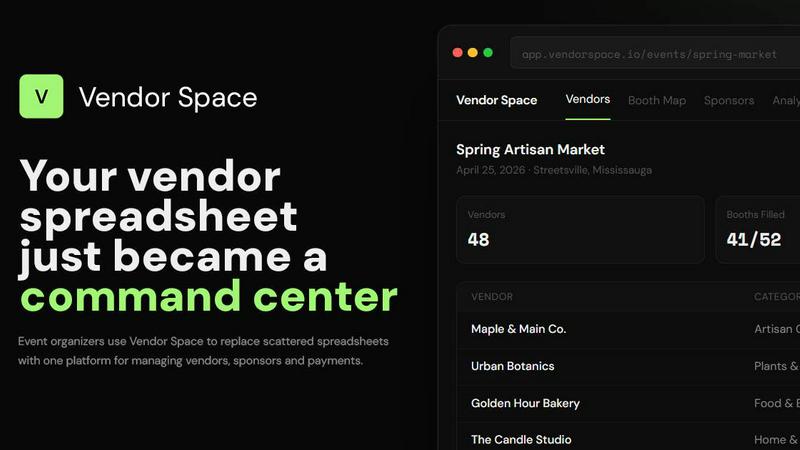
Vendor Space continuously evolves to replace scattered spreadsheets with one simple platform for managing all your event vendors and payments.
Last updated: April 13, 2026
Visual Comparison
ConvertBankToExcel

Vendor Space
Feature Comparison
ConvertBankToExcel
99%+ Accuracy Rate
ConvertBankToExcel is equipped with advanced AI technology that ensures a remarkable accuracy rate exceeding 99%. This CPA-verified feature guarantees that every transaction is accurately extracted, allowing professionals to trust the data they work with.
Rapid Processing Speed
Our platform is designed for efficiency, processing bank statements in under 30 seconds on average. This swift turnaround time allows accounting professionals to handle multiple statements quickly, enabling them to focus on more critical tasks.
Extensive Bank Support
ConvertBankToExcel offers support for over 20 major US and Canadian banks, including Chase, Wells Fargo, and TD. This extensive compatibility ensures that users can convert statements from a wide range of financial institutions with ease.
Multiple Export Formats
Users can export their converted bank statements into nine different formats, including QuickBooks (QBO/QFX/OFX/IIF), Excel, CSV, JSON, and XML. This flexibility allows for seamless integration with various accounting software and personal finance tools.
Vendor Space
Centralized Vendor & Sponsor Dashboard
Replace countless spreadsheets and documents with a single source of truth. The dashboard provides a real-time overview of all your vendors and sponsors, their status, booth assignments, and payments. Track key metrics like total revenue, booth fill rate, and vendor confirmation status at a glance, enabling proactive management and data-driven decisions for every event cycle.
Interactive Visual Booth Mapping
Move beyond static seating charts with an intelligent, drag-and-drop booth map. Visually assign spaces, see real-time availability, and automatically prevent double-booking conflicts. Designate premium booth locations and easily communicate layout plans to vendors, streamlining the physical setup process and continuously improving your floor plan strategy.
Integrated Payment Processing & Contracts
Close the loop between application and participation with built-in, Stripe-powered payments and digital contracts. Vendors can pay fees securely upon application, and you can send legally-binding agreements for electronic signature directly through the platform. This integration automates tracking, reduces administrative follow-up, and ensures financial clarity.
Self-Serve Vendor Portal
Empower your vendors with a professional, self-service experience. They can apply, submit information via your custom forms, pay fees, sign contracts, and access important event details—all through their dedicated portal. This dramatically reduces email clutter for you, improves data accuracy, and frees up your time for higher-value tasks, enhancing the partnership with each iteration.
Use Cases
ConvertBankToExcel
Mortgage Applications
ConvertBankToExcel is invaluable for mortgage professionals who need to prepare organized bank statements for lenders. By converting statements into easily digestible formats, users can expedite the mortgage approval process.
Tax Preparation
During tax season, accountants and tax professionals can leverage ConvertBankToExcel to organize financial statements efficiently. This tool helps ensure compliance with IRS requirements and simplifies the tax filing process.
Visa Applications
Individuals and businesses applying for visas can benefit from ConvertBankToExcel by converting their bank statements to meet the financial requirements set by embassies and immigration offices. This conversion helps streamline the application process.
Financial Audits
Auditors can utilize ConvertBankToExcel to convert and organize bank statements quickly for financial audits. The accuracy and speed of this tool enhance the auditing process, allowing for thorough reviews without the burden of manual data entry.
Vendor Space
Seasonal Farmers & Craft Markets
Manage a rotating roster of artisans and producers across multiple seasonal events. Use custom forms to collect product details, utilize the booth map for each market's unique layout, and process payments as vendors re-apply. The platform helps standardize operations, making each successive market smoother and more efficient than the last.
Large-Scale Trade Shows & Expos
Coordinate hundreds of exhibitors and multiple sponsorship tiers from a single command center. Track complex booth packages, manage high-value sponsor deliverables, and use integrated payments for large invoices. The analytics dashboard provides crucial insights to demonstrate ROI to sponsors and refine your offering for future events.
Community Food Festivals & Pop-Ups
Handle the fast-paced logistics of curating food vendors, from health permits to power requirements. Create specific application forms for food vendors, map out food truck or stall locations visually, and ensure all contracts and insurance documents are digitally signed and stored in one place, improving safety and compliance iteratively.
Non-Profit Fundraising & Charity Galas
Streamline the management of auction item donors, event sponsors, and vendor partners for a major gala. Create tailored sponsorship packages, track donor contributions and guest lists, and manage all communications and payments through one system. This professional approach helps build stronger, recurring partnerships for annual events.
Overview
About ConvertBankToExcel
ConvertBankToExcel is an innovative AI-powered platform designed specifically for accounting professionals who seek to streamline the process of bank statement conversion. With the rapid advancement of technology, manual data entry has become obsolete, and our platform exemplifies this shift by automatically extracting transaction data from PDF bank statements. The result is a seamless transformation of complex financial documents into ready-to-use formats like Excel, CSV, and QuickBooks, all within seconds. Trusted by over 50,000 CPAs and bookkeepers, ConvertBankToExcel has successfully processed more than 1 million bank statements, showcasing its reliability and efficiency. Our solution not only saves time but also enhances accuracy, boasting a CPA-verified accuracy rate of over 99%. With support for more than 20 major US and Canadian banks and a user-friendly interface, ConvertBankToExcel is the ideal tool for professionals looking to optimize their workflow and eliminate the hassle of manual data entry.
About Vendor Space
Vendor Space is the all-in-one vendor management platform engineered to end the chaos for event organizers. Built by an event organizer for event organizers, it replaces the endless cycle of scattered spreadsheets, disjointed email threads, and manual payment tracking with a single, powerful command center. This platform is designed for anyone running vendor-driven events—from craft fairs and farmers markets to trade shows and food festivals—who is ready to professionalize their operations and reclaim their time. Vendor Space consolidates the entire vendor lifecycle into one intuitive dashboard. You can create custom application forms, manage a visual booth map with drag-and-drop ease, send and track digital contracts, and process payments seamlessly. It even integrates sponsor management, ensuring your paid partnerships are handled within the same streamlined system. The core value proposition is powerful simplicity: a completely free-to-use platform with a transparent, performance-based fee. You only pay a flat 6% transaction fee when you successfully collect payments, with no monthly subscriptions, hidden costs, or contracts. This model aligns Vendor Space's success directly with yours, fostering a partnership geared towards continuous improvement of your event's efficiency and profitability. The platform embodies an iterative philosophy, constantly evolving to turn administrative chaos into a smoother, more professional experience for both organizers and their vendors.
Frequently Asked Questions
ConvertBankToExcel FAQ
How does ConvertBankToExcel ensure data accuracy?
ConvertBankToExcel employs advanced AI technology and Optical Character Recognition (OCR) to extract data with over 99% accuracy. This CPA-verified feature minimizes errors during data extraction.
What types of bank statements can I convert?
Our platform supports a wide variety of bank statements from over 20 major US and Canadian banks. This includes both digital and scanned PDF formats, making it versatile for different user needs.
Is my data secure with ConvertBankToExcel?
Absolutely. ConvertBankToExcel utilizes bank-grade encryption to keep your data secure. Additionally, we practice an auto-delete policy that removes your data after 24 hours to further ensure privacy.
Can I use ConvertBankToExcel for batch processing?
Yes, ConvertBankToExcel offers batch processing capabilities, allowing users to convert multiple bank statements simultaneously. This feature saves significant time and improves efficiency for accounting professionals.
Vendor Space FAQ
How quickly can I set up my first event?
Most organizers have their first event live and ready to accept vendor applications within 15 minutes. The process is straightforward: create your event, configure booth options and pricing, and instantly share your unique vendor registration page. This rapid setup allows you to immediately begin improving your workflow.
What is the cost to use Vendor Space?
Vendor Space operates on a simple, transparent pricing model. The platform is completely free to use. You only pay a flat 6% transaction fee when you successfully collect a payment from a vendor or sponsor. There are no monthly subscriptions, no hidden setup fees, and no required contracts.
How does the vendor portal work?
Once you publish your event, vendors receive a link to a professional, branded registration page. They can complete your custom application form, submit payment securely via Stripe, and sign any required digital contracts—all in one place. They also get a login to view their status and event details, reducing repetitive questions.
Can I manage sponsors alongside vendors?
Absolutely. Vendor Space includes dedicated sponsor management features. You can create custom, tiered sponsorship packages (e.g., Gold, Silver, Bronze), track the deliverables and benefits for each sponsor, and manage all communications and payments within the same dashboard used for vendors, creating a unified event ecosystem.
Alternatives
ConvertBankToExcel Alternatives
ConvertBankToExcel is an AI-powered bank statement conversion platform designed specifically for accounting professionals. This tool falls under the productivity and management category, streamlining the process of converting PDF bank statements into usable formats like Excel and CSV. Users often seek alternatives due to various factors, such as pricing, feature sets, and specific platform compatibility that better suits their unique needs. When looking for an alternative, it's essential to consider the accuracy of data extraction, supported file formats, processing speed, and the overall user experience. Additionally, security features and customer support can significantly impact your choice, ensuring that you select a solution that not only enhances productivity but also aligns with your business requirements.
Vendor Space Alternatives
Vendor Space is a dedicated vendor and sponsor management platform within the business and finance category, designed to replace the chaos of spreadsheets and emails for event organizers. Users may explore alternatives for various reasons, such as seeking different pricing structures beyond transaction fees, requiring integrations with specific event software, or needing a broader suite of tools that includes attendee ticketing or registration. When evaluating other platforms, it's crucial to assess your core needs for vendor lifecycle management. Consider the total cost of ownership, the depth of features for applications, contracts, and payments, and the overall user experience for both you and your vendors. The goal is to find a system that evolves with your events, reducing administrative friction so you can focus on continuous improvement. The ideal solution should centralize your operations, offering a clear path to professionalizing your processes. Look for a tool that not only solves today's problems but also adapts to support the iterative growth of your events, turning vendor management from a recurring chore into a streamlined advantage.